

BobM, post: 361888, member: 27 wrote: Is anyone using Carlson with intellicad 8.1? Is it stable? How do you like it? Also, given a choice between Carlson Survey and Carlson Civil Suite (which includes Survey) which would you opt for assuming money is not an issue? Thanks.
Bob
I upgraded to Carlson 16 with Intellicad 8.1 from Carlson 2009 OEM in January, and find it quite stable. There are some quirks, but I found them to be mostly just learning new software, and figuring out the proper settings.
One of the issues I have is labeling a line with a leader. The label comes in parallel to the line, and I can't figure out the setting to make it horizontal. This happens in both paper space with north rotated, and model space with north up.
If I had a choice between Carlson Survey and Carlson Civil Suite, I would go with the Civil Suite, because you have more, and better options. You will not use all that Civil Suite has to offer, but there re some features that make it desirable, such as importing georeferenced photos from Google Earth through the GIS portion.

The only problem I have with Carson Survey 16 w/Intellicad 8.1 is that i'm an old C&G person from back in the DOS days and some of those C&G buttons and commands aren't there anymore. Also, I keep having to choose my .crd file, usually when plotting new points, even though it was already opened. Maybe it's just me, don't know.

Been using since January. Cheaper than Autodesk products no doubt, but buggy to say the least. Although we don't average a crash a day, I bet it's close. Now, all our drawings are Autocad based, so that may be part of the issue, but damn it says it works w/Autocad drawings, so it should WORK! Lots I like, but lots I don't like. I'm migrating over from the stone age (Softdesk V8 & R14-I know). Maybe I'm just stuck in my ways, but after 3 months, I can still work circles around Carlson and Intellicad, and turn out better looking drawings IMHO. I loved all the old annotative lines (tilde, breaks, and squiggly breaks) for scale breaks and continuations of linework. I don't see any of that in Carlson/Intellicad, but maybe I haven't gotten that far. Takes me forever to get a drawing started having to load all the settings, but again, maybe I haven't become very proficient at it. We are slowly moving towards F2F so we'll see how that goes, but I can say the point group stuff and point features do seem to be pretty slick. One thing I don't care for is the limited ways to create points compared to SD V8/R14. I hate that to create multiple 50 foot lots along a block line I have to occupy and backsight a block corner when in SD V8 I could simply set points based on an interval, or divide command. Breaking lines is a PITA (God how do I miss the old "Break lot line" command in SD V8!!!). Dimensions are giving me fits for some reason, can't seem to get my old styles to migrate over, but I'm working on that. Anyhow, the learning curve is slow. I'm a "get in, sit down, shut up and let's go" type guy. I don't have time to sit an watch YouTube videos. If I had to give it a grade, I'd say C- right now, but I'm still new...

hlbennettpls, post: 363878, member: 10049 wrote: Been using since January. Cheaper than Autodesk products no doubt, but buggy to say the least. Although we don't average a crash a day, I bet it's close. Now, all our drawings are Autocad based, so that may be part of the issue, but damn it says it works w/Autocad drawings, so it should WORK! Lots I like, but lots I don't like. I'm migrating over from the stone age (Softdesk V8 & R14-I know). Maybe I'm just stuck in my ways, but after 3 months, I can still work circles around Carlson and Intellicad, and turn out better looking drawings IMHO. I loved all the old annotative lines (tilde, breaks, and squiggly breaks) for scale breaks and continuations of linework. I don't see any of that in Carlson/Intellicad, but maybe I haven't gotten that far. Takes me forever to get a drawing started having to load all the settings, but again, maybe I haven't become very proficient at it. We are slowly moving towards F2F so we'll see how that goes, but I can say the point group stuff and point features do seem to be pretty slick. One thing I don't care for is the limited ways to create points compared to SD V8/R14. I hate that to create multiple 50 foot lots along a block line I have to occupy and backsight a block corner when in SD V8 I could simply set points based on an interval, or divide command. Breaking lines is a PITA (God how do I miss the old "Break lot line" command in SD V8!!!). Dimensions are giving me fits for some reason, can't seem to get my old styles to migrate over, but I'm working on that. Anyhow, the learning curve is slow. I'm a "get in, sit down, shut up and let's go" type guy. I don't have time to sit an watch YouTube videos. If I had to give it a grade, I'd say C- right now, but I'm still new...
I know where you are coming from but give it time. I've made the change to IntelliCad and it probably took me about a year to get fully up to speed with all the features and quirks. It took me longer because I kept going back and forth from AutoCAD to IntelliCad. There is more than likely a solution to all of the above you just have to find it!!
Geesh...only a year? Lol.

My Carlson 2016 w/ Icad just crashed ... again. I think it averages out to at least once per day. Save and save often...

Peter Lothian - MA ME, post: 364591, member: 4512 wrote: My Carlson 2016 w/ Icad just crashed ... again. I think it averages out to at least once per day. Save and save often...
My Civil3d crashes at least once a day. That is what happens when you push it to that limit that you do not think should be the limit.
I have Carlson 2016 with ICad 8 and have experienced the crashing problem too. Tech Support tells me it could be a compatibility issue with the NVIDIA Quadro K2000 video card. They gave me several workarounds that fixed it for a while and recommended a Geoforce video card. I'm now looking to replace the card and see what happens.

How do I have the software automatically use romans.shx font rather than having to set it that way every time I open a drawing for the PTXT style?
Ladd offered these suggestions, the first I tried, but for some reason is not working, the second scares me:
Hi Brad,
You'll want to either update the text style(s) in your underlying "template drawing" (typically a DWT file specified under Settings -- Carlson Configure -- Startup Settings) and/or modify the underlying point attribute layouts as suggested in the following Carlson Knowledgebase article:
http://www.carlsonsw.com/support/knowledge-base/?action=display_topic&topic_id=779

Using something new always sucks, I upgraded to the OEM version and here I am again, a new learning curve. I got most of my issues solved or found another way to do it, but there are always a few problems lingering.
tchads, post: 366885, member: 11564 wrote: I have Carlson 2016 with ICad 8 and have experienced the crashing problem too. Tech Support tells me it could be a compatibility issue with the NVIDIA Quadro K2000 video card. They gave me several workarounds that fixed it for a while and recommended a Geoforce video card. I'm now looking to replace the card and see what happens.
Let me know how that works. I've been told this too.
Brad Ott, post: 366919, member: 197 wrote: How do I have the software automatically use romans.shx font rather than having to set it that way every time I open a drawing for the PTXT style?
Ladd offered these suggestions, the first I tried, but for some reason is not working, the second scares me:
Hi Brad,
You'll want to either update the text style(s) in your underlying "template drawing" (typically a DWT file specified under Settings -- Carlson Configure -- Startup Settings) and/or modify the underlying point attribute layouts as suggested in the following Carlson Knowledgebase article:
http://www.carlsonsw.com/support/knowledge-base/?action=display_topic&topic_id=779
When I got to update my *.dwt, I don't even have the PTXT style listed! They could really do a better job w/this stuff...

hlbennettpls, post: 367020, member: 10049 wrote: When I got to update my *.dwt, I don't even have the PTXT style listed! They could really do a better job w/this stuff...
The PTXT (Point Text) style is/are defined in the ten different point attribute layout ID blocks (srvpnoX.dwg, where X = a number between 0 and 9... e.g. srvpno3.dwg or srvpno5.dwg, etc) and the https://knowledge.autodesk.com/support/autocad/learn-explore/caas/CloudHelp/cloudhelp/2016/ENU/AutoCAD-Core/files/GUID-BC0FD3C1-3BFC-4C5D-AB9A-BF480D5084BE-htm.html&apos ;">rules of block insertions govern. There is, however, one additional consideration:
Autodesk holds the copyright on the RomanS.shx font. Since the ITC cannot (and does not) redistribute this font, IntelliCAD performs a http://www.carlsonsw.com/support/knowledge-base/?action=display_topic&topic_id=602&apos ;">font substitution when it cannot find a font specified in a given text style. Based on this, I suspect one of three things might be happening:
- The RomanS font cannot be found within the Support File Search path of the CAD application (presumed to be IntelliCAD in this case), or,
- The PTXT text style in the aforementioned srvpnoX.dwg file(s) has/have not been updated to utilize the RomanS font, or,
- A PTXT text style has not been created or defined in either the template (*.DWT) drawing and/or active drawing in which a point is being inserted.
In all three cases, it will be up to the user to figure out which solution(s) they'll want to implement. I have, however, updated the http://www.carlsonsw.com/support/knowledge-base/?action=display_topic&topic_id=779&apos ;">Customized Carlson Point Attribute Layouts article to include a collection of https://update.carlsonsw.com/kbase_attach/779/SrvPNo-RomanS.zip&apos ;">attributes that call for the RomanS font.
I hope this information helps.
Created the style PTXT in my *.dwt file, and it completely ignored it and went back to standard txt font. Do I have to do that as well as update the text in the srvpnoX.dwg file?!
Ladd Nelson, post: 367043, member: 307 wrote: The PTXT (Point Text) style is/are defined in the ten different point attribute layout ID blocks (srvpnoX.dwg, where X = a number between 0 and 9... e.g. srvpno3.dwg or srvpno5.dwg, etc) and the https://knowledge.autodesk.com/support/autocad/learn-explore/caas/CloudHelp/cloudhelp/2016/ENU/AutoCAD-Core/files/GUID-BC0FD3C1-3BFC-4C5D-AB9A-BF480D5084BE-htm.html&apos ;">rules of block insertions govern. There is, however, one additional consideration:
Autodesk holds the copyright on the RomanS.shx font. Since the ITC cannot (and does not) redistribute this font, IntelliCAD performs a http://www.carlsonsw.com/support/knowledge-base/?action=display_topic&topic_id=602&apos ;">font substitution when it cannot find a font specified in a given text style. Based on this, I suspect one of three things might be happening:
- The RomanS font cannot be found within the Support File Search path of the CAD application (presumed to be IntelliCAD in this case), or,
- The PTXT text style in the aforementioned srvpnoX.dwg file(s) has/have not been updated to utilize the RomanS font, or,
- A PTXT text style has not been created or defined in either the template (*.DWT) drawing and/or active drawing in which a point is being inserted.
In all three cases, it will be up to the user to figure out which solution(s) they'll want to implement. I have, however, updated the http://www.carlsonsw.com/support/knowledge-base/?action=display_topic&topic_id=779&apos ;">Customized Carlson Point Attribute Layouts article to include a collection of https://update.carlsonsw.com/kbase_attach/779/SrvPNo-RomanS.zip&apos ;">attributes that call for the RomanS font.
I hope this information helps.
Thanks buddy, I will look at this when I get back to the office.
hlbennettpls, post: 367188, member: 10049 wrote: Created the style PTXT in my *.dwt file, and it completely ignored it and went back to standard txt font. Do I have to do that as well as update the text in the srvpnoX.dwg file?!
Creating a text style (e.g. PTXT) in a *.DWT file would make that style available in any new subsequent drawings created from the DWT file... it would not "ripple" into any existing drawings. In my case, I:
- Updated my DWT file to have the text style(s) (and desired font associated with each text style) and saved the DWT file. As an example, I used the Impact font for the PTXT style.
- Created a new DWG based on the modified DWT file.
- Inserted points into my DWG using the aforementioned https://update.carlsonsw.com/kbase_attach/779/SrvPNo-RomanS.zip&apos ;">attributes that call for the RomanS font.
Since I had explicitly defined my DWT (and subsequently new DWG files) with a PTXT style that calls for the Impact font, the points and their block attributes were placed (as expected) with the Impact font despite the fact that the underlying definitions were based on the RomanS font. This presumes, however, that a given field code has been structured to use the "Attribute Block" setting (this is the approach I commonly recommend):
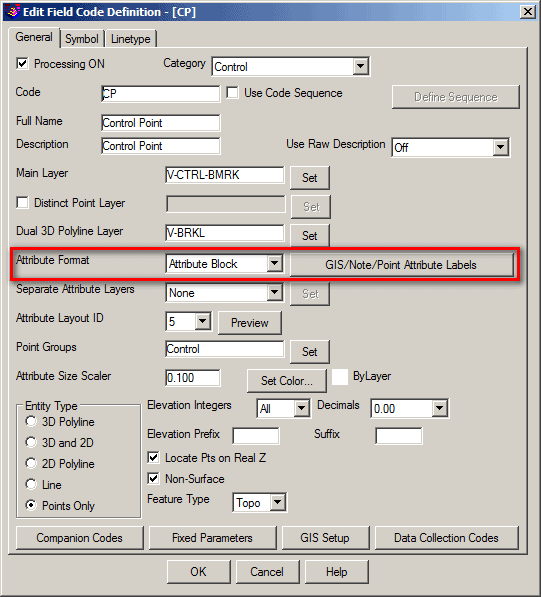
If your system is configure for the "Text Attribute", you'll need to identify the text style(s) for each of the attributes for each of your field codes. I hope this information helps.

In reference to the crashing issue.
I have a refurbished Dell 760 with only 4 gigs RAM. I experienced the crash when I first got the software up and running. I discovered my system was setup to conserve power in the control panel - Power Options. I bumped that up to "High Performance". Then in the "Visual Effects" under "Performance Options" I unchecked just about everything except the "Smooth edges of screen fonts". All of which sap the RAM. This greatly sped up my system. I still get an occasional crash. But I attribute that to the under-powered computer I'm working with. Looking at maybe one of those gaming types that have a decent video card not built-in the motherboard.
Anyway, I am still getting used to all of the settings that need to be set in order to get a product done. I do wish there were pre-made templates to get one up and running faster. Then try each and modify as needed. Overall I am impressed with Carlson. I have produced professional results which is what I was hoping for. The YouTube videos are extremely helpful and have not had to contact support yet.
I have worked with C3D, TBC, Microstation, Eagle Point, Foresight etc and each have their strengths. I do like the bang for the buck. Just my nickels worth (inflation).

Good afternoon all,
I am a Senior CADD tech with a local surveyor in Georgia. I'm not a surveyor by license, to old to go back to school and I don't want the student loan, but have spent enough time in the field to know the difference between North and South. South is to the West and North is to the East!
To answer the question that was originally posted, ICAD is as stable as a YUGO with no wheels. ICAD crashes between crashes, locks up when switching between paperspace tabs, can't hatch a closed polyline unless you explode the line, the MTEXT editor is shabby, and they don't even offer a block editor. I recently had someone with ICAD who claims to be a CAD Expert question me why I need a block editor. I have recently compiled a list of the numerous issues that we experience on a daily basis and sent off to technical support. And no it's not a graphics card, memory or latest build issue (all three are the most common response from technical support).
PC guts:
Dell XPS 8700
Intel i7-4790 CPU
16.0 GB
64-bit OS
NVIDIA GeForce GTX745
I like Carslon OEM more than I do with ICAD, but not as much as Carlson with Autocad. And if your not into doing Civil projects then Carlson Survey is the way to go.
I've worked with AutoCAD Civil 3D and Carlson (all three platforms) and all but ICAD is perfect for the job at hand. And yes money is always an issue, but when your dealing with downtime caused by your CAD program one has to ponder why am I wasting money.
If money wasn't an issue there would be no ICAD consortium. We would all be on AutoCad or Carlson OEM.
CAD DUDE, post: 368008, member: 11594 wrote: ICAD crashes between crashes, locks up when switching between paperspace tabs, can't hatch a closed polyline unless you explode the line, the MTEXT editor is shabby
Not true at all in my experience. I do not have these issues.
CAD DUDE, post: 368008, member: 11594 wrote: when your dealing with downtime caused by your CAD program one has to ponder why am I wasting money.
If money wasn't an issue there would be no ICAD consortium. We would all be on AutoCad or Carlson OEM
Agreed. AutoCAD is the best choice if money is not a consideration. Also if you are sharing drawings with other AutoCAD users it has to be the number one choice.
I was wrong to rip ICAD like I did. I've been a user for 6 months and I want it to work. I can't explain why we have so many glitches with the software. But it's killing production. The only thing I can think of doing is a complete uninstall/reinstall.
In its defense, ICAD does the work. It's just the aforementioned issues. Resolve those and it becomes a viable alternative to AutoCAD. However, I still believe that Carlson is a better platform for Surveyors.