

AI Assistant
Notifications
Clear all

Carlson 2016 with intellicad 8.1

94 Posts
38 Users
0 Reactions
2,386 Views
JBrinkworth
(@jbrinkworth)
Posts: 195
Member
Translate
English
Spanish
French
German
Italian
Portuguese
Russian
Chinese
Japanese
Korean
Arabic
Hindi
Dutch
Polish
Turkish
Vietnamese
Thai
Swedish
Danish
Finnish
Norwegian
Czech
Hungarian
Romanian
Greek
Hebrew
Indonesian
Malay
Ukrainian
Bulgarian
Croatian
Slovak
Slovenian
Serbian
Lithuanian
Latvian
Estonian
 

I am not an expert on PS/MS, but here's one that's driving me nuts.

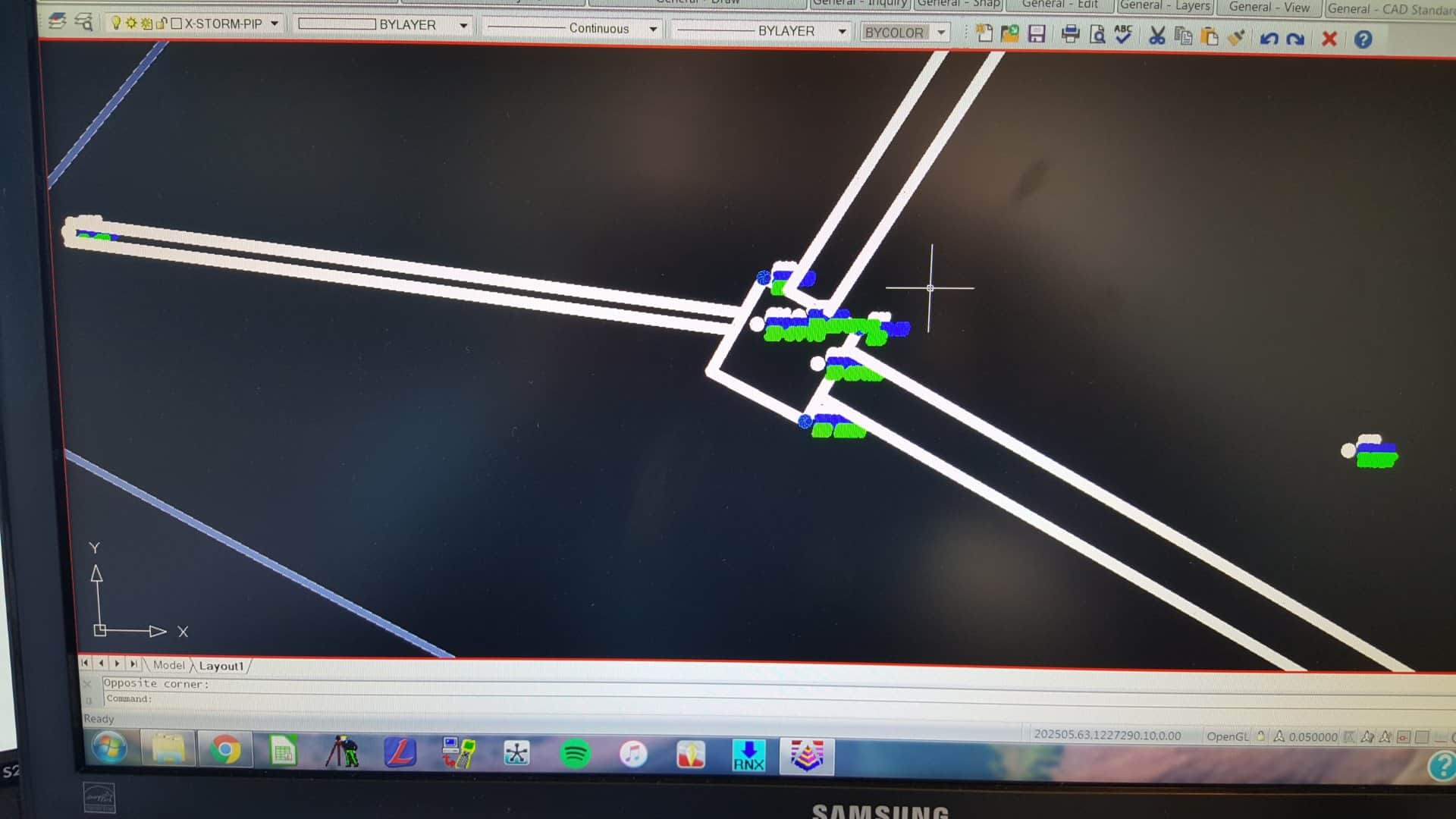
Below shows a Paper Space view of a section of a job I am working on. Does anyone know why my points are fuzzy and not readable? This only happens in Paper Space (Model Space, they show up great).

 
Posted : June 6, 2016 8:32 am
brad-ott
(@brad-ott)
Posts: 6178
Member
Translate
English
Spanish
French
German
Italian
Portuguese
Russian
Chinese
Japanese
Korean
Arabic
Hindi
Dutch
Polish
Turkish
Vietnamese
Thai
Swedish
Danish
Finnish
Norwegian
Czech
Hungarian
Romanian
Greek
Hebrew
Indonesian
Malay
Ukrainian
Bulgarian
Croatian
Slovak
Slovenian
Serbian
Lithuanian
Latvian
Estonian
 

JBrinkworth, post: 375789, member: 6179 wrote: I am not an expert on PS/MS, but here's one that's driving me nuts.

Below shows a Paper Space view of a section of a job I am working on. Does anyone know why my points are fuzzy and not readable? This only happens in Paper Space (Model Space, they show up great).

Yikes that does look frustrating. Have you double clicked in the modelspace viewport through the paperspace tab and tried to do a regen?


Posted : June 6, 2016 8:33 am
JBrinkworth
(@jbrinkworth)
Posts: 195
Member
Translate
English
Spanish
French
German
Italian
Portuguese
Russian
Chinese
Japanese
Korean
Arabic
Hindi
Dutch
Polish
Turkish
Vietnamese
Thai
Swedish
Danish
Finnish
Norwegian
Czech
Hungarian
Romanian
Greek
Hebrew
Indonesian
Malay
Ukrainian
Bulgarian
Croatian
Slovak
Slovenian
Serbian
Lithuanian
Latvian
Estonian
 

Brad Ott, post: 375790, member: 197 wrote: Yikes that does look frustrating. Have you double clicked in the modelspace viewport through the paperspace tab and tried to do a regen?

Good point...and to no avail.


 
Posted : June 6, 2016 8:36 am
paul-d
(@paul-d)
Posts: 488
Member
Translate
English
Spanish
French
German
Italian
Portuguese
Russian
Chinese
Japanese
Korean
Arabic
Hindi
Dutch
Polish
Turkish
Vietnamese
Thai
Swedish
Danish
Finnish
Norwegian
Czech
Hungarian
Romanian
Greek
Hebrew
Indonesian
Malay
Ukrainian
Bulgarian
Croatian
Slovak
Slovenian
Serbian
Lithuanian
Latvian
Estonian
 

Looks like you are set to display lineweights. Try turning it off.


Posted : June 6, 2016 9:14 am
stephen-ward
(@stephen-ward)
Posts: 2244
Member
Translate
English
Spanish
French
German
Italian
Portuguese
Russian
Chinese
Japanese
Korean
Arabic
Hindi
Dutch
Polish
Turkish
Vietnamese
Thai
Swedish
Danish
Finnish
Norwegian
Czech
Hungarian
Romanian
Greek
Hebrew
Indonesian
Malay
Ukrainian
Bulgarian
Croatian
Slovak
Slovenian
Serbian
Lithuanian
Latvian
Estonian
 

JBrinkworth, post: 375789, member: 6179 wrote: I am not an expert on PS/MS, but here's one that's driving me nuts.

Below shows a Paper Space view of a section of a job I am working on. Does anyone know why my points are fuzzy and not readable? This only happens in Paper Space (Model Space, they show up great).

Line weight is being displayed when you are in paper space. If you're using layer dependent line weights, just change the line weight for the point layers to a thinner setting.

Everyone uses the tools differently, but for me this never causes a problem. I draft in model space, print any worksheets displaying point data from model space, etc. Paper space for me is all about legends, notes, borders, and viewports to properly plot my handiwork from model space.


Posted : June 6, 2016 9:17 am

JBrinkworth
(@jbrinkworth)
Posts: 195
Member
Translate
English
Spanish
French
German
Italian
Portuguese
Russian
Chinese
Japanese
Korean
Arabic
Hindi
Dutch
Polish
Turkish
Vietnamese
Thai
Swedish
Danish
Finnish
Norwegian
Czech
Hungarian
Romanian
Greek
Hebrew
Indonesian
Malay
Ukrainian
Bulgarian
Croatian
Slovak
Slovenian
Serbian
Lithuanian
Latvian
Estonian
 

Paul D, post: 375800, member: 323 wrote: Looks like you are set to display lineweights. Try turning it off.

Bingo!

Thanks!


 
Posted : June 6, 2016 9:21 am
mark-o
(@mark-o)
Posts: 176
Member
Translate
English
Spanish
French
German
Italian
Portuguese
Russian
Chinese
Japanese
Korean
Arabic
Hindi
Dutch
Polish
Turkish
Vietnamese
Thai
Swedish
Danish
Finnish
Norwegian
Czech
Hungarian
Romanian
Greek
Hebrew
Indonesian
Malay
Ukrainian
Bulgarian
Croatian
Slovak
Slovenian
Serbian
Lithuanian
Latvian
Estonian
 

Just upgraded from LDD 04 to Carlson 16 Civil Suite w/ intellicad 8.1. There is the obvious learning curve, but I'm mostly having trouble with some basic key commands, like ED which edits text, for example. I don't want to type ddedit, I want my old "ed" to work. I've tried to manually add it as an alias in the menuload, but it doesn't work. Any help appreciated.


 
Posted : June 12, 2016 8:50 pm
anonymous
(@Anonymous)
Posts: 0
Translate
English
Spanish
French
German
Italian
Portuguese
Russian
Chinese
Japanese
Korean
Arabic
Hindi
Dutch
Polish
Turkish
Vietnamese
Thai
Swedish
Danish
Finnish
Norwegian
Czech
Hungarian
Romanian
Greek
Hebrew
Indonesian
Malay
Ukrainian
Bulgarian
Croatian
Slovak
Slovenian
Serbian
Lithuanian
Latvian
Estonian
 

Is it already an assigned alias?
Have you tried adding via import alias?
Create a text file add alias and command, save as (. pgp) and use that.
Latter is my preferred way and build up the file as I progress in time, use etc.


 
Posted : June 12, 2016 8:55 pm
shawn-billings
(@shawn-billings)
Posts: 2691
Member
Translate
English
Spanish
French
German
Italian
Portuguese
Russian
Chinese
Japanese
Korean
Arabic
Hindi
Dutch
Polish
Turkish
Vietnamese
Thai
Swedish
Danish
Finnish
Norwegian
Czech
Hungarian
Romanian
Greek
Hebrew
Indonesian
Malay
Ukrainian
Bulgarian
Croatian
Slovak
Slovenian
Serbian
Lithuanian
Latvian
Estonian
 

Just double click on the text. No keyboard command required.


 
Posted : June 12, 2016 8:59 pm
ladd-nelson
(@ladd-nelson)
Posts: 738
Member
Translate
English
Spanish
French
German
Italian
Portuguese
Russian
Chinese
Japanese
Korean
Arabic
Hindi
Dutch
Polish
Turkish
Vietnamese
Thai
Swedish
Danish
Finnish
Norwegian
Czech
Hungarian
Romanian
Greek
Hebrew
Indonesian
Malay
Ukrainian
Bulgarian
Croatian
Slovak
Slovenian
Serbian
Lithuanian
Latvian
Estonian
 

Mark O, post: 376884, member: 11591 wrote: Just upgraded from LDD 04 to Carlson 16 Civil Suite w/ intellicad 8.1. There is the obvious learning curve, but I'm mostly having trouble with some basic key commands, like ED which edits text, for example. I don't want to type ddedit, I want my old "ed" to work. I've tried to manually add it as an alias in the menuload, but it doesn't work. Any help appreciated.

Look under Settings -- Quick Keys. You can re-assign the ED quick key to launch DDEDIT.


Posted : June 12, 2016 9:04 pm

mark-o
(@mark-o)
Posts: 176
Member
Translate
English
Spanish
French
German
Italian
Portuguese
Russian
Chinese
Japanese
Korean
Arabic
Hindi
Dutch
Polish
Turkish
Vietnamese
Thai
Swedish
Danish
Finnish
Norwegian
Czech
Hungarian
Romanian
Greek
Hebrew
Indonesian
Malay
Ukrainian
Bulgarian
Croatian
Slovak
Slovenian
Serbian
Lithuanian
Latvian
Estonian
 

Ladd Nelson, post: 376887, member: 307 wrote: Look under Settings -- Quick Keys. You can re-assign the ED quick key to launch DDEDIT.

Excellent!!!


Posted : June 12, 2016 9:52 pm
a-harris
(@a-harris)
Posts: 8759
Member
Translate
English
Spanish
French
German
Italian
Portuguese
Russian
Chinese
Japanese
Korean
Arabic
Hindi
Dutch
Polish
Turkish
Vietnamese
Thai
Swedish
Danish
Finnish
Norwegian
Czech
Hungarian
Romanian
Greek
Hebrew
Indonesian
Malay
Ukrainian
Bulgarian
Croatian
Slovak
Slovenian
Serbian
Lithuanian
Latvian
Estonian
 

I have began to place my final drawing on one layer and save to a new file name (xyzabc_final_1.dwg)
It simplifies that drawing and the original working drawing remains intact as drawn.
Took alot of the flaws out of the mix.


 
Posted : June 12, 2016 11:25 pm
hlbennettpls
(@hlbennettpls)
Posts: 321
Member
Translate
English
Spanish
French
German
Italian
Portuguese
Russian
Chinese
Japanese
Korean
Arabic
Hindi
Dutch
Polish
Turkish
Vietnamese
Thai
Swedish
Danish
Finnish
Norwegian
Czech
Hungarian
Romanian
Greek
Hebrew
Indonesian
Malay
Ukrainian
Bulgarian
Croatian
Slovak
Slovenian
Serbian
Lithuanian
Latvian
Estonian
 

Yeah, the double clicking to edit text is a VERY nice feature!


Posted : June 13, 2016 5:00 am
adam
 adam
(@adam)
Posts: 1165
Member
Translate
English
Spanish
French
German
Italian
Portuguese
Russian
Chinese
Japanese
Korean
Arabic
Hindi
Dutch
Polish
Turkish
Vietnamese
Thai
Swedish
Danish
Finnish
Norwegian
Czech
Hungarian
Romanian
Greek
Hebrew
Indonesian
Malay
Ukrainian
Bulgarian
Croatian
Slovak
Slovenian
Serbian
Lithuanian
Latvian
Estonian
 

I have noticed something since I upgraded and finally figured what was causing it today, I think. I have been trying to print to an HP Design Jet 510, It prints most of the time no problem. When I have an aerial photo in the drawing and want to print that I have problems. I can print the aerial if I leave the Fade set at zero. I like to fade the pic a little so I can write on the printout in the field and still see what I write. When I try to print with fade set at something other than zero, I only get the aerial faded as specified but no text or linework and I get a memory error on the HP printer. Any of ya'll seen this behavior?


Posted : June 15, 2016 4:03 pm
Page 5 / 5