Reading RPLS is free for the whole profession. Members post, reply, and get the members-only rooms.

Notifications
Clear all
Strictly Surveying
18
Posts
10
Users
0
Reactions
827
Views

Topic starter
Translate
▼
English
Spanish
French
German
Italian
Portuguese
Russian
Chinese
Japanese
Korean
Arabic
Hindi
Dutch
Polish
Turkish
Vietnamese
Thai
Swedish
Danish
Finnish
Norwegian
Czech
Hungarian
Romanian
Greek
Hebrew
Indonesian
Malay
Ukrainian
Bulgarian
Croatian
Slovak
Slovenian
Serbian
Lithuanian
Latvian
Estonian
This is probably the wrong category, but how are you backing up your computer and data.
I signed up for Carbonite, but as my Carlson has a .sys file it will not backup folders, I have to manually backup.
Thanks
Posted : July 6, 2017 7:40 pm

Translate
▼
English
Spanish
French
German
Italian
Portuguese
Russian
Chinese
Japanese
Korean
Arabic
Hindi
Dutch
Polish
Turkish
Vietnamese
Thai
Swedish
Danish
Finnish
Norwegian
Czech
Hungarian
Romanian
Greek
Hebrew
Indonesian
Malay
Ukrainian
Bulgarian
Croatian
Slovak
Slovenian
Serbian
Lithuanian
Latvian
Estonian
Well, for our office computers which run AutoCAD Civil3D I have set them up so that programs and drawings are on the internal SSD and backup is to an internal spinning HD. The backup is automatic, set to run daily in the afternoon, using Windows Task Scheduler, with the task being a Robocopy (robust copy) script. We have Carslon .sys files in the projects on the SSD, and the .sys do get copied ok (I've just checked).
Posted : July 6, 2017 8:11 pm

Translate
▼
English
Spanish
French
German
Italian
Portuguese
Russian
Chinese
Japanese
Korean
Arabic
Hindi
Dutch
Polish
Turkish
Vietnamese
Thai
Swedish
Danish
Finnish
Norwegian
Czech
Hungarian
Romanian
Greek
Hebrew
Indonesian
Malay
Ukrainian
Bulgarian
Croatian
Slovak
Slovenian
Serbian
Lithuanian
Latvian
Estonian
We use egnyte and and an on-premise NAS that backs up new items on the fly. File cloud seems to work well with on premise storage too.
Sent from my SAMSUNG-SM-N920A using Tapatalk
Posted : July 6, 2017 9:20 pm

Translate
▼
English
Spanish
French
German
Italian
Portuguese
Russian
Chinese
Japanese
Korean
Arabic
Hindi
Dutch
Polish
Turkish
Vietnamese
Thai
Swedish
Danish
Finnish
Norwegian
Czech
Hungarian
Romanian
Greek
Hebrew
Indonesian
Malay
Ukrainian
Bulgarian
Croatian
Slovak
Slovenian
Serbian
Lithuanian
Latvian
Estonian
I use LuckyBackup.
Automated by schedules, and manually at milestones.
Both current and accumulative data sets.
Select data only and computer settings only, no software.
Copied to secondary local drive, and to the cloud, then Replicated on remote machines via the cloud.
http://luckybackup.sourceforge.net/
Simple, user friendly. Copies are browse-able with your favorite file manager.
It is also ported to Windows http://www.bmtsolutions.us/wiki/doku.php?id=contrib:luckybackup-win
a neighbor uses it on Windows 7 for accounting business
Posted : July 6, 2017 9:57 pm

Translate
▼
English
Spanish
French
German
Italian
Portuguese
Russian
Chinese
Japanese
Korean
Arabic
Hindi
Dutch
Polish
Turkish
Vietnamese
Thai
Swedish
Danish
Finnish
Norwegian
Czech
Hungarian
Romanian
Greek
Hebrew
Indonesian
Malay
Ukrainian
Bulgarian
Croatian
Slovak
Slovenian
Serbian
Lithuanian
Latvian
Estonian
I'm a one man band and just backup manually the job(s) at end of day, or earlier.
Being in an area subject to sudden power outages I don't leave my PC running when not about. I have battery backup but experience has seen PC failure despite that system in place.
So automated backup wouldn't work too well for me.
I don't find it a chore.
Use portable hard drive and occasionally copy work directories to another drive for further security.
Posted : July 7, 2017 1:47 am
Translate
▼
English
Spanish
French
German
Italian
Portuguese
Russian
Chinese
Japanese
Korean
Arabic
Hindi
Dutch
Polish
Turkish
Vietnamese
Thai
Swedish
Danish
Finnish
Norwegian
Czech
Hungarian
Romanian
Greek
Hebrew
Indonesian
Malay
Ukrainian
Bulgarian
Croatian
Slovak
Slovenian
Serbian
Lithuanian
Latvian
Estonian
https://surveyorconnect.com/community/members/richard.833/&apos ;">Richard have a look at your UPS software and your PC software, both should be able to do a proper shutdown when the battery is low.
Automation helps for those forgetful times...
Posted : July 7, 2017 7:21 am

Translate
▼
English
Spanish
French
German
Italian
Portuguese
Russian
Chinese
Japanese
Korean
Arabic
Hindi
Dutch
Polish
Turkish
Vietnamese
Thai
Swedish
Danish
Finnish
Norwegian
Czech
Hungarian
Romanian
Greek
Hebrew
Indonesian
Malay
Ukrainian
Bulgarian
Croatian
Slovak
Slovenian
Serbian
Lithuanian
Latvian
Estonian
I'm fortunate enough to have my office about 20 m from my house and a cat 6 cable connecting the two. I just use windows to do hourly incremental backups to an NAS at home.
Posted : July 7, 2017 7:47 am
Translate
▼
English
Spanish
French
German
Italian
Portuguese
Russian
Chinese
Japanese
Korean
Arabic
Hindi
Dutch
Polish
Turkish
Vietnamese
Thai
Swedish
Danish
Finnish
Norwegian
Czech
Hungarian
Romanian
Greek
Hebrew
Indonesian
Malay
Ukrainian
Bulgarian
Croatian
Slovak
Slovenian
Serbian
Lithuanian
Latvian
Estonian
Peter Ehlert, post: 435734, member: 60 wrote: https://surveyorconnect.com/community/members/richard.833/&apos ;">Richard have a look at your UPS software and your PC software, both should be able to do a proper shutdown when the battery is low.
Automation helps for those forgetful times..
Thanks Peter. Yes it's a feature I've used, but historically I haven't been able to rely on it.
I've lost 3 PC's to power problems. Once whilst the power supply company was here fiddling with things and turned off the power then on then off. That was too much for my UPS and it spat the dummy and goodbye PC.
We live off a separate line with own transformer and swans flip the lines tripping the fuses,and brown outs (one phase drops out) and other power outages are common place.
Yes that feature is a valid option but I've learnt to live with it and be in control and haven't had an issue.
Just curious, how do auto backups handle the PC shutting down during its auto backup?
Hadn't thought about such until this conversation.
Posted : July 7, 2017 3:58 pm
Translate
▼
English
Spanish
French
German
Italian
Portuguese
Russian
Chinese
Japanese
Korean
Arabic
Hindi
Dutch
Polish
Turkish
Vietnamese
Thai
Swedish
Danish
Finnish
Norwegian
Czech
Hungarian
Romanian
Greek
Hebrew
Indonesian
Malay
Ukrainian
Bulgarian
Croatian
Slovak
Slovenian
Serbian
Lithuanian
Latvian
Estonian
Richard, post: 435855, member: 833 wrote: I've lost 3 PC's to power problems. Once whilst the power supply company was here fiddling with things and turned off the power then on then off. That was too much for my UPS and it spat the dummy and goodbye PC.
IMHO, if "goodbye PC" means the PC got fried, then perhaps that was not the fault of the UPS. We have UPS for each of the 7 PC's here and quite often when the power goes off we don't get time to do a manual PC shutdown before the UPS cuts out (bad UPS battery, under-capacity UPS), so the PC's just go off while Windows is still running. I don't think this has ever fried one of our PC's.
Posted : July 7, 2017 4:11 pm

Translate
▼
English
Spanish
French
German
Italian
Portuguese
Russian
Chinese
Japanese
Korean
Arabic
Hindi
Dutch
Polish
Turkish
Vietnamese
Thai
Swedish
Danish
Finnish
Norwegian
Czech
Hungarian
Romanian
Greek
Hebrew
Indonesian
Malay
Ukrainian
Bulgarian
Croatian
Slovak
Slovenian
Serbian
Lithuanian
Latvian
Estonian
I had Carbonite and experienced the same problems with having to manually back up files. I now use CrashPlan for my online backups. It will back up all of my files without exception. I have an external hard drive on my desk and sync between my work station and the external hard drive, then CrashPlan backs up the external hard drive. CrashPlan run constantly in the background or you can force a backup. It is also easy to migrate to a new drive if necessary. I have also had great luck with the technical support with CrashPlan unlike Carbonite.
Posted : July 7, 2017 4:29 pm
Translate
▼
English
Spanish
French
German
Italian
Portuguese
Russian
Chinese
Japanese
Korean
Arabic
Hindi
Dutch
Polish
Turkish
Vietnamese
Thai
Swedish
Danish
Finnish
Norwegian
Czech
Hungarian
Romanian
Greek
Hebrew
Indonesian
Malay
Ukrainian
Bulgarian
Croatian
Slovak
Slovenian
Serbian
Lithuanian
Latvian
Estonian
Yes you're probably right Richard. Given the history I felt happy enough to control things myself, relying on UPS to handle things whilst I was about, but more comfortable to know while I'm out I don't have to be concerned about it.
It's really just a lifestyle choice I made way back and continued.
Actually just bought a new UPS as my previous one was playing up. It would suddenly cut power to the PC without warning despite the mains power working okay, which was exciting!
Posted : July 7, 2017 4:32 pm

Translate
▼
English
Spanish
French
German
Italian
Portuguese
Russian
Chinese
Japanese
Korean
Arabic
Hindi
Dutch
Polish
Turkish
Vietnamese
Thai
Swedish
Danish
Finnish
Norwegian
Czech
Hungarian
Romanian
Greek
Hebrew
Indonesian
Malay
Ukrainian
Bulgarian
Croatian
Slovak
Slovenian
Serbian
Lithuanian
Latvian
Estonian
[USER=833]@Richard[/USER]
I can relate to dysfunctional power supply.
On the best of days, the local electric provider can not regulate their system and it has been a total necessity to have my communications, entertainment and computer systems on battery backup.
Any air conditioner, freezer and refrigerator is at risk because of the power bumping on and off in cycles.
After my 5ton AC went out, I went to window units for each room of the house with remotes so I can cut them off during the cycling experiences.
Five 12,000btu units were much cheaper than one 5ton unit and use less electricity.
Posted : July 7, 2017 4:32 pm
Translate
▼
English
Spanish
French
German
Italian
Portuguese
Russian
Chinese
Japanese
Korean
Arabic
Hindi
Dutch
Polish
Turkish
Vietnamese
Thai
Swedish
Danish
Finnish
Norwegian
Czech
Hungarian
Romanian
Greek
Hebrew
Indonesian
Malay
Ukrainian
Bulgarian
Croatian
Slovak
Slovenian
Serbian
Lithuanian
Latvian
Estonian
In February I bought a APC Back-UPS BE600M1 (Amazon $60) and it seems to handle the brownouts and flickers we get here on the edge of the grid. It serves 2 desktops. For the past several years I have only had laptops, but now needed one again with the desktops.
I think surge protection is also highly important, this one had good reviews. http://www.apc.com/shop/us/en/products/APC-Back-UPS-BE600M1-600VA-120V-1-USB-charging-port/P-BE600M1
Richard, post: 435855, member: 833 wrote: Thanks Peter. Yes it's a feature I've used, but historically I haven't been able to rely on it.
I've lost 3 PC's to power problems. Once whilst the power supply company was here fiddling with things and turned off the power then on then off. That was too much for my UPS and it spat the dummy and goodbye PC.
We live off a separate line with own transformer and swans flip the lines tripping the fuses,and brown outs (one phase drops out) and other power outages are common place.
Yes that feature is a valid option but I've learnt to live with it and be in control and haven't had an issue.Just curious, how do auto backups handle the PC shutting down during its auto backup?
Hadn't thought about such until this conversation.
I suppose the file being copied at the moment would not replace the old version. The scheduled backup would run again when it is due, and a backup could be scheduled to run on boot if desired.
LuckyBackup does Not compile and compress into a big wad, it makes exact copies of individual files in the same directory structure as the originals... that is one reason I like it, find the old/missing file and copy it back as desired.
Posted : July 7, 2017 9:16 pm
Translate
▼
English
Spanish
French
German
Italian
Portuguese
Russian
Chinese
Japanese
Korean
Arabic
Hindi
Dutch
Polish
Turkish
Vietnamese
Thai
Swedish
Danish
Finnish
Norwegian
Czech
Hungarian
Romanian
Greek
Hebrew
Indonesian
Malay
Ukrainian
Bulgarian
Croatian
Slovak
Slovenian
Serbian
Lithuanian
Latvian
Estonian
I have 3 of the BE1500LS units and they have more plug in options than most units.
A few days ago I received the first set of replacement power packs for all of them.
They were about the same price.
The originals lasted 8yrs and backup time was down to 10mins or less cutting it short for shutting down the computers.
Posted : July 8, 2017 12:00 am
Translate
▼
English
Spanish
French
German
Italian
Portuguese
Russian
Chinese
Japanese
Korean
Arabic
Hindi
Dutch
Polish
Turkish
Vietnamese
Thai
Swedish
Danish
Finnish
Norwegian
Czech
Hungarian
Romanian
Greek
Hebrew
Indonesian
Malay
Ukrainian
Bulgarian
Croatian
Slovak
Slovenian
Serbian
Lithuanian
Latvian
Estonian
Richard, post: 435860, member: 833 wrote: Actually just bought a new UPS as my previous one was playing up. It would suddenly cut power to the PC without warning despite the mains power working okay, which was exciting!
This kept happening to us with Belkin, and the Interlore reckoned that Belkin have an in built system that shuts itself down when there are spikes etc, to protect the UPS itself - stupid. Now we use exclusively APC 650 per PC (the 300 series are too small).
Posted : July 8, 2017 12:19 am
Translate
▼
English
Spanish
French
German
Italian
Portuguese
Russian
Chinese
Japanese
Korean
Arabic
Hindi
Dutch
Polish
Turkish
Vietnamese
Thai
Swedish
Danish
Finnish
Norwegian
Czech
Hungarian
Romanian
Greek
Hebrew
Indonesian
Malay
Ukrainian
Bulgarian
Croatian
Slovak
Slovenian
Serbian
Lithuanian
Latvian
Estonian
I have never messed with the Windows settings for my BE600M1.
I expect you must have more options available than you are aware of.
I just plugged the included USB cable and the system try quickly detected it
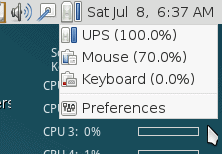
in Power Manager these options appeared...
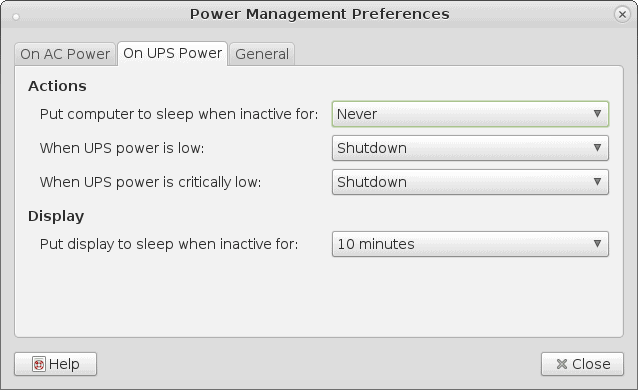
Yes, it works as expected.... a proper shutdown
(Linux Debian Mate)
Posted : July 8, 2017 7:47 am

Translate
▼
English
Spanish
French
German
Italian
Portuguese
Russian
Chinese
Japanese
Korean
Arabic
Hindi
Dutch
Polish
Turkish
Vietnamese
Thai
Swedish
Danish
Finnish
Norwegian
Czech
Hungarian
Romanian
Greek
Hebrew
Indonesian
Malay
Ukrainian
Bulgarian
Croatian
Slovak
Slovenian
Serbian
Lithuanian
Latvian
Estonian
I have a shell script that runs rsync on a whole bunch of directories, including my surveying directory. It copies them to a computer in a city four hours away. When I bring that computer home (why it's not here is a long story), I think I'll add a storage volume to my VPS and use that for offsite backup.
Posted : July 8, 2017 9:46 pm

Translate
▼
English
Spanish
French
German
Italian
Portuguese
Russian
Chinese
Japanese
Korean
Arabic
Hindi
Dutch
Polish
Turkish
Vietnamese
Thai
Swedish
Danish
Finnish
Norwegian
Czech
Hungarian
Romanian
Greek
Hebrew
Indonesian
Malay
Ukrainian
Bulgarian
Croatian
Slovak
Slovenian
Serbian
Lithuanian
Latvian
Estonian
We work directly in google drive. We also have a auto backn up occur every night on hardrive in our office, and we also have a auto backup of all files and computer images in a cloud that a local IT guy offers. We get an email every night for both backups that tells us if the backup was successful and how many files were backed up
Posted : July 9, 2017 8:50 pm