Reading RPLS is free for the whole profession. Members post, reply, and get the members-only rooms.


Notifications
Clear all
Software, CAD & Mapping
14
Posts
6
Users
0
Reactions
1,873
Views

Topic starter
Translate
▼
English
Spanish
French
German
Italian
Portuguese
Russian
Chinese
Japanese
Korean
Arabic
Hindi
Dutch
Polish
Turkish
Vietnamese
Thai
Swedish
Danish
Finnish
Norwegian
Czech
Hungarian
Romanian
Greek
Hebrew
Indonesian
Malay
Ukrainian
Bulgarian
Croatian
Slovak
Slovenian
Serbian
Lithuanian
Latvian
Estonian
Hello everybody. My company recently switched to using Leica data collectors (Model CS 20, see photos). We are experiencing the following problem after taking the shot: although the code and description are put in correctly, when double checking the list of points shot (after saving the shot), we noticed that a lot of times the codes have not been changed and they're carrying the same description as whatever the previous shot was described as. I tried discovering if there is pattern to this error but so far I have been unsuccessful to figure out what might cause it. The manual does not mention anything helpful and the Leica representative doesn't know how to fix it either. This happens to 2 of the 3 collectors used in the field and while this post might be a shot in the dark, I was wondering if maybe some of you experienced a similar problem.
Thank you for your time, A.M.
Posted : September 14, 2016 11:24 am
Translate
▼
English
Spanish
French
German
Italian
Portuguese
Russian
Chinese
Japanese
Korean
Arabic
Hindi
Dutch
Polish
Turkish
Vietnamese
Thai
Swedish
Danish
Finnish
Norwegian
Czech
Hungarian
Romanian
Greek
Hebrew
Indonesian
Malay
Ukrainian
Bulgarian
Croatian
Slovak
Slovenian
Serbian
Lithuanian
Latvian
Estonian
Hello, Alin! If i understand correctly, the problem is that sometimes the point is being saved not with a code that you have entered before the measurement but with a code that you have used with a previous measurement, am i right?
Can you give a little more info - what Captivate version are you using? Does this happen when using the new Linework coding or the Points only coding method? Do you get the same issues if you input just the code alone as if you input the code AND description?
Posted : September 16, 2016 1:57 am

Translate
▼
English
Spanish
French
German
Italian
Portuguese
Russian
Chinese
Japanese
Korean
Arabic
Hindi
Dutch
Polish
Turkish
Vietnamese
Thai
Swedish
Danish
Finnish
Norwegian
Czech
Hungarian
Romanian
Greek
Hebrew
Indonesian
Malay
Ukrainian
Bulgarian
Croatian
Slovak
Slovenian
Serbian
Lithuanian
Latvian
Estonian
Do all the collector have the same firm ware and what version. 2.0 is the latest.
Posted : September 16, 2016 11:00 am

Translate
▼
English
Spanish
French
German
Italian
Portuguese
Russian
Chinese
Japanese
Korean
Arabic
Hindi
Dutch
Polish
Turkish
Vietnamese
Thai
Swedish
Danish
Finnish
Norwegian
Czech
Hungarian
Romanian
Greek
Hebrew
Indonesian
Malay
Ukrainian
Bulgarian
Croatian
Slovak
Slovenian
Serbian
Lithuanian
Latvian
Estonian
I have experienced the problems you describe, and in my case it is user error.
When typing in a new point code, be certain to hit the enter button, right and down of the ok button, before changing back to page 1.
Sorry you have to deal with a CS20.
Posted : September 23, 2016 11:42 pm
Topic starter
Translate
▼
English
Spanish
French
German
Italian
Portuguese
Russian
Chinese
Japanese
Korean
Arabic
Hindi
Dutch
Polish
Turkish
Vietnamese
Thai
Swedish
Danish
Finnish
Norwegian
Czech
Hungarian
Romanian
Greek
Hebrew
Indonesian
Malay
Ukrainian
Bulgarian
Croatian
Slovak
Slovenian
Serbian
Lithuanian
Latvian
Estonian
Thanks everyone for your input and please accept my apologies for not replying earlier but we've been extremely busy.
The Leica version software we're using is 2.03 (19.652970)
Win EC version 7.0 (2864).
According to one of our draftsman, the error occurs mostly with utilities such as manholes, light poles, etc.
Last week it was taken to the dealer for a new software update, but the problem still occurs. I ended up creating a shortcut using a hotkey button so that I'm checking every single shot after I take it, but as you can imagine, that's highly frustrating.
Again, thanks everyone for your input and if by any chance you find a solution, please let me know.
Posted : September 26, 2016 7:05 am

Topic starter
Translate
▼
English
Spanish
French
German
Italian
Portuguese
Russian
Chinese
Japanese
Korean
Arabic
Hindi
Dutch
Polish
Turkish
Vietnamese
Thai
Swedish
Danish
Finnish
Norwegian
Czech
Hungarian
Romanian
Greek
Hebrew
Indonesian
Malay
Ukrainian
Bulgarian
Croatian
Slovak
Slovenian
Serbian
Lithuanian
Latvian
Estonian
summerprophet, post: 392493, member: 8874 wrote: I have experienced the problems you describe, and in my case it is user error.
When typing in a new point code, be certain to hit the enter button, right and down of the ok button, before changing back to page 1.Sorry you have to deal with a CS20.
User error was my guess at first too. And I probably did that a few times but when I started keeping an eye on it, it turned out to be a random thing.
And yes, I'm sorry that I have to deal with the CS20 too, especially after using a TopCon for 20 years.
Posted : September 26, 2016 7:09 am
Topic starter
Translate
▼
English
Spanish
French
German
Italian
Portuguese
Russian
Chinese
Japanese
Korean
Arabic
Hindi
Dutch
Polish
Turkish
Vietnamese
Thai
Swedish
Danish
Finnish
Norwegian
Czech
Hungarian
Romanian
Greek
Hebrew
Indonesian
Malay
Ukrainian
Bulgarian
Croatian
Slovak
Slovenian
Serbian
Lithuanian
Latvian
Estonian
Jethro, post: 391352, member: 7322 wrote: Do all the collector have the same firm ware and what version. 2.0 is the latest.
Yes, they all have the same version and are updated at the same dealer.
Posted : September 26, 2016 7:10 am
Translate
▼
English
Spanish
French
German
Italian
Portuguese
Russian
Chinese
Japanese
Korean
Arabic
Hindi
Dutch
Polish
Turkish
Vietnamese
Thai
Swedish
Danish
Finnish
Norwegian
Czech
Hungarian
Romanian
Greek
Hebrew
Indonesian
Malay
Ukrainian
Bulgarian
Croatian
Slovak
Slovenian
Serbian
Lithuanian
Latvian
Estonian
What does you dealer say about this? I'll check with my CS20 and try to replicate the problem but so far i haven't had these kind of issues. Maybe formatting would do the trick...
Posted : September 27, 2016 12:40 am
Translate
▼
English
Spanish
French
German
Italian
Portuguese
Russian
Chinese
Japanese
Korean
Arabic
Hindi
Dutch
Polish
Turkish
Vietnamese
Thai
Swedish
Danish
Finnish
Norwegian
Czech
Hungarian
Romanian
Greek
Hebrew
Indonesian
Malay
Ukrainian
Bulgarian
Croatian
Slovak
Slovenian
Serbian
Lithuanian
Latvian
Estonian
BTW, there's a v2.10 coming out today, maybe that will solve the problem.
Posted : September 27, 2016 12:44 am

Translate
▼
English
Spanish
French
German
Italian
Portuguese
Russian
Chinese
Japanese
Korean
Arabic
Hindi
Dutch
Polish
Turkish
Vietnamese
Thai
Swedish
Danish
Finnish
Norwegian
Czech
Hungarian
Romanian
Greek
Hebrew
Indonesian
Malay
Ukrainian
Bulgarian
Croatian
Slovak
Slovenian
Serbian
Lithuanian
Latvian
Estonian
This is very strange. I have sold a ton a lot of these controllers and i have never heard this complaint.
Curious, what is your "coding functionality" set to? Settings/customization/coding
Posted : September 27, 2016 9:28 am


Translate
▼
English
Spanish
French
German
Italian
Portuguese
Russian
Chinese
Japanese
Korean
Arabic
Hindi
Dutch
Polish
Turkish
Vietnamese
Thai
Swedish
Danish
Finnish
Norwegian
Czech
Hungarian
Romanian
Greek
Hebrew
Indonesian
Malay
Ukrainian
Bulgarian
Croatian
Slovak
Slovenian
Serbian
Lithuanian
Latvian
Estonian
I had this happen to me in the V1 firmware, haven't had it happen since loading V2. I dealt with it by using the map screen and turning on the point descriptions. If the prior description stuck I could see it real time then edit the errors as they happened. Going to edit points after every shot would be super frustrating.
Posted : September 27, 2016 4:04 pm
Topic starter
Translate
▼
English
Spanish
French
German
Italian
Portuguese
Russian
Chinese
Japanese
Korean
Arabic
Hindi
Dutch
Polish
Turkish
Vietnamese
Thai
Swedish
Danish
Finnish
Norwegian
Czech
Hungarian
Romanian
Greek
Hebrew
Indonesian
Malay
Ukrainian
Bulgarian
Croatian
Slovak
Slovenian
Serbian
Lithuanian
Latvian
Estonian
Arturs, post: 392770, member: 11365 wrote: What does you dealer say about this? I'll check with my CS20 and try to replicate the problem but so far i haven't had these kind of issues. Maybe formatting would do the trick...
The dealer just shrugs his shoulders. He said he never encountered this problem with other users.
Posted : October 1, 2016 2:44 pm
Topic starter
Translate
▼
English
Spanish
French
German
Italian
Portuguese
Russian
Chinese
Japanese
Korean
Arabic
Hindi
Dutch
Polish
Turkish
Vietnamese
Thai
Swedish
Danish
Finnish
Norwegian
Czech
Hungarian
Romanian
Greek
Hebrew
Indonesian
Malay
Ukrainian
Bulgarian
Croatian
Slovak
Slovenian
Serbian
Lithuanian
Latvian
Estonian
Cameron Watson PLS, post: 392856, member: 11407 wrote: I had this happen to me in the V1 firmware, haven't had it happen since loading V2. I dealt with it by using the map screen and turning on the point descriptions. If the prior description stuck I could see it real time then edit the errors as they happened. Going to edit points after every shot would be super frustrating.
Thanks for the idea. I have yet to figure out to have on display the previous point shot.
Posted : October 1, 2016 2:45 pm
Translate
▼
English
Spanish
French
German
Italian
Portuguese
Russian
Chinese
Japanese
Korean
Arabic
Hindi
Dutch
Polish
Turkish
Vietnamese
Thai
Swedish
Danish
Finnish
Norwegian
Czech
Hungarian
Romanian
Greek
Hebrew
Indonesian
Malay
Ukrainian
Bulgarian
Croatian
Slovak
Slovenian
Serbian
Lithuanian
Latvian
Estonian
AlinM, post: 393508, member: 11332 wrote: Thanks for the idea. I have yet to figure out to have on display the previous point shot.
First make sure to use the zoom tool so the map tracks with you. That's the 2nd button up from the bottom on the right hand side inside the zoom tools.
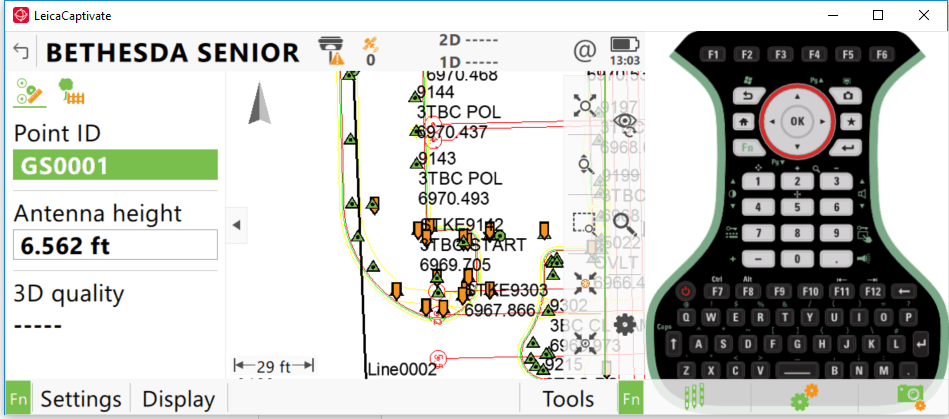
The one with the 4 arrows pointing to the orange prism.
Then hit Fn Display at the bottom.
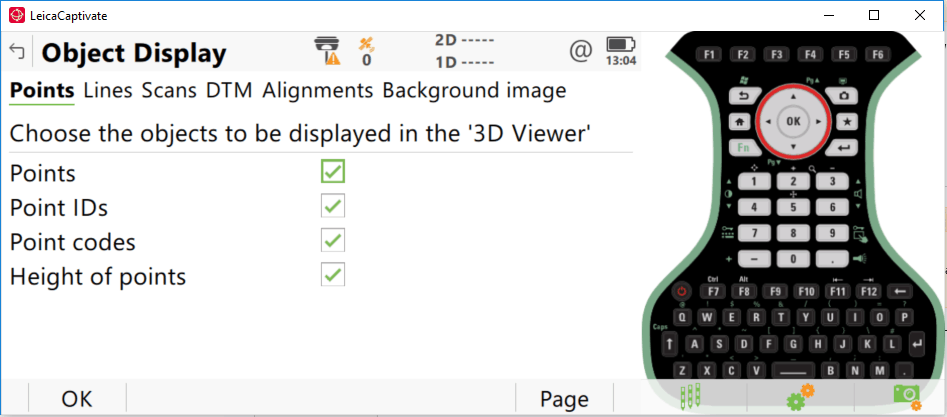
Here I would typically only have the first 3 checked to minimize clutter on the map. Good luck!
Posted : October 10, 2016 1:10 pm