Reading RPLS is free for the whole profession. Members post, reply, and get the members-only rooms.


Notifications
Clear all

Topic starter
Translate
▼
English
Spanish
French
German
Italian
Portuguese
Russian
Chinese
Japanese
Korean
Arabic
Hindi
Dutch
Polish
Turkish
Vietnamese
Thai
Swedish
Danish
Finnish
Norwegian
Czech
Hungarian
Romanian
Greek
Hebrew
Indonesian
Malay
Ukrainian
Bulgarian
Croatian
Slovak
Slovenian
Serbian
Lithuanian
Latvian
Estonian
In autocad, when lines like contours & roads are drawn crooked you could issue a REGEN command to redraw the lines and make them smooth as they were originally drawn. I guess the crooked lines were a way to cheat to make the drawings load faster.
Anyway when I open the same drawing in Trueview 2013, the lines again appear crooked but I could not issue the REGEN command to make them smooth. Is there a setting somewhere in TrueView?
Posted : September 18, 2015 6:31 pm

Translate
▼
English
Spanish
French
German
Italian
Portuguese
Russian
Chinese
Japanese
Korean
Arabic
Hindi
Dutch
Polish
Turkish
Vietnamese
Thai
Swedish
Danish
Finnish
Norwegian
Czech
Hungarian
Romanian
Greek
Hebrew
Indonesian
Malay
Ukrainian
Bulgarian
Croatian
Slovak
Slovenian
Serbian
Lithuanian
Latvian
Estonian
FrancisH, post: 336999, member: 10211 wrote: In autocad, when lines like contours & roads are drawn crooked you could issue a REGEN command to redraw the lines and make them smooth as they were originally drawn. I guess the crooked lines were a way to cheat to make the drawings load faster.
Anyway when I open the same drawing in Trueview 2013, the lines again appear crooked but I could not issue the REGEN command to make them smooth. Is there a setting somewhere in TrueView?
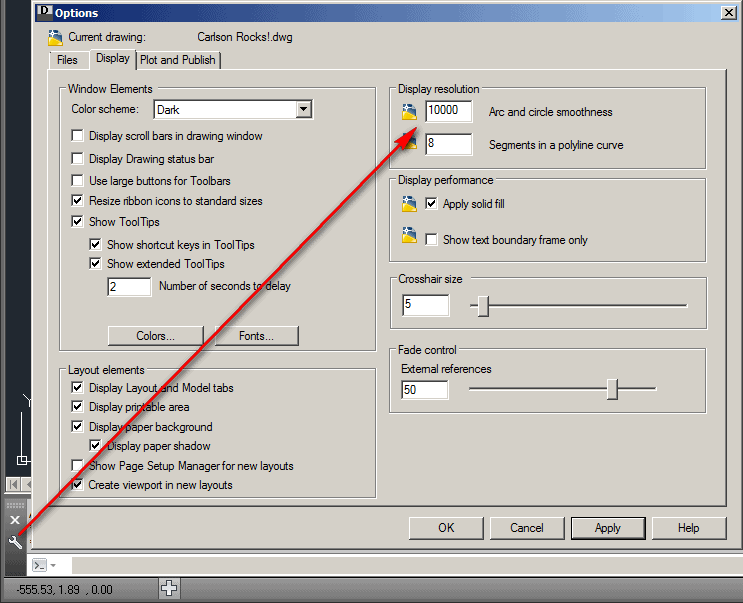
You should be able to increase the "Arc and circle smoothness" setting cleverly hidden under the Options wrench near the Command line:
Posted : September 18, 2015 7:27 pm
Topic starter
Translate
▼
English
Spanish
French
German
Italian
Portuguese
Russian
Chinese
Japanese
Korean
Arabic
Hindi
Dutch
Polish
Turkish
Vietnamese
Thai
Swedish
Danish
Finnish
Norwegian
Czech
Hungarian
Romanian
Greek
Hebrew
Indonesian
Malay
Ukrainian
Bulgarian
Croatian
Slovak
Slovenian
Serbian
Lithuanian
Latvian
Estonian
Thanks Ladd, never saw that settings icon,
Posted : September 19, 2015 3:09 am

Translate
▼
English
Spanish
French
German
Italian
Portuguese
Russian
Chinese
Japanese
Korean
Arabic
Hindi
Dutch
Polish
Turkish
Vietnamese
Thai
Swedish
Danish
Finnish
Norwegian
Czech
Hungarian
Romanian
Greek
Hebrew
Indonesian
Malay
Ukrainian
Bulgarian
Croatian
Slovak
Slovenian
Serbian
Lithuanian
Latvian
Estonian
VIEWRES Command. I set my default drawings to 20000. Back in the old ACad days, having a high viewres meant longer/more frequent regen times during zooms & pans. Pretty irrelevant with today's processors.
Posted : September 19, 2015 8:21 am