Reading RPLS is free for the whole profession. Members post, reply, and get the members-only rooms.


Notifications
Clear all
Software, CAD & Mapping
13
Posts
11
Users
0
Reactions
2,757
Views

Topic starter
Translate
▼
English
Spanish
French
German
Italian
Portuguese
Russian
Chinese
Japanese
Korean
Arabic
Hindi
Dutch
Polish
Turkish
Vietnamese
Thai
Swedish
Danish
Finnish
Norwegian
Czech
Hungarian
Romanian
Greek
Hebrew
Indonesian
Malay
Ukrainian
Bulgarian
Croatian
Slovak
Slovenian
Serbian
Lithuanian
Latvian
Estonian
I'm using Carlson Survey 2016 with IntelliCAD 8.1. I want to draw a line that is tangent to two circles, like this.
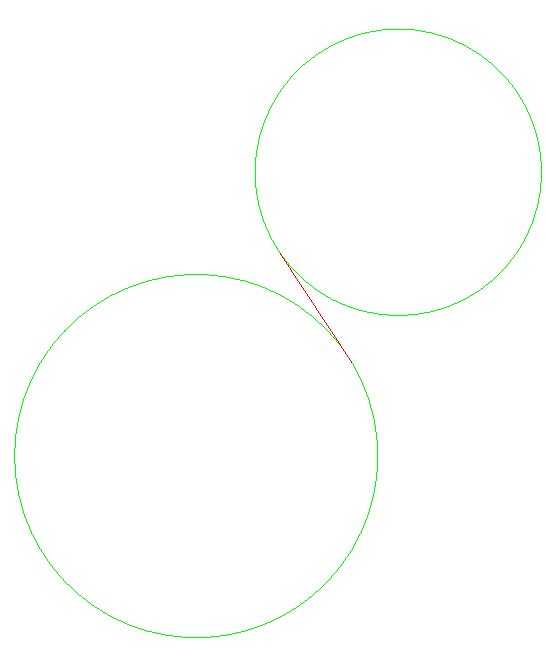
Tangent Snap works fine in drawing a line "to" a tangent, but not "from" a tangent. Is there an easy way to draw this?
Thanks.
Posted : January 13, 2017 6:58 pm

Translate
▼
English
Spanish
French
German
Italian
Portuguese
Russian
Chinese
Japanese
Korean
Arabic
Hindi
Dutch
Polish
Turkish
Vietnamese
Thai
Swedish
Danish
Finnish
Norwegian
Czech
Hungarian
Romanian
Greek
Hebrew
Indonesian
Malay
Ukrainian
Bulgarian
Croatian
Slovak
Slovenian
Serbian
Lithuanian
Latvian
Estonian
It's an easy Calc to get the bearing and missing side. Use the sum of the radii as one leg of an angle side side triangle...
Posted : January 13, 2017 7:10 pm

Translate
▼
English
Spanish
French
German
Italian
Portuguese
Russian
Chinese
Japanese
Korean
Arabic
Hindi
Dutch
Polish
Turkish
Vietnamese
Thai
Swedish
Danish
Finnish
Norwegian
Czech
Hungarian
Romanian
Greek
Hebrew
Indonesian
Malay
Ukrainian
Bulgarian
Croatian
Slovak
Slovenian
Serbian
Lithuanian
Latvian
Estonian
Offset the big circle in the radius of the small circle. Draw a line from the center of the small circle to tangent to the inner big circle. The rest should be apparent.
Posted : January 13, 2017 7:35 pm

Translate
▼
English
Spanish
French
German
Italian
Portuguese
Russian
Chinese
Japanese
Korean
Arabic
Hindi
Dutch
Polish
Turkish
Vietnamese
Thai
Swedish
Danish
Finnish
Norwegian
Czech
Hungarian
Romanian
Greek
Hebrew
Indonesian
Malay
Ukrainian
Bulgarian
Croatian
Slovak
Slovenian
Serbian
Lithuanian
Latvian
Estonian
With the autocad engine in the cogo menu there is a simple routine "tangent line between circles", great routine. Hopefully intellecad version has it.
Posted : January 13, 2017 8:01 pm

Translate
▼
English
Spanish
French
German
Italian
Portuguese
Russian
Chinese
Japanese
Korean
Arabic
Hindi
Dutch
Polish
Turkish
Vietnamese
Thai
Swedish
Danish
Finnish
Norwegian
Czech
Hungarian
Romanian
Greek
Hebrew
Indonesian
Malay
Ukrainian
Bulgarian
Croatian
Slovak
Slovenian
Serbian
Lithuanian
Latvian
Estonian
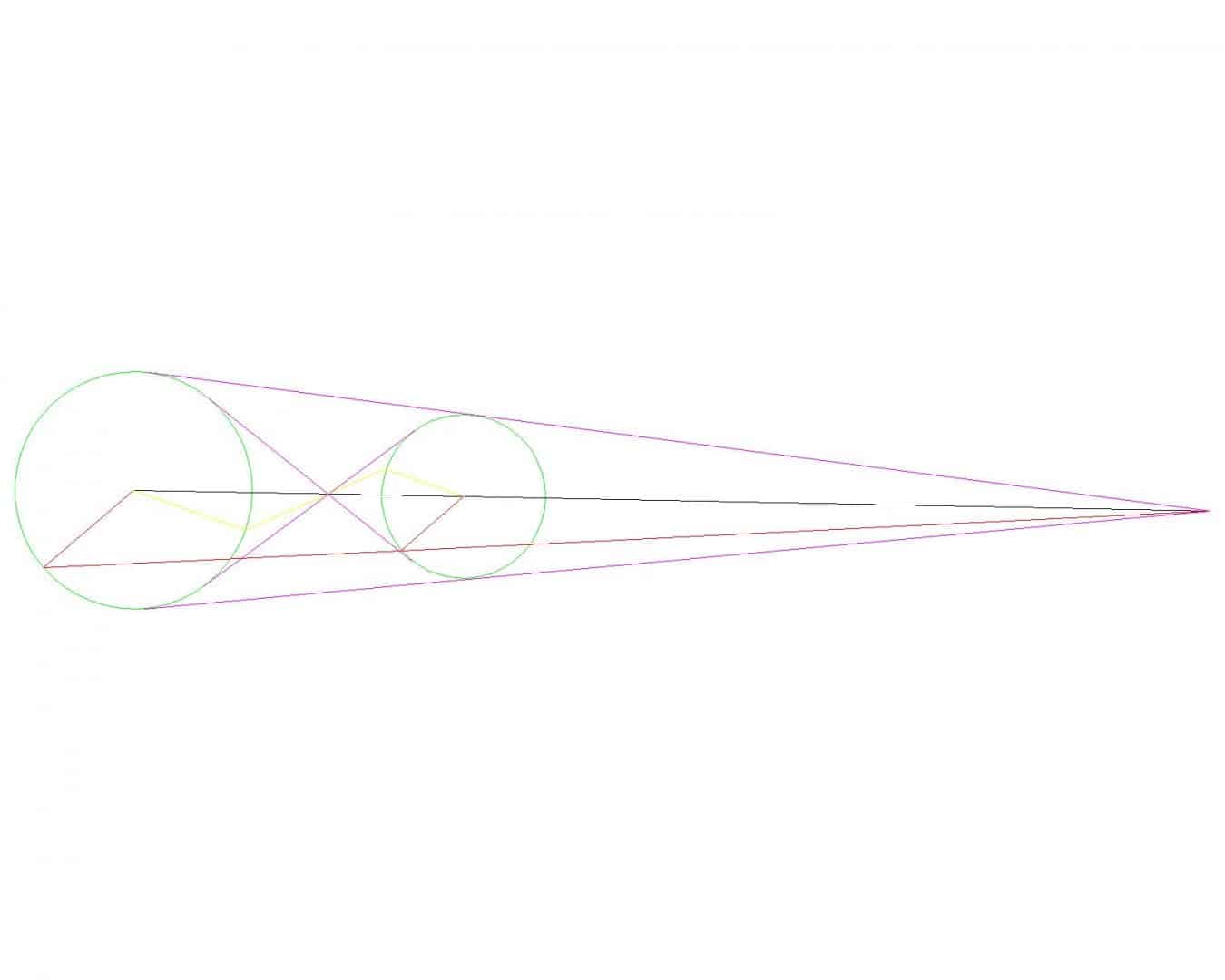
You're sketch is showing one of the internal tangents. To get that, look at the yellow lines above. I created a random radial on the large circle running SE, then I copied that radial to the small circle but ran it NW and connected the end points of the radials. Notice that the yellow line intersects the line between the two center points (black) at the same place where the two interior radials (magenta) intersect. Once you have that intersection point you can draw a line from there and snap tangent to one of the circles then extend the line to the other circle and it should be tangent to both.
The external tangents are similar but instead of making the two radials on reverse headings, make them parallel like the red radials above. Connecting the end points of the parallel radials and intersecting with a line running through the center of both circles will create the outer intersection point above. Now you can draw a line from the intersection point and snap tangent to the far circle and trim it at the near circle.
I wish I could claim I knew this before you ask the question, but Google and Wikipedia are wonderful teachers.
Posted : January 13, 2017 8:14 pm

Translate
▼
English
Spanish
French
German
Italian
Portuguese
Russian
Chinese
Japanese
Korean
Arabic
Hindi
Dutch
Polish
Turkish
Vietnamese
Thai
Swedish
Danish
Finnish
Norwegian
Czech
Hungarian
Romanian
Greek
Hebrew
Indonesian
Malay
Ukrainian
Bulgarian
Croatian
Slovak
Slovenian
Serbian
Lithuanian
Latvian
Estonian
The crossing of the magenta lines intersection is the key. It can be constructed a thousand ways because of its symmetry!
Stephan's method has a weakness when the circles are nearly the same size.
I connected the radius points, then constructed diameters of each circle perpendicular to that line (giving an "H" shape).
Drawing a line from one diameter extremity to the opposite diameter extremity of the other circle, in effect making an "X" out of the "H", gives one way to make the intersection. Then snap your tangents from there.
This method will work even for equal radius circles!
Posted : January 13, 2017 10:32 pm

Translate
▼
English
Spanish
French
German
Italian
Portuguese
Russian
Chinese
Japanese
Korean
Arabic
Hindi
Dutch
Polish
Turkish
Vietnamese
Thai
Swedish
Danish
Finnish
Norwegian
Czech
Hungarian
Romanian
Greek
Hebrew
Indonesian
Malay
Ukrainian
Bulgarian
Croatian
Slovak
Slovenian
Serbian
Lithuanian
Latvian
Estonian
Years ago in ACAD, you just had to do the line command, type, tan, click on one circle, then tan, click on the other, and it would draw the line tangent to both. I can't get that to work in Carlson, with embedded ACAD, though.
Posted : January 14, 2017 9:16 am

Translate
▼
English
Spanish
French
German
Italian
Portuguese
Russian
Chinese
Japanese
Korean
Arabic
Hindi
Dutch
Polish
Turkish
Vietnamese
Thai
Swedish
Danish
Finnish
Norwegian
Czech
Hungarian
Romanian
Greek
Hebrew
Indonesian
Malay
Ukrainian
Bulgarian
Croatian
Slovak
Slovenian
Serbian
Lithuanian
Latvian
Estonian
Regular Autocad (I'm in 2009 right now) generates this geometry with the tangent functions on both ends.
Draw larger circle, then smaller circle.
Begin LINE command, and snap to TAN of larger circle, then the to point, snap to the TAN of the smaller circle.
Tangent line between circles is generated, that is identical to the one developed via Stephen Ward's method.
Does IntelliCAD not provide this functionality?
Posted : January 14, 2017 9:20 am

Translate
▼
English
Spanish
French
German
Italian
Portuguese
Russian
Chinese
Japanese
Korean
Arabic
Hindi
Dutch
Polish
Turkish
Vietnamese
Thai
Swedish
Danish
Finnish
Norwegian
Czech
Hungarian
Romanian
Greek
Hebrew
Indonesian
Malay
Ukrainian
Bulgarian
Croatian
Slovak
Slovenian
Serbian
Lithuanian
Latvian
Estonian
I know this thread is really about how to get the software to do it for you, but I wondered how to do it on a calculator.
d = distance between centers
R = one circle radius
r = other circle radius
a = distance from first circle center to crossing point
Then from similar triangles you can quickly derive
a = d * R /(r+R)
With that it is easy to solve the rest of the triangles.
-----
The first step in derivation is to note that the angles in each triangle are the same, so the sides are proportional.
a/R = (d-a)/r
and the rest is trivial algebra
Posted : January 14, 2017 9:45 am

Translate
▼
English
Spanish
French
German
Italian
Portuguese
Russian
Chinese
Japanese
Korean
Arabic
Hindi
Dutch
Polish
Turkish
Vietnamese
Thai
Swedish
Danish
Finnish
Norwegian
Czech
Hungarian
Romanian
Greek
Hebrew
Indonesian
Malay
Ukrainian
Bulgarian
Croatian
Slovak
Slovenian
Serbian
Lithuanian
Latvian
Estonian
epoch date, post: 409078, member: 485 wrote: Regular Autocad (I'm in 2009 right now) generates this geometry with the tangent functions on both ends.
Does IntelliCAD not provide this functionality?
I believe this is another small annoying function cut out of the OEM version. AutoCAD may do it as a reminder that your not using the full version.
Posted : January 14, 2017 6:21 pm

Translate
▼
English
Spanish
French
German
Italian
Portuguese
Russian
Chinese
Japanese
Korean
Arabic
Hindi
Dutch
Polish
Turkish
Vietnamese
Thai
Swedish
Danish
Finnish
Norwegian
Czech
Hungarian
Romanian
Greek
Hebrew
Indonesian
Malay
Ukrainian
Bulgarian
Croatian
Slovak
Slovenian
Serbian
Lithuanian
Latvian
Estonian
It is sad that we have become an army of button pushers instead of thinkers. When did we stop learning how to do things first instead of expecting to get immediate answers with a few keystrokes.
This goes far beyond surveying and trigonometry. The answer to anything MUST BE easily found on that magic wad of plastic and electronics that one can hold in their hand. Understanding whether or not the answer provided is reasonable has become passe.
Posted : January 14, 2017 8:48 pm
Translate
▼
English
Spanish
French
German
Italian
Portuguese
Russian
Chinese
Japanese
Korean
Arabic
Hindi
Dutch
Polish
Turkish
Vietnamese
Thai
Swedish
Danish
Finnish
Norwegian
Czech
Hungarian
Romanian
Greek
Hebrew
Indonesian
Malay
Ukrainian
Bulgarian
Croatian
Slovak
Slovenian
Serbian
Lithuanian
Latvian
Estonian
epoch date, post: 409078, member: 485 wrote: Regular Autocad (I'm in 2009 right now) generates this geometry with the tangent functions on both ends.
Draw larger circle, then smaller circle.
Begin LINE command, and snap to TAN of larger circle, then the to point, snap to the TAN of the smaller circle.Tangent line between circles is generated, that is identical to the one developed via Stephen Ward's method.
Does IntelliCAD not provide this functionality?
I run full AutoCAD, so normally I just draw a line snapping tangent to both circles. My method above was just a workaround for those who aren't blessed with software that will draw it automatically.
Posted : January 14, 2017 8:49 pm
Topic starter
Translate
▼
English
Spanish
French
German
Italian
Portuguese
Russian
Chinese
Japanese
Korean
Arabic
Hindi
Dutch
Polish
Turkish
Vietnamese
Thai
Swedish
Danish
Finnish
Norwegian
Czech
Hungarian
Romanian
Greek
Hebrew
Indonesian
Malay
Ukrainian
Bulgarian
Croatian
Slovak
Slovenian
Serbian
Lithuanian
Latvian
Estonian
Thanks, guys, for all your responses. There's more than one way to skin a cat!
As far as I can tell, IntelliCAD will not snap from a tangent, only to a tangent. It does have the "tangent line between circles" routine BK9196 mentioned.
I love this place.:gammon::stakeout:
Posted : January 14, 2017 9:09 pm