Reading RPLS is free for the whole profession. Members post, reply, and get the members-only rooms.


Notifications
Clear all

Topic starter
Translate
▼
English
Spanish
French
German
Italian
Portuguese
Russian
Chinese
Japanese
Korean
Arabic
Hindi
Dutch
Polish
Turkish
Vietnamese
Thai
Swedish
Danish
Finnish
Norwegian
Czech
Hungarian
Romanian
Greek
Hebrew
Indonesian
Malay
Ukrainian
Bulgarian
Croatian
Slovak
Slovenian
Serbian
Lithuanian
Latvian
Estonian
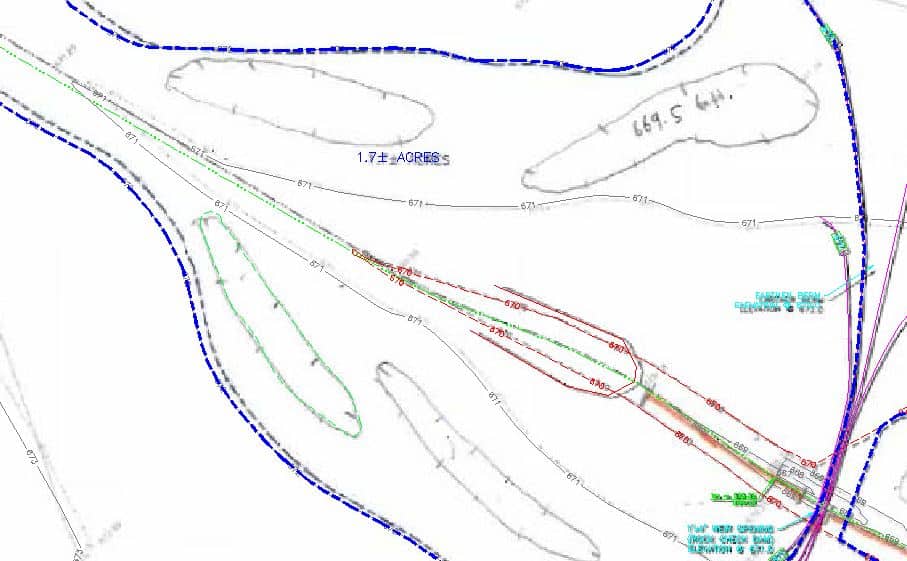
I am looking for a depression contour line type. Maybe it is already loaded in AutoCAD, I just don't know what it is called? Or maybe you will be so kind as to send me one?
Posted : July 6, 2015 1:14 pm

Translate
▼
English
Spanish
French
German
Italian
Portuguese
Russian
Chinese
Japanese
Korean
Arabic
Hindi
Dutch
Polish
Turkish
Vietnamese
Thai
Swedish
Danish
Finnish
Norwegian
Czech
Hungarian
Romanian
Greek
Hebrew
Indonesian
Malay
Ukrainian
Bulgarian
Croatian
Slovak
Slovenian
Serbian
Lithuanian
Latvian
Estonian
Brad Ott, post: 326025, member: 197 wrote: I am looking for a depression contour line type. Maybe it is already loaded in AutoCAD, I just don't know what it is called? Or maybe you will be so kind as to send me one?
In Civil 3D it is not a linetype but a function of the surface style...
Posted : July 6, 2015 2:46 pm

Translate
▼
English
Spanish
French
German
Italian
Portuguese
Russian
Chinese
Japanese
Korean
Arabic
Hindi
Dutch
Polish
Turkish
Vietnamese
Thai
Swedish
Danish
Finnish
Norwegian
Czech
Hungarian
Romanian
Greek
Hebrew
Indonesian
Malay
Ukrainian
Bulgarian
Croatian
Slovak
Slovenian
Serbian
Lithuanian
Latvian
Estonian

Posted : July 6, 2015 2:58 pm

Translate
▼
English
Spanish
French
German
Italian
Portuguese
Russian
Chinese
Japanese
Korean
Arabic
Hindi
Dutch
Polish
Turkish
Vietnamese
Thai
Swedish
Danish
Finnish
Norwegian
Czech
Hungarian
Romanian
Greek
Hebrew
Indonesian
Malay
Ukrainian
Bulgarian
Croatian
Slovak
Slovenian
Serbian
Lithuanian
Latvian
Estonian
There is NO depression contour line type. The line type stays consistent with it being either an index or intermediate contour (Sorry guys, there is NO SUCH thing as major and minor contours. You going to practice MY craft,. learn the proper nomenclature.)
Depression contours are symbolized by depression contour ticks. The easiest way to create then is to make a block of a short line section. Make two separate blocks, "Tic1" and Tic2". Draw the line segment due North and South. Set the insertion point on one of them at the north end; the South end on the other one. Use the measure command to insert the block at 1/10 of the drawing scale. Tell it to align the blocks with the line.The direction of the way the contour is drawn will mess with you, thus the need for the two blocks. The ticks go towards the inside of the depression, so if they point the wrong way, do an "undo" and use the other block.
Remember too, that a depression contour "closes on itself" and surrounds elevations of lower value. If that contour does not CLOSE ON ITSELF within your drawing, you DO NOT add the ticks.
Posted : July 6, 2015 5:51 pm
Topic starter
Translate
▼
English
Spanish
French
German
Italian
Portuguese
Russian
Chinese
Japanese
Korean
Arabic
Hindi
Dutch
Polish
Turkish
Vietnamese
Thai
Swedish
Danish
Finnish
Norwegian
Czech
Hungarian
Romanian
Greek
Hebrew
Indonesian
Malay
Ukrainian
Bulgarian
Croatian
Slovak
Slovenian
Serbian
Lithuanian
Latvian
Estonian
cptdent, post: 326080, member: 527 wrote: There is NO depression contour line type. The line type stays consistent with it being either an index or intermediate contour (Sorry guys, there is NO SUCH thing as major and minor contours. You going to practice MY craft,. learn the proper nomenclature.)
Depression contours are symbolized by depression contour ticks. The easiest way to create then is to make a block of a short line section. Make two separate blocks, "Tic1" and Tic2". Draw the line segment due North and South. Set the insertion point on one of them at the north end; the South end on the other one. Use the measure command to insert the block at 1/10 of the drawing scale. Tell it to align the blocks with the line.The direction of the way the contour is drawn will mess with you, thus the need for the two blocks. The ticks go towards the inside of the depression, so if they point the wrong way, do an "undo" and use the other block.
Remember too, that a depression contour "closes on itself" and surrounds elevations of lower value. If that contour does not CLOSE ON ITSELF within your drawing, you DO NOT add the ticks.
Ten four. Thank you very much sir.
Posted : July 6, 2015 5:54 pm

Translate
▼
English
Spanish
French
German
Italian
Portuguese
Russian
Chinese
Japanese
Korean
Arabic
Hindi
Dutch
Polish
Turkish
Vietnamese
Thai
Swedish
Danish
Finnish
Norwegian
Czech
Hungarian
Romanian
Greek
Hebrew
Indonesian
Malay
Ukrainian
Bulgarian
Croatian
Slovak
Slovenian
Serbian
Lithuanian
Latvian
Estonian
Do you want a custom linetype with a tic coming off it? Dashed, Hidden, (X2), (2)? It'll take me about 2 minutes in the morning as my laptop has no CAD 🙁
You will need a Reverse Polyline script (it comes with Carlson) and perhaps my SHP file (unless I look in the AutoCAD SHP for a line). I made a continuous with a tic every 0.1' for an edge of lawn that would be wicked easy to revise.
thadd at ese-llc dot com
Posted : July 6, 2015 8:28 pm

Translate
▼
English
Spanish
French
German
Italian
Portuguese
Russian
Chinese
Japanese
Korean
Arabic
Hindi
Dutch
Polish
Turkish
Vietnamese
Thai
Swedish
Danish
Finnish
Norwegian
Czech
Hungarian
Romanian
Greek
Hebrew
Indonesian
Malay
Ukrainian
Bulgarian
Croatian
Slovak
Slovenian
Serbian
Lithuanian
Latvian
Estonian
See if you like this one . .
*TIC,TIC |:|:|:|:|:|:|:|:|:|:|:|:|:|:|:|:|:|:|:|
A,.4,.4,[TRACK1,ltypeshp.shx,x=-.2,y=-.1,s=.1],.4
Posted : July 6, 2015 8:41 pm

Translate
▼
English
Spanish
French
German
Italian
Portuguese
Russian
Chinese
Japanese
Korean
Arabic
Hindi
Dutch
Polish
Turkish
Vietnamese
Thai
Swedish
Danish
Finnish
Norwegian
Czech
Hungarian
Romanian
Greek
Hebrew
Indonesian
Malay
Ukrainian
Bulgarian
Croatian
Slovak
Slovenian
Serbian
Lithuanian
Latvian
Estonian
Dude, you need some uppers to get you out of this depression mode.:-(:-(:-(:-(:-(:-(:-(:-(:-(:-(
Posted : July 6, 2015 9:56 pm
Translate
▼
English
Spanish
French
German
Italian
Portuguese
Russian
Chinese
Japanese
Korean
Arabic
Hindi
Dutch
Polish
Turkish
Vietnamese
Thai
Swedish
Danish
Finnish
Norwegian
Czech
Hungarian
Romanian
Greek
Hebrew
Indonesian
Malay
Ukrainian
Bulgarian
Croatian
Slovak
Slovenian
Serbian
Lithuanian
Latvian
Estonian
spledeus, post: 326095, member: 3579 wrote: Do you want a custom linetype with a tic coming off it? Dashed, Hidden, (X2), (2)? It'll take me about 2 minutes in the morning as my laptop has no CAD 🙁
You will need a Reverse Polyline script (it comes with Carlson) and perhaps my SHP file (unless I look in the AutoCAD SHP for a line). I made a continuous with a tic every 0.1' for an edge of lawn that would be wicked easy to revise.
thadd at ese-llc dot com
Peter Hughes-Davies, post: 326097, member: 48 wrote: See if you like this one . .
*TIC,TIC |:|:|:|:|:|:|:|:|:|:|:|:|:|:|:|:|:|:|:|
A,.4,.4,[TRACK1,ltypeshp.shx,x=-.2,y=-.1,s=.1],.4
Both of these ideas will work, but the problem of the ticks being on the wrong side or the poly still remains. (That is all dependent on which direction the software uses to create the poly.) But then the Carlson command "Reverse Poly" should fix that problem.
There's always more than one way to skin a cat. (Now awaiting HC's retort about cat skinning. :whistle: )
Posted : July 7, 2015 5:44 am

Translate
▼
English
Spanish
French
German
Italian
Portuguese
Russian
Chinese
Japanese
Korean
Arabic
Hindi
Dutch
Polish
Turkish
Vietnamese
Thai
Swedish
Danish
Finnish
Norwegian
Czech
Hungarian
Romanian
Greek
Hebrew
Indonesian
Malay
Ukrainian
Bulgarian
Croatian
Slovak
Slovenian
Serbian
Lithuanian
Latvian
Estonian
I use Carlson.
Go to ANNOTATE
LINE TYPES
CHANGE POLYLINE LINETYPE
I use the VEE linetype on the last page.
🙂
Posted : July 7, 2015 5:48 am
Translate
▼
English
Spanish
French
German
Italian
Portuguese
Russian
Chinese
Japanese
Korean
Arabic
Hindi
Dutch
Polish
Turkish
Vietnamese
Thai
Swedish
Danish
Finnish
Norwegian
Czech
Hungarian
Romanian
Greek
Hebrew
Indonesian
Malay
Ukrainian
Bulgarian
Croatian
Slovak
Slovenian
Serbian
Lithuanian
Latvian
Estonian
Yes, please do not be depressed. These will add a tic from ltypeshp.shx, if you need that SHX let me know. The tic will appear with 4 dashes between.
*DASHED-TIC,Dashed-Tic __ __ __ __ __ __ __ __ __ __ __ __ __ _
A,.25,[TRACK1,ltypeshp.shx,y=-.25,s=.25],0.25,-.25,0.5,-0.25,0.5,-0.25,0.5,-0.25
*DASHED2-TIC,Dashed-Tic (.5x) _ _ _ _ _ _ _ _ _ _ _ _ _ _ _ _ _
A,.125,[TRACK1,ltypeshp.shx,y=-.25,s=.25],0.125,-.125,0.25,-.125,0.25,-.125,0.25,-.125
*DASHEDX2-TIC,Dashed-Tic (2x) ____ ____ ____ ____ ____ ___
A,0.5,[TRACK1,ltypeshp.shx,y=-.25,s=.25],0.5,-0.5,1.0,-0.5,1.0,-0.5,1.0,-0.5,1.0,-0.5
Some tricks:
The reverse polyline command is essential. REVPLINE Non carlson users can find a script out there.
Also you may want to turn on the Linetype Continuity, or you may not want to. Play with it.
If you want them tighter spaced, just delete out a couple of the ,0.5,-0.25 or similar. Just end the line with a Minus or you will get a long first dash.
Do not be afraid to rename the linetype.
Let me know if you need more.
Posted : July 7, 2015 7:57 am
Topic starter
Translate
▼
English
Spanish
French
German
Italian
Portuguese
Russian
Chinese
Japanese
Korean
Arabic
Hindi
Dutch
Polish
Turkish
Vietnamese
Thai
Swedish
Danish
Finnish
Norwegian
Czech
Hungarian
Romanian
Greek
Hebrew
Indonesian
Malay
Ukrainian
Bulgarian
Croatian
Slovak
Slovenian
Serbian
Lithuanian
Latvian
Estonian
Many thanks to all! I will be making a contribution to the Tip Jar once I can find the confounded thing:

Posted : July 7, 2015 9:23 am
Translate
▼
English
Spanish
French
German
Italian
Portuguese
Russian
Chinese
Japanese
Korean
Arabic
Hindi
Dutch
Polish
Turkish
Vietnamese
Thai
Swedish
Danish
Finnish
Norwegian
Czech
Hungarian
Romanian
Greek
Hebrew
Indonesian
Malay
Ukrainian
Bulgarian
Croatian
Slovak
Slovenian
Serbian
Lithuanian
Latvian
Estonian
cptdent, post: 326080, member: 527 wrote: There is NO depression contour line type. The line type stays consistent with it being either an index or intermediate contour (Sorry guys, there is NO SUCH thing as major and minor contours. You going to practice MY craft,. learn the proper nomenclature.)
Depression contours are symbolized by depression contour ticks. The easiest way to create then is to make a block of a short line section. Make two separate blocks, "Tic1" and Tic2". Draw the line segment due North and South. Set the insertion point on one of them at the north end; the South end on the other one. Use the measure command to insert the block at 1/10 of the drawing scale. Tell it to align the blocks with the line.The direction of the way the contour is drawn will mess with you, thus the need for the two blocks. The ticks go towards the inside of the depression, so if they point the wrong way, do an "undo" and use the other block.
Remember too, that a depression contour "closes on itself" and surrounds elevations of lower value. If that contour does not CLOSE ON ITSELF within your drawing, you DO NOT add the ticks.
"Sorry guys, there is NO SUCH thing as major and minor contours. You going to practice MY craft,. learn the proper nomenclature."
?? You are somewhat correct, although "minor" can be switched with "intermediate" without confusion...
Posted : July 7, 2015 12:27 pm
Translate
▼
English
Spanish
French
German
Italian
Portuguese
Russian
Chinese
Japanese
Korean
Arabic
Hindi
Dutch
Polish
Turkish
Vietnamese
Thai
Swedish
Danish
Finnish
Norwegian
Czech
Hungarian
Romanian
Greek
Hebrew
Indonesian
Malay
Ukrainian
Bulgarian
Croatian
Slovak
Slovenian
Serbian
Lithuanian
Latvian
Estonian
Here's the same TIC type linetypes for use with the HIDDED linetypes.
*HIDDEN-TIC,Hidden __ __ __ __ __ __ __ __ __ __ __ __ __ __
A,.125,[TRACK1,ltypeshp2.shx,y=-.25,s=.25],0.125,-.125,0.25,-.125,0.25,-.125,0.25,-.125
*HIDDEN2-TIC,Hidden (.5x) _ _ _ _ _ _ _ _ _ _ _ _ _ _ _ _ _
A,.0625,[TRACK1,ltypeshp2.shx,y=-.25,s=.25],0.0625,-.0625,.125,-.0625,.125,-.0625,.125,-.0625
*HIDDENX2-TIC,Hidden (2x) ____ ____ ____ ____ ____ ____ ____
A,.25,[TRACK1,ltypeshp2.shx,y=-.25,s=.25],0.25,-.25,0.5,-0.25,0.5,-0.25,0.5,-0.25
I also got the SHX file to upload by adding a TXT extension, for those of you lacking the SHX file to make this work.
Posted : July 8, 2015 7:54 am