Reading RPLS is free for the whole profession. Members post, reply, and get the members-only rooms.


Notifications
Clear all
Software, CAD & Mapping
8
Posts
8
Users
0
Reactions
1,201
Views

Topic starter
Translate
▼
English
Spanish
French
German
Italian
Portuguese
Russian
Chinese
Japanese
Korean
Arabic
Hindi
Dutch
Polish
Turkish
Vietnamese
Thai
Swedish
Danish
Finnish
Norwegian
Czech
Hungarian
Romanian
Greek
Hebrew
Indonesian
Malay
Ukrainian
Bulgarian
Croatian
Slovak
Slovenian
Serbian
Lithuanian
Latvian
Estonian
What controls the scale of a pline?
As in making a polyline into a fenceline.
I have always had to change my drawing scale to get the new line to look right and even at that, it doesn't seem to be consistent with the new scale.
Posted : May 26, 2017 7:37 am

Translate
▼
English
Spanish
French
German
Italian
Portuguese
Russian
Chinese
Japanese
Korean
Arabic
Hindi
Dutch
Polish
Turkish
Vietnamese
Thai
Swedish
Danish
Finnish
Norwegian
Czech
Hungarian
Romanian
Greek
Hebrew
Indonesian
Malay
Ukrainian
Bulgarian
Croatian
Slovak
Slovenian
Serbian
Lithuanian
Latvian
Estonian
Grip the line & change the line type scale:
Or maybe type LTSCALE? 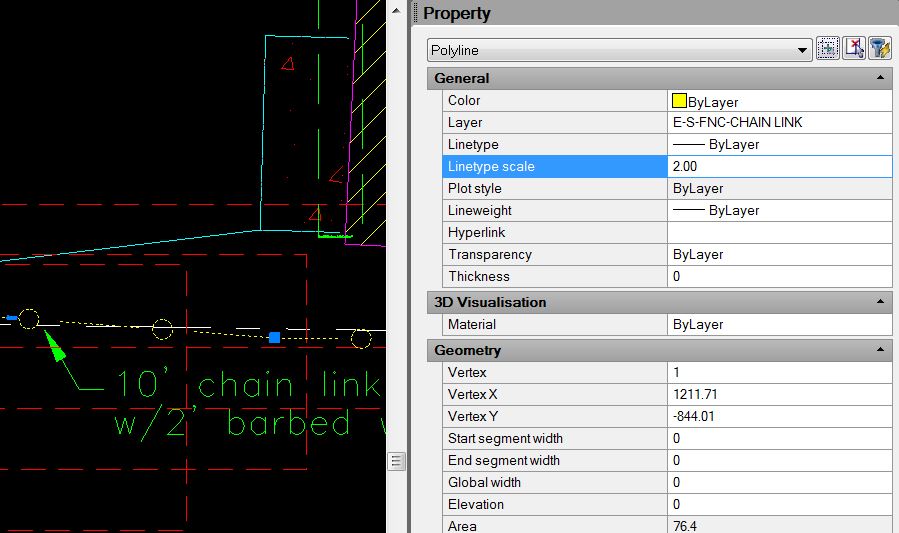
Posted : May 26, 2017 7:48 am

Translate
▼
English
Spanish
French
German
Italian
Portuguese
Russian
Chinese
Japanese
Korean
Arabic
Hindi
Dutch
Polish
Turkish
Vietnamese
Thai
Swedish
Danish
Finnish
Norwegian
Czech
Hungarian
Romanian
Greek
Hebrew
Indonesian
Malay
Ukrainian
Bulgarian
Croatian
Slovak
Slovenian
Serbian
Lithuanian
Latvian
Estonian
Perhaps you need to fuss with the fence linetype definition.
Posted : May 26, 2017 8:12 am

Translate
▼
English
Spanish
French
German
Italian
Portuguese
Russian
Chinese
Japanese
Korean
Arabic
Hindi
Dutch
Polish
Turkish
Vietnamese
Thai
Swedish
Danish
Finnish
Norwegian
Czech
Hungarian
Romanian
Greek
Hebrew
Indonesian
Malay
Ukrainian
Bulgarian
Croatian
Slovak
Slovenian
Serbian
Lithuanian
Latvian
Estonian
Check you linetype scale LTS and model space scale MSLTSCALE
Posted : May 26, 2017 8:31 am

Translate
▼
English
Spanish
French
German
Italian
Portuguese
Russian
Chinese
Japanese
Korean
Arabic
Hindi
Dutch
Polish
Turkish
Vietnamese
Thai
Swedish
Danish
Finnish
Norwegian
Czech
Hungarian
Romanian
Greek
Hebrew
Indonesian
Malay
Ukrainian
Bulgarian
Croatian
Slovak
Slovenian
Serbian
Lithuanian
Latvian
Estonian
Check scale in drawing settings
Posted : May 26, 2017 9:31 am

Translate
▼
English
Spanish
French
German
Italian
Portuguese
Russian
Chinese
Japanese
Korean
Arabic
Hindi
Dutch
Polish
Turkish
Vietnamese
Thai
Swedish
Danish
Finnish
Norwegian
Czech
Hungarian
Romanian
Greek
Hebrew
Indonesian
Malay
Ukrainian
Bulgarian
Croatian
Slovak
Slovenian
Serbian
Lithuanian
Latvian
Estonian
Check line type scale, half of whatever scale you drawing is works well
Ltscale is the command
Posted : May 29, 2017 4:08 pm

Translate
▼
English
Spanish
French
German
Italian
Portuguese
Russian
Chinese
Japanese
Korean
Arabic
Hindi
Dutch
Polish
Turkish
Vietnamese
Thai
Swedish
Danish
Finnish
Norwegian
Czech
Hungarian
Romanian
Greek
Hebrew
Indonesian
Malay
Ukrainian
Bulgarian
Croatian
Slovak
Slovenian
Serbian
Lithuanian
Latvian
Estonian
Is the polyline being produced in model space or paper space? I usually set LTSCALE to 1 in order to view linetypes properly in paper space.
One of the big problems I have had in the past with Carlson Survey is that it appears to reset the ltscale when placing scale dependent annotation. Then is does not set ltscale back to what it was. This usually occurs just before I send to the plotter which results in no linetypes at all, just solid lines on everything. Very frustrating and a big waste of paper and ink.
Posted : May 30, 2017 2:54 pm

Translate
▼
English
Spanish
French
German
Italian
Portuguese
Russian
Chinese
Japanese
Korean
Arabic
Hindi
Dutch
Polish
Turkish
Vietnamese
Thai
Swedish
Danish
Finnish
Norwegian
Czech
Hungarian
Romanian
Greek
Hebrew
Indonesian
Malay
Ukrainian
Bulgarian
Croatian
Slovak
Slovenian
Serbian
Lithuanian
Latvian
Estonian
SirveyorBill, post: 430432, member: 199 wrote: Is the polyline being produced in model space or paper space? I usually set LTSCALE to 1 in order to view linetypes properly in paper space.
One of the big problems I have had in the past with Carlson Survey is that it appears to reset the ltscale when placing scale dependent annotation. Then is does not set ltscale back to what it was. This usually occurs just before I send to the plotter which results in no linetypes at all, just solid lines on everything. Very frustrating and a big waste of paper and ink.
Sounds strange, I know, but this is why I started setting my paperspace scale to be the same as my model scale. Then I don't have to keep switching ltscale to the space I'm in.
Posted : May 31, 2017 5:24 am