

$8700 for full license. There are cheaper monthly lease plans.
For those interested in Drone mapping, the cost does not end at the drone. You need an iPad or Droid Tablet. For accurate georeferenced mapping, orthophotos, and point clouds. You need to set Ground Control Points, then measure then with survey grade GPS. Then you need software that will allow you to enter the GCP's to mosaic the photos and create the point cloud. Most the software cost around $7000 to $9000. Now you need a very up to date PC with multiple core processors and GB's of RAM. The projects I posted early take about 30 to 45 minutes to process using a 6 core I7 CPU at 4Ghz and 32 GB of RAM. You can purchase a high end PC with dual Xeon CPU's that have a total of 44 cores. But the Xeon run slower at about 2.3Ghz. There is a new i7 CPU with 10 cores at 3.6 GHz can be over clocked to 4Ghz, but no way to run two in one machine.
It does get expensive in a hurry. Plus the technology is moving so fast, that there are newer drones and software every 6 months that often are faster, smaller, lighter, more accurate, more features such as collision avoidance lidar ,better sensors/cameras, longer battery life, larger payloads, etc. Just like all emerging technology. The best you can by today, is obsolete in a few short years or less.
I am finding that the high dollar "professional survey grade drones" do not appear to yeild much better if any results, than the DJI ProConsumer grade drone.
The DJI series have lots of features, lot software apps ( most are free), lots of users whom a familiar with it, better battery life, a very good camera and easy to fly compared to the others.

Caltrans is starting up a formal research effort to determine what is required to obtain mapping accuracy comparable to that obtained from conventional photogrammetry and LIDAR technology, but using drones. They'll be looking at cameras, ground control, on-board GNSS, flight altitude, software -- everything needed to produce results they can use reliably. It has the potential to cut through the "optimistic" vendor accuracy claims.
One of the challenges will be producing a report that's not hopelessly stale by the time it comes out.

Jim,
That part about being stale is definitely the problem with trying to read studies, and know what is the latest. This field is moving so rapidly, that you just about have to jump on in and figure out where to go by trial/error. I still find myself going to google to find the "latest" only to read stuff I knew from months ago. I can appreciate the benefit of learning from some research -- if there was something "current" -- because I could have saved myself thousands of dollars. However, what I have had to do is make the best educated guess, then spend some money. I have so many "projects" sitting on the shelf that I never even bothered to fire up. Drones as well as cameras. That being said, I do believe we are close to having something that surveyors can really use.
On another subject, it seems like every body and their brother dreams of getting a drone and camera, then sending the images to the cloud, and finally selling the resultant 3d models to surveyors, contractors or engineers. Like this is something a surveyor would want to purchase? Or an engineer wanting it to design a project? (Can you imagine who the engineer would sue for faulty data that cost someone a lot of wasted time/money when they went to build the design? In Florida, the engineer would more than likely loose his PE license for buying such data from someone who was not a PLS and that was not signed/sealed.) I find this akin to someone in the 50's laying down the money for a transit and steel tape, thinking they could go around town and measure between monuments, and sell the angles and distance to surveyors. Or like someone in the 2000's buying a computer, some software and a robot and prism, who then thinks they can go around town measuring monuments, and then make up maps of everything and go sell the maps to surveyors, engineers, banks, realtors, home builders, etc.. It all seems like the same concept. Crazy!
I don't know if it's like this everywhere, but in Florida you have to be a Professional Surveyor and Mapper, in order to sign/seal land measurement data obtained from photogrammetric means. (I think the following is about the way it all started) Back around 1990, I believe it was Professor Dave Gibson from the University of Florida, who was at the fore front of the push in the State of Florida for bringing in all licensed Photogrammetrists (less than a 100 +/-) as Surveyors. The trade off was that all Florida Professional Land Surveyors would then become Photogrammetrists...hence the title Surveyors and Mappers. Ever since, I believed it would behoove surveyors to learn this field, and today it certainly appears that is the case. As it was with the steel tape/transit, anyone can purchase a drone/camera and go make measurements with it, but it is the surveyor (in Florida and perhaps elsewhere) who can sign/seal the info. And, I see that as a very good thing for Professional Surveyors.
Lee,
You touched on the subject of needing a powerful computer for processing. About a year ago I bought the fastest i7 (about $1200 at the time), and a motherboard that would allow 128GB ram. I started out with 64GB (8 x 8), and was at the point of getting 8 pieces of 16GB ram, but I read about some study (there goes that word), where the researchers learned something about graphics cards. It seems that Graphic Processors process in parallel (hence many thousands of threads simultaneously), while a CPU processes serially, and is limited in the number of threads by the number of processing cores available. (going strictly from memory and I likely buggered that explanation) Anyway, it tempted me to buy the latest gaming graphics card (GEFORCE GTX 980Ti) , and for about the same amount of money. It tuned out to be the key to my processing bottleneck. At some point I plan to connect 4 980Ti's together (I believe it's called a STRIX or something), but have not needed the extra horsepower yet. I had tried about everything I could think of to get the speed up. Fastest I7, m.2 (hard drive that is merely a chip plugged into the motherboard), etc. I saw 8 hour processing times cut to 2 hours. It thought it was amazing. Still do.
Another way to handle too large data, at least with Agisoft, is to break the project up into chunks and then pack it all together at the end.
Ben,
I've looked at AgiSoft and understand, as you mentioned, it can utilize fast GPU and CPU more so than Pix4d, which is CPU intensive. I use 4 SSD drives in a Raid stripe, another aspect to mention. Hard drive speed and size is important to efficient processing this enormous amounts of data. For example a 38MP photo is about 10MB. Can have hundred's even 1000 photos per project.

I've had a project with volume calculation. I've asked a drone-company to fly over the stockpile and send me the pointcloud for processing in Pointcab.
The operator (and owner) could operate the drone and provide me with a nice picture but the pointcloud was a real pain. He didn't had a clue what he was doing (uses pix4d). I finally made my pointcloud with a trail version of agisoft and produced nice civil3d surfaces.
It's going to be the same with drones as with scanning. Non surveyors just push the button but have no feeling with accuracy and checking things.

beuckie, post: 394282, member: 2245 wrote: I've had a project with volume calculation. I've asked a drone-company to fly over the stockpile and send me the pointcloud for processing in Pointcab.
The operator (and owner) could operate the drone and provide me with a nice picture but the pointcloud was a real pain. He didn't had a clue what he was doing (uses pix4d). I finally made my pointcloud with a trail version of agisoft and produced nice civil3d surfaces.
Can you explain what you mean by "He didn't had a clue what he was doing (uses pix4d)"?
I ask because I've used Pix4D to create 1 or 2 point clouds and it seemed fairly simple, if I remember correctly. Am I missing something or was he just oblivious to what a point cloud is? Is there a lot more to it that just "pushing the buttons" as instructed? I guess I'm just wondering if there is more involved to creating a point cloud than simply taking pictures, orthorecitfying images and then creating the point cloud (and of course QA/QC checks). I have very limited experience with point clouds but I'm trying to learn.
Gregg

Its incredible the mapping claims made by these "drone companies". Drone technology is all the rave right now, so anyone with a few grand is buying one and thinks they're magically a surveyor. You ask them what kind of accuracy they are getting and they either A. have no idea or B. claim 0.001mm or a similarly ridiculous number. I even saw a drone company claiming to do boundary surveys! Its goes to show how little thought these startups are putting into it - which can be good for us.
I like Bens comparison to other survey equipment. This isn't the first time a new technology has made it easier to make measurements and produce a product. At the end of the day, governments require a surveyor to sign plans. And even more important than that, surveyors are professionals who understand what it takes to produce accurate spatial data. People are about to find out the hard what that means, so we surveyors need to get out in front of this technology. It shouldn't be hard for us to compete against 15 year olds with an ipad and a toy. If it is....I give up.
Lee,
Have you looked into speed tests of the m.2 versus various RAID systems? Read/write times, etc.
I found that every computer processing component makes a difference, although most were just incremental. For example, I started with 8 GB RAM, then moved to 16 GB RAM, then 32, then 64, and though every increase, as expected, helped to reduce the required processing times, however, there were no wow moments. Also, went from a somewhat weak i7 to the fastest i7 (fastest at one year ago), but no real wow. Also, the m.2 hard drive yielded a noticeable improvement. Of course, everything together made a significant difference, but I saw an amazing difference when I concentrated on the GPU component.
I suspect Agisoft is somewhat slower at processing than Pix4d or various other softwares, but it is one of the most widely (global/universities) used in the world and there are a lot of studies showing it performs well when compared to everything else out there. Also, Agisoft now has contouring. Agisoft can be a little difficult to learn if you are striving for really good 3d models/orthos. Although it is fairly simple to use for getting a so-so product, but when you figure out how to tweak the settings you can really get a superior product. The problem with Agisoft, is that with the documentation provided you will never even be aware of those tweaks. I do like the nice slick appearance of Pix4d as compared to Agisoft.
Ben,
As you said, I think all the components as whole make the PC fast. Really no one part that does it all. One nice part of Pix4D is the full priced version gives you licensure for two PC's. So I have installed on a laptop and my workstation. I do have the m.2 hard disk on my laptop with 16Gb ram, Nvidia 980 graphics card and i7 six core CPU at 4GHz. The RAid drives are much faster. Well the need to spend extra $$ on getting fastest SD cards. The 275Mb/s micro sd are great for capturing Drone photos, and copy then your PC via USB 3.0
I waiting or hoping for the price drop on i7 10 core CPU. It will plug n play in my desktop. But cost $1700.00
surveyor85,
Sorry to hijack your thread. Back to your stockpile/volume needs, I would suggest going on ebay and getting a used Phantom 3 Professional. Then, I would visit mapsmadeeasy.com, and download to an iPad (sorry, not for android) their fantastic Map Pilot app. I have no idea what kinds of materials you wish to measure, however, (taking a guess here) I am assuming the materials angle of repose will not introduce any seriously occluded areas so that nadir photos (straight down 90 degree pictures) will capture enough detail. With a little bit of trial/error you should get the hang of Map Pilot. Also, rather than trying to purchase the photogrammetric software I would suggest using mapsmadeeasy for determining the volumes. They have a system of assigning "points" to a collection of images, and if the total number of points is less than 250 (I could have this number wrong) the processing is actually free. Their Map Pilot app will show you the points required as you design the flight plan, so you revise the flight plan if need be to keep the points number down. After you fly just upload the images to them. The reason I would recommend the P3P is to stay on the cheap. However, the I1 gives you more flexibility as you can start with the Zenmuse X3 camera (GoPro equivalent with 94 degree FOV), and move to the larger Zenmuse X5 micro four thirds interchangeable lens camera. Really depends on how much you want to spend. Of course you could go with the DJI Matrice 600 hex with a medium format Hasselblad A5D camera for $26,000. I don't know if I want to spend that much for a camera, but I am going to try to find if/where I can rent one so that I can evaluate the difference (improvement) compared with the Sony 42.6 megapixel full frame mirrorless camera.
Cheers

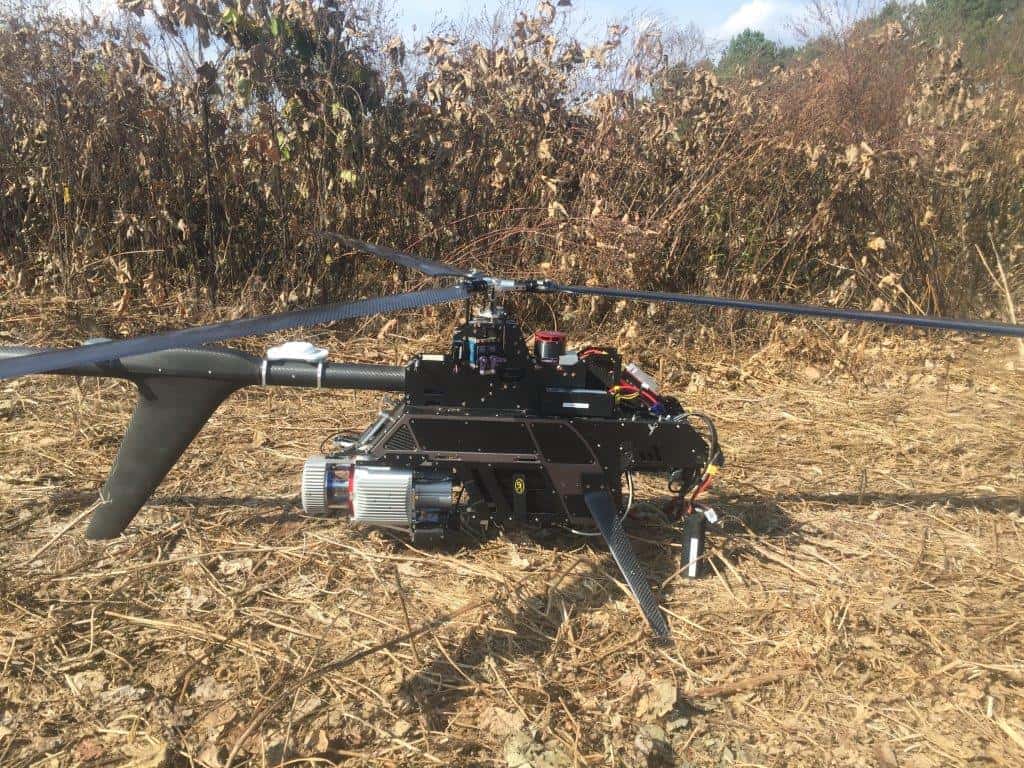
I got to work with this. It was a lot of fun to watch. The LIDAR unit is awesome. We also had a 32 megapixel camera mounted taking pictures.

For those of you using Pix4D, how difficult was it to learn and get up to speed with?
John,
Pix4D is written in Switzerland, and an office in San Francisco, CA. Not the most intuitive software. Menu's and workflow are completely different than any software I have used for the past 25 years. There are a lot of videos to learn from. Tech support is about 4-12 hour delay via email only. There is a training session next week in PA. I've seen very few classes available.
Thanks Lee. I am working with someone who is getting into this and has the DJI. We flew a small area of a site we are working on conventionally and I am playing around with the images collected in the 15-day trial version. I have looked at many of the videos and working through help screens. There is a lot more involved with the software than it first appears. It looks like the procedure one would use to set up a Least Squares network before processing.
John
"looks like the procedure one would use to set up a Least Squares network before processing."
Perfect analogy.