Reading RPLS is free for the whole profession. Members post, reply, and get the members-only rooms.

Notifications
Clear all
Strictly Surveying
20
Posts
9
Users
0
Reactions
843
Views

Topic starter
Translate
▼
English
Spanish
French
German
Italian
Portuguese
Russian
Chinese
Japanese
Korean
Arabic
Hindi
Dutch
Polish
Turkish
Vietnamese
Thai
Swedish
Danish
Finnish
Norwegian
Czech
Hungarian
Romanian
Greek
Hebrew
Indonesian
Malay
Ukrainian
Bulgarian
Croatian
Slovak
Slovenian
Serbian
Lithuanian
Latvian
Estonian
We are completely perplexed by the RAW data information shown when exported from the FC-500 data collector running Magnet software.
No matter if the backsight measurements are .01' or 500' off of anticipated checks the RAW data file shows unbelievably tight tolerances. It always reports 0.003 or 0.005. Below is an excerpt of FBK file:
! MAGNET Field Jul 25, 2014 (MAGNET Field V2.5.0.0) Version 2.7.1 (build 150712)
NEZ 2 1266991.3620 2287775.9841 864.5650 "TRV-2-RB-CAP"
NEZ 1 1266977.3776 2288303.6989 855.6153 "TRV-1-RB-CAP"
! --------------------------------------------------------------------------------
STN 2 5.820000
BS 1 0.000000
! ----------Backsight HR:4.760
! ----------Backsight HR:4.760
! ----------BS check 2 - 1:ZE91.04590,SD528.000,HD err= 0.003,VD err= -0.003
! ----------BS Circle Check : horizontal angular err= -0.00010, vertical angular err= 0.00010
This RAW data file does not jive with our "on screen" visual report which shows horizontal & vertical errors of 0.02' and 0.03'. ???
Anyone else having this problem?
Posted : August 27, 2015 1:21 pm

Translate
▼
English
Spanish
French
German
Italian
Portuguese
Russian
Chinese
Japanese
Korean
Arabic
Hindi
Dutch
Polish
Turkish
Vietnamese
Thai
Swedish
Danish
Finnish
Norwegian
Czech
Hungarian
Romanian
Greek
Hebrew
Indonesian
Malay
Ukrainian
Bulgarian
Croatian
Slovak
Slovenian
Serbian
Lithuanian
Latvian
Estonian
The horizontal angular error of one second in the distance 528 feet is 0.0026. Looks like irrelevant information being reported in lieu of the real information needed.
Posted : August 27, 2015 1:37 pm

Translate
▼
English
Spanish
French
German
Italian
Portuguese
Russian
Chinese
Japanese
Korean
Arabic
Hindi
Dutch
Polish
Turkish
Vietnamese
Thai
Swedish
Danish
Finnish
Norwegian
Czech
Hungarian
Romanian
Greek
Hebrew
Indonesian
Malay
Ukrainian
Bulgarian
Croatian
Slovak
Slovenian
Serbian
Lithuanian
Latvian
Estonian
You are using an old version of Magnet v2.7.1 which had known bug in raw format.
Upgrade to v3.1 for the fix.
Posted : August 27, 2015 4:42 pm

Translate
▼
English
Spanish
French
German
Italian
Portuguese
Russian
Chinese
Japanese
Korean
Arabic
Hindi
Dutch
Polish
Turkish
Vietnamese
Thai
Swedish
Danish
Finnish
Norwegian
Czech
Hungarian
Romanian
Greek
Hebrew
Indonesian
Malay
Ukrainian
Bulgarian
Croatian
Slovak
Slovenian
Serbian
Lithuanian
Latvian
Estonian
leegreen, post: 333838, member: 2332 wrote: Upgrade to v3.1 for the fix.
You might want to be aware of this...
Good afternoon Civilcad/Magnet Office users
Just be aware, before you upgrade to the latest 3.1 version of Magnet Office, that Topcon have dropped support for data transfer from Magnet Office to their own FC-250 series field controllers using TopSurv 8.x software. This is an apparent attempt to make all users upgrade to new field controllers and/or software. I believe this decision by Topcon is dumb and will adversely affect their user data base but who am I to know.
The only solutions to me are to wind back to the last version of Magnet Office where the transfer utility works (ver 2.71), or to upgrade all our field controllers and/or field controller software, or ditch Topcon. If I havenÛªt already said it before, this move by Topcon is dumb.
Regards
Keith Holswich - New Plymouth
Posted : August 28, 2015 12:03 am
Translate
▼
English
Spanish
French
German
Italian
Portuguese
Russian
Chinese
Japanese
Korean
Arabic
Hindi
Dutch
Polish
Turkish
Vietnamese
Thai
Swedish
Danish
Finnish
Norwegian
Czech
Hungarian
Romanian
Greek
Hebrew
Indonesian
Malay
Ukrainian
Bulgarian
Croatian
Slovak
Slovenian
Serbian
Lithuanian
Latvian
Estonian
jim.cox, post: 333900, member: 93 wrote: You might want to be aware of this...
Topcon have dropped support for data transfer from Magnet Office to their own FC-250 series field controllers using TopSurv 8.x software.
Suggest upgrading the Fc250 from TopSurv 8 to Magnet Field, I think it cost $300. Lot's of enhancements to be gained between TopSurv version 8 on a FC250 and Magnet 3.1 on a Tablet PC. I do not use Magnet office, so was not aware of the lost of transfer issue. I have found that if you place TopSurv or Magnet Job files in the "My Documents" folder of the FC250 or any Windows Mobile device, then use Windows Mobile Device Center to Sync the devices. The files will transfer to/from WM into your PC. Then open the job files from there. I dread using the FC250 now after using my Windows PC Tablet w/ Magnet (Pansaonic ToughPad). No more downloads or transfers. I mapped a drive letter "G:" from my Google cloud account on the tablet, and use either 4G mobile internal modem, or WiFi to sync all files to cloud, to my desktop, to laptop and to my tablet. Instantly. No effort at all. Plus the tablet is about 10x faster, and screen is 3x bigger than the FC250.
Posted : August 28, 2015 2:06 am

Translate
▼
English
Spanish
French
German
Italian
Portuguese
Russian
Chinese
Japanese
Korean
Arabic
Hindi
Dutch
Polish
Turkish
Vietnamese
Thai
Swedish
Danish
Finnish
Norwegian
Czech
Hungarian
Romanian
Greek
Hebrew
Indonesian
Malay
Ukrainian
Bulgarian
Croatian
Slovak
Slovenian
Serbian
Lithuanian
Latvian
Estonian
I got this from Magnet/Tesla setup a couple of weeks ago. Still scratching my head.
All of the other sets were good.
The set below was copied from above.
The software/instrument shot the backsight as a foresight.
The average angle and distance are blown.
Angle Set Report
Occ Pt: 1000
HI: 5.500
Results
Point 2300
H Angle V Angle S Dist BS Circle
Dir 180å¡04'29" 90å¡00'39" 722.982 0å¡00'00"
Rev 0å¡04'28" 269å¡59'17" 722.981 0å¡00'00"
Rev 0å¡04'31" 269å¡59'16" 722.981 0å¡00'00"
Dir 180å¡04'32" 90å¡00'45" 722.981 0å¡00'00"
Dir 180å¡04'33" 90å¡00'43" 722.981 0å¡00'00"
Rev 0å¡04'32" 269å¡59'16" 722.981 0å¡00'00"
Rev 0å¡04'36" 269å¡59'15" 722.981 0å¡00'00"
Dir 180å¡04'36" 90å¡00'47" 722.981 0å¡00'00"
Dir 180å¡04'29" 90å¡00'44" 722.981 0å¡00'00"
Rev 180å¡00'01" 269å¡58'03" 1080.900 0å¡00'00"
Mean 198å¡04'05" 90å¡00'51" 758.773 0å¡00'00"
Point 2300
Ang Rt BS H Dist FS H Dist
Avg 198å¡04'05" 1080.901 901.940
Hi 180å¡04'36" 1080.902 1080.900
Low 0å¡00'01" 1080.900 722.981
Diff -179å¡55'25" 0.002 357.919
Point North East Height
2300 4278.643 4764.670 100.882
Obs Point H Circle Z Angle S Dist1 S Dist2 S Dist3 S Dist4 S Dist5 BS Circle HR HA Res VA Res SD Res
BSD 1001 0å¡00'00" 90å¡01'52" 1080.902 1080.902 1080.902 1080.902 1080.902 0å¡00'00" 4.820 -0å¡00'04" 0å¡00'03" -0.001
FSD 2300 180å¡04'29" 90å¡00'39" 722.982 722.982 722.982 722.982 722.981 0å¡00'00" 4.430 17å¡59'36" 0å¡00'12" 35.791
BSR 1001 179å¡59'56" 269å¡58'09" 1080.902 1080.902 1080.902 1080.902 1080.902 0å¡00'00" 4.820 0å¡00'00" 0å¡00'04" -0.001
FSR 2300 0å¡04'24" 269å¡59'17" 722.981 722.981 722.981 722.980 722.981 0å¡00'00" 4.430 17å¡59'37" 0å¡00'08" 35.792
BSR 1001 179å¡59'51" 269å¡58'06" 1080.901 1080.901 1080.900 1080.901 1080.901 0å¡00'00" 4.820 0å¡00'05" 0å¡00'01" 0.001
FSR 2300 0å¡04'22" 269å¡59'16" 722.981 722.982 722.982 722.981 722.981 0å¡00'00" 4.430 17å¡59'34" 0å¡00'07" 35.792
BSD 1001 359å¡59'59" 90å¡01'56" 1080.902 1080.902 1080.902 1080.902 1080.902 0å¡00'00" 4.820 -0å¡00'03" -0å¡00'01" -0.001
FSD 2300 180å¡04'31" 90å¡00'45" 722.981 722.981 722.981 722.981 722.982 0å¡00'00" 4.430 17å¡59'33" 0å¡00'06" 35.792
BSD 1001 359å¡59'58" 90å¡01'55" 1080.902 1080.902 1080.902 1080.902 1080.902 0å¡00'00" 4.820 -0å¡00'02" 0å¡00'00" -0.001
Posted : August 28, 2015 11:49 am
Translate
▼
English
Spanish
French
German
Italian
Portuguese
Russian
Chinese
Japanese
Korean
Arabic
Hindi
Dutch
Polish
Turkish
Vietnamese
Thai
Swedish
Danish
Finnish
Norwegian
Czech
Hungarian
Romanian
Greek
Hebrew
Indonesian
Malay
Ukrainian
Bulgarian
Croatian
Slovak
Slovenian
Serbian
Lithuanian
Latvian
Estonian
I have never seen Magnet record the bad angle. It would always say "wrong face" detected.
I saw the wrong face error using Magnet Field 2.7.1 on a PS robot on a Tesla. It has since been fixed with Magnet 3.X. Also a firmware update in PS robot help reduce set collection problems.
Posted : August 28, 2015 12:01 pm

Translate
▼
English
Spanish
French
German
Italian
Portuguese
Russian
Chinese
Japanese
Korean
Arabic
Hindi
Dutch
Polish
Turkish
Vietnamese
Thai
Swedish
Danish
Finnish
Norwegian
Czech
Hungarian
Romanian
Greek
Hebrew
Indonesian
Malay
Ukrainian
Bulgarian
Croatian
Slovak
Slovenian
Serbian
Lithuanian
Latvian
Estonian
leegreen, post: 333838, member: 2332 wrote: You are using an old version of Magnet v2.7.1 which had known bug in raw format.
Upgrade to v3.1 for the fix.
Lee, I wish this was the case, we are using Magnet 3.1. I know that the horizontal and vertical backsight check resulted in about 0.03' and 0.04' for the data below.
I computed the based on the info below and sure enough there is no way the vertical error is 0.002.
Most of our backsight checks are much tighter than this and then we see the errors in the raw data drop even more significantly. Most of the time we see errors of 0.001, 0.000, 0.002 or absurdly close to zero. Our guys set tight control but they aren't that good!
This is based on exporting the Raw data in either a .raw or .rw5 format. If there is another format that works please let me know but if they provide those as options to export to, then the data should be correct.
--MAGNET Field [hl]Version 3.1[/hl] (build 204361)
SP,PN17,N 3129.8209,E 3265.4072,EL129.2060,--RP-CAP
SP,PN29,N 2958.2245,E 2979.8088,EL130.1520,--RP-CAP
OC,OP17,N 3129.821,E 3265.407,EL129.206,--RP-CAP
FC,PN17,FNRP-CAP
LS,HI5.550,HR5.000
BK,OP17,BP29,BS239.0004,BC0.0000
RB,OP17,BP29,AR0.00000,ZE89.55380,SD333.205
--Backsight HR:5.000
--BS check 17 - 29:ZE89.55370,SD333.215,[hl]HD err= 0.010,VD err= 0.002[/hl]
--BS Circle Check : horizontal angular err= 0.00010, vertical angular err= 0.00010
Posted : August 29, 2015 10:42 am
Translate
▼
English
Spanish
French
German
Italian
Portuguese
Russian
Chinese
Japanese
Korean
Arabic
Hindi
Dutch
Polish
Turkish
Vietnamese
Thai
Swedish
Danish
Finnish
Norwegian
Czech
Hungarian
Romanian
Greek
Hebrew
Indonesian
Malay
Ukrainian
Bulgarian
Croatian
Slovak
Slovenian
Serbian
Lithuanian
Latvian
Estonian
Gregg,
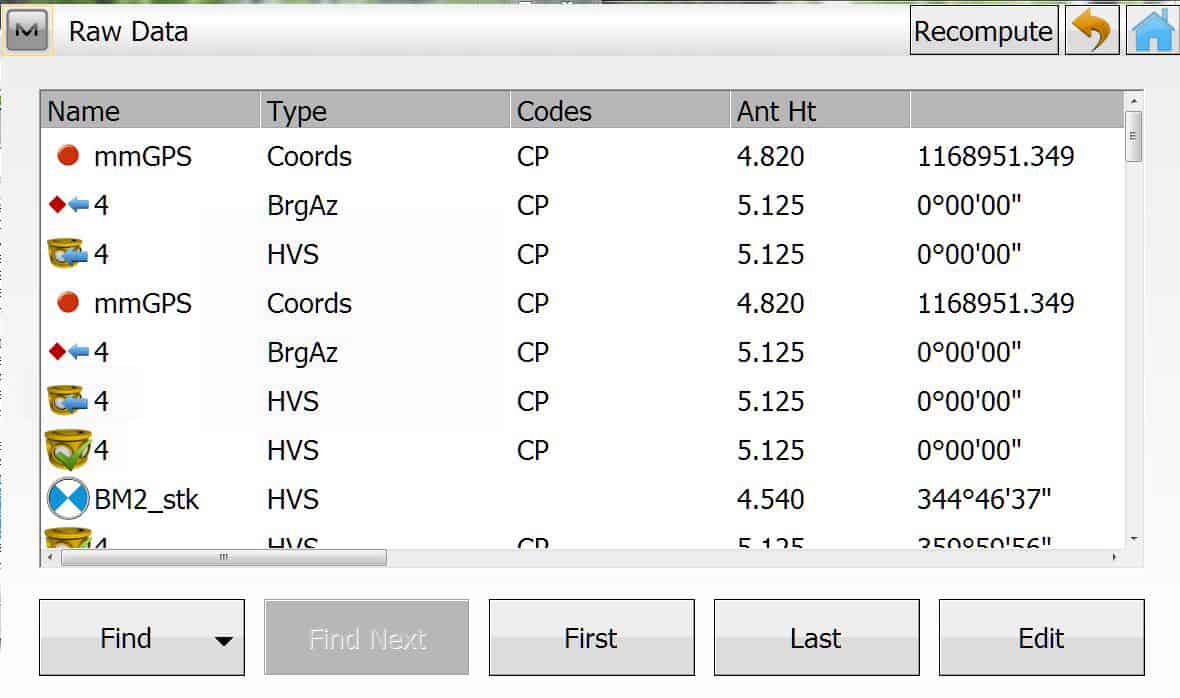
To check the BS and see what was displayed to field crew when they took a BS check. In Magnet Field, go to EDIT >Raw Data
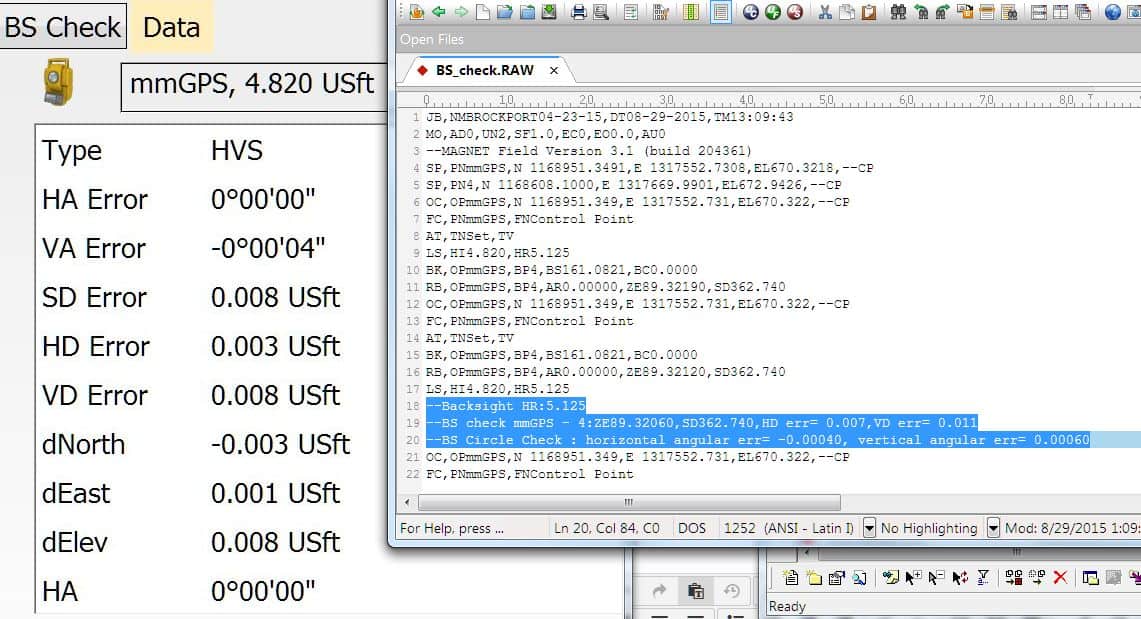
Look for icon of a 360å¡ prism with green check through it. Then select the Data tab at top. I notice this old file created in 2.7.1 does NOT export the RAW data from Magnet 3.1 exactly the same as seen in Magnet. Much closer than you are seeing.
On the right is the text file RAW format for same job.
What instrument are you using. Wonder if a firmware is needed. I'm using GPT-9003
Posted : August 29, 2015 11:26 am
Translate
▼
English
Spanish
French
German
Italian
Portuguese
Russian
Chinese
Japanese
Korean
Arabic
Hindi
Dutch
Polish
Turkish
Vietnamese
Thai
Swedish
Danish
Finnish
Norwegian
Czech
Hungarian
Romanian
Greek
Hebrew
Indonesian
Malay
Ukrainian
Bulgarian
Croatian
Slovak
Slovenian
Serbian
Lithuanian
Latvian
Estonian
Yep, the guys are seeing the correct info when they take the shot, and then the other day I looked at the raw data on the collector using the same process you described above. Those items display correctly on the collector, just not in the raw once exported.
We are using a PS-103 with a 2600 collector running Magnet 3.1
Thanks Lee
Posted : August 29, 2015 12:09 pm
Translate
▼
English
Spanish
French
German
Italian
Portuguese
Russian
Chinese
Japanese
Korean
Arabic
Hindi
Dutch
Polish
Turkish
Vietnamese
Thai
Swedish
Danish
Finnish
Norwegian
Czech
Hungarian
Romanian
Greek
Hebrew
Indonesian
Malay
Ukrainian
Bulgarian
Croatian
Slovak
Slovenian
Serbian
Lithuanian
Latvian
Estonian
Hopefully someone from Topcon, perhaps [USER=8922]@pmoran[/USER] can view this thread and tell us why the export of raw data recomputes the backsight checks, then displays it differently.
Posted : August 29, 2015 12:21 pm
Translate
▼
English
Spanish
French
German
Italian
Portuguese
Russian
Chinese
Japanese
Korean
Arabic
Hindi
Dutch
Polish
Turkish
Vietnamese
Thai
Swedish
Danish
Finnish
Norwegian
Czech
Hungarian
Romanian
Greek
Hebrew
Indonesian
Malay
Ukrainian
Bulgarian
Croatian
Slovak
Slovenian
Serbian
Lithuanian
Latvian
Estonian
leegreen, post: 333996, member: 2332 wrote: I have never seen Magnet record the bad angle. It would always say "wrong face" detected.
I saw the wrong face error using Magnet Field 2.7.1 on a PS robot on a Tesla. It has since been fixed with Magnet 3.X. Also a firmware update in PS robot help reduce set collection problems.
That is the same setup -will do the update
Posted : August 30, 2015 2:23 pm

Translate
▼
English
Spanish
French
German
Italian
Portuguese
Russian
Chinese
Japanese
Korean
Arabic
Hindi
Dutch
Polish
Turkish
Vietnamese
Thai
Swedish
Danish
Finnish
Norwegian
Czech
Hungarian
Romanian
Greek
Hebrew
Indonesian
Malay
Ukrainian
Bulgarian
Croatian
Slovak
Slovenian
Serbian
Lithuanian
Latvian
Estonian
Has anyone found a resolution to this? Have seen some discrepancies myself when exporting RAW Data from TESLA w/Magnet 3.1. I am using an ES-103 Total Station.
Posted : September 23, 2015 7:58 am
Translate
▼
English
Spanish
French
German
Italian
Portuguese
Russian
Chinese
Japanese
Korean
Arabic
Hindi
Dutch
Polish
Turkish
Vietnamese
Thai
Swedish
Danish
Finnish
Norwegian
Czech
Hungarian
Romanian
Greek
Hebrew
Indonesian
Malay
Ukrainian
Bulgarian
Croatian
Slovak
Slovenian
Serbian
Lithuanian
Latvian
Estonian
MS SURV, post: 337582, member: 10318 wrote: Has anyone found a resolution to this? Have seen some discrepancies myself when exporting RAW Data from TESLA w/Magnet 3.1. I am using an ES-103 Total Station.
Funny you should ask. I logged a support ticket on this topic and this morning, just a few minutes ago I got a message from Topcon support. "
"From topcon
Have them open the job, click on the M in the upper left corner, select about and then click on Support Info. Click on the green check mark and it will save the job along with all supporting information to a zip file. Send this file to me."
I sent them this message:
In Magnet Field 3.1 there is still an error in the computation of a Back Sight check with an EDM, when exporting to a RAW data file such as rw5, raw, and sdr. The BS Check on left of the image below is displayed from Magnet Field 3.1. Notice the VA Error, HD Error and VD Error do NOT match the BS Check sent to the raw data file (shown on the right). The HA Error is correct on both. The HD err and VD err appear to be off by one decimal place, the vertical angular error is off by one decimal place, plus 1Û.
This error happens on every job, every device, with every instrument and all raw formats. I believe this problem has existed in all versions of Magnet Field that I have used stating at v2.0.

Posted : September 23, 2015 8:07 am

Translate
▼
English
Spanish
French
German
Italian
Portuguese
Russian
Chinese
Japanese
Korean
Arabic
Hindi
Dutch
Polish
Turkish
Vietnamese
Thai
Swedish
Danish
Finnish
Norwegian
Czech
Hungarian
Romanian
Greek
Hebrew
Indonesian
Malay
Ukrainian
Bulgarian
Croatian
Slovak
Slovenian
Serbian
Lithuanian
Latvian
Estonian
I am using Topcon Topsurv and when I export a raw file to rw5 format it shows a VD error on the Backsight check that is not there in the field check screen. Is this the same thing that is happening? It usually shows quite a large error.
Posted : October 10, 2015 2:28 am
Translate
▼
English
Spanish
French
German
Italian
Portuguese
Russian
Chinese
Japanese
Korean
Arabic
Hindi
Dutch
Polish
Turkish
Vietnamese
Thai
Swedish
Danish
Finnish
Norwegian
Czech
Hungarian
Romanian
Greek
Hebrew
Indonesian
Malay
Ukrainian
Bulgarian
Croatian
Slovak
Slovenian
Serbian
Lithuanian
Latvian
Estonian
Totalsurv, post: 339973, member: 8202 wrote: I am using Topcon Topsurv and when I export a raw file to rw5 format it shows a VD error on the Backsight check that is not there in the field check screen. Is this the same thing that is happening? It usually shows quite a large error.
I'll try the image here again..

Posted : October 10, 2015 3:11 am
Translate
▼
English
Spanish
French
German
Italian
Portuguese
Russian
Chinese
Japanese
Korean
Arabic
Hindi
Dutch
Polish
Turkish
Vietnamese
Thai
Swedish
Danish
Finnish
Norwegian
Czech
Hungarian
Romanian
Greek
Hebrew
Indonesian
Malay
Ukrainian
Bulgarian
Croatian
Slovak
Slovenian
Serbian
Lithuanian
Latvian
Estonian
Looks like Topcon has corrected the backsight errors in Magnet Field version 3.2, just released this week.
Improvements and Resolved Issues
The following Improvements and Resolved issues, where applicable, apply to all versions of MAGNET Field
software (Field/Site/Layout).
âá Addressed an issue when exporting RAW data in APA-SIMA format, the VA is now included in the records
âá Corrected an issue when importing drawings (*.dwg) into MAGNET Field; curves in polylines would import as
tangents. The curves are now imported correctly.
âá Corrected an issue when creating custom Classes for observations, the Class definitions are now recognized
correctly.
âá Resolved an issue where photos would not link to a point. Photos now correctly link to points.
âá Addressed an issue in Angle Set reports when displaying the slope distance in the SD Residual field. The
Residuals are now correctly displayed
âá Addressed an issue when importing .dxf files. In some instances the linework was not shown correctly.
âá[hl] Corrected an issue when exporting Raw Data. The resulting HD, VD, HA and, VA errors were not reported
correctly.[/hl]
âá Resolved an issue when updating jobs with Localizations from a previous version of MAGNET Field software.
The Localization residuals are now shown.
âá Addressed an issue when Exporting to GTS format, all data is now included.
âá Addressed an issue in Resection when Û÷Setup for 3DMCÛª is checked. Resections performed with the 3DMC
function enabled would rotate and shift the resection after accepting the results.
âá Resolved an issue when creating and storing a Custom Datum on a Field Controller. The coordinate offsets
and rotation are now stored after saving the Custom Datum.
âá Resolved an issue when creating a surface with a boundary when there are closed breaklines that contain the
triangulation area. Closed boundaries are now recognized.
âá Corrected an issue In Set Collection. Set collection now allows for the user to search for the prism if the line of
sight to the prism was lost. Set Collection will continue once the prism is found.
âá Updated Set Collection to use Auto Pointing instead of Auto Tracking after turning to a point.
âá Addressed an issue in Resection, the residual calculation now show the correct distance measurement units.
âá Addressed an issue in mmGPS. The Field calibration routine has been updated to show the calculated values
Posted : October 13, 2015 4:55 pm
Translate
▼
English
Spanish
French
German
Italian
Portuguese
Russian
Chinese
Japanese
Korean
Arabic
Hindi
Dutch
Polish
Turkish
Vietnamese
Thai
Swedish
Danish
Finnish
Norwegian
Czech
Hungarian
Romanian
Greek
Hebrew
Indonesian
Malay
Ukrainian
Bulgarian
Croatian
Slovak
Slovenian
Serbian
Lithuanian
Latvian
Estonian
I just loaded Magnet 3.2 onto one of our instruments with the Onboard software.
The Raw data is still showing that the backsights are perfect. HD error = 0.000 VD error = 0.000.
This is after I slid the instrument 0.05' back and then shot it again.
I tried exporting a .raw file, a .rw5 file and others and all had the same result.
I have not tried this yet on a controller so hopefully it will work on there
Posted : October 31, 2015 10:42 am
Translate
▼
English
Spanish
French
German
Italian
Portuguese
Russian
Chinese
Japanese
Korean
Arabic
Hindi
Dutch
Polish
Turkish
Vietnamese
Thai
Swedish
Danish
Finnish
Norwegian
Czech
Hungarian
Romanian
Greek
Hebrew
Indonesian
Malay
Ukrainian
Bulgarian
Croatian
Slovak
Slovenian
Serbian
Lithuanian
Latvian
Estonian
Gregg Gaffney, post: 342551, member: 1111 wrote: I just loaded Magnet 3.2 onto one of our instruments with the Onboard software.
The Raw data is still showing that the backsights are perfect. HD error = 0.000 VD error = 0.000.
This is after I slid the instrument 0.05' back and then shot it again.I tried exporting a .raw file, a .rw5 file and others and all had the same result.
I have not tried this yet on a controller so hopefully it will work on there
Errors read correctly for me on the ToughPad with v3.2.
Posted : October 31, 2015 11:42 am

Translate
▼
English
Spanish
French
German
Italian
Portuguese
Russian
Chinese
Japanese
Korean
Arabic
Hindi
Dutch
Polish
Turkish
Vietnamese
Thai
Swedish
Danish
Finnish
Norwegian
Czech
Hungarian
Romanian
Greek
Hebrew
Indonesian
Malay
Ukrainian
Bulgarian
Croatian
Slovak
Slovenian
Serbian
Lithuanian
Latvian
Estonian
leegreen, post: 342562, member: 2332 wrote: Errors read correctly for me on the ToughPad with v3.2.
Ver 3.2 does not use my pre-set backsight prism. On screen and raw data both indicate it is using my foresight prism.
I have not created any new jobs in the data collector since installing, but I doubt this is the problem. Raw data in the same job before upgrading from 3.1 shows it was working in 3.1.
This is with a Tesla and QS Total Station.
Posted : October 31, 2015 1:29 pm