Reading RPLS is free for the whole profession. Members post, reply, and get the members-only rooms.

Notifications
Clear all
Strictly Surveying
7
Posts
5
Users
0
Reactions
1,471
Views

Topic starter
Translate
▼
English
Spanish
French
German
Italian
Portuguese
Russian
Chinese
Japanese
Korean
Arabic
Hindi
Dutch
Polish
Turkish
Vietnamese
Thai
Swedish
Danish
Finnish
Norwegian
Czech
Hungarian
Romanian
Greek
Hebrew
Indonesian
Malay
Ukrainian
Bulgarian
Croatian
Slovak
Slovenian
Serbian
Lithuanian
Latvian
Estonian
A few years ago, I was working on a pipe line, and we used the "stake to line" function on the Leica 1200 GPS. Fantastic options - stake to sun was there as well as a few others. I think you got to the menu hitting shift and F7 or something - I forget.
Last week I needed to do a similar thing with the Leica Viva GPS - so I downloaded the console the night before and played around and found it. Go to stake out, press function config, then on the "graphics" tab, all my options were there. Sorted, or so I thought.
When I got to site, the only options I had on the actual Leica Viva was stake to azimuth.
So where are these options? Is there a firmware upgrade? Do I have to pay for it?
Thanks in advance.
Posted : February 9, 2014 10:23 am

Translate
▼
English
Spanish
French
German
Italian
Portuguese
Russian
Chinese
Japanese
Korean
Arabic
Hindi
Dutch
Polish
Turkish
Vietnamese
Thai
Swedish
Danish
Finnish
Norwegian
Czech
Hungarian
Romanian
Greek
Hebrew
Indonesian
Malay
Ukrainian
Bulgarian
Croatian
Slovak
Slovenian
Serbian
Lithuanian
Latvian
Estonian
Latest Version is 5.02 for Smartworx Viva and yes the firmware updates are a paid subscription. Keep in mind that the fimrware on the GS needs to be the same on the CS. So you would need them to update both recievers and the controller. I have been using Smartwox since 3.0 and have always had the option to orientate yourself to the sun. In GPS stakeout or stakeout+ hit FNC and Config (F2) and goto the visual and audio tab. Your orientations options are there under the navigaion direction drop down. If not, i dont know how old your firmware is. There is a smartworx LT version that is orange bordered screen. I beleive they do not have that as an option in the LT version; so that may be your problem :-S . Good Luck!
Posted : February 9, 2014 1:33 pm

Translate
▼
English
Spanish
French
German
Italian
Portuguese
Russian
Chinese
Japanese
Korean
Arabic
Hindi
Dutch
Polish
Turkish
Vietnamese
Thai
Swedish
Danish
Finnish
Norwegian
Czech
Hungarian
Romanian
Greek
Hebrew
Indonesian
Malay
Ukrainian
Bulgarian
Croatian
Slovak
Slovenian
Serbian
Lithuanian
Latvian
Estonian
I don't think it's a firmware issue. Orientate to sun has been around since at least the 500 series.
As mention, when in stakeout on viva, press the green Fn key, tab until graphics Navigate direction, to sun.
Not sure how this works at night?
Posted : February 9, 2014 7:45 pm

Translate
▼
English
Spanish
French
German
Italian
Portuguese
Russian
Chinese
Japanese
Korean
Arabic
Hindi
Dutch
Polish
Turkish
Vietnamese
Thai
Swedish
Danish
Finnish
Norwegian
Czech
Hungarian
Romanian
Greek
Hebrew
Indonesian
Malay
Ukrainian
Bulgarian
Croatian
Slovak
Slovenian
Serbian
Lithuanian
Latvian
Estonian
This is the screen I always get. So when you pull this up on your CS15 it only shows "stake to azimuth" ?
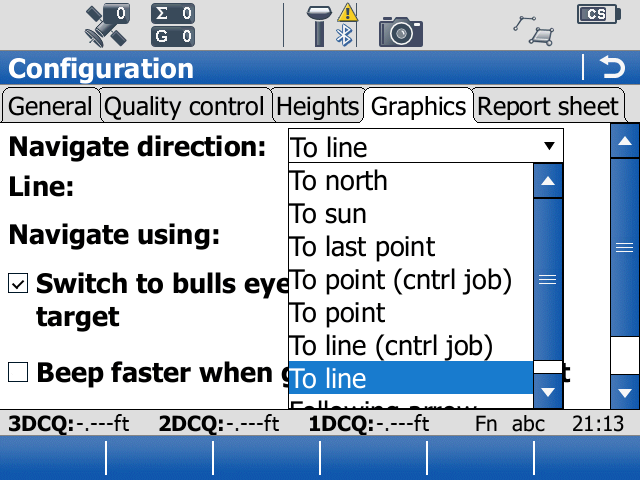
If you are trying to stake to a "reference line" then that is an extra that you have to pay for.
Posted : February 9, 2014 9:34 pm
Topic starter
Translate
▼
English
Spanish
French
German
Italian
Portuguese
Russian
Chinese
Japanese
Korean
Arabic
Hindi
Dutch
Polish
Turkish
Vietnamese
Thai
Swedish
Danish
Finnish
Norwegian
Czech
Hungarian
Romanian
Greek
Hebrew
Indonesian
Malay
Ukrainian
Bulgarian
Croatian
Slovak
Slovenian
Serbian
Lithuanian
Latvian
Estonian
Thanks guys. That's correct, I have two options only, to North or azimuth and something else I forget.
I suspect it might the LT version mentioned before. Orange sounds familiar. I shall have a look today and post a photo.
I can see the sun while it's your night! Very useful lol. Although recently we've had rather too many rain clouds.
Posted : February 10, 2014 12:38 am

Translate
▼
English
Spanish
French
German
Italian
Portuguese
Russian
Chinese
Japanese
Korean
Arabic
Hindi
Dutch
Polish
Turkish
Vietnamese
Thai
Swedish
Danish
Finnish
Norwegian
Czech
Hungarian
Romanian
Greek
Hebrew
Indonesian
Malay
Ukrainian
Bulgarian
Croatian
Slovak
Slovenian
Serbian
Lithuanian
Latvian
Estonian
Richcritch,
You are working in the Lite mode of SmartWorx. the color scheme on the screens you are looking at will be an orange-brown color. The full version is a blue color scheme and the full version is where you need to be to get all of the options.
The explanation is that there was opportunity during he original development to make a more simple version of SmartWorx that had limited options. One so users that may have issues with having allot of options would be steered into just having a few basic options. Second, the Lite version is a little cheaper if price is an issue.
If you have a license for the full version of SmartWorx then you also have a license for the Lite version. I personally delete the icon for the shortcut for LT version IOrange Icon) on the Windows desktop so that the only choice is the Full version of SmartWorx (Blue icon)
Posted : February 10, 2014 9:02 am
Translate
▼
English
Spanish
French
German
Italian
Portuguese
Russian
Chinese
Japanese
Korean
Arabic
Hindi
Dutch
Polish
Turkish
Vietnamese
Thai
Swedish
Danish
Finnish
Norwegian
Czech
Hungarian
Romanian
Greek
Hebrew
Indonesian
Malay
Ukrainian
Bulgarian
Croatian
Slovak
Slovenian
Serbian
Lithuanian
Latvian
Estonian
> Richcritch,
>
> I personally delete the icon for the shortcut for LT version IOrange Icon) on the Windows desktop so that the only choice is the Full version of SmartWorx (Blue icon)
Excellent advice. Crew did not select the correct icon a while back; causing problems. Removing the LT version icon is a simple and effective solution.
Posted : February 10, 2014 6:43 pm