Reading RPLS is free for the whole profession. Members post, reply, and get the members-only rooms.


Notifications
Clear all
Software, CAD & Mapping
3
Posts
2
Users
0
Reactions
689
Views

Topic starter
Translate
▼
English
Spanish
French
German
Italian
Portuguese
Russian
Chinese
Japanese
Korean
Arabic
Hindi
Dutch
Polish
Turkish
Vietnamese
Thai
Swedish
Danish
Finnish
Norwegian
Czech
Hungarian
Romanian
Greek
Hebrew
Indonesian
Malay
Ukrainian
Bulgarian
Croatian
Slovak
Slovenian
Serbian
Lithuanian
Latvian
Estonian
Running Carlson 2016 with IntelliCAD now. Previously had been running Carlson 2015.
Work flow to convert a LDT drawing to Carlson was to use the Drawing Cleanup command to convert LDT points and contours to Carlson points and polylines. The result would leave both a Carlson point and a proxy LDT point object together at each point. With 2015, I would then:
Erase > FILter > PRoxy to get the proxy points out of the drawing.
Now in Carlson 2016, the FILter option brings up a dialog box that has no choice for selecting proxy objects.
Any ideas on how to get rid of these proxy point objects after converting them to Carlson points?
Posted : March 21, 2016 12:10 pm

Translate
▼
English
Spanish
French
German
Italian
Portuguese
Russian
Chinese
Japanese
Korean
Arabic
Hindi
Dutch
Polish
Turkish
Vietnamese
Thai
Swedish
Danish
Finnish
Norwegian
Czech
Hungarian
Romanian
Greek
Hebrew
Indonesian
Malay
Ukrainian
Bulgarian
Croatian
Slovak
Slovenian
Serbian
Lithuanian
Latvian
Estonian
Peter Lothian - MA ME, post: 363486, member: 4512 wrote: Running Carlson 2016 with IntelliCAD now. Previously had been running Carlson 2015.
Work flow to convert a LDT drawing to Carlson was to use the Drawing Cleanup command to convert LDT points and contours to Carlson points and polylines. The result would leave both a Carlson point and a proxy LDT point object together at each point. With 2015, I would then:
Erase > FILter > PRoxy to get the proxy points out of the drawing.
Now in Carlson 2016, the FILter option brings up a dialog box that has no choice for selecting proxy objects.
Any ideas on how to get rid of these proxy point objects after converting them to Carlson points?
To get the Command line FILter option back, look at Settings -- Carlson Configure -- General Settings and clear the toggle as illustrated below:
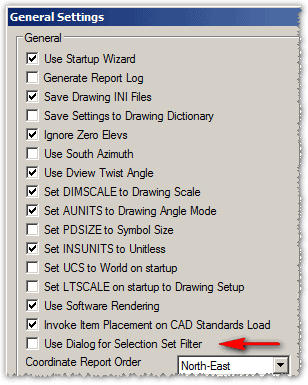
Otherwise, another approach would be to issue the File -- Save As command and save back to the original R12 DWG format which was the last DWG that did not offer support for custom ARX objects (but be aware this approach would also destroy newer items such as Annotative settings, MText, etc). I hope this information helps.
Posted : March 21, 2016 3:01 pm
Topic starter
Translate
▼
English
Spanish
French
German
Italian
Portuguese
Russian
Chinese
Japanese
Korean
Arabic
Hindi
Dutch
Polish
Turkish
Vietnamese
Thai
Swedish
Danish
Finnish
Norwegian
Czech
Hungarian
Romanian
Greek
Hebrew
Indonesian
Malay
Ukrainian
Bulgarian
Croatian
Slovak
Slovenian
Serbian
Lithuanian
Latvian
Estonian
Thanks, Ladd. Toggling off the FILter dialog got me what I needed.
Posted : March 22, 2016 7:05 am