Reading RPLS is free for the whole profession. Members post, reply, and get the members-only rooms.


Notifications
Clear all

Topic starter
Translate
▼
English
Spanish
French
German
Italian
Portuguese
Russian
Chinese
Japanese
Korean
Arabic
Hindi
Dutch
Polish
Turkish
Vietnamese
Thai
Swedish
Danish
Finnish
Norwegian
Czech
Hungarian
Romanian
Greek
Hebrew
Indonesian
Malay
Ukrainian
Bulgarian
Croatian
Slovak
Slovenian
Serbian
Lithuanian
Latvian
Estonian
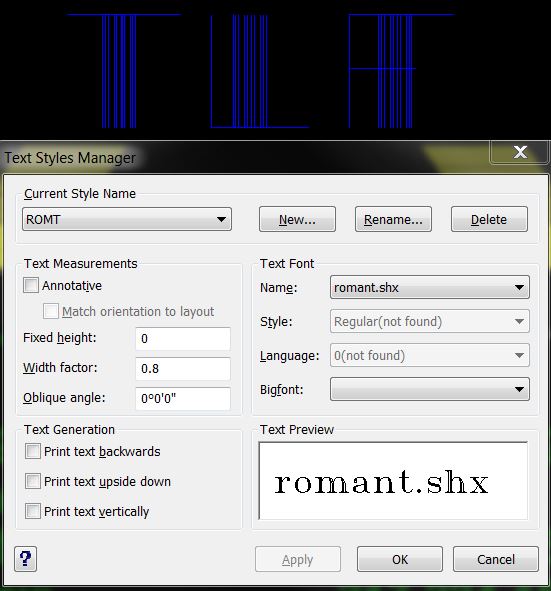
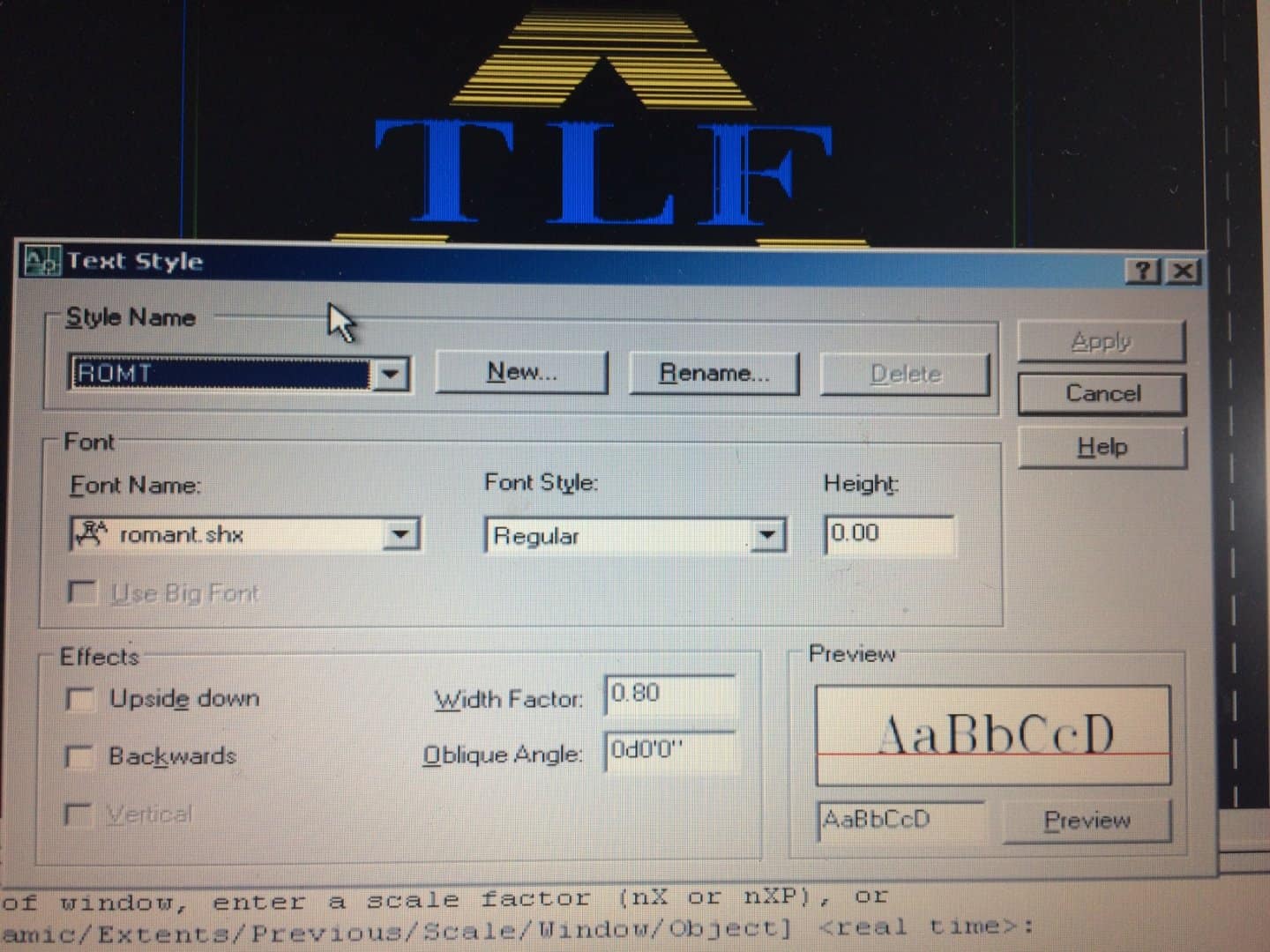
How come the romant.shx font shows up a okay in my old laptop running Carlson 2012, but does not work right in my Carlson 2016?
Posted : March 19, 2016 12:15 pm

Translate
▼
English
Spanish
French
German
Italian
Portuguese
Russian
Chinese
Japanese
Korean
Arabic
Hindi
Dutch
Polish
Turkish
Vietnamese
Thai
Swedish
Danish
Finnish
Norwegian
Czech
Hungarian
Romanian
Greek
Hebrew
Indonesian
Malay
Ukrainian
Bulgarian
Croatian
Slovak
Slovenian
Serbian
Lithuanian
Latvian
Estonian
In autocad, I think it's commandline>textfill
set it to '1'. That might be stretching my grey matter, thought. no guarantees.
Posted : March 19, 2016 12:20 pm
Topic starter
Translate
▼
English
Spanish
French
German
Italian
Portuguese
Russian
Chinese
Japanese
Korean
Arabic
Hindi
Dutch
Polish
Turkish
Vietnamese
Thai
Swedish
Danish
Finnish
Norwegian
Czech
Hungarian
Romanian
Greek
Hebrew
Indonesian
Malay
Ukrainian
Bulgarian
Croatian
Slovak
Slovenian
Serbian
Lithuanian
Latvian
Estonian
Thanks, but it is not a text fill problem. My screen shots are not clear, sorry about that. The 2012 version draws the letters TLF correctly, but the 2016 version draws them as straight line sticks. Ignore the other straight lines it is my client's attempt to do their own shading...
Posted : March 19, 2016 12:32 pm

Translate
▼
English
Spanish
French
German
Italian
Portuguese
Russian
Chinese
Japanese
Korean
Arabic
Hindi
Dutch
Polish
Turkish
Vietnamese
Thai
Swedish
Danish
Finnish
Norwegian
Czech
Hungarian
Romanian
Greek
Hebrew
Indonesian
Malay
Ukrainian
Bulgarian
Croatian
Slovak
Slovenian
Serbian
Lithuanian
Latvian
Estonian
Not sure about Carlson but with AutoCAD you'd need to change that 0 in fixed height to maybe .1.
Posted : March 19, 2016 12:54 pm
Topic starter
Translate
▼
English
Spanish
French
German
Italian
Portuguese
Russian
Chinese
Japanese
Korean
Arabic
Hindi
Dutch
Polish
Turkish
Vietnamese
Thai
Swedish
Danish
Finnish
Norwegian
Czech
Hungarian
Romanian
Greek
Hebrew
Indonesian
Malay
Ukrainian
Bulgarian
Croatian
Slovak
Slovenian
Serbian
Lithuanian
Latvian
Estonian
bobwesterman, post: 363211, member: 7106 wrote: Not sure about Carlson but with AutoCAD you'd need to change that 0 in fixed height to maybe .1.
Thanks, but that made no difference either.
Posted : March 19, 2016 12:59 pm

Translate
▼
English
Spanish
French
German
Italian
Portuguese
Russian
Chinese
Japanese
Korean
Arabic
Hindi
Dutch
Polish
Turkish
Vietnamese
Thai
Swedish
Danish
Finnish
Norwegian
Czech
Hungarian
Romanian
Greek
Hebrew
Indonesian
Malay
Ukrainian
Bulgarian
Croatian
Slovak
Slovenian
Serbian
Lithuanian
Latvian
Estonian
Is this Intellicad?
I've had issues similar but not exactly same in MicroSurvey.
Did you copy this from dwg to dwg? I can do that in the drawing Explorer environs.
Does it actually exist where it thinks it's looking for it?
I've had Cad supposedly using that Font, but it defaulted to something else and played up on screen. (again Intellicad MicroSurvey)
What happens if you delete that style and create a new one from scratch. Might want to change/merge the style to another in case you lose all entities with that style (Romt) applied.
Posted : March 19, 2016 1:44 pm
Topic starter
Translate
▼
English
Spanish
French
German
Italian
Portuguese
Russian
Chinese
Japanese
Korean
Arabic
Hindi
Dutch
Polish
Turkish
Vietnamese
Thai
Swedish
Danish
Finnish
Norwegian
Czech
Hungarian
Romanian
Greek
Hebrew
Indonesian
Malay
Ukrainian
Bulgarian
Croatian
Slovak
Slovenian
Serbian
Lithuanian
Latvian
Estonian
Richard, post: 363220, member: 833 wrote: Is this Intellicad?
I've had issues similar but not exactly same in MicroSurvey.
Did you copy this from dwg to dwg? I can do that in the drawing Explorer environs.
Does it actually exist where it thinks it's looking for it?
I've had Cad supposedly using that Font, but it defaulted to something else and played up on screen. (again Intellicad MicroSurvey)
What happens if you delete that style and create a new one from scratch. Might want to change/merge the style to another in case you lose all entities with that style (Romt) applied.
YES! Thank you.
Posted : March 19, 2016 1:51 pm