Reading RPLS is free for the whole profession. Members post, reply, and get the members-only rooms.


Notifications
Clear all

Topic starter
Translate
▼
English
Spanish
French
German
Italian
Portuguese
Russian
Chinese
Japanese
Korean
Arabic
Hindi
Dutch
Polish
Turkish
Vietnamese
Thai
Swedish
Danish
Finnish
Norwegian
Czech
Hungarian
Romanian
Greek
Hebrew
Indonesian
Malay
Ukrainian
Bulgarian
Croatian
Slovak
Slovenian
Serbian
Lithuanian
Latvian
Estonian
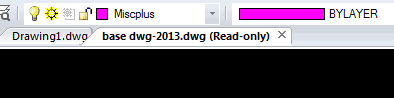
I just upgraded to Carlson 2018 and now have drawing tabs. I am googling and searching but cannot find a way to disable them. Anyone figure this out yet?
Posted : September 7, 2017 2:22 pm

Translate
▼
English
Spanish
French
German
Italian
Portuguese
Russian
Chinese
Japanese
Korean
Arabic
Hindi
Dutch
Polish
Turkish
Vietnamese
Thai
Swedish
Danish
Finnish
Norwegian
Czech
Hungarian
Romanian
Greek
Hebrew
Indonesian
Malay
Ukrainian
Bulgarian
Croatian
Slovak
Slovenian
Serbian
Lithuanian
Latvian
Estonian
Not sure about in Carlson 2018, but in C3D you go to options / Display / and then uncheck the "Display File Tabs" box.
However, the tabs are pretty handy if you ever need to have more than one dwg open at the same time.
Posted : September 7, 2017 2:38 pm

Translate
▼
English
Spanish
French
German
Italian
Portuguese
Russian
Chinese
Japanese
Korean
Arabic
Hindi
Dutch
Polish
Turkish
Vietnamese
Thai
Swedish
Danish
Finnish
Norwegian
Czech
Hungarian
Romanian
Greek
Hebrew
Indonesian
Malay
Ukrainian
Bulgarian
Croatian
Slovak
Slovenian
Serbian
Lithuanian
Latvian
Estonian
I find the tabs handy for switching from one drawing to another. Why would you want to disable them?
Posted : September 7, 2017 3:19 pm

Translate
▼
English
Spanish
French
German
Italian
Portuguese
Russian
Chinese
Japanese
Korean
Arabic
Hindi
Dutch
Polish
Turkish
Vietnamese
Thai
Swedish
Danish
Finnish
Norwegian
Czech
Hungarian
Romanian
Greek
Hebrew
Indonesian
Malay
Ukrainian
Bulgarian
Croatian
Slovak
Slovenian
Serbian
Lithuanian
Latvian
Estonian
ANOTHER_TEXAS_SURVEYOR, post: 445623, member: 8610 wrote: I just upgraded to Carlson 2018 and now have drawing tabs. I am googling and searching but cannot find a way to disable them. Anyone figure this out yet?
Options-Display-Click off "show file tabs". At least if your running on top of Autocad
Posted : September 8, 2017 1:00 pm
Topic starter
Translate
▼
English
Spanish
French
German
Italian
Portuguese
Russian
Chinese
Japanese
Korean
Arabic
Hindi
Dutch
Polish
Turkish
Vietnamese
Thai
Swedish
Danish
Finnish
Norwegian
Czech
Hungarian
Romanian
Greek
Hebrew
Indonesian
Malay
Ukrainian
Bulgarian
Croatian
Slovak
Slovenian
Serbian
Lithuanian
Latvian
Estonian
[USER=708]@Hack[/USER], unfortunately I am running I-CAD, so I do not see that option. I always use shift+tab to cycle through the different drawing open. I'll reach out to Carlson now and see if they have an option.
Posted : September 12, 2017 6:21 am

Translate
▼
English
Spanish
French
German
Italian
Portuguese
Russian
Chinese
Japanese
Korean
Arabic
Hindi
Dutch
Polish
Turkish
Vietnamese
Thai
Swedish
Danish
Finnish
Norwegian
Czech
Hungarian
Romanian
Greek
Hebrew
Indonesian
Malay
Ukrainian
Bulgarian
Croatian
Slovak
Slovenian
Serbian
Lithuanian
Latvian
Estonian
I like that feature.
Have several drawings open at the same time most every day.
Posted : September 12, 2017 8:54 am
Topic starter
Translate
▼
English
Spanish
French
German
Italian
Portuguese
Russian
Chinese
Japanese
Korean
Arabic
Hindi
Dutch
Polish
Turkish
Vietnamese
Thai
Swedish
Danish
Finnish
Norwegian
Czech
Hungarian
Romanian
Greek
Hebrew
Indonesian
Malay
Ukrainian
Bulgarian
Croatian
Slovak
Slovenian
Serbian
Lithuanian
Latvian
Estonian
If anyone is like me and would like to remove the drawing file tabs, I have instructions from Carlson.
- please type OPTIONS
- switch to Display tab
- click MDI Options... button at the bottom
- remove a check mark from Enable MDI tabs checkbox
Posted : September 12, 2017 9:28 am

Translate
▼
English
Spanish
French
German
Italian
Portuguese
Russian
Chinese
Japanese
Korean
Arabic
Hindi
Dutch
Polish
Turkish
Vietnamese
Thai
Swedish
Danish
Finnish
Norwegian
Czech
Hungarian
Romanian
Greek
Hebrew
Indonesian
Malay
Ukrainian
Bulgarian
Croatian
Slovak
Slovenian
Serbian
Lithuanian
Latvian
Estonian
Change the MDISTYLE variable, I set it to 64 and they went away
Posted : September 12, 2017 10:02 am

Translate
▼
English
Spanish
French
German
Italian
Portuguese
Russian
Chinese
Japanese
Korean
Arabic
Hindi
Dutch
Polish
Turkish
Vietnamese
Thai
Swedish
Danish
Finnish
Norwegian
Czech
Hungarian
Romanian
Greek
Hebrew
Indonesian
Malay
Ukrainian
Bulgarian
Croatian
Slovak
Slovenian
Serbian
Lithuanian
Latvian
Estonian
I just noticed that the oft complained about buttons on the start wizard have been renamed. Previously, they were "Recent" and "Open" now in 2018, they are "Open Recent" and "Browse". I like it much better this way, I've lost count of the times I've gotten it wrong.
Posted : September 13, 2017 10:02 pm
Translate
▼
English
Spanish
French
German
Italian
Portuguese
Russian
Chinese
Japanese
Korean
Arabic
Hindi
Dutch
Polish
Turkish
Vietnamese
Thai
Swedish
Danish
Finnish
Norwegian
Czech
Hungarian
Romanian
Greek
Hebrew
Indonesian
Malay
Ukrainian
Bulgarian
Croatian
Slovak
Slovenian
Serbian
Lithuanian
Latvian
Estonian
Stephen Ward, post: 446667, member: 1206 wrote: I just noticed that the oft complained about buttons on the start wizard have been renamed. Previously, they were "Recent" and "Open" now in 2018, they are "Open Recent" and "Browse". I like it much better this way, I've lost count of the times I've gotten it wrong.
Drove me and everyone else here crazy.
Posted : September 14, 2017 9:17 am

Translate
▼
English
Spanish
French
German
Italian
Portuguese
Russian
Chinese
Japanese
Korean
Arabic
Hindi
Dutch
Polish
Turkish
Vietnamese
Thai
Swedish
Danish
Finnish
Norwegian
Czech
Hungarian
Romanian
Greek
Hebrew
Indonesian
Malay
Ukrainian
Bulgarian
Croatian
Slovak
Slovenian
Serbian
Lithuanian
Latvian
Estonian
Loaded 2018 w iCad last night on the home computer to take a look. Seems faster. Tried a new drafting things and seem to work a bit better too. THe 2 things I asked for are in there. The old shift-control dynamic pan/zoom is back. And gradient hatching is there too.
Posted : September 14, 2017 9:40 am