Reading RPLS is free for the whole profession. Members post, reply, and get the members-only rooms.


Notifications
Clear all
Software, CAD & Mapping
5
Posts
3
Users
0
Reactions
687
Views

Topic starter
Translate
▼
English
Spanish
French
German
Italian
Portuguese
Russian
Chinese
Japanese
Korean
Arabic
Hindi
Dutch
Polish
Turkish
Vietnamese
Thai
Swedish
Danish
Finnish
Norwegian
Czech
Hungarian
Romanian
Greek
Hebrew
Indonesian
Malay
Ukrainian
Bulgarian
Croatian
Slovak
Slovenian
Serbian
Lithuanian
Latvian
Estonian
While utilizing carlson civil/survey 2010, the command "label station-offset" (offsta) under the centerline pulldown menu
does not distinguesh the offsets to be left or right or plus or minus from my centerline file as the text is placed on the
CAD drawing, is this a glitch or am I missing something in the setup box or another setting menu elsewhere..? any help is appreciated...
Posted : October 20, 2016 7:13 pm

Translate
▼
English
Spanish
French
German
Italian
Portuguese
Russian
Chinese
Japanese
Korean
Arabic
Hindi
Dutch
Polish
Turkish
Vietnamese
Thai
Swedish
Danish
Finnish
Norwegian
Czech
Hungarian
Romanian
Greek
Hebrew
Indonesian
Malay
Ukrainian
Bulgarian
Croatian
Slovak
Slovenian
Serbian
Lithuanian
Latvian
Estonian
For some reason the programmers decided to leave a few fields blank (instead of using an industry standard default). It's still that way in the 2017 version!
Under the Label Station-Offset Settings window, you will see an area titled "Label Fields".
Highlight the used field named "Offset-1" or something similiar. Click on the icon to the lower right that looks like a Christmas tree light (Seriously guys!).
Add your +/- prefix to both of those fields or "R" and "L" as a suffix.
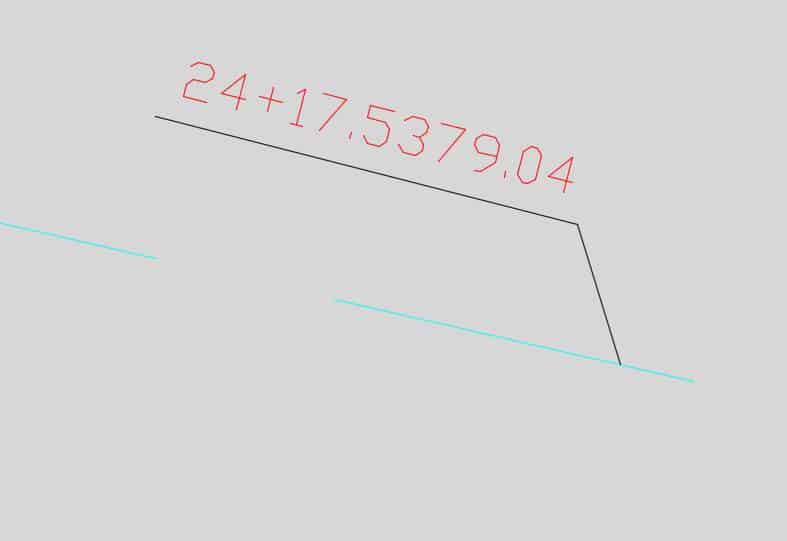
I have been annoyed at how there is no space between the station and the offset labels. Fixing these types of things are much more important to me than new routines. I briefly looked at the settings and didn't see a way to increase the spacing. Not something I want to spend time trying to figure out.
Posted : October 21, 2016 9:21 am

Translate
▼
English
Spanish
French
German
Italian
Portuguese
Russian
Chinese
Japanese
Korean
Arabic
Hindi
Dutch
Polish
Turkish
Vietnamese
Thai
Swedish
Danish
Finnish
Norwegian
Czech
Hungarian
Romanian
Greek
Hebrew
Indonesian
Malay
Ukrainian
Bulgarian
Croatian
Slovak
Slovenian
Serbian
Lithuanian
Latvian
Estonian
imaudigger, post: 396320, member: 7286 wrote: For some reason the programmers decided to leave a few fields blank (instead of using an industry standard default). It's still that way in the 2017 version!
Under the Label Station-Offset Settings window, you will see an area titled "Label Fields".
Highlight the used field named "Offset-1" or something similiar. Click on the icon to the lower right that looks like a Christmas tree light (Seriously guys!).
Add your +/- prefix to both of those fields or "R" and "L" as a suffix.I have been annoyed at how there is no space between the station and the offset labels. Fixing these types of things are much more important to me than new routines. I briefly looked at the settings and didn't see a way to increase the spacing. Not something I want to spend time trying to figure out.
Posted : October 21, 2016 3:00 pm
Translate
▼
English
Spanish
French
German
Italian
Portuguese
Russian
Chinese
Japanese
Korean
Arabic
Hindi
Dutch
Polish
Turkish
Vietnamese
Thai
Swedish
Danish
Finnish
Norwegian
Czech
Hungarian
Romanian
Greek
Hebrew
Indonesian
Malay
Ukrainian
Bulgarian
Croatian
Slovak
Slovenian
Serbian
Lithuanian
Latvian
Estonian
imaudigger, post: 396320, member: 7286 wrote: For some reason the programmers decided to leave a few fields blank (instead of using an industry standard default). It's still that way in the 2017 version!
Under the Label Station-Offset Settings window, you will see an area titled "Label Fields".
Highlight the used field named "Offset-1" or something similiar. Click on the icon to the lower right that looks like a Christmas tree light (Seriously guys!).
Add your +/- prefix to both of those fields or "R" and "L" as a suffix.I have been annoyed at how there is no space between the station and the offset labels. Fixing these types of things are much more important to me than new routines. I briefly looked at the settings and didn't see a way to increase the spacing. Not something I want to spend time trying to figure out.
In addition to +/- and/or R/L designations for either the Prefix and/or Suffix, note that you can also include spaces, commas and pretty much anything if your "standard" happens to require something unique:
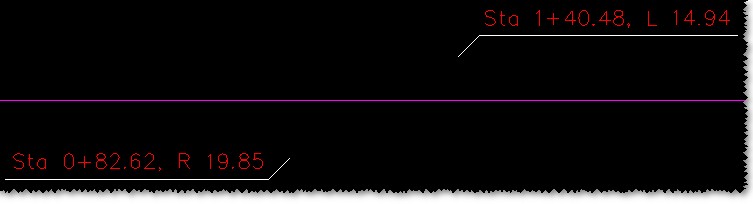
As it was once quoted to me... "The good thing about 'standards' is that everyone has one." Also, the "Christmas tree light" is actually supposed to be a representation of the nib/tip of a fountain pen:
Posted : October 21, 2016 3:10 pm
Translate
▼
English
Spanish
French
German
Italian
Portuguese
Russian
Chinese
Japanese
Korean
Arabic
Hindi
Dutch
Polish
Turkish
Vietnamese
Thai
Swedish
Danish
Finnish
Norwegian
Czech
Hungarian
Romanian
Greek
Hebrew
Indonesian
Malay
Ukrainian
Bulgarian
Croatian
Slovak
Slovenian
Serbian
Lithuanian
Latvian
Estonian
Ladd, I tried to add a space to the prefix of the offset label, but it didn't work.
Maybe I need to add a space to the suffix of the station label? I bet that would work.
------------------
I realize everybody has different ways of doing things...but I will lay some money down that nobody willingly uses the the default label format that I showed above! It's crud.
The labeling you have shown above would be the perfect default. It gets the idea across right out of the box. If you want to alter the format, you can grab your quill and ink and look around for the settings. But crud by default isn't acceptable.
Label precision...should be two decimal places for foot units and three for metric. Who would argue with that?
Let the anal guy spend his time figuring out how to change the default so he can label stations to the nearest thousandths - not me.
Posted : October 21, 2016 6:08 pm