Reading RPLS is free for the whole profession. Members post, reply, and get the members-only rooms.

Notifications
Clear all

Topic starter
Translate
▼
English
Spanish
French
German
Italian
Portuguese
Russian
Chinese
Japanese
Korean
Arabic
Hindi
Dutch
Polish
Turkish
Vietnamese
Thai
Swedish
Danish
Finnish
Norwegian
Czech
Hungarian
Romanian
Greek
Hebrew
Indonesian
Malay
Ukrainian
Bulgarian
Croatian
Slovak
Slovenian
Serbian
Lithuanian
Latvian
Estonian
Hi All
For any of your field teams using Windows ??mobile device centre?? and a Windows 10 PC to upload/download field data to TCS3 type controllers, please be aware that last week??s Windows 10 update will cause this to not work.
Trimble (Allterra) are scrambling to fix. Work arounds are to hold off updating Windows 10 until Trimble catch up, or upload using odler PCs or use a USB stick in the meantime
Let your field teams know?
Posted : June 7, 2017 5:26 pm

Translate
▼
English
Spanish
French
German
Italian
Portuguese
Russian
Chinese
Japanese
Korean
Arabic
Hindi
Dutch
Polish
Turkish
Vietnamese
Thai
Swedish
Danish
Finnish
Norwegian
Czech
Hungarian
Romanian
Greek
Hebrew
Indonesian
Malay
Ukrainian
Bulgarian
Croatian
Slovak
Slovenian
Serbian
Lithuanian
Latvian
Estonian
Hi Jim
I almost posted yesterday on same issue. Have upgraded PC and could not get South S10 (LT30) to connect properly, was showing as a device but not in file manager. I am not using activesync, but still requires mobile device centre to be active.
Our PC admin guy found a solution when I could not, try the following;
On S10 (TSC3) while connected to PC USB 2.0 port.
Settings, Connections, USB to PC, ActiveSync
Turn off ActiveSync option by changing to Disk Driver (faster file transfer), the re check ActiveSync to turn on, OK. Should reset and connect to pc.
The result was the PC went ding, WMDC opened and things connected as usual.
Regards Kelvin
Blenheim NZ
Posted : June 7, 2017 5:49 pm

Translate
▼
English
Spanish
French
German
Italian
Portuguese
Russian
Chinese
Japanese
Korean
Arabic
Hindi
Dutch
Polish
Turkish
Vietnamese
Thai
Swedish
Danish
Finnish
Norwegian
Czech
Hungarian
Romanian
Greek
Hebrew
Indonesian
Malay
Ukrainian
Bulgarian
Croatian
Slovak
Slovenian
Serbian
Lithuanian
Latvian
Estonian
I don't have a TSC3, but the Win10 Creator update broke my WMDC connectivity, too. I found a registry hack online that fixed it. If anyone is interested, I'll dig it up again.
Posted : June 7, 2017 6:12 pm

Translate
▼
English
Spanish
French
German
Italian
Portuguese
Russian
Chinese
Japanese
Korean
Arabic
Hindi
Dutch
Polish
Turkish
Vietnamese
Thai
Swedish
Danish
Finnish
Norwegian
Czech
Hungarian
Romanian
Greek
Hebrew
Indonesian
Malay
Ukrainian
Bulgarian
Croatian
Slovak
Slovenian
Serbian
Lithuanian
Latvian
Estonian
From Linkedin
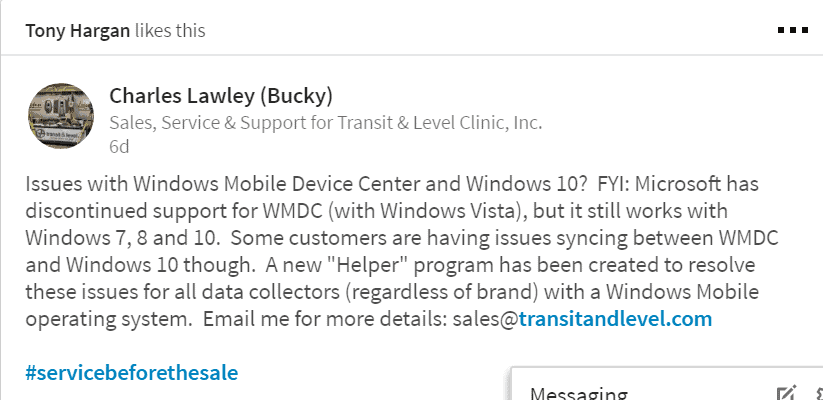
Posted : June 8, 2017 3:40 am

Translate
▼
English
Spanish
French
German
Italian
Portuguese
Russian
Chinese
Japanese
Korean
Arabic
Hindi
Dutch
Polish
Turkish
Vietnamese
Thai
Swedish
Danish
Finnish
Norwegian
Czech
Hungarian
Romanian
Greek
Hebrew
Indonesian
Malay
Ukrainian
Bulgarian
Croatian
Slovak
Slovenian
Serbian
Lithuanian
Latvian
Estonian
Maybe this would help:
Posted : June 8, 2017 4:55 am

Translate
▼
English
Spanish
French
German
Italian
Portuguese
Russian
Chinese
Japanese
Korean
Arabic
Hindi
Dutch
Polish
Turkish
Vietnamese
Thai
Swedish
Danish
Finnish
Norwegian
Czech
Hungarian
Romanian
Greek
Hebrew
Indonesian
Malay
Ukrainian
Bulgarian
Croatian
Slovak
Slovenian
Serbian
Lithuanian
Latvian
Estonian
I did a write up on how to fix the issue. The first workaround works on tablets but is not permanent. The second workaround requires making some registry changes but works on all windows 10 machines. Trimble has also put out an app, but I have had no luck with it.
Posted : June 8, 2017 7:53 am
Translate
▼
English
Spanish
French
German
Italian
Portuguese
Russian
Chinese
Japanese
Korean
Arabic
Hindi
Dutch
Polish
Turkish
Vietnamese
Thai
Swedish
Danish
Finnish
Norwegian
Czech
Hungarian
Romanian
Greek
Hebrew
Indonesian
Malay
Ukrainian
Bulgarian
Croatian
Slovak
Slovenian
Serbian
Lithuanian
Latvian
Estonian
I made the registry changes shown in the PDF, but I also had to change the "Windows Mobile 2003-based device connectivity" service log on mode property to "Local System account."
Posted : June 8, 2017 8:03 am

Translate
▼
English
Spanish
French
German
Italian
Portuguese
Russian
Chinese
Japanese
Korean
Arabic
Hindi
Dutch
Polish
Turkish
Vietnamese
Thai
Swedish
Danish
Finnish
Norwegian
Czech
Hungarian
Romanian
Greek
Hebrew
Indonesian
Malay
Ukrainian
Bulgarian
Croatian
Slovak
Slovenian
Serbian
Lithuanian
Latvian
Estonian
Jim Frame, post: 431652, member: 10 wrote: I made the registry changes shown in the PDF, but I also had to change the "Windows Mobile 2003-based device connectivity" service log on mode property to "Local System account."
Jim, did it work? I've had the same problem and just been using a stick to transfer. Thanks.
Posted : June 8, 2017 8:08 am
Translate
▼
English
Spanish
French
German
Italian
Portuguese
Russian
Chinese
Japanese
Korean
Arabic
Hindi
Dutch
Polish
Turkish
Vietnamese
Thai
Swedish
Danish
Finnish
Norwegian
Czech
Hungarian
Romanian
Greek
Hebrew
Indonesian
Malay
Ukrainian
Bulgarian
Croatian
Slovak
Slovenian
Serbian
Lithuanian
Latvian
Estonian
Mapman, post: 431653, member: 6096 wrote: Jim, did it work? I've had the same problem and just been using a stick to transfer. Thanks.
Yes, it worked.
Posted : June 8, 2017 8:26 am

Translate
▼
English
Spanish
French
German
Italian
Portuguese
Russian
Chinese
Japanese
Korean
Arabic
Hindi
Dutch
Polish
Turkish
Vietnamese
Thai
Swedish
Danish
Finnish
Norwegian
Czech
Hungarian
Romanian
Greek
Hebrew
Indonesian
Malay
Ukrainian
Bulgarian
Croatian
Slovak
Slovenian
Serbian
Lithuanian
Latvian
Estonian
I was going NUTS trying to find a solution yesterday. I ended up writing files to SD card.
Posted : June 8, 2017 9:10 am
Translate
▼
English
Spanish
French
German
Italian
Portuguese
Russian
Chinese
Japanese
Korean
Arabic
Hindi
Dutch
Polish
Turkish
Vietnamese
Thai
Swedish
Danish
Finnish
Norwegian
Czech
Hungarian
Romanian
Greek
Hebrew
Indonesian
Malay
Ukrainian
Bulgarian
Croatian
Slovak
Slovenian
Serbian
Lithuanian
Latvian
Estonian
Sergeant Schultz, post: 431621, member: 315 wrote: Maybe this would help:
We found that info and tried drivers, the helper utility. The next step would have been to fiddle around with the registry, something we generally try to avoid.
It was only one new PC, not my old one or two others with same windows version.
Resetting the connection on the device trying to connect to windows 10 PC was an easy fix that worked, surprisingly. Recommend testing this solution if you are having connection problems.
Windows 10 pro version 1703 (OS Build 15063.332)
Posted : June 8, 2017 2:54 pm

Translate
▼
English
Spanish
French
German
Italian
Portuguese
Russian
Chinese
Japanese
Korean
Arabic
Hindi
Dutch
Polish
Turkish
Vietnamese
Thai
Swedish
Danish
Finnish
Norwegian
Czech
Hungarian
Romanian
Greek
Hebrew
Indonesian
Malay
Ukrainian
Bulgarian
Croatian
Slovak
Slovenian
Serbian
Lithuanian
Latvian
Estonian
Just fixed our field download computers. The Juniper Systems WMDC helper worked.
Sent from my XT1585 using Tapatalk
Posted : June 8, 2017 5:43 pm
Translate
▼
English
Spanish
French
German
Italian
Portuguese
Russian
Chinese
Japanese
Korean
Arabic
Hindi
Dutch
Polish
Turkish
Vietnamese
Thai
Swedish
Danish
Finnish
Norwegian
Czech
Hungarian
Romanian
Greek
Hebrew
Indonesian
Malay
Ukrainian
Bulgarian
Croatian
Slovak
Slovenian
Serbian
Lithuanian
Latvian
Estonian
I just installed Vista 64 version then ran in compatibility mode. Set it up last week, not sure if that laptop had the most recent update.
Still have some xp boxes for these reasons...
Posted : June 10, 2017 7:57 am