Reading RPLS is free for the whole profession. Members post, reply, and get the members-only rooms.


Notifications
Clear all
Software, CAD & Mapping
29
Posts
16
Users
0
Reactions
1,668
Views

Topic starter
Translate
▼
English
Spanish
French
German
Italian
Portuguese
Russian
Chinese
Japanese
Korean
Arabic
Hindi
Dutch
Polish
Turkish
Vietnamese
Thai
Swedish
Danish
Finnish
Norwegian
Czech
Hungarian
Romanian
Greek
Hebrew
Indonesian
Malay
Ukrainian
Bulgarian
Croatian
Slovak
Slovenian
Serbian
Lithuanian
Latvian
Estonian
What is the best one to use for viewing deeds. It ain't Windows Photo Viewer.
Posted : July 6, 2017 9:42 am

Translate
▼
English
Spanish
French
German
Italian
Portuguese
Russian
Chinese
Japanese
Korean
Arabic
Hindi
Dutch
Polish
Turkish
Vietnamese
Thai
Swedish
Danish
Finnish
Norwegian
Czech
Hungarian
Romanian
Greek
Hebrew
Indonesian
Malay
Ukrainian
Bulgarian
Croatian
Slovak
Slovenian
Serbian
Lithuanian
Latvian
Estonian
Irfanview - hands down.
Our county office uses multi-page .tif format and it handles that well.
Posted : July 6, 2017 9:57 am

Translate
▼
English
Spanish
French
German
Italian
Portuguese
Russian
Chinese
Japanese
Korean
Arabic
Hindi
Dutch
Polish
Turkish
Vietnamese
Thai
Swedish
Danish
Finnish
Norwegian
Czech
Hungarian
Romanian
Greek
Hebrew
Indonesian
Malay
Ukrainian
Bulgarian
Croatian
Slovak
Slovenian
Serbian
Lithuanian
Latvian
Estonian
Irfanview. Nothing close
Posted : July 6, 2017 10:04 am

Translate
▼
English
Spanish
French
German
Italian
Portuguese
Russian
Chinese
Japanese
Korean
Arabic
Hindi
Dutch
Polish
Turkish
Vietnamese
Thai
Swedish
Danish
Finnish
Norwegian
Czech
Hungarian
Romanian
Greek
Hebrew
Indonesian
Malay
Ukrainian
Bulgarian
Croatian
Slovak
Slovenian
Serbian
Lithuanian
Latvian
Estonian
I've been using FastStone viewer for years. It seems pretty robust and you can set it up how you like.
Posted : July 6, 2017 10:08 am

Translate
▼
English
Spanish
French
German
Italian
Portuguese
Russian
Chinese
Japanese
Korean
Arabic
Hindi
Dutch
Polish
Turkish
Vietnamese
Thai
Swedish
Danish
Finnish
Norwegian
Czech
Hungarian
Romanian
Greek
Hebrew
Indonesian
Malay
Ukrainian
Bulgarian
Croatian
Slovak
Slovenian
Serbian
Lithuanian
Latvian
Estonian
Irfanview is the best and free
Posted : July 6, 2017 10:30 am

Translate
▼
English
Spanish
French
German
Italian
Portuguese
Russian
Chinese
Japanese
Korean
Arabic
Hindi
Dutch
Polish
Turkish
Vietnamese
Thai
Swedish
Danish
Finnish
Norwegian
Czech
Hungarian
Romanian
Greek
Hebrew
Indonesian
Malay
Ukrainian
Bulgarian
Croatian
Slovak
Slovenian
Serbian
Lithuanian
Latvian
Estonian
Irfanview
be sure and download all the extra tools after you download the main program
I use it mostly for assembling many pages into one PDF file
Posted : July 6, 2017 11:18 am

Translate
▼
English
Spanish
French
German
Italian
Portuguese
Russian
Chinese
Japanese
Korean
Arabic
Hindi
Dutch
Polish
Turkish
Vietnamese
Thai
Swedish
Danish
Finnish
Norwegian
Czech
Hungarian
Romanian
Greek
Hebrew
Indonesian
Malay
Ukrainian
Bulgarian
Croatian
Slovak
Slovenian
Serbian
Lithuanian
Latvian
Estonian
Our local register's website uses Alternatif. It is pretty good, on the website, but I agree with everyone else, I use Irfanview.
Posted : July 6, 2017 6:21 pm

Translate
▼
English
Spanish
French
German
Italian
Portuguese
Russian
Chinese
Japanese
Korean
Arabic
Hindi
Dutch
Polish
Turkish
Vietnamese
Thai
Swedish
Danish
Finnish
Norwegian
Czech
Hungarian
Romanian
Greek
Hebrew
Indonesian
Malay
Ukrainian
Bulgarian
Croatian
Slovak
Slovenian
Serbian
Lithuanian
Latvian
Estonian
Irfanview++
Posted : July 6, 2017 7:14 pm

Translate
▼
English
Spanish
French
German
Italian
Portuguese
Russian
Chinese
Japanese
Korean
Arabic
Hindi
Dutch
Polish
Turkish
Vietnamese
Thai
Swedish
Danish
Finnish
Norwegian
Czech
Hungarian
Romanian
Greek
Hebrew
Indonesian
Malay
Ukrainian
Bulgarian
Croatian
Slovak
Slovenian
Serbian
Lithuanian
Latvian
Estonian
+1 for Irfanview. Our county has the oldest books scanned to tif files. The problem is, the entire book is in one file, and I haven't found a program that will let me go to a particular page without scrolling through the whole thing (including Irfanview). My solution is to turn the mouse upside down and roll the mouse wheel along my desk. You can go through a whole book in a few seconds.
Posted : July 6, 2017 9:26 pm

Translate
▼
English
Spanish
French
German
Italian
Portuguese
Russian
Chinese
Japanese
Korean
Arabic
Hindi
Dutch
Polish
Turkish
Vietnamese
Thai
Swedish
Danish
Finnish
Norwegian
Czech
Hungarian
Romanian
Greek
Hebrew
Indonesian
Malay
Ukrainian
Bulgarian
Croatian
Slovak
Slovenian
Serbian
Lithuanian
Latvian
Estonian
I rarely deal with TIFF images, but I want to point out that Irfanview is only free for non-commercial use. I think it's $12 to be able to register and use it for business purposes.
C Billingsley, post: 435691, member: 1965 wrote: +1 for Irfanview. Our county has the oldest books scanned to tif files. The problem is, the entire book is in one file, and I haven't found a program that will let me go to a particular page without scrolling through the whole thing (including Irfanview). My solution is to turn the mouse upside down and roll the mouse wheel along my desk. You can go through a whole book in a few seconds.
Do you have the file yourself? I don't know the advantages of viewing a TIFF versus a PDF, but you could use a program like Bluebeam to open the TIFF, set bookmarks, and be able to navigate to those bookmarks, or at least be able to tell it to go to page 211 without setting bookmarks.
Posted : July 7, 2017 5:27 am
Translate
▼
English
Spanish
French
German
Italian
Portuguese
Russian
Chinese
Japanese
Korean
Arabic
Hindi
Dutch
Polish
Turkish
Vietnamese
Thai
Swedish
Danish
Finnish
Norwegian
Czech
Hungarian
Romanian
Greek
Hebrew
Indonesian
Malay
Ukrainian
Bulgarian
Croatian
Slovak
Slovenian
Serbian
Lithuanian
Latvian
Estonian
I keep tiffs as a master and convert to other files as needed, mostly pdf.
Irfanview has a tool to convert to pdf and back to tiff.
Once opened in Adobe or most any pdf viewer, it is easy to maneuver thru the entire file and separate pages from the whole volume and make many other edit functions.
Also use Irfanview for making negative and or positive to make black on white background to print to hardcopy.
Posted : July 7, 2017 5:34 am

Translate
▼
English
Spanish
French
German
Italian
Portuguese
Russian
Chinese
Japanese
Korean
Arabic
Hindi
Dutch
Polish
Turkish
Vietnamese
Thai
Swedish
Danish
Finnish
Norwegian
Czech
Hungarian
Romanian
Greek
Hebrew
Indonesian
Malay
Ukrainian
Bulgarian
Croatian
Slovak
Slovenian
Serbian
Lithuanian
Latvian
Estonian
Irfanview (free): http://www.irfanview.net/
Posted : July 7, 2017 5:40 am
Translate
▼
English
Spanish
French
German
Italian
Portuguese
Russian
Chinese
Japanese
Korean
Arabic
Hindi
Dutch
Polish
Turkish
Vietnamese
Thai
Swedish
Danish
Finnish
Norwegian
Czech
Hungarian
Romanian
Greek
Hebrew
Indonesian
Malay
Ukrainian
Bulgarian
Croatian
Slovak
Slovenian
Serbian
Lithuanian
Latvian
Estonian
C Billingsley, post: 435691, member: 1965 wrote: +1 for Irfanview. Our county has the oldest books scanned to tif files. The problem is, the entire book is in one file, and I haven't found a program that will let me go to a particular page without scrolling through the whole thing (including Irfanview). My solution is to turn the mouse upside down and roll the mouse wheel along my desk. You can go through a whole book in a few seconds.
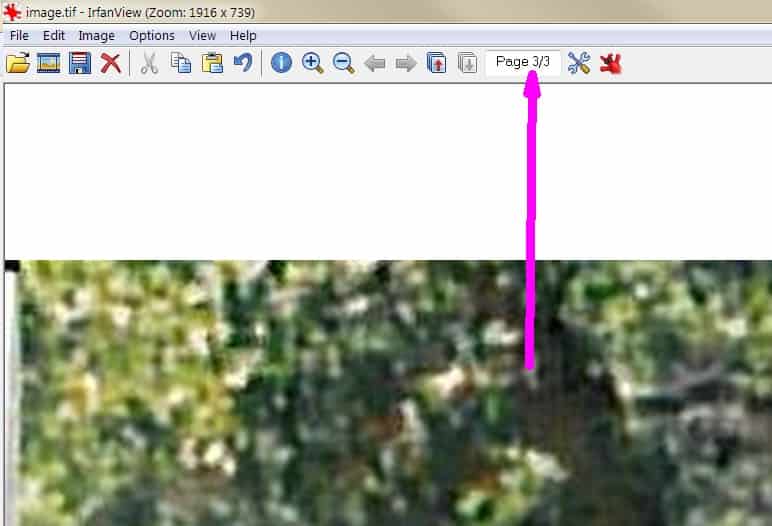
Sometimes you just have to ask...pretty easy, just select the first number as shown below and change it to the page you want to go to, then hit enter.
Posted : July 7, 2017 10:16 am
Translate
▼
English
Spanish
French
German
Italian
Portuguese
Russian
Chinese
Japanese
Korean
Arabic
Hindi
Dutch
Polish
Turkish
Vietnamese
Thai
Swedish
Danish
Finnish
Norwegian
Czech
Hungarian
Romanian
Greek
Hebrew
Indonesian
Malay
Ukrainian
Bulgarian
Croatian
Slovak
Slovenian
Serbian
Lithuanian
Latvian
Estonian
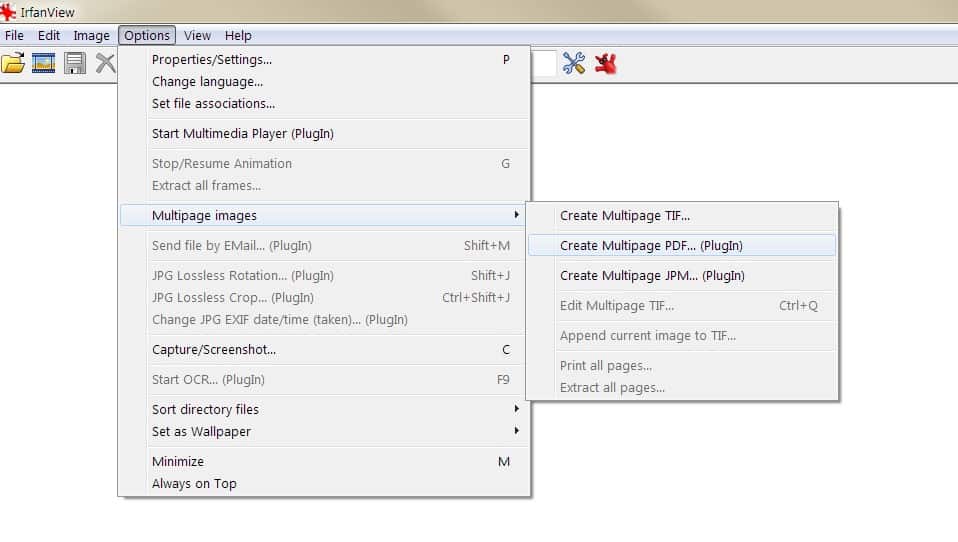
Alternatively if you continually access a particular multi-page .tif, convert it to a PDF and view it in Acrobat Reader if your more comfortable with that.
Posted : July 7, 2017 10:23 am
Translate
▼
English
Spanish
French
German
Italian
Portuguese
Russian
Chinese
Japanese
Korean
Arabic
Hindi
Dutch
Polish
Turkish
Vietnamese
Thai
Swedish
Danish
Finnish
Norwegian
Czech
Hungarian
Romanian
Greek
Hebrew
Indonesian
Malay
Ukrainian
Bulgarian
Croatian
Slovak
Slovenian
Serbian
Lithuanian
Latvian
Estonian
Then if your really old school, you can open a specific page of a multi-page .tif by going to the command line window and typing something like this...
i_view32.exe c:test.tif /page=3
(I like this solution the best!)
Posted : July 7, 2017 10:33 am

Translate
▼
English
Spanish
French
German
Italian
Portuguese
Russian
Chinese
Japanese
Korean
Arabic
Hindi
Dutch
Polish
Turkish
Vietnamese
Thai
Swedish
Danish
Finnish
Norwegian
Czech
Hungarian
Romanian
Greek
Hebrew
Indonesian
Malay
Ukrainian
Bulgarian
Croatian
Slovak
Slovenian
Serbian
Lithuanian
Latvian
Estonian
Tommy Young, post: 435542, member: 703 wrote: What is the best one to use for viewing deeds. It ain't Windows Photo Viewer.
A Mac.
Seriously, though, I didn't know there even such things as "Tiff Viewers" (other than perhaps Photoshop).
I've always just double clicked them and they open.
Posted : July 7, 2017 10:39 am
Translate
▼
English
Spanish
French
German
Italian
Portuguese
Russian
Chinese
Japanese
Korean
Arabic
Hindi
Dutch
Polish
Turkish
Vietnamese
Thai
Swedish
Danish
Finnish
Norwegian
Czech
Hungarian
Romanian
Greek
Hebrew
Indonesian
Malay
Ukrainian
Bulgarian
Croatian
Slovak
Slovenian
Serbian
Lithuanian
Latvian
Estonian
imaudigger, post: 435775, member: 7286 wrote: Sometimes you just have to ask...pretty easy, just select the first number as shown below and change it to the page you want to go to, then hit enter.
I must either have a different version, or mine is set up wrong, because I don't have that option.
Posted : July 7, 2017 9:31 pm

Translate
▼
English
Spanish
French
German
Italian
Portuguese
Russian
Chinese
Japanese
Korean
Arabic
Hindi
Dutch
Polish
Turkish
Vietnamese
Thai
Swedish
Danish
Finnish
Norwegian
Czech
Hungarian
Romanian
Greek
Hebrew
Indonesian
Malay
Ukrainian
Bulgarian
Croatian
Slovak
Slovenian
Serbian
Lithuanian
Latvian
Estonian
We have geo tiffs here, and they can get humungous.
Windows makes a chore of these, even hangs.
Other viewers open up quickly and no lag when zooming about.
I'm Win 10 Pro with decent hardware.
I've always been a Faststone fan but note a lot of IrfanView here.
How well does that open up 350 +mb images?
Posted : July 7, 2017 10:03 pm
Translate
▼
English
Spanish
French
German
Italian
Portuguese
Russian
Chinese
Japanese
Korean
Arabic
Hindi
Dutch
Polish
Turkish
Vietnamese
Thai
Swedish
Danish
Finnish
Norwegian
Czech
Hungarian
Romanian
Greek
Hebrew
Indonesian
Malay
Ukrainian
Bulgarian
Croatian
Slovak
Slovenian
Serbian
Lithuanian
Latvian
Estonian
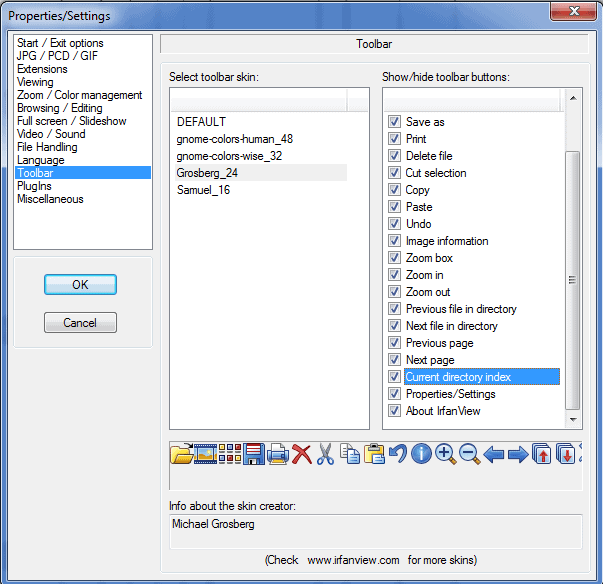
C Billingsley, post: 435903, member: 1965 wrote: I must either have a different version, or mine is set up wrong, because I don't have that option.
At least in the versions I have it is a toolbar setting which wasn't turned on by default last time updated Irfanview.
Posted : July 8, 2017 3:03 pm

Translate
▼
English
Spanish
French
German
Italian
Portuguese
Russian
Chinese
Japanese
Korean
Arabic
Hindi
Dutch
Polish
Turkish
Vietnamese
Thai
Swedish
Danish
Finnish
Norwegian
Czech
Hungarian
Romanian
Greek
Hebrew
Indonesian
Malay
Ukrainian
Bulgarian
Croatian
Slovak
Slovenian
Serbian
Lithuanian
Latvian
Estonian
Irfanview is not free. The EULA does not allow decompiling, let alone modifying the source code.
I just tried a TIFF in a couple of programs. I prefer Okteta to Gwenview. Gwenview shows one page at a time, and if I zoom in to a page, then switch to another page and back, it's shrunk to fit. Gimp can edit them; it asks if you want to import the pages as layers or images.
Posted : July 8, 2017 9:10 pm
Page 1 / 2
Next