Reading RPLS is free for the whole profession. Members post, reply, and get the members-only rooms.


Notifications
Clear all
Software, CAD & Mapping
9
Posts
6
Users
0
Reactions
1,019
Views

Topic starter
Translate
▼
English
Spanish
French
German
Italian
Portuguese
Russian
Chinese
Japanese
Korean
Arabic
Hindi
Dutch
Polish
Turkish
Vietnamese
Thai
Swedish
Danish
Finnish
Norwegian
Czech
Hungarian
Romanian
Greek
Hebrew
Indonesian
Malay
Ukrainian
Bulgarian
Croatian
Slovak
Slovenian
Serbian
Lithuanian
Latvian
Estonian
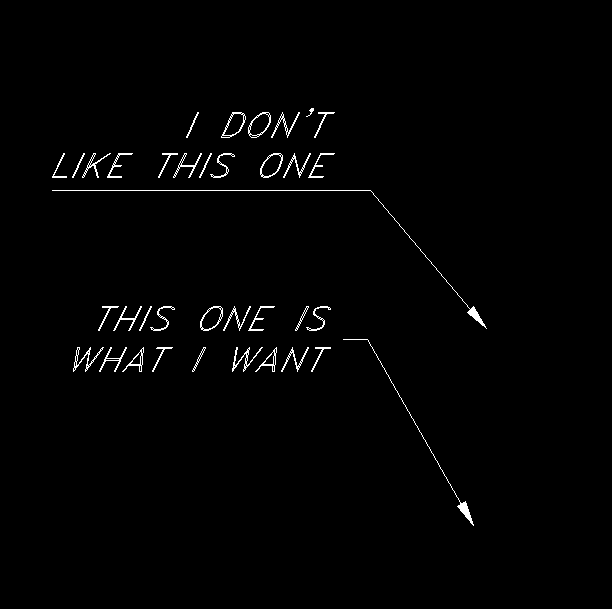
Running Carlson 2015. Embeded AutoCAD version. There seem to be multiple ways to make a leader (and among them multiple styles) I find using the command "LEADER" draws the leader, the arrowhead, uses MText and when the MText is moved the leader remains pointing from it. That is what I like. However the style of leader has always been the same at this company and I want to keep it that way. When I make it it puts the text above the leader, and I want it in the center of the text. The best way to explain it is...
Posted : August 3, 2015 1:45 pm

Translate
▼
English
Spanish
French
German
Italian
Portuguese
Russian
Chinese
Japanese
Korean
Arabic
Hindi
Dutch
Polish
Turkish
Vietnamese
Thai
Swedish
Danish
Finnish
Norwegian
Czech
Hungarian
Romanian
Greek
Hebrew
Indonesian
Malay
Ukrainian
Bulgarian
Croatian
Slovak
Slovenian
Serbian
Lithuanian
Latvian
Estonian
I like the second one even better when the leader tic lines up with the middle of the first line of text.
Posted : August 3, 2015 4:03 pm

Translate
▼
English
Spanish
French
German
Italian
Portuguese
Russian
Chinese
Japanese
Korean
Arabic
Hindi
Dutch
Polish
Turkish
Vietnamese
Thai
Swedish
Danish
Finnish
Norwegian
Czech
Hungarian
Romanian
Greek
Hebrew
Indonesian
Malay
Ukrainian
Bulgarian
Croatian
Slovak
Slovenian
Serbian
Lithuanian
Latvian
Estonian
You might want to try sleader. It is a S shaped leader with the text like the second one.
Posted : August 4, 2015 5:36 am

Translate
▼
English
Spanish
French
German
Italian
Portuguese
Russian
Chinese
Japanese
Korean
Arabic
Hindi
Dutch
Polish
Turkish
Vietnamese
Thai
Swedish
Danish
Finnish
Norwegian
Czech
Hungarian
Romanian
Greek
Hebrew
Indonesian
Malay
Ukrainian
Bulgarian
Croatian
Slovak
Slovenian
Serbian
Lithuanian
Latvian
Estonian
Try
MLEADER
Posted : August 4, 2015 6:04 am
Topic starter
Translate
▼
English
Spanish
French
German
Italian
Portuguese
Russian
Chinese
Japanese
Korean
Arabic
Hindi
Dutch
Polish
Turkish
Vietnamese
Thai
Swedish
Danish
Finnish
Norwegian
Czech
Hungarian
Romanian
Greek
Hebrew
Indonesian
Malay
Ukrainian
Bulgarian
Croatian
Slovak
Slovenian
Serbian
Lithuanian
Latvian
Estonian
MLEADER did well, but when I move the text to the left side of the leader it runs the leader line, all the way under the first text line. I guess I am more looking for settings on these things. But I cannot seem to set up a default for one.
Posted : August 4, 2015 9:53 am

Translate
▼
English
Spanish
French
German
Italian
Portuguese
Russian
Chinese
Japanese
Korean
Arabic
Hindi
Dutch
Polish
Turkish
Vietnamese
Thai
Swedish
Danish
Finnish
Norwegian
Czech
Hungarian
Romanian
Greek
Hebrew
Indonesian
Malay
Ukrainian
Bulgarian
Croatian
Slovak
Slovenian
Serbian
Lithuanian
Latvian
Estonian
ppm, post: 330387, member: 6808 wrote: MLEADER did well, but when I move the text to the left side of the leader it runs the leader line, all the way under the first text line. I guess I am more looking for settings on these things. But I cannot seem to set up a default for one.
Open your properties pallet. Under the TEXT category towards the bottom you will see options for left and right attachment, set them as you like.
Posted : August 4, 2015 10:09 am
Translate
▼
English
Spanish
French
German
Italian
Portuguese
Russian
Chinese
Japanese
Korean
Arabic
Hindi
Dutch
Polish
Turkish
Vietnamese
Thai
Swedish
Danish
Finnish
Norwegian
Czech
Hungarian
Romanian
Greek
Hebrew
Indonesian
Malay
Ukrainian
Bulgarian
Croatian
Slovak
Slovenian
Serbian
Lithuanian
Latvian
Estonian
ppm, post: 330387, member: 6808 wrote: MLEADER did well, but when I move the text to the left side of the leader it runs the leader line, all the way under the first text line. I guess I am more looking for settings on these things. But I cannot seem to set up a default for one.
Also to set the default behavior type _mleaderstyle and set your preference on the content tab of the dialog that pops up.
Posted : August 4, 2015 10:12 am
Topic starter
Translate
▼
English
Spanish
French
German
Italian
Portuguese
Russian
Chinese
Japanese
Korean
Arabic
Hindi
Dutch
Polish
Turkish
Vietnamese
Thai
Swedish
Danish
Finnish
Norwegian
Czech
Hungarian
Romanian
Greek
Hebrew
Indonesian
Malay
Ukrainian
Bulgarian
Croatian
Slovak
Slovenian
Serbian
Lithuanian
Latvian
Estonian
Randy Rain, post: 330395, member: 35 wrote: Also to set the default behavior type _mleaderstyle and set your preference on the content tab of the dialog that pops up.
Thank you, Thank you, thank you.
Posted : August 4, 2015 10:56 am

Translate
▼
English
Spanish
French
German
Italian
Portuguese
Russian
Chinese
Japanese
Korean
Arabic
Hindi
Dutch
Polish
Turkish
Vietnamese
Thai
Swedish
Danish
Finnish
Norwegian
Czech
Hungarian
Romanian
Greek
Hebrew
Indonesian
Malay
Ukrainian
Bulgarian
Croatian
Slovak
Slovenian
Serbian
Lithuanian
Latvian
Estonian
Can't you right-click and hit properties and then adjust the attachment point? You can do it globally somehow I'm sure by making the default setting the way you want it. That's how it works in C3D, and I'm pretty sure Carlson does the same thing.
Posted : August 4, 2015 11:48 am