Google "NAIP", then let us know if you figured out a way to get the software to read the Mr. SID file format.

JBStahl, post: 363324, member: 427 wrote: My only frustration has been that when the resource files are supplied in UTM metric and my drawing file is using some form of SPC or LDP in feet (ift or usft), Carlson doesn't seem to provide any way for the .tfw file to be automatically translated to the dwg coordinate system so the image will import properly. Has anyone figured out a way to make that happen in Carlson? There is a way to easily scale the .tfw file from ft to meters or vice versa, but no way that I can find to translate from UTM to SPC, then scale & rotate (all of the parameters in the .tfw file). This was a simple process in LDD. Just had to tell the import routine what coordinate system the source data was given.
Have you tried QGIS?

cptdent, post: 363178, member: 527 wrote: Carlson Survey Embedded has a GIS tab that allows you to insert georefferenced word file images.
Does Carlson Survey with IntelliCAD allow you to insert geo-referenced images from bing or google earth similar to Civil 3-D or is this only in the embedded version?

I would recommend looking into the Hexagon Imagery Program. This can run as a yearly service and stream the aerial imagery into the office software (if it accepts the protocol). They offer 1/2' GSD for urban areas over 50,000 population and 1' GSD for rural areas. The yearly services gives you access to the entire US. Otherwise it appears you can also purchase by square mile.
From
Here is a link for more information: http://www.leica-geosystems.us/en/HxIP-Hexagon-Imagery-Program_106454.htm&apos ;">Hexagon Imagery Program
Here is a coverage map: https://leica.maps.arcgis.com/apps/Viewer/index.html?appid=7bd90423af234c07904ec3210cf81965&apos ;">Hexagon Imagery Program Coverage

Don't overlook the fact that you can go "the other way".
That is, pull your boundaries or any part of your project, into Google Earth.
Just set up your drawing to your projection. (SETTINGS; DRAWING SETUP; PROJECTION)
Then FILE, GOOGLE EARTH; EXPORT GOOGLE EARTH FILE.

imaudigger, post: 363710, member: 7286 wrote: Google "NAIP", then let us know if you figured out a way to get the software to read the Mr. SID file format.
I have a copy of Mr. SID in a zip file that I can give you if I can find it. It will export a specific area as a tif with a world file.
mattsib79, post: 364063, member: 1138 wrote: I have a copy of Mr. SID in a zip file that I can give you if I can find it. It will export a specific area as a tif with a world file.
I have plenty of Sid files, just never found an easy way to get Carlson to import them to the correct location.
I use those images in ArcMap.

I use [REDACTED] to convert referenced SID files to Geo-tiff.
Mike Childs wrote a wonderful program...
DDSM:beer:

imaudigger, post: 364146, member: 7286 wrote: I have plenty of Sid files, just never found an easy way to get Carlson to import them to the correct location.
I use those images in ArcMap.
Just a shot in the dark here, but have you tried typing geotiff at the command line?
Brad Ott, post: 364156, member: 197 wrote: Just a shot in the dark here, but have you tried typing geotiff at the command line?
Tried that..appears my problem lies in the fact that my SID file is in a different projection than my drawing.
With ArcMap, it automatically re-projects the image to my coordinate system and I never really notice that it happened.
That's probably what has been keeping me from using the SID files (in Carlson) that I do have - I lack the software or knowledge to re-project/save the SID files to my coordinate system.

Jimmy Cleveland, post: 362827, member: 91 wrote: Now that I am working at my new job, and working on projects of a much larger scale, I am finding the benefits of having georeferenced aerial images as backgrounds for some of my projects.
I am fairly familiar with how to insert a georeferenced aerial image into Carlson 2016 OEM, but I am having a hard time sometimes finding the aerial images to reference. I use Google earth quite a bit, but don't know if there is a way to reference those aerial images, or if there is a better source to find, or create georeferenced images.
We are working on several large drainage basin projects, and the lead survey tech here in the office has been using Civil3D to pull in the aerial backgrounds, which is pretty slick, but I have no desire to move over to Civil3D, when that is the only thing I find appealing at this point about Civil3D. I am sure there are other benefits, but for what we do, Carlson Survey is what I have decided we are using, and am very happy with it.
Any ideas or suggestions for georeferenced images will be greatly appreciated. Right now the main focus of our work is the greater Memphis area, and about a 200 mile radius.
I am looking at the USGS National Map viewer, and seeing what it has to offer.
I have used ArcGIS to georeference images, but I liked Erdas Imagine better. Very user friendly and really robust remote sensing software.
Cheers,
GeomÌÁgico

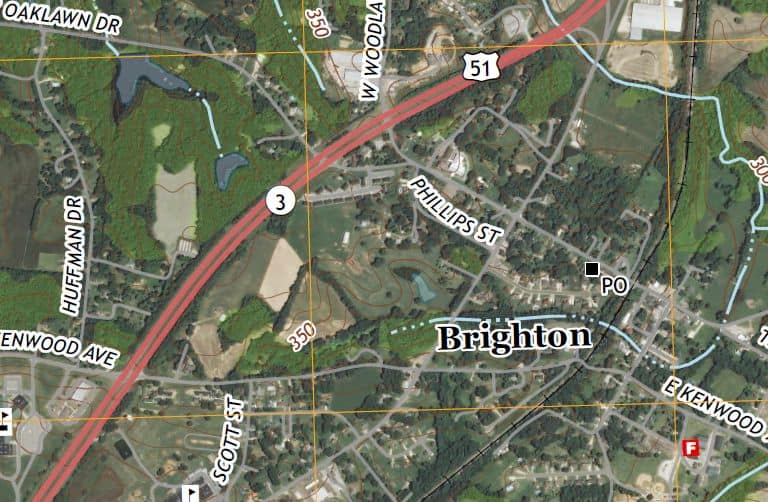
If you can use a GeoPDF, try this link.
https://www.sciencebase.gov/catalog/item/521567bbe4b06d85e09851f1
Go down to "Related External Resources" and click on the link in the box beside "Web Link"
When you open it in Adobe Reader, check the box beside Imagery. It's basically a USGS Topo map with imagery and road/feature labels that can be turned off and on.
I just haven't figured out a good way of getting to it yet.
James
Edit, here's a screen shot