Reading RPLS is free for the whole profession. Members post, reply, and get the members-only rooms.

Notifications
Clear all
Software, CAD & Mapping
35
Posts
21
Users
0
Reactions
2,091
Views

Topic starter
Translate
▼
English
Spanish
French
German
Italian
Portuguese
Russian
Chinese
Japanese
Korean
Arabic
Hindi
Dutch
Polish
Turkish
Vietnamese
Thai
Swedish
Danish
Finnish
Norwegian
Czech
Hungarian
Romanian
Greek
Hebrew
Indonesian
Malay
Ukrainian
Bulgarian
Croatian
Slovak
Slovenian
Serbian
Lithuanian
Latvian
Estonian
Looking for a pdf editor program. I've used Acrobat a lot and like it, except for the cost. I downloaded a demo of Fox-it Standard yesterday and it looks like it might be OK. Have any of you had experiences with it, positive or negative?
Posted : September 1, 2017 11:14 am

Translate
▼
English
Spanish
French
German
Italian
Portuguese
Russian
Chinese
Japanese
Korean
Arabic
Hindi
Dutch
Polish
Turkish
Vietnamese
Thai
Swedish
Danish
Finnish
Norwegian
Czech
Hungarian
Romanian
Greek
Hebrew
Indonesian
Malay
Ukrainian
Bulgarian
Croatian
Slovak
Slovenian
Serbian
Lithuanian
Latvian
Estonian
I use foxit as a backup/workaround for acrobat, the company owns acrobat 10 and that works fine for most things, but I still fire up foxit to place image files it's just easier than doing it in acrobat.
Posted : September 1, 2017 1:24 pm

Translate
▼
English
Spanish
French
German
Italian
Portuguese
Russian
Chinese
Japanese
Korean
Arabic
Hindi
Dutch
Polish
Turkish
Vietnamese
Thai
Swedish
Danish
Finnish
Norwegian
Czech
Hungarian
Romanian
Greek
Hebrew
Indonesian
Malay
Ukrainian
Bulgarian
Croatian
Slovak
Slovenian
Serbian
Lithuanian
Latvian
Estonian
Since you're not getting much feedback on Foxit, I personally love Bluebeam as an alternative to Acrobat. It is probably priced between Acrobat and Foxit, and they also have free trials. It has a lot of nice features, collaboration tools, email archiving, quantity takeoffs, and useful plugins for not just Autocad, but also Word and Excel.
Posted : September 4, 2017 5:33 am

Translate
▼
English
Spanish
French
German
Italian
Portuguese
Russian
Chinese
Japanese
Korean
Arabic
Hindi
Dutch
Polish
Turkish
Vietnamese
Thai
Swedish
Danish
Finnish
Norwegian
Czech
Hungarian
Romanian
Greek
Hebrew
Indonesian
Malay
Ukrainian
Bulgarian
Croatian
Slovak
Slovenian
Serbian
Lithuanian
Latvian
Estonian
I'm a Bluebeam fan too.
I have tried Foxit but didn't find it up to Bluebeam.
Foxit was certainly a very capable PDF, but text and annotation was not as good as Bluebeam from my experience.
I thought Foxit was way cheaper, might be wrong.
Posted : September 4, 2017 2:47 pm
Topic starter
Translate
▼
English
Spanish
French
German
Italian
Portuguese
Russian
Chinese
Japanese
Korean
Arabic
Hindi
Dutch
Polish
Turkish
Vietnamese
Thai
Swedish
Danish
Finnish
Norwegian
Czech
Hungarian
Romanian
Greek
Hebrew
Indonesian
Malay
Ukrainian
Bulgarian
Croatian
Slovak
Slovenian
Serbian
Lithuanian
Latvian
Estonian
BlitzkriegBob, post: 444951, member: 9554 wrote: I personally love Bluebeam
Richard, post: 445024, member: 833 wrote: I'm a Bluebeam fan too.
I have used Bluebeam, for about a year an a half. I would go for it if my clients were using for project management. But I just want something to edit pdfs, mainly to collect items from various sources into a single pdf document. That and mark ups.
Posted : September 4, 2017 3:18 pm

Translate
▼
English
Spanish
French
German
Italian
Portuguese
Russian
Chinese
Japanese
Korean
Arabic
Hindi
Dutch
Polish
Turkish
Vietnamese
Thai
Swedish
Danish
Finnish
Norwegian
Czech
Hungarian
Romanian
Greek
Hebrew
Indonesian
Malay
Ukrainian
Bulgarian
Croatian
Slovak
Slovenian
Serbian
Lithuanian
Latvian
Estonian
Mark Mayer, post: 444506, member: 424 wrote: Looking for a pdf editor program. I've used Acrobat a lot and like it, except for the cost. I downloaded a demo of Fox-it Standard yesterday and it looks like it might be OK. Have any of you had experiences with it, positive or negative?
I know nothing about Foxit, but following through the rest of the thread I noticed other suggestions, so I thought I'd throw mine in.
There us a freeware product out there called PDFCREATOR which I've always thought was one of the best. As of a couple of years ago they have been bundling a PDF editor with it.
I haven't actually used the editor part, and I'm not even sure if it is freeware, but going by the quality of PDFCREATOR I would think that anything bundled with it would be worth looking at.
PDFCREATOR is available at pdfforge.org
Posted : September 4, 2017 4:07 pm

Translate
▼
English
Spanish
French
German
Italian
Portuguese
Russian
Chinese
Japanese
Korean
Arabic
Hindi
Dutch
Polish
Turkish
Vietnamese
Thai
Swedish
Danish
Finnish
Norwegian
Czech
Hungarian
Romanian
Greek
Hebrew
Indonesian
Malay
Ukrainian
Bulgarian
Croatian
Slovak
Slovenian
Serbian
Lithuanian
Latvian
Estonian
A program package comes with a Brother Printer that includes PDF Viewer Plus that does all that.
Posted : September 4, 2017 8:19 pm

Translate
▼
English
Spanish
French
German
Italian
Portuguese
Russian
Chinese
Japanese
Korean
Arabic
Hindi
Dutch
Polish
Turkish
Vietnamese
Thai
Swedish
Danish
Finnish
Norwegian
Czech
Hungarian
Romanian
Greek
Hebrew
Indonesian
Malay
Ukrainian
Bulgarian
Croatian
Slovak
Slovenian
Serbian
Lithuanian
Latvian
Estonian
Posted : September 4, 2017 9:20 pm
Translate
▼
English
Spanish
French
German
Italian
Portuguese
Russian
Chinese
Japanese
Korean
Arabic
Hindi
Dutch
Polish
Turkish
Vietnamese
Thai
Swedish
Danish
Finnish
Norwegian
Czech
Hungarian
Romanian
Greek
Hebrew
Indonesian
Malay
Ukrainian
Bulgarian
Croatian
Slovak
Slovenian
Serbian
Lithuanian
Latvian
Estonian
I could certainly work with Foxit.
Bluebeam has integration with Ms office products.
Does Foxit have that? Maybe you don't need it.
[USER=3108]@mcaanda[/USER] does that PDF allow scale and annotate distances etc?
Looks good. I'd never heard of it.
Posted : September 5, 2017 2:37 am

Translate
▼
English
Spanish
French
German
Italian
Portuguese
Russian
Chinese
Japanese
Korean
Arabic
Hindi
Dutch
Polish
Turkish
Vietnamese
Thai
Swedish
Danish
Finnish
Norwegian
Czech
Hungarian
Romanian
Greek
Hebrew
Indonesian
Malay
Ukrainian
Bulgarian
Croatian
Slovak
Slovenian
Serbian
Lithuanian
Latvian
Estonian
I use Nitro Pro as an Adobe backup. It's powerful and reasonably priced. And there's always a 20% discount coupon.
Posted : September 5, 2017 4:30 am

Translate
▼
English
Spanish
French
German
Italian
Portuguese
Russian
Chinese
Japanese
Korean
Arabic
Hindi
Dutch
Polish
Turkish
Vietnamese
Thai
Swedish
Danish
Finnish
Norwegian
Czech
Hungarian
Romanian
Greek
Hebrew
Indonesian
Malay
Ukrainian
Bulgarian
Croatian
Slovak
Slovenian
Serbian
Lithuanian
Latvian
Estonian
Nitro Pro here as well. It does more than I need.
Posted : September 5, 2017 4:34 am

Translate
▼
English
Spanish
French
German
Italian
Portuguese
Russian
Chinese
Japanese
Korean
Arabic
Hindi
Dutch
Polish
Turkish
Vietnamese
Thai
Swedish
Danish
Finnish
Norwegian
Czech
Hungarian
Romanian
Greek
Hebrew
Indonesian
Malay
Ukrainian
Bulgarian
Croatian
Slovak
Slovenian
Serbian
Lithuanian
Latvian
Estonian
I love Foxit. I do all my edits and markups in that. Then I open in Adobe to delete the Foxit copyright stamp that gets put there when you save it, (since I'm using the free version).
Posted : September 5, 2017 6:21 am
Translate
▼
English
Spanish
French
German
Italian
Portuguese
Russian
Chinese
Japanese
Korean
Arabic
Hindi
Dutch
Polish
Turkish
Vietnamese
Thai
Swedish
Danish
Finnish
Norwegian
Czech
Hungarian
Romanian
Greek
Hebrew
Indonesian
Malay
Ukrainian
Bulgarian
Croatian
Slovak
Slovenian
Serbian
Lithuanian
Latvian
Estonian
Richard, post: 445098, member: 833 wrote:
[USER=3108]@mcaanda[/USER] does that PDF allow scale and annotate distances etc?
Looks good. I'd never heard of it.
[USER=833]@Richard[/USER] TBH I've never used it for that, but looking into the options there does look like there's the opportunity to do so yes.

They have a couple three versions of the program, and this is the one that I bought myself. I think it was in the +/- 70'ish dollar range?

Posted : September 5, 2017 7:49 am
Translate
▼
English
Spanish
French
German
Italian
Portuguese
Russian
Chinese
Japanese
Korean
Arabic
Hindi
Dutch
Polish
Turkish
Vietnamese
Thai
Swedish
Danish
Finnish
Norwegian
Czech
Hungarian
Romanian
Greek
Hebrew
Indonesian
Malay
Ukrainian
Bulgarian
Croatian
Slovak
Slovenian
Serbian
Lithuanian
Latvian
Estonian
[USER=3108]@mcaanda[/USER] thanks.
yes that's as I expected.
Posted : September 5, 2017 3:10 pm
Topic starter
Translate
▼
English
Spanish
French
German
Italian
Portuguese
Russian
Chinese
Japanese
Korean
Arabic
Hindi
Dutch
Polish
Turkish
Vietnamese
Thai
Swedish
Danish
Finnish
Norwegian
Czech
Hungarian
Romanian
Greek
Hebrew
Indonesian
Malay
Ukrainian
Bulgarian
Croatian
Slovak
Slovenian
Serbian
Lithuanian
Latvian
Estonian
So my 14 day free trial of Fox-it expires today. The experience has been quite satisfactory. It does all the things I want it to and does them well. I would be willing to fork over the $130. In fact, now I really can't see any reason to pay for Acrobat.
But first I'm going to give Nitro Pro a try. It's a bit more expensive at $160.
Posted : September 13, 2017 6:28 pm
Translate
▼
English
Spanish
French
German
Italian
Portuguese
Russian
Chinese
Japanese
Korean
Arabic
Hindi
Dutch
Polish
Turkish
Vietnamese
Thai
Swedish
Danish
Finnish
Norwegian
Czech
Hungarian
Romanian
Greek
Hebrew
Indonesian
Malay
Ukrainian
Bulgarian
Croatian
Slovak
Slovenian
Serbian
Lithuanian
Latvian
Estonian
Mark I found both Foxit and Nitro gave extensions, it was just a matter of asking.
Nitro sent me many emails asking how I was going.
I was suitably impressed with both actually,
Posted : September 13, 2017 8:56 pm

Translate
▼
English
Spanish
French
German
Italian
Portuguese
Russian
Chinese
Japanese
Korean
Arabic
Hindi
Dutch
Polish
Turkish
Vietnamese
Thai
Swedish
Danish
Finnish
Norwegian
Czech
Hungarian
Romanian
Greek
Hebrew
Indonesian
Malay
Ukrainian
Bulgarian
Croatian
Slovak
Slovenian
Serbian
Lithuanian
Latvian
Estonian
Do these non-Adobe offerings provide digital signature capability?
FWIW, it looks like Acrobat Pro X can be bought on eBay for a similar cost.
Posted : September 14, 2017 1:46 am
Topic starter
Translate
▼
English
Spanish
French
German
Italian
Portuguese
Russian
Chinese
Japanese
Korean
Arabic
Hindi
Dutch
Polish
Turkish
Vietnamese
Thai
Swedish
Danish
Finnish
Norwegian
Czech
Hungarian
Romanian
Greek
Hebrew
Indonesian
Malay
Ukrainian
Bulgarian
Croatian
Slovak
Slovenian
Serbian
Lithuanian
Latvian
Estonian
Jim Frame, post: 446668, member: 10 wrote: Do these non-Adobe offerings provide digital signature capability?
They both have digital signature functions. I have not tested them for that.
Posted : September 14, 2017 6:25 am

Translate
▼
English
Spanish
French
German
Italian
Portuguese
Russian
Chinese
Japanese
Korean
Arabic
Hindi
Dutch
Polish
Turkish
Vietnamese
Thai
Swedish
Danish
Finnish
Norwegian
Czech
Hungarian
Romanian
Greek
Hebrew
Indonesian
Malay
Ukrainian
Bulgarian
Croatian
Slovak
Slovenian
Serbian
Lithuanian
Latvian
Estonian
I use Foxit to edit and print PDF's, but since I also need a decent driver for Intellicad, I use PDFCreator to print to PDF and it mimics the small file sizes I am used to with C3D.
Without PDFCreator, I was getting ridiculously huge files. Foxit doesn't really work that well as a driver for CAD though if that is a consideration. Large File Size and it doesn't read in some of my text styles for some reason.
0.02'
Posted : September 14, 2017 8:03 am

Translate
▼
English
Spanish
French
German
Italian
Portuguese
Russian
Chinese
Japanese
Korean
Arabic
Hindi
Dutch
Polish
Turkish
Vietnamese
Thai
Swedish
Danish
Finnish
Norwegian
Czech
Hungarian
Romanian
Greek
Hebrew
Indonesian
Malay
Ukrainian
Bulgarian
Croatian
Slovak
Slovenian
Serbian
Lithuanian
Latvian
Estonian
For what it's worth, the last few versions of AutoCAD include a printer named "dwg to pdf" or something similar that does a great job of plotting direct to pdf. Both AutoCAD and the latest version of Carlson on Intellicad 8.3 have a feature under the file menu where you pick PDF rather than Plot and you can create a pdf of multiple layouts simultaneously. I believe the command in Intellicad is "pdfexport", and here is a pic of the dialog box.
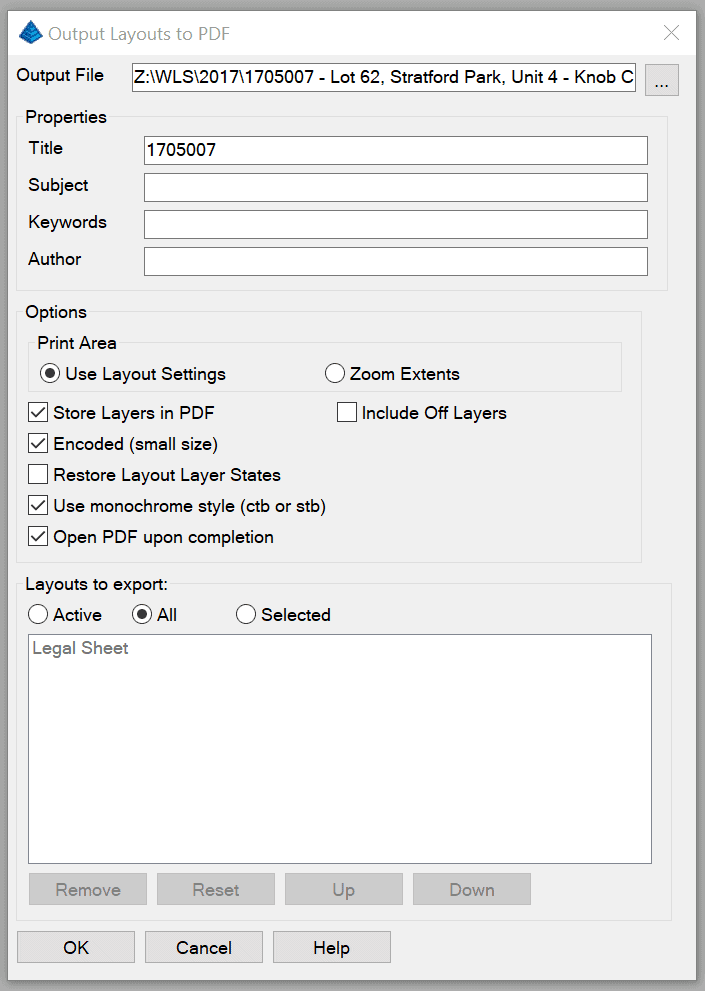
Pretty handy commands if you don't have a pdf writer that has a good CAD driver.
Posted : September 14, 2017 8:48 am
Page 1 / 2
Next