Reading RPLS is free for the whole profession. Members post, reply, and get the members-only rooms.


Notifications
Clear all

Topic starter
Translate
▼
English
Spanish
French
German
Italian
Portuguese
Russian
Chinese
Japanese
Korean
Arabic
Hindi
Dutch
Polish
Turkish
Vietnamese
Thai
Swedish
Danish
Finnish
Norwegian
Czech
Hungarian
Romanian
Greek
Hebrew
Indonesian
Malay
Ukrainian
Bulgarian
Croatian
Slovak
Slovenian
Serbian
Lithuanian
Latvian
Estonian
I am 90% into a drawing in Carlson CES and I get the message box
FATAL ERROR: Unhandled Access Violation Exception at 33a08034h
and the program closes.
Open drawing again and after a few minutes, the same happens......
Any suggestions
Posted : August 4, 2015 9:25 am

Translate
▼
English
Spanish
French
German
Italian
Portuguese
Russian
Chinese
Japanese
Korean
Arabic
Hindi
Dutch
Polish
Turkish
Vietnamese
Thai
Swedish
Danish
Finnish
Norwegian
Czech
Hungarian
Romanian
Greek
Hebrew
Indonesian
Malay
Ukrainian
Bulgarian
Croatian
Slovak
Slovenian
Serbian
Lithuanian
Latvian
Estonian
A Harris, post: 330378, member: 81 wrote: I am 90% into a drawing in Carlson CES and I get the message box
FATAL ERROR: Unhandled Access Violation Exception at 33a08034h
and the program closes.
Open drawing again and after a few minutes, the same happens......
Any suggestions
Try this:
Delete all of the *.AcDsGcCache files ihn the following directory:
C:Users*your user name*AppDataLocalAutodesk*your autocad product name*R##.#(your autocad version)enuGraphicsCache
Then try opening the file again.
Posted : August 4, 2015 10:04 am

Translate
▼
English
Spanish
French
German
Italian
Portuguese
Russian
Chinese
Japanese
Korean
Arabic
Hindi
Dutch
Polish
Turkish
Vietnamese
Thai
Swedish
Danish
Finnish
Norwegian
Czech
Hungarian
Romanian
Greek
Hebrew
Indonesian
Malay
Ukrainian
Bulgarian
Croatian
Slovak
Slovenian
Serbian
Lithuanian
Latvian
Estonian
If that fails, you might try inserting and exploding it onto a new drawing.
Posted : August 4, 2015 10:05 am

Translate
▼
English
Spanish
French
German
Italian
Portuguese
Russian
Chinese
Japanese
Korean
Arabic
Hindi
Dutch
Polish
Turkish
Vietnamese
Thai
Swedish
Danish
Finnish
Norwegian
Czech
Hungarian
Romanian
Greek
Hebrew
Indonesian
Malay
Ukrainian
Bulgarian
Croatian
Slovak
Slovenian
Serbian
Lithuanian
Latvian
Estonian
My first step is to audit the drawing. Errors in the drawing will cause all sorts of mayhem.
Posted : August 4, 2015 10:55 am

Translate
▼
English
Spanish
French
German
Italian
Portuguese
Russian
Chinese
Japanese
Korean
Arabic
Hindi
Dutch
Polish
Turkish
Vietnamese
Thai
Swedish
Danish
Finnish
Norwegian
Czech
Hungarian
Romanian
Greek
Hebrew
Indonesian
Malay
Ukrainian
Bulgarian
Croatian
Slovak
Slovenian
Serbian
Lithuanian
Latvian
Estonian
Audit, then purge, then if that still doesn't fix it, insert it as a block into a new drawing and explode. Hopefully that'll do the trick.
Posted : August 4, 2015 10:59 am

Translate
▼
English
Spanish
French
German
Italian
Portuguese
Russian
Chinese
Japanese
Korean
Arabic
Hindi
Dutch
Polish
Turkish
Vietnamese
Thai
Swedish
Danish
Finnish
Norwegian
Czech
Hungarian
Romanian
Greek
Hebrew
Indonesian
Malay
Ukrainian
Bulgarian
Croatian
Slovak
Slovenian
Serbian
Lithuanian
Latvian
Estonian
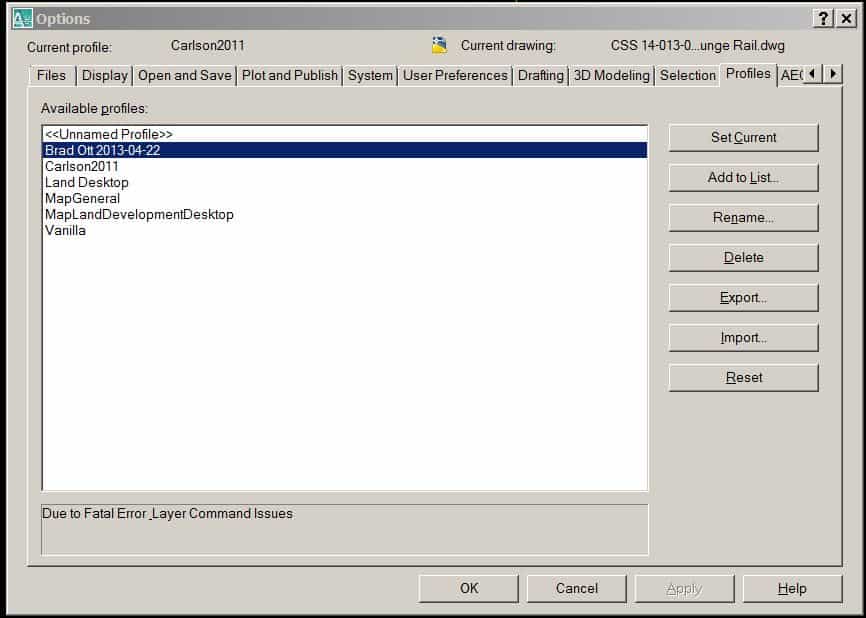
OPTIONS -->. PROFILES. -->. SET CURRENT
Play around with these settings, it is somehow related to layer dialogue box opening...?
Posted : August 4, 2015 11:00 am
Topic starter
Translate
▼
English
Spanish
French
German
Italian
Portuguese
Russian
Chinese
Japanese
Korean
Arabic
Hindi
Dutch
Polish
Turkish
Vietnamese
Thai
Swedish
Danish
Finnish
Norwegian
Czech
Hungarian
Romanian
Greek
Hebrew
Indonesian
Malay
Ukrainian
Bulgarian
Croatian
Slovak
Slovenian
Serbian
Lithuanian
Latvian
Estonian
Randy: I have run thru the files and can not find a path to get to any file of that name
Steven & Dan: I have audited the file and purged the file and no end to the error
J.T.: I have made a new drawing and inserted the original, exploded and soon the error would return
One thing that is happening to my computer the last few days is that a new Chrome window will open by itself while I am in the middle of some process. That happened while I was drawing and I believe that action has caused something to go wrong with my Carlson drawing and has made the error.
I am going to run superantispyware and a few others and try to find out that cause.
I have simply loaded a new drawing on another computer and am starting the drawing again.
These darn machines are going to drive me completely away from computers one day.....
Posted : August 4, 2015 5:53 pm

Translate
▼
English
Spanish
French
German
Italian
Portuguese
Russian
Chinese
Japanese
Korean
Arabic
Hindi
Dutch
Polish
Turkish
Vietnamese
Thai
Swedish
Danish
Finnish
Norwegian
Czech
Hungarian
Romanian
Greek
Hebrew
Indonesian
Malay
Ukrainian
Bulgarian
Croatian
Slovak
Slovenian
Serbian
Lithuanian
Latvian
Estonian
Not sure if you have already tried this, but try running the program as an administrator. Right click and open as admin. Not sure why some programs get a bug like you have, but I have a couple programs that require me to run as an admin to function properly or at least to fix whatever the problem is.
Posted : August 5, 2015 4:16 am
Topic starter
Translate
▼
English
Spanish
French
German
Italian
Portuguese
Russian
Chinese
Japanese
Korean
Arabic
Hindi
Dutch
Polish
Turkish
Vietnamese
Thai
Swedish
Danish
Finnish
Norwegian
Czech
Hungarian
Romanian
Greek
Hebrew
Indonesian
Malay
Ukrainian
Bulgarian
Croatian
Slovak
Slovenian
Serbian
Lithuanian
Latvian
Estonian
I erased all those drawings and began the drawing again on the same machine and the same kept happening
so
I went to another computer, opened an old drawing, deleted everything and started this drawing again.
Got to about 90% again and the same FATAL ERROR message again...........
I am at a complete loss
Posted : August 6, 2015 10:01 pm

Translate
▼
English
Spanish
French
German
Italian
Portuguese
Russian
Chinese
Japanese
Korean
Arabic
Hindi
Dutch
Polish
Turkish
Vietnamese
Thai
Swedish
Danish
Finnish
Norwegian
Czech
Hungarian
Romanian
Greek
Hebrew
Indonesian
Malay
Ukrainian
Bulgarian
Croatian
Slovak
Slovenian
Serbian
Lithuanian
Latvian
Estonian
Contact Carlson Support. They will help you.
I have never had an issue like this, but I had an issue with F2F not drawing lines, and they figured it out pretty quickly.
Posted : August 6, 2015 10:07 pm

Translate
▼
English
Spanish
French
German
Italian
Portuguese
Russian
Chinese
Japanese
Korean
Arabic
Hindi
Dutch
Polish
Turkish
Vietnamese
Thai
Swedish
Danish
Finnish
Norwegian
Czech
Hungarian
Romanian
Greek
Hebrew
Indonesian
Malay
Ukrainian
Bulgarian
Croatian
Slovak
Slovenian
Serbian
Lithuanian
Latvian
Estonian
A Harris, post: 330820, member: 81 wrote: I erased all those drawings and began the drawing again on the same machine and the same kept happening
so
I went to another computer, opened an old drawing, deleted everything and started this drawing again.Got to about 90% again and the same FATAL ERROR message again...........
I am at a complete loss
Feel free to send me the DWG at lnelsonATcarlsonswDOTcom and I'll see if I can figure out what is going on.
Posted : August 7, 2015 4:00 pm
Translate
▼
English
Spanish
French
German
Italian
Portuguese
Russian
Chinese
Japanese
Korean
Arabic
Hindi
Dutch
Polish
Turkish
Vietnamese
Thai
Swedish
Danish
Finnish
Norwegian
Czech
Hungarian
Romanian
Greek
Hebrew
Indonesian
Malay
Ukrainian
Bulgarian
Croatian
Slovak
Slovenian
Serbian
Lithuanian
Latvian
Estonian
Brad Ott, post: 330409, member: 197 wrote: OPTIONS -->. PROFILES. -->. SET CURRENT
Play around with these settings, it is somehow related to layer dialogue box opening...?
Posted : August 7, 2015 4:37 pm
Translate
▼
English
Spanish
French
German
Italian
Portuguese
Russian
Chinese
Japanese
Korean
Arabic
Hindi
Dutch
Polish
Turkish
Vietnamese
Thai
Swedish
Danish
Finnish
Norwegian
Czech
Hungarian
Romanian
Greek
Hebrew
Indonesian
Malay
Ukrainian
Bulgarian
Croatian
Slovak
Slovenian
Serbian
Lithuanian
Latvian
Estonian
Brad Ott, post: 330922, member: 197 wrote:
...like this here (it has helped me with the FATAL ERRORS that I have been getting...)
Posted : August 8, 2015 9:25 am