Reading RPLS is free for the whole profession. Members post, reply, and get the members-only rooms.


Notifications
Clear all

Topic starter
Translate
▼
English
Spanish
French
German
Italian
Portuguese
Russian
Chinese
Japanese
Korean
Arabic
Hindi
Dutch
Polish
Turkish
Vietnamese
Thai
Swedish
Danish
Finnish
Norwegian
Czech
Hungarian
Romanian
Greek
Hebrew
Indonesian
Malay
Ukrainian
Bulgarian
Croatian
Slovak
Slovenian
Serbian
Lithuanian
Latvian
Estonian
Good evening everyone,
I am working on a spreadsheet that will ultimately be used for attributes in a GIS database. I have a spreadsheet that has two existing columns that need to be combined into one single column. Column A is the deed book, and Column B is the page of the deed book. I have looked online, and not sure if there is a quick and easy way to combine the text from column B into Column A, and have the data represented as 202-241 for example. There are approximately 2400 rows that I need to combine into one single cell.
Here is a screenshot:
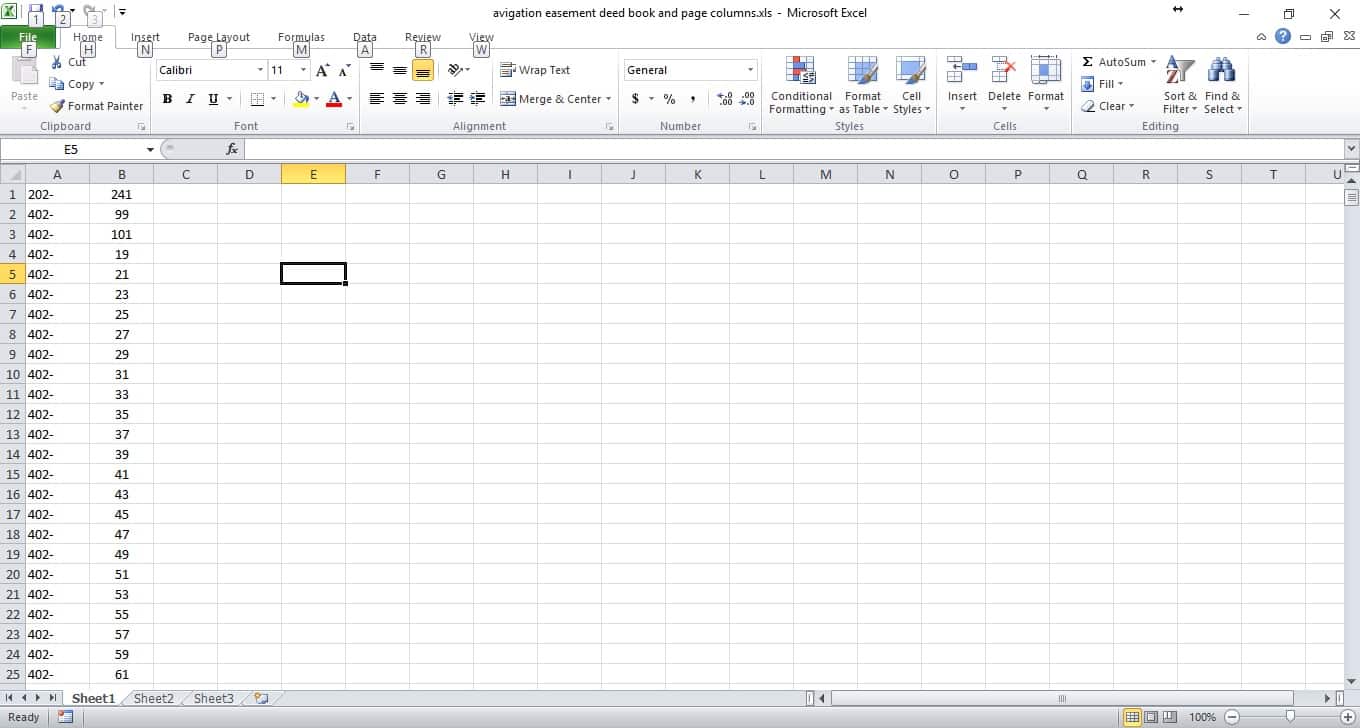
Thanks in advance,
Jimmy
Posted : May 30, 2017 10:07 pm

Translate
▼
English
Spanish
French
German
Italian
Portuguese
Russian
Chinese
Japanese
Korean
Arabic
Hindi
Dutch
Polish
Turkish
Vietnamese
Thai
Swedish
Danish
Finnish
Norwegian
Czech
Hungarian
Romanian
Greek
Hebrew
Indonesian
Malay
Ukrainian
Bulgarian
Croatian
Slovak
Slovenian
Serbian
Lithuanian
Latvian
Estonian
concatenate is your friend.
Posted : May 30, 2017 10:18 pm

Translate
▼
English
Spanish
French
German
Italian
Portuguese
Russian
Chinese
Japanese
Korean
Arabic
Hindi
Dutch
Polish
Turkish
Vietnamese
Thai
Swedish
Danish
Finnish
Norwegian
Czech
Hungarian
Romanian
Greek
Hebrew
Indonesian
Malay
Ukrainian
Bulgarian
Croatian
Slovak
Slovenian
Serbian
Lithuanian
Latvian
Estonian
postidparentid
Posted : May 30, 2017 11:28 pm

Translate
▼
English
Spanish
French
German
Italian
Portuguese
Russian
Chinese
Japanese
Korean
Arabic
Hindi
Dutch
Polish
Turkish
Vietnamese
Thai
Swedish
Danish
Finnish
Norwegian
Czech
Hungarian
Romanian
Greek
Hebrew
Indonesian
Malay
Ukrainian
Bulgarian
Croatian
Slovak
Slovenian
Serbian
Lithuanian
Latvian
Estonian
Then you may need to copy that to a new column as Values.
Otherwise each cell is a consequence of any changes to the other parent columns.
Copy. Paste Special. chose Values.
There maybe a way to strip that out by way of selecting the column. Can't remember and not near Excel
Posted : May 30, 2017 11:47 pm

Translate
▼
English
Spanish
French
German
Italian
Portuguese
Russian
Chinese
Japanese
Korean
Arabic
Hindi
Dutch
Polish
Turkish
Vietnamese
Thai
Swedish
Danish
Finnish
Norwegian
Czech
Hungarian
Romanian
Greek
Hebrew
Indonesian
Malay
Ukrainian
Bulgarian
Croatian
Slovak
Slovenian
Serbian
Lithuanian
Latvian
Estonian
You can merge the data into the new column by concatenation. For example go to cell C1 and input the formula =A1&B1 and then double-click the bottom right corner to paste the formula to all cells bellow C1. If you need only values you can then copy the new column and paste as special into an empty column and select values. I hope I am making sense...:(
Posted : May 31, 2017 12:31 am

Translate
▼
English
Spanish
French
German
Italian
Portuguese
Russian
Chinese
Japanese
Korean
Arabic
Hindi
Dutch
Polish
Turkish
Vietnamese
Thai
Swedish
Danish
Finnish
Norwegian
Czech
Hungarian
Romanian
Greek
Hebrew
Indonesian
Malay
Ukrainian
Bulgarian
Croatian
Slovak
Slovenian
Serbian
Lithuanian
Latvian
Estonian
Jimmy Cleveland, post: 430463, member: 91 wrote: Good evening everyone,
I am working on a spreadsheet that will ultimately be used for attributes in a GIS database. I have a spreadsheet that has two existing columns that need to be combined into one single column. Column A is the deed book, and Column B is the page of the deed book. I have looked online, and not sure if there is a quick and easy way to combine the text from column B into Column A, and have the data represented as 202-241 for example. There are approximately 2400 rows that I need to combine into one single cell.
Here is a screenshot:
Thanks in advance,
Jimmy
Do you need the data to truly be in a single cell, or just look like "202-241"? If the latter, Right Justify Column A and Left Justify Column B.
Posted : May 31, 2017 3:13 am
Translate
▼
English
Spanish
French
German
Italian
Portuguese
Russian
Chinese
Japanese
Korean
Arabic
Hindi
Dutch
Polish
Turkish
Vietnamese
Thai
Swedish
Danish
Finnish
Norwegian
Czech
Hungarian
Romanian
Greek
Hebrew
Indonesian
Malay
Ukrainian
Bulgarian
Croatian
Slovak
Slovenian
Serbian
Lithuanian
Latvian
Estonian
rfc, post: 430473, member: 8882 wrote: Do you need the data to truly be in a single cell, or just look like "202-241"? If the latter, Right Justify Column A and Left Justify Column B.
And of course, if you truly want the output in a single cell, as Edward Reading has suggested...:
The command would be:
=concatenate (A1,B1),
And finally, if the dash after the first numbers is not intended to be there...that is you have a real number for the book and a real number for the page...
=concatenate (A1 "-", B1).
Posted : May 31, 2017 3:50 am

Translate
▼
English
Spanish
French
German
Italian
Portuguese
Russian
Chinese
Japanese
Korean
Arabic
Hindi
Dutch
Polish
Turkish
Vietnamese
Thai
Swedish
Danish
Finnish
Norwegian
Czech
Hungarian
Romanian
Greek
Hebrew
Indonesian
Malay
Ukrainian
Bulgarian
Croatian
Slovak
Slovenian
Serbian
Lithuanian
Latvian
Estonian
=concatenate (A1,"-",B1)
don't forget the comma separators between text elements
the "-" isn't necessary since you have the dash in the fist number column so
=concatenate(A1,B1)
Posted : May 31, 2017 6:43 am
Translate
▼
English
Spanish
French
German
Italian
Portuguese
Russian
Chinese
Japanese
Korean
Arabic
Hindi
Dutch
Polish
Turkish
Vietnamese
Thai
Swedish
Danish
Finnish
Norwegian
Czech
Hungarian
Romanian
Greek
Hebrew
Indonesian
Malay
Ukrainian
Bulgarian
Croatian
Slovak
Slovenian
Serbian
Lithuanian
Latvian
Estonian
VA LS 2867, post: 430479, member: 1444 wrote: =concatenate (A1,"-",B1)
don't forget the comma separators between text elements
the "-" isn't necessary since you have the dash in the fist number column so
=concatenate(A1,B1)
Good catch! I left a comma out!
Posted : May 31, 2017 6:46 am
Topic starter
Translate
▼
English
Spanish
French
German
Italian
Portuguese
Russian
Chinese
Japanese
Korean
Arabic
Hindi
Dutch
Polish
Turkish
Vietnamese
Thai
Swedish
Danish
Finnish
Norwegian
Czech
Hungarian
Romanian
Greek
Hebrew
Indonesian
Malay
Ukrainian
Bulgarian
Croatian
Slovak
Slovenian
Serbian
Lithuanian
Latvian
Estonian
Thanks everyone, I just made a new column, and used the process outlined above in about 2 minutes. It saved me hours of work.
Unfortunately, I do need the numbers into a single cell, with the dash between. that is the norm around here for deed book 202 page 241.
Posted : May 31, 2017 8:52 am

Translate
▼
English
Spanish
French
German
Italian
Portuguese
Russian
Chinese
Japanese
Korean
Arabic
Hindi
Dutch
Polish
Turkish
Vietnamese
Thai
Swedish
Danish
Finnish
Norwegian
Czech
Hungarian
Romanian
Greek
Hebrew
Indonesian
Malay
Ukrainian
Bulgarian
Croatian
Slovak
Slovenian
Serbian
Lithuanian
Latvian
Estonian
I would have saved as a CSV, open with notepad, delete the commas, open with excel. Voila!
Posted : June 1, 2017 7:35 pm