Reading RPLS is free for the whole profession. Members post, reply, and get the members-only rooms.

Notifications
Clear all
Software, CAD & Mapping
69
Posts
23
Users
0
Reactions
2,856
Views

Topic starter
Translate
▼
English
Spanish
French
German
Italian
Portuguese
Russian
Chinese
Japanese
Korean
Arabic
Hindi
Dutch
Polish
Turkish
Vietnamese
Thai
Swedish
Danish
Finnish
Norwegian
Czech
Hungarian
Romanian
Greek
Hebrew
Indonesian
Malay
Ukrainian
Bulgarian
Croatian
Slovak
Slovenian
Serbian
Lithuanian
Latvian
Estonian
I've "re-calibrated" my expectation to develop a detailed topo map of our 25 acres, having completed a control network of about 50 stations, to starting with a more reasonable 1/2 acre section including a pond, several ditches leading into and out of it; a gravel drive, and a few other features that would be good to practice on.
The first thing I ran into, trying to place topo points appropriately was this:
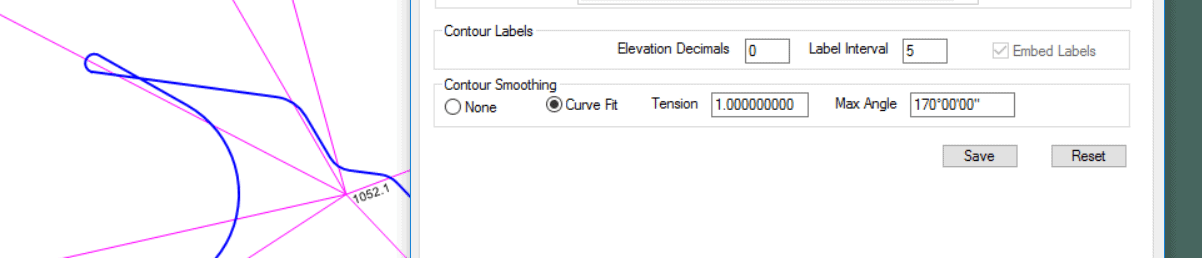
I suspected that this loop had to do with Contour Smoothing, and turned it off:
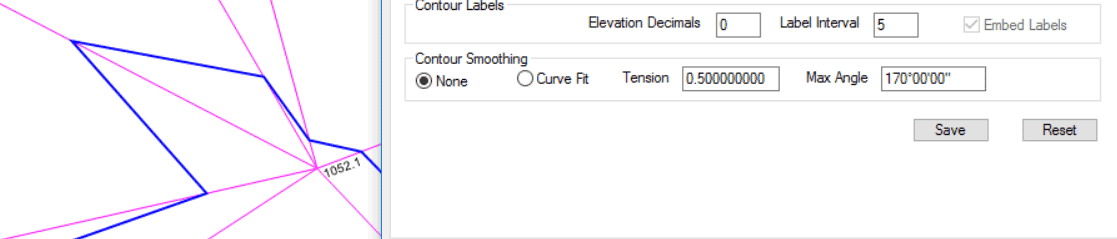
And sure enough, it went away. Is there any such similar setting in other programs to this smoothing option? Can anyone suggest what the heck the software (TPC) is doing? BTW, the Magenta lines are TIN lines.
Posted : August 23, 2017 2:31 pm

Translate
▼
English
Spanish
French
German
Italian
Portuguese
Russian
Chinese
Japanese
Korean
Arabic
Hindi
Dutch
Polish
Turkish
Vietnamese
Thai
Swedish
Danish
Finnish
Norwegian
Czech
Hungarian
Romanian
Greek
Hebrew
Indonesian
Malay
Ukrainian
Bulgarian
Croatian
Slovak
Slovenian
Serbian
Lithuanian
Latvian
Estonian
You have discovered one of the reasons I refuse to let software pretend to draw contour lines. It is easy to recognize sloppy firms who let stuff like that go out for the entire world to see. It devalues their reputation quickly. I would terminate or at least "re-educate" any draftsman working for me who couldn't notice such erroneous results.
Posted : August 23, 2017 2:39 pm

Translate
▼
English
Spanish
French
German
Italian
Portuguese
Russian
Chinese
Japanese
Korean
Arabic
Hindi
Dutch
Polish
Turkish
Vietnamese
Thai
Swedish
Danish
Finnish
Norwegian
Czech
Hungarian
Romanian
Greek
Hebrew
Indonesian
Malay
Ukrainian
Bulgarian
Croatian
Slovak
Slovenian
Serbian
Lithuanian
Latvian
Estonian
What happens if you use .75 for the tension?
Posted : August 23, 2017 2:49 pm

Translate
▼
English
Spanish
French
German
Italian
Portuguese
Russian
Chinese
Japanese
Korean
Arabic
Hindi
Dutch
Polish
Turkish
Vietnamese
Thai
Swedish
Danish
Finnish
Norwegian
Czech
Hungarian
Romanian
Greek
Hebrew
Indonesian
Malay
Ukrainian
Bulgarian
Croatian
Slovak
Slovenian
Serbian
Lithuanian
Latvian
Estonian
I rarely, if ever, "smooth" contours... If you want "smooth" contours give me a blank check and will start on a ?ñ1' interval topo survey.
Posted : August 23, 2017 3:18 pm

Translate
▼
English
Spanish
French
German
Italian
Portuguese
Russian
Chinese
Japanese
Korean
Arabic
Hindi
Dutch
Polish
Turkish
Vietnamese
Thai
Swedish
Danish
Finnish
Norwegian
Czech
Hungarian
Romanian
Greek
Hebrew
Indonesian
Malay
Ukrainian
Bulgarian
Croatian
Slovak
Slovenian
Serbian
Lithuanian
Latvian
Estonian
Jim in AZ, post: 442780, member: 249 wrote: I rarely, if ever, "smooth" contours...
Smoothing contours is akin to putting lipstick on a pig.
Posted : August 23, 2017 3:27 pm

Translate
▼
English
Spanish
French
German
Italian
Portuguese
Russian
Chinese
Japanese
Korean
Arabic
Hindi
Dutch
Polish
Turkish
Vietnamese
Thai
Swedish
Danish
Finnish
Norwegian
Czech
Hungarian
Romanian
Greek
Hebrew
Indonesian
Malay
Ukrainian
Bulgarian
Croatian
Slovak
Slovenian
Serbian
Lithuanian
Latvian
Estonian
Contours can cross at an overhanging cliff or a cave entrance.
Posted : August 23, 2017 3:39 pm
Topic starter
Translate
▼
English
Spanish
French
German
Italian
Portuguese
Russian
Chinese
Japanese
Korean
Arabic
Hindi
Dutch
Polish
Turkish
Vietnamese
Thai
Swedish
Danish
Finnish
Norwegian
Czech
Hungarian
Romanian
Greek
Hebrew
Indonesian
Malay
Ukrainian
Bulgarian
Croatian
Slovak
Slovenian
Serbian
Lithuanian
Latvian
Estonian
Dave Lindell, post: 442784, member: 55 wrote: Contours can cross at an overhanging cliff or a cave entrance.
Yes, but if I'm not mistaken, they go dotted as they cross, i.e. the lower elevation goes dotted as it passes beneath the higher overhang. Isn't that correct?
Posted : August 23, 2017 3:57 pm
Topic starter
Translate
▼
English
Spanish
French
German
Italian
Portuguese
Russian
Chinese
Japanese
Korean
Arabic
Hindi
Dutch
Polish
Turkish
Vietnamese
Thai
Swedish
Danish
Finnish
Norwegian
Czech
Hungarian
Romanian
Greek
Hebrew
Indonesian
Malay
Ukrainian
Bulgarian
Croatian
Slovak
Slovenian
Serbian
Lithuanian
Latvian
Estonian
lmbrls, post: 442774, member: 6823 wrote: What happens if you use .75 for the tension?
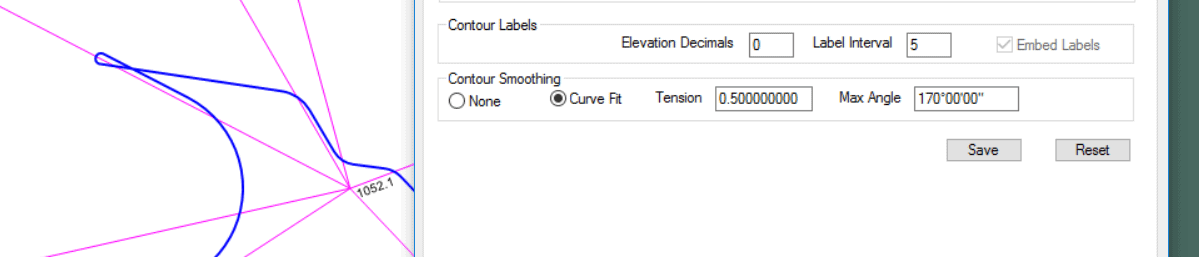
The size of the loop changes, then, below .5 (around .4), it "untwists" and the radius gets smaller and smaller.
Here's .5:
And .3:

And .1:
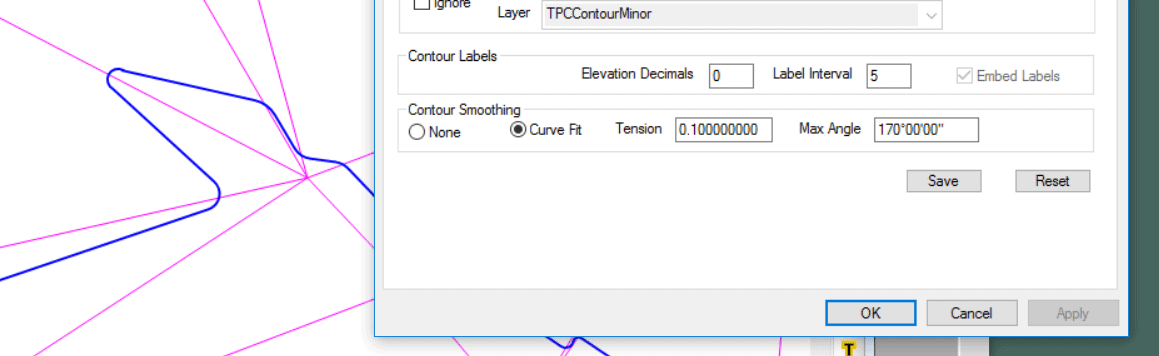
Posted : August 23, 2017 4:07 pm

Translate
▼
English
Spanish
French
German
Italian
Portuguese
Russian
Chinese
Japanese
Korean
Arabic
Hindi
Dutch
Polish
Turkish
Vietnamese
Thai
Swedish
Danish
Finnish
Norwegian
Czech
Hungarian
Romanian
Greek
Hebrew
Indonesian
Malay
Ukrainian
Bulgarian
Croatian
Slovak
Slovenian
Serbian
Lithuanian
Latvian
Estonian
That data does not look accurate to me, but I can't see enough to be sure.
Here is a good line of thought to use when reviewing a TIN....if your contours are radically changing direction and you don't have break lines to define those specific terrain features, you probably didn't collect enough measurements and the contours probably do not accurately reflect the actual terrain.
Those skinny triangles give it away. If it's really flat - it all goes out the window.
I will bet if you fix your field data, those smoothing settings will no longer be a problem for you.
Posted : August 23, 2017 4:08 pm
Topic starter
Translate
▼
English
Spanish
French
German
Italian
Portuguese
Russian
Chinese
Japanese
Korean
Arabic
Hindi
Dutch
Polish
Turkish
Vietnamese
Thai
Swedish
Danish
Finnish
Norwegian
Czech
Hungarian
Romanian
Greek
Hebrew
Indonesian
Malay
Ukrainian
Bulgarian
Croatian
Slovak
Slovenian
Serbian
Lithuanian
Latvian
Estonian
Mark Mayer, post: 442782, member: 424 wrote: Smoothing contours is akin to putting lipstick on a pig.
I agree in principle, but you have to admit, the hand drawn USGS quads are just magnificent. They're truly works of art in my opinion.
Computer generated, algorithm based "smoothing" just can't touch them.
Posted : August 23, 2017 4:09 pm
Topic starter
Translate
▼
English
Spanish
French
German
Italian
Portuguese
Russian
Chinese
Japanese
Korean
Arabic
Hindi
Dutch
Polish
Turkish
Vietnamese
Thai
Swedish
Danish
Finnish
Norwegian
Czech
Hungarian
Romanian
Greek
Hebrew
Indonesian
Malay
Ukrainian
Bulgarian
Croatian
Slovak
Slovenian
Serbian
Lithuanian
Latvian
Estonian
imaudigger, post: 442793, member: 7286 wrote: That data does not look accurate to me, but I can't see enough to be sure.
Here is a good line of thought to use when reviewing a TIN....if your contours are radically changing direction and you don't have break lines to define those specific terrain features, you probably didn't collect enough measurements and the contours probably do not accurately reflect the actual terrain.
Those skinny triangles give it away. If it's really flat - it all goes out the window.I will bet if you fix your field data, those smoothing settings will no longer be a problem for you.
I was going to start a separate thread on just that...I'm trying to treat the area just to the west of the little squiggle properly. 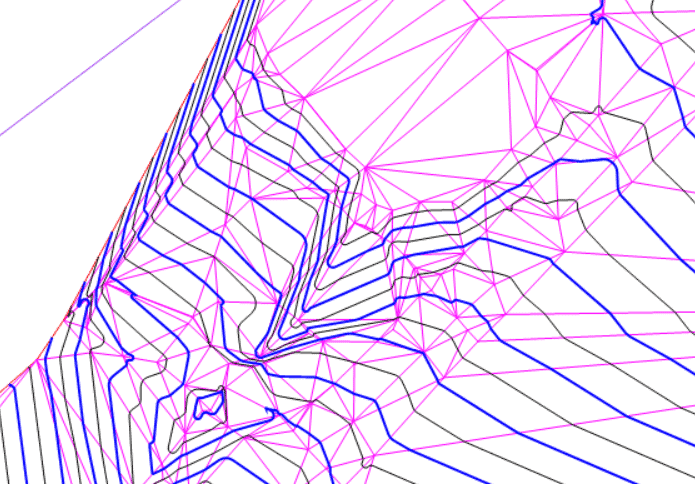
The feature is a path that crosses the ditch trending Northeast into the pond. There's a culvert running under it, just Northeast of the small closed contour.
I think I need a breakline to treat the inlet of the culvert, but it's not an abutment with wing walls...just a steep slope. I'm not even sure how to show a culvert on a topo (other than with dotted lines), but that's for future research. Right now, I'm just trying to get the contours to look approximately correct, lol. First rodeo doing this stuff. Btw, the Primary contours are 2'; the secondary are 1'.
I will check my field notes though on the point at the errant squiggle...I've already found several instances where I left the HR in the data collector at the wrong height. The plot looked like something out of Max Escher's greatest works of art.:eek:
Posted : August 23, 2017 4:23 pm
Translate
▼
English
Spanish
French
German
Italian
Portuguese
Russian
Chinese
Japanese
Korean
Arabic
Hindi
Dutch
Polish
Turkish
Vietnamese
Thai
Swedish
Danish
Finnish
Norwegian
Czech
Hungarian
Romanian
Greek
Hebrew
Indonesian
Malay
Ukrainian
Bulgarian
Croatian
Slovak
Slovenian
Serbian
Lithuanian
Latvian
Estonian
Can you highlight your breaklines and post that picture again?
Posted : August 23, 2017 4:39 pm
Translate
▼
English
Spanish
French
German
Italian
Portuguese
Russian
Chinese
Japanese
Korean
Arabic
Hindi
Dutch
Polish
Turkish
Vietnamese
Thai
Swedish
Danish
Finnish
Norwegian
Czech
Hungarian
Romanian
Greek
Hebrew
Indonesian
Malay
Ukrainian
Bulgarian
Croatian
Slovak
Slovenian
Serbian
Lithuanian
Latvian
Estonian
rfc, post: 442794, member: 8882 wrote: I agree in principle, but you have to admit, the hand drawn USGS quads are just magnificent. They're truly works of art in my opinion.
Computer generated, algorithm based "smoothing" just can't touch them.
When the contours only have to be accurate to within 30', you have a fairly large artistic budget to work with.
Posted : August 23, 2017 4:41 pm
Topic starter
Translate
▼
English
Spanish
French
German
Italian
Portuguese
Russian
Chinese
Japanese
Korean
Arabic
Hindi
Dutch
Polish
Turkish
Vietnamese
Thai
Swedish
Danish
Finnish
Norwegian
Czech
Hungarian
Romanian
Greek
Hebrew
Indonesian
Malay
Ukrainian
Bulgarian
Croatian
Slovak
Slovenian
Serbian
Lithuanian
Latvian
Estonian
imaudigger, post: 442801, member: 7286 wrote: Can you highlight your breaklines and post that picture again?
I have none in there at the moment. I had such a screwed up mess, I took them all out. I probably just need a gazillion more shots. Visualization would probably be enhanced if I drew in the driveway (you can see the outline of it to the east of the ditch, running NE/SW). I did manage to capture a bit of crown in it though.
Posted : August 23, 2017 4:46 pm
Translate
▼
English
Spanish
French
German
Italian
Portuguese
Russian
Chinese
Japanese
Korean
Arabic
Hindi
Dutch
Polish
Turkish
Vietnamese
Thai
Swedish
Danish
Finnish
Norwegian
Czech
Hungarian
Romanian
Greek
Hebrew
Indonesian
Malay
Ukrainian
Bulgarian
Croatian
Slovak
Slovenian
Serbian
Lithuanian
Latvian
Estonian
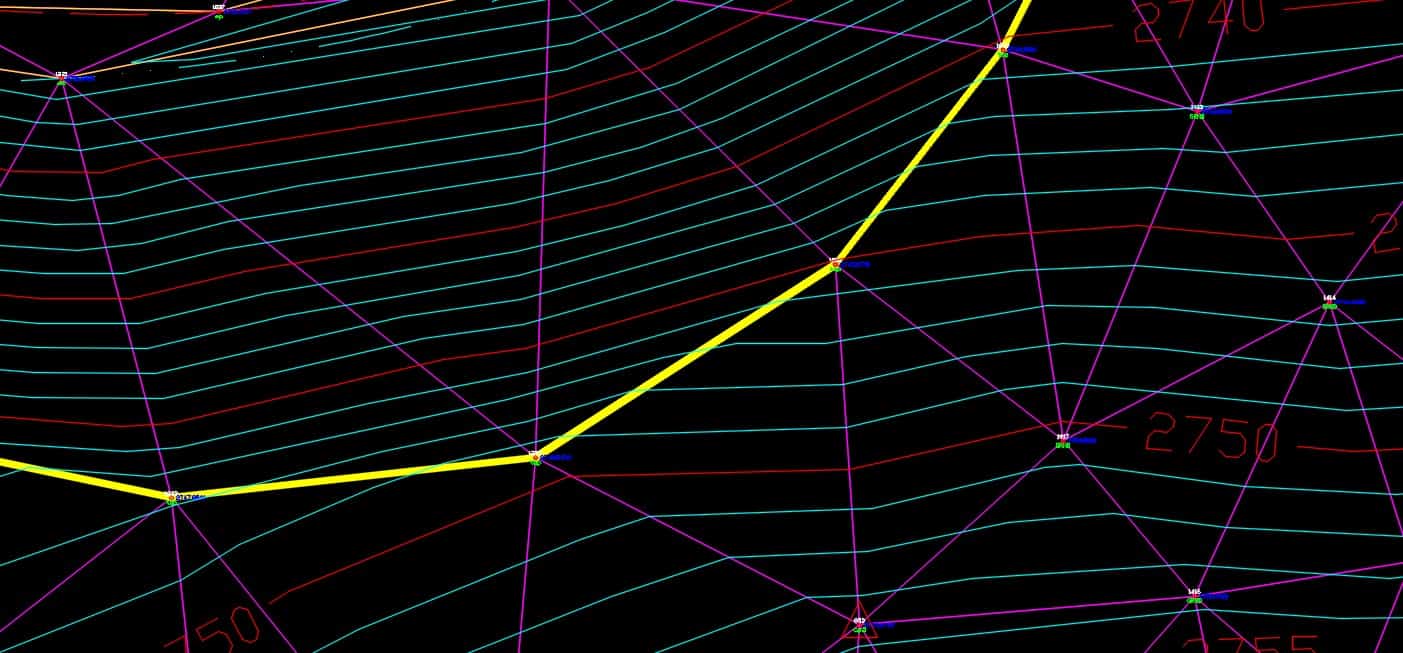
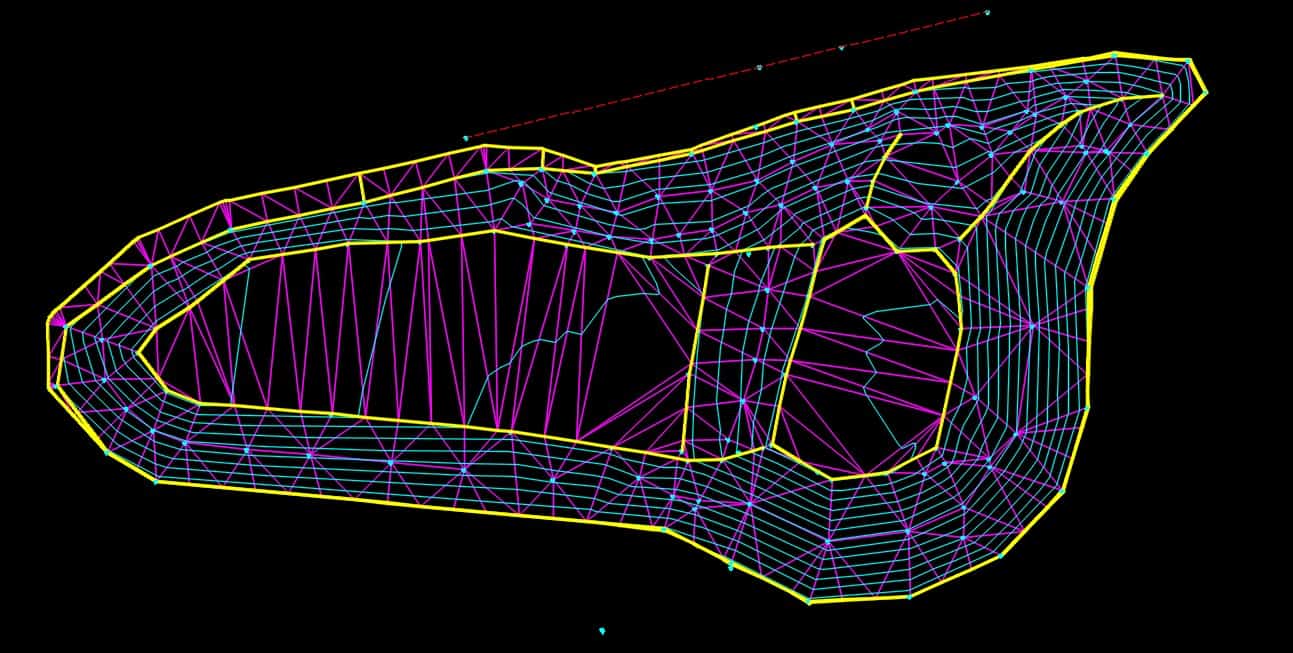
Here is an example of what I'm talking about. In the picture below, the contours change direction at my break line (yellow). That is accurate. Triangles are more equilateral than long and skinny.
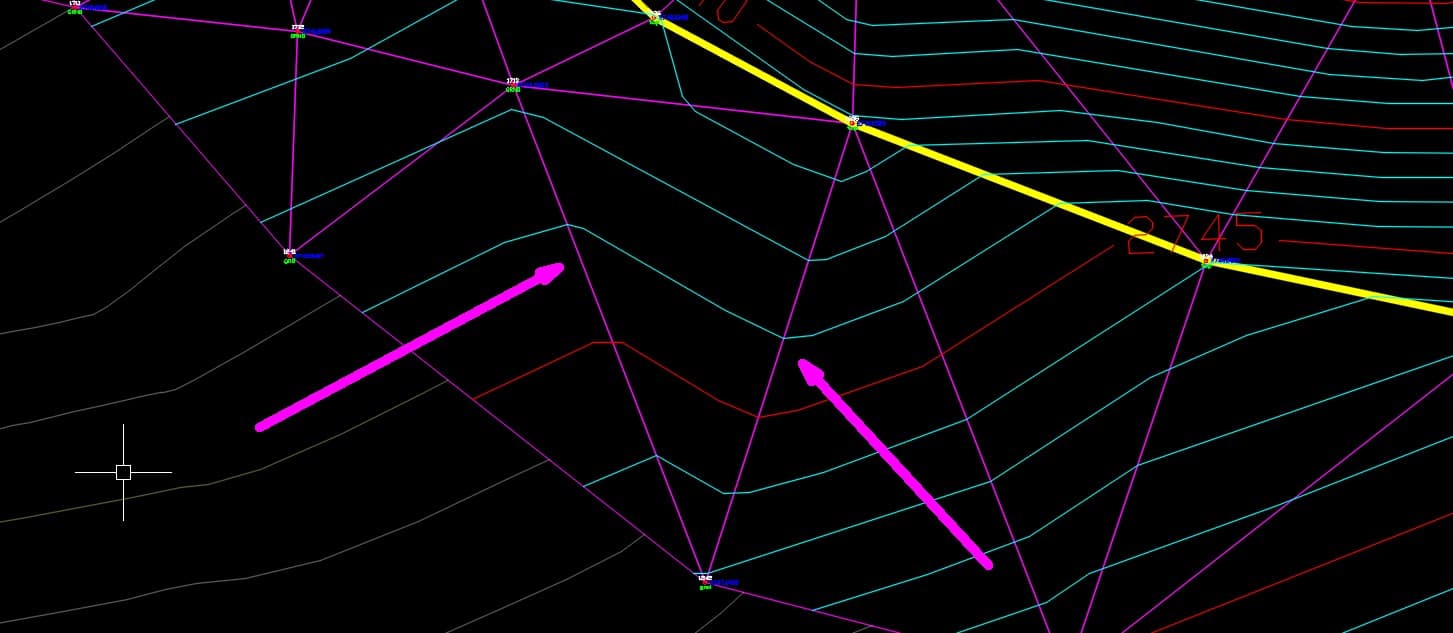
In the screen shot below, I don't have a lot of confidence in the contours by the pink arrows. The contours are changing direction with no break lines to define the terrain feature. The terrain is changing there, but I'm missing a couple more shots to show it.
Posted : August 23, 2017 4:49 pm
Topic starter
Translate
▼
English
Spanish
French
German
Italian
Portuguese
Russian
Chinese
Japanese
Korean
Arabic
Hindi
Dutch
Polish
Turkish
Vietnamese
Thai
Swedish
Danish
Finnish
Norwegian
Czech
Hungarian
Romanian
Greek
Hebrew
Indonesian
Malay
Ukrainian
Bulgarian
Croatian
Slovak
Slovenian
Serbian
Lithuanian
Latvian
Estonian
imaudigger, post: 442806, member: 7286 wrote: Here is an example of what I'm talking about. In the picture below, the contours change direction at my break line (yellow). That is accurate. Triangles are more equilateral than long and skinny.
imaudigger, thank you for that. Are you suggesting that, in general, equilateral triangles between points, will produce better results? For example, I've got several really skinny triangles right on the pathway across the culvert:
: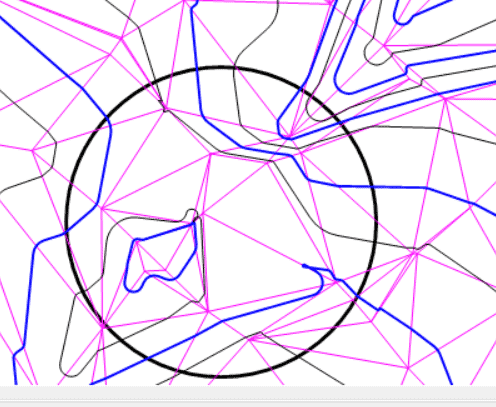
If certain points are causing skinny Tin Triangles, should I remove them and shoot others that will achieve more equilateral shapes? In this case, it'd be a several feet further to the east.
Posted : August 23, 2017 5:10 pm
Translate
▼
English
Spanish
French
German
Italian
Portuguese
Russian
Chinese
Japanese
Korean
Arabic
Hindi
Dutch
Polish
Turkish
Vietnamese
Thai
Swedish
Danish
Finnish
Norwegian
Czech
Hungarian
Romanian
Greek
Hebrew
Indonesian
Malay
Ukrainian
Bulgarian
Croatian
Slovak
Slovenian
Serbian
Lithuanian
Latvian
Estonian
rfc, post: 442805, member: 8882 wrote: I have none in there at the moment. I had such a screwed up mess, I took them all out. I probably just need a gazillion more shots. Visualization would probably be enhanced if I drew in the driveway (you can see the outline of it to the east of the ditch, running NE/SW). I did manage to capture a bit of crown in it though.
You would need a ton of shots if you were not to use break lines.
Break lines are a tool to better approximate the surface without gathering a ton of shots.
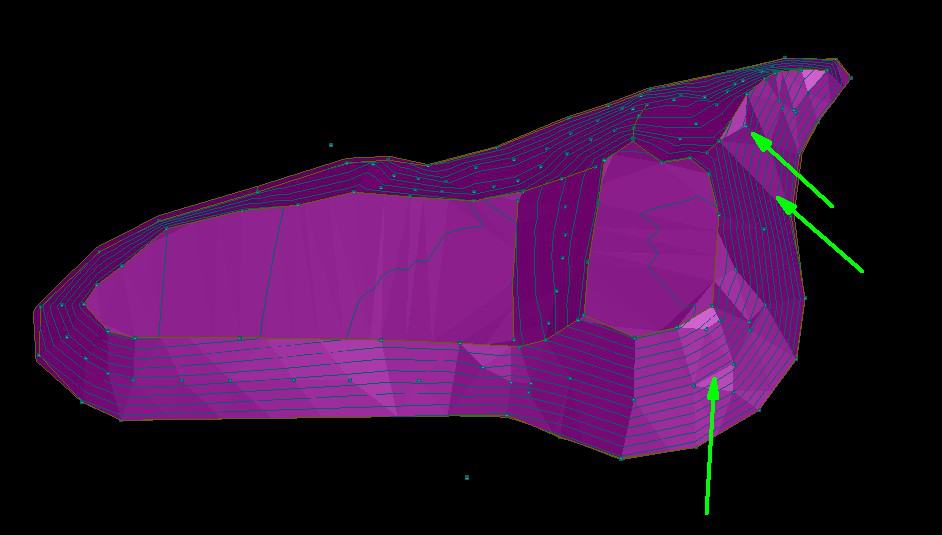
Here is a pretty basic use of break lines. Notice when the terrain gets flat, the contours start doing weird things.
I could have used more data in this terrain model, but the purpose of the survey was to estimate some rough quantities.
It is very difficult to create a perfect model when mapping dirt,
I can pick out problems with this model...
Bottom arrow - missing a shot.
Middle arrow - missing several shots or a breakline (in this case a couple shots).
Top arrow - missing data left and right of that shot.
That was about 250 shots for a .8 acre pile of gravel. 25 more shots in the right spots would have helped tremendously but was more effort than the project warranted.
Posted : August 23, 2017 5:13 pm
Translate
▼
English
Spanish
French
German
Italian
Portuguese
Russian
Chinese
Japanese
Korean
Arabic
Hindi
Dutch
Polish
Turkish
Vietnamese
Thai
Swedish
Danish
Finnish
Norwegian
Czech
Hungarian
Romanian
Greek
Hebrew
Indonesian
Malay
Ukrainian
Bulgarian
Croatian
Slovak
Slovenian
Serbian
Lithuanian
Latvian
Estonian
A long skinny triangle is just showing you that you are projecting a long way between shots. That's fine as long as there isn't any relief happening in between and the contours are not changing direction because of a projected elevation. So I don't like the long skinny triangles on the flat top of the pile. I would rather have a couple shots up the middle (which would create better shaped triangles). However my contours are not changing direction along those skinny triangles like it is where the middle arrow is in the picture above.
Posted : August 23, 2017 5:26 pm

Translate
▼
English
Spanish
French
German
Italian
Portuguese
Russian
Chinese
Japanese
Korean
Arabic
Hindi
Dutch
Polish
Turkish
Vietnamese
Thai
Swedish
Danish
Finnish
Norwegian
Czech
Hungarian
Romanian
Greek
Hebrew
Indonesian
Malay
Ukrainian
Bulgarian
Croatian
Slovak
Slovenian
Serbian
Lithuanian
Latvian
Estonian
Yo flipface! Or swap tin edge or whatever your software calls it.
Posted : August 23, 2017 5:29 pm
Translate
▼
English
Spanish
French
German
Italian
Portuguese
Russian
Chinese
Japanese
Korean
Arabic
Hindi
Dutch
Polish
Turkish
Vietnamese
Thai
Swedish
Danish
Finnish
Norwegian
Czech
Hungarian
Romanian
Greek
Hebrew
Indonesian
Malay
Ukrainian
Bulgarian
Croatian
Slovak
Slovenian
Serbian
Lithuanian
Latvian
Estonian
spledeus, post: 442811, member: 3579 wrote: Yo flipface! Or swap tin edge or whatever your software calls it.
I have done that in the past when I just don't want to go back out and get a few missing shots.
I'd much rather have enough data to know it's right over flipping triangles to try and make it look right. A hole in the data is still a hole, no matter which way the triangles are flipped around.
Posted : August 23, 2017 5:44 pm
Page 1 / 4
Next