Reading RPLS is free for the whole profession. Members post, reply, and get the members-only rooms.


Notifications
Clear all

Topic starter
Translate
▼
English
Spanish
French
German
Italian
Portuguese
Russian
Chinese
Japanese
Korean
Arabic
Hindi
Dutch
Polish
Turkish
Vietnamese
Thai
Swedish
Danish
Finnish
Norwegian
Czech
Hungarian
Romanian
Greek
Hebrew
Indonesian
Malay
Ukrainian
Bulgarian
Croatian
Slovak
Slovenian
Serbian
Lithuanian
Latvian
Estonian
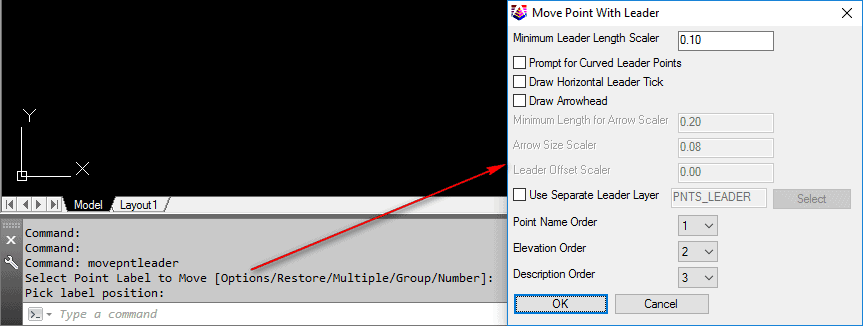
- We have CS 2017 OEM. Can anyone tell me how to control the "leaders" associated when we pull point attributes away from the point? Can we set which layer they go in?
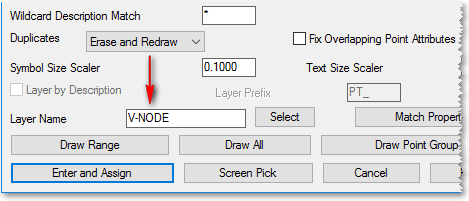
- Can we set with layers non coded points go in?
- May be more of a AutoCAD question, but how do we turn off the automatic creation of the "drawing 1"?
- In the 2017 version it seems the points attributes are blocked together. Where is the toggle to control that?
Thanks
Posted : March 8, 2017 7:44 am

Translate
▼
English
Spanish
French
German
Italian
Portuguese
Russian
Chinese
Japanese
Korean
Arabic
Hindi
Dutch
Polish
Turkish
Vietnamese
Thai
Swedish
Danish
Finnish
Norwegian
Czech
Hungarian
Romanian
Greek
Hebrew
Indonesian
Malay
Ukrainian
Bulgarian
Croatian
Slovak
Slovenian
Serbian
Lithuanian
Latvian
Estonian
1. I think the leader goes on the layer the points are on. It is doing it that way in my 2016 OEM.
2. Field to Finish can fix that for you. I think you can set up a default layer in the Draw Locate points dialog box. That is where I set most of my settings. I think you can also set up parameters in the Point Defaults menu.
3. I saw this option on this forum a few days ago.
4. Not sure.
Posted : March 8, 2017 9:19 am

Translate
▼
English
Spanish
French
German
Italian
Portuguese
Russian
Chinese
Japanese
Korean
Arabic
Hindi
Dutch
Polish
Turkish
Vietnamese
Thai
Swedish
Danish
Finnish
Norwegian
Czech
Hungarian
Romanian
Greek
Hebrew
Indonesian
Malay
Ukrainian
Bulgarian
Croatian
Slovak
Slovenian
Serbian
Lithuanian
Latvian
Estonian
Have you sent these questions to Carlson support? They have been quick to respond to my questions, although after I end up having to do a little digging and experimenting on my own to have the result i am looking for.
Posted : March 8, 2017 9:25 am

Translate
▼
English
Spanish
French
German
Italian
Portuguese
Russian
Chinese
Japanese
Korean
Arabic
Hindi
Dutch
Polish
Turkish
Vietnamese
Thai
Swedish
Danish
Finnish
Norwegian
Czech
Hungarian
Romanian
Greek
Hebrew
Indonesian
Malay
Ukrainian
Bulgarian
Croatian
Slovak
Slovenian
Serbian
Lithuanian
Latvian
Estonian
FLS, post: 417452, member: 647 wrote:
- We have CS 2017 OEM. Can anyone tell me how to control the "leaders" associated when we pull point attributes away from the point? Can we set which layer they go in?
- Can we set with layers non coded points go in?
- May be more of a AutoCAD question, but how do we turn off the automatic creation of the "drawing 1"?
- In the 2017 version it seems the points attributes are blocked together. Where is the toggle to control that?
Thanks
- Some leader control can be established through the Options portion of the Move Point Attributes with Leader command:
- Depending on how you're placing "non-coded" points, you might explore the layer control found within Draw-Locate Points:
- To my knowledge, there isn't a way to suppress the automatic creation of "Drawing1.dwg" with the OEM-based product. Like most Windows-based "document" applications, they typically start with an empty document of some type so you can get right to work without having to issue File -- New or File -- Open.
- Depending on what you're referring to with the "attributes are blocked together" statement, you'll probably want to look at your current Field Code Library (Survey -- Edit Field-to-Finish Codes) and determine the setting for the Attribute Format:
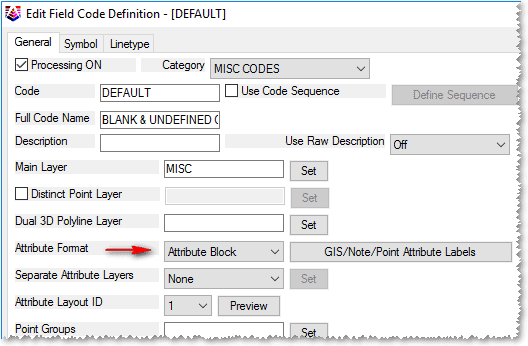
I hope this information helps.
Posted : March 8, 2017 3:03 pm
Topic starter
Translate
▼
English
Spanish
French
German
Italian
Portuguese
Russian
Chinese
Japanese
Korean
Arabic
Hindi
Dutch
Polish
Turkish
Vietnamese
Thai
Swedish
Danish
Finnish
Norwegian
Czech
Hungarian
Romanian
Greek
Hebrew
Indonesian
Malay
Ukrainian
Bulgarian
Croatian
Slovak
Slovenian
Serbian
Lithuanian
Latvian
Estonian
Thank you very much!!! You would think after being with Carlson since Point Cad, I'd have these routines down. Might be a retention issue...
Posted : March 9, 2017 7:12 am

Translate
▼
English
Spanish
French
German
Italian
Portuguese
Russian
Chinese
Japanese
Korean
Arabic
Hindi
Dutch
Polish
Turkish
Vietnamese
Thai
Swedish
Danish
Finnish
Norwegian
Czech
Hungarian
Romanian
Greek
Hebrew
Indonesian
Malay
Ukrainian
Bulgarian
Croatian
Slovak
Slovenian
Serbian
Lithuanian
Latvian
Estonian
4. Control-shift A
Sent from my SAMSUNG-SM-N920A using Tapatalk
Posted : March 9, 2017 10:41 pm