Reading RPLS is free for the whole profession. Members post, reply, and get the members-only rooms.

Notifications
Clear all
Software, CAD & Mapping
24
Posts
11
Users
0
Reactions
1,635
Views

Topic starter
Translate
▼
English
Spanish
French
German
Italian
Portuguese
Russian
Chinese
Japanese
Korean
Arabic
Hindi
Dutch
Polish
Turkish
Vietnamese
Thai
Swedish
Danish
Finnish
Norwegian
Czech
Hungarian
Romanian
Greek
Hebrew
Indonesian
Malay
Ukrainian
Bulgarian
Croatian
Slovak
Slovenian
Serbian
Lithuanian
Latvian
Estonian
I'm a Carlson user, but our drafter uses C3D. I ask her about moving some labels away from a fence line and she started in with something about it not being possible, having to change styles, etc, and that it's too difficult to do, and I'm in the stone-age using Carlson. Stuff like that.
So, having left LDD years ago, I'm not up on C3D, but is this true? In Carlson, I label, by line or point to point, and the labels are text, and I can move them and the arrow wherever I like, if needed.
Also, I'm getting a lot of push-back about her use of labels that change when a line length changes. I'm telling her that I don't want them to be dynamic, and I don't want something changing on its own, especially after I've checked a draft. I don't want to have to re-check distances that I've already checked and verified. She said that the only way to do that is to type the text and not use auto-labeling. Again, is this true, or is she not aware, or just trying to put something past me, not wanting to "dumb" things down for the guy using what she thinks is old, crappy, software?
Posted : December 9, 2015 9:42 am

Translate
▼
English
Spanish
French
German
Italian
Portuguese
Russian
Chinese
Japanese
Korean
Arabic
Hindi
Dutch
Polish
Turkish
Vietnamese
Thai
Swedish
Danish
Finnish
Norwegian
Czech
Hungarian
Romanian
Greek
Hebrew
Indonesian
Malay
Ukrainian
Bulgarian
Croatian
Slovak
Slovenian
Serbian
Lithuanian
Latvian
Estonian
I'll be watching this one. It is a pain to do in C3D. I often explode the label to avoid making another style but that kind of does away with everything that make the smart labels good.
Gregg
Posted : December 9, 2015 9:45 am

Translate
▼
English
Spanish
French
German
Italian
Portuguese
Russian
Chinese
Japanese
Korean
Arabic
Hindi
Dutch
Polish
Turkish
Vietnamese
Thai
Swedish
Danish
Finnish
Norwegian
Czech
Hungarian
Romanian
Greek
Hebrew
Indonesian
Malay
Ukrainian
Bulgarian
Croatian
Slovak
Slovenian
Serbian
Lithuanian
Latvian
Estonian
It is a pain to correctly set up your label styles. I recently spent about a day re-doing all of our survey, Line and Curve Label Styles. Once you have them setup, it is very easy to switch between them. If you switch your label's anchor point to label location instead of middle, you can slide it around.
If you annotate by placing a label between two points, instead of the actual entity, then the label is not dynamic to the line.
Just curious why a line length is changing after you annotate it??
We explode our deed comp labels, but try not to explode anything else.
Below are the 73 we came up with:
LINE
Survey-B Only Above SHA (00.0")
Survey-B&D Above
Survey-B&D Above (Mask)
Survey-B&D Above w-CorSym
Survey-B&D Above w-CorSym (Mask)
Survey-B&D Below
Survey-B&D Below (Mask)
Survey-B&D Below w-CorSym
Survey-B&D Below w-CorSym (Mask)
Survey-B&D Stacked Above
Survey-B&D Stacked Above (Mask)
Survey-B&D Stacked Above w-CorSym
Survey-B&D Stacked Above w-CorSym (Mask)
Survey-B&D Stacked On Line
Survey-B&D Stacked On Line (Mask)
Survey-B&D Stacked On Line w-CorSym
Survey-B&D Stacked On Line w-CorSym (Mask)
Survey-CorSym
Survey-CorSym [Half Size Dots]
Survey-Crew's Feet Above
Survey-Crew's Feet Above [Half Size]
Survey-D Only Above
Survey-D Only Above (Mask)
Survey-D Only Above w-CorSym
Survey-D Only Above w-CorSym (Mask)
Survey-D Only Rotated 90å¡
Survey-D Only Rotated 90å¡ (Mask)
Survey-D Only Rotated 90å¡ w- Leader
Survey-D Only Rotated 90å¡ w- Leader (Mask)
Survey-Perches B&D Perches & Feet (CCW Scaled)
Survey-Perches B&D Perches & Feet (CW Scaled)
Survey-Perches B&D Perches (CCW To Be Scaled)
Survey-Perches B&D Perches (CW To Be Scaled)
Survey-TAG-L# Above (Mask)
Survey-TAG-L# Above (Mask)
Survey-TAG-L# Above w-CorSym (Mask)
Survey-TAG-Number Above Circle
Survey-TAG-Number Above Circle w-CorSym
Survey-TAG-Perpendicular Leader
Survey-TIE-B&D Above
Survey-TIE-B&D Above (Mask)
Survey-TIE-B&D Stacked Above
Survey-TIE-B&D Stacked Above (Mask)
Survey-TIE-B&D Stacked On Line Rotated 90å¡
Survey-TIE-B&D Stacked On Line Rotated 90å¡ (Mask)
Survey-TIE-Crew's Feet Above
Survey-TIE-Crew's Feet Above [Half Size]
Survey-TIE-D Only
Survey-TIE-D Only (Mask)
Survey-Wall Check Distance
Survey-Wall Check Distance (Mask)
CURVE
Survey-CorSym
Survey-CorSym [Half Size DOTS]
Survey-Length Only Above
Survey-Length Only Above (Mask)
Survey-Length Only Above [Curved]
Survey-Length Only Below
Survey-Length Only Below (Mask)
Survey-Length Only Below [Curved]
Survey-Length Only Radial Inside
Survey-Length Only Radial Inside (Mask)
Survey-Length Only Radial Outside
Survey-Length Only Radial Outside (Mask)
Survey-Length Radius Above
Survey-Length Radius Below
Survey-Length Radius Delta [Curved]
Survey-Radius Only Above
Survey-Radius Only Above
Survey-Radius Only Below
Survey-SHA Curve Info
Survey-TAG-Number Above
Survey-TAG-Number Above w-CorSym
Survey-TAG-Radial leader
Posted : December 9, 2015 10:36 am

Translate
▼
English
Spanish
French
German
Italian
Portuguese
Russian
Chinese
Japanese
Korean
Arabic
Hindi
Dutch
Polish
Turkish
Vietnamese
Thai
Swedish
Danish
Finnish
Norwegian
Czech
Hungarian
Romanian
Greek
Hebrew
Indonesian
Malay
Ukrainian
Bulgarian
Croatian
Slovak
Slovenian
Serbian
Lithuanian
Latvian
Estonian
Last experience I had with C3D was ver 2010 and that was a few years ago. It depends on if the line is part of a parcel or just a regular Autcad line, but either way it depends on how the label style is setup. Label styles are pretty powerful and there are many options on what you can do with them. Sometimes you almost need to be a programmer to get them to do what you want. In this case, I think she may need to copy the existing B D label style and adjust the dragstate, maybe remove the leader option, or adjust the offset from the line to get them to do what you want.
Regarding the dynamic labeling, I don't know what to tell you. If the parcel routines are being used, parcels have topology and must close. If you are trying to match record, and have measured ground points you are going to have rounding issues. My suggestion for the drafter is to draw lines on a no plot layer and annotate them the way you want and leave them be. Don't label the parcel and only go with the general label style on the line.
In C3D parcels are defined by lines- and must close perfectly- In the surveying real world, boundary lines are defined by points, and we have tiny bits of error such as thousandths and seconds.
Posted : December 9, 2015 10:45 am

Translate
▼
English
Spanish
French
German
Italian
Portuguese
Russian
Chinese
Japanese
Korean
Arabic
Hindi
Dutch
Polish
Turkish
Vietnamese
Thai
Swedish
Danish
Finnish
Norwegian
Czech
Hungarian
Romanian
Greek
Hebrew
Indonesian
Malay
Ukrainian
Bulgarian
Croatian
Slovak
Slovenian
Serbian
Lithuanian
Latvian
Estonian
Others have answered. Yes, you can drag or slide your labels. I cringe every time I hear someone talk about exploding anything.:-O
Posted : December 9, 2015 10:49 am
Topic starter
Translate
▼
English
Spanish
French
German
Italian
Portuguese
Russian
Chinese
Japanese
Korean
Arabic
Hindi
Dutch
Polish
Turkish
Vietnamese
Thai
Swedish
Danish
Finnish
Norwegian
Czech
Hungarian
Romanian
Greek
Hebrew
Indonesian
Malay
Ukrainian
Bulgarian
Croatian
Slovak
Slovenian
Serbian
Lithuanian
Latvian
Estonian
I'm a surveyor, not a drafter, and do not care about making labeling easier, by having them be "smart", and change with a line. If I check it once, it should never change.
One example is, I had a survey plan with two non-adjacent parcels. I found two original stones that monumented the back line of these lots, but were not on these parcels, and I had the drafter label the distance between the two stones, with other distances tying to the lot lines. On the draft, she had them all the same linetype. I reviewed, approved the tie distance, and red-lined that I wanted the lines that weren't part of the subject boundaries to be a different and lighter linetype, and one part dashed. When I received the edited plan, the overall distance between the bounds had moved and changed to one of the segments. I called it out, and she blamed it on me for changing the line. This is what I don't want.
Posted : December 9, 2015 11:08 am
Topic starter
Translate
▼
English
Spanish
French
German
Italian
Portuguese
Russian
Chinese
Japanese
Korean
Arabic
Hindi
Dutch
Polish
Turkish
Vietnamese
Thai
Swedish
Danish
Finnish
Norwegian
Czech
Hungarian
Romanian
Greek
Hebrew
Indonesian
Malay
Ukrainian
Bulgarian
Croatian
Slovak
Slovenian
Serbian
Lithuanian
Latvian
Estonian
Is this for real?
You must be doing more than just boundary plans.
Posted : December 9, 2015 11:17 am
Translate
▼
English
Spanish
French
German
Italian
Portuguese
Russian
Chinese
Japanese
Korean
Arabic
Hindi
Dutch
Polish
Turkish
Vietnamese
Thai
Swedish
Danish
Finnish
Norwegian
Czech
Hungarian
Romanian
Greek
Hebrew
Indonesian
Malay
Ukrainian
Bulgarian
Croatian
Slovak
Slovenian
Serbian
Lithuanian
Latvian
Estonian
So she broke one line into segments, the annotation updated because the line (the new segment that contained the area she clicked) is now shorter, and she didn't catch it? Yes, the line changed, and that's the reason for the label changing. It did what she told it to do.
If she had annotated between the two points, then the label would only change if you moved one of the points.
Posted : December 9, 2015 11:19 am
Translate
▼
English
Spanish
French
German
Italian
Portuguese
Russian
Chinese
Japanese
Korean
Arabic
Hindi
Dutch
Polish
Turkish
Vietnamese
Thai
Swedish
Danish
Finnish
Norwegian
Czech
Hungarian
Romanian
Greek
Hebrew
Indonesian
Malay
Ukrainian
Bulgarian
Croatian
Slovak
Slovenian
Serbian
Lithuanian
Latvian
Estonian
JPH, post: 348172, member: 6636 wrote: Is this for real?
You must be doing more than just boundary plans.
Boundaries, easement sketches and subdivision plats.
Posted : December 9, 2015 11:21 am
Topic starter
Translate
▼
English
Spanish
French
German
Italian
Portuguese
Russian
Chinese
Japanese
Korean
Arabic
Hindi
Dutch
Polish
Turkish
Vietnamese
Thai
Swedish
Danish
Finnish
Norwegian
Czech
Hungarian
Romanian
Greek
Hebrew
Indonesian
Malay
Ukrainian
Bulgarian
Croatian
Slovak
Slovenian
Serbian
Lithuanian
Latvian
Estonian
Yeah, I don't know what routine or method she's using. I'm just at a loss. I can use the label routines in Carlson, and then pick and move each label, or part of each label, if I want to get it away from a fence, monument, detail, etc. Sometimes it's easier and looks better than using a text mask.
It shouldn't be this complicated.
Posted : December 9, 2015 11:21 am

Translate
▼
English
Spanish
French
German
Italian
Portuguese
Russian
Chinese
Japanese
Korean
Arabic
Hindi
Dutch
Polish
Turkish
Vietnamese
Thai
Swedish
Danish
Finnish
Norwegian
Czech
Hungarian
Romanian
Greek
Hebrew
Indonesian
Malay
Ukrainian
Bulgarian
Croatian
Slovak
Slovenian
Serbian
Lithuanian
Latvian
Estonian
These changes should be made in the template so that it can be done easily in all the drawings from now on. She just has to go into label properties click dragged state components and pick as composed. It should take about 7 seconds.
Posted : December 9, 2015 11:22 am
Translate
▼
English
Spanish
French
German
Italian
Portuguese
Russian
Chinese
Japanese
Korean
Arabic
Hindi
Dutch
Polish
Turkish
Vietnamese
Thai
Swedish
Danish
Finnish
Norwegian
Czech
Hungarian
Romanian
Greek
Hebrew
Indonesian
Malay
Ukrainian
Bulgarian
Croatian
Slovak
Slovenian
Serbian
Lithuanian
Latvian
Estonian
I'm an LS and an avid Carlson user, in a previous life I was an LSIT and a C3D draftsman forced to the company drafting standards by way of the standard C3D template. Believe me, I have had to answer the question as to why a dimension changed or didn't match record. IT WASN'T ME, IT WAS CIVIL 3D.
The "smart" updating labels I think were designed more to take the labor out of drafting mega lot subdivision plats, cookie cutter square lots, and not the typical "irregular lots" with many corners that exist in the wild.
Posted : December 9, 2015 11:25 am
Topic starter
Translate
▼
English
Spanish
French
German
Italian
Portuguese
Russian
Chinese
Japanese
Korean
Arabic
Hindi
Dutch
Polish
Turkish
Vietnamese
Thai
Swedish
Danish
Finnish
Norwegian
Czech
Hungarian
Romanian
Greek
Hebrew
Indonesian
Malay
Ukrainian
Bulgarian
Croatian
Slovak
Slovenian
Serbian
Lithuanian
Latvian
Estonian
standing on the corner, post: 348173, member: 8561 wrote: So she broke one line into segments, the annotation updated because the line (the new segment that contained the area she clicked) is now shorter, and she didn't catch it? Yes, the line changed, and that's the reason for the label changing. It did what she told it to do.
If she had annotated between the two points, then the label would only change if you moved one of the points.
Yeah, I'm starting to understand that. But my problem is that I don't want her to have to catch it. Does that make sense? I already checked that line, and marked it as good. I only wanted some linetypes changed. In my simple world, changing the one thing shouldn't affect the other. But I get it now. Which is why I wanted to know if this can be done in C3D in the way that I'm doing it in Carlson.
Posted : December 9, 2015 11:28 am
Translate
▼
English
Spanish
French
German
Italian
Portuguese
Russian
Chinese
Japanese
Korean
Arabic
Hindi
Dutch
Polish
Turkish
Vietnamese
Thai
Swedish
Danish
Finnish
Norwegian
Czech
Hungarian
Romanian
Greek
Hebrew
Indonesian
Malay
Ukrainian
Bulgarian
Croatian
Slovak
Slovenian
Serbian
Lithuanian
Latvian
Estonian
Dan Patterson, post: 348177, member: 1179 wrote: These changes should be made in the template so that it can be done easily in all the drawings from now on. She just has to go into label properties click dragged state components and pick as composed. It should take about 7 seconds.
Thanks!
Posted : December 9, 2015 11:31 am
Translate
▼
English
Spanish
French
German
Italian
Portuguese
Russian
Chinese
Japanese
Korean
Arabic
Hindi
Dutch
Polish
Turkish
Vietnamese
Thai
Swedish
Danish
Finnish
Norwegian
Czech
Hungarian
Romanian
Greek
Hebrew
Indonesian
Malay
Ukrainian
Bulgarian
Croatian
Slovak
Slovenian
Serbian
Lithuanian
Latvian
Estonian
JPH, post: 348181, member: 6636 wrote: But my problem is that I don't want her to have to catch it. Does that make sense? I already checked that line, and marked it as good.
It does make sense. And it is the exact reason why I re-did our styles to what I posted above. Catching things is hardest part of our in-house review process. I struggle with our techs and their methods sometimes.
Posted : December 9, 2015 11:37 am

Translate
▼
English
Spanish
French
German
Italian
Portuguese
Russian
Chinese
Japanese
Korean
Arabic
Hindi
Dutch
Polish
Turkish
Vietnamese
Thai
Swedish
Danish
Finnish
Norwegian
Czech
Hungarian
Romanian
Greek
Hebrew
Indonesian
Malay
Ukrainian
Bulgarian
Croatian
Slovak
Slovenian
Serbian
Lithuanian
Latvian
Estonian
Now that is what I call overkill!!
I have 13...
Posted : December 9, 2015 11:58 am

Translate
▼
English
Spanish
French
German
Italian
Portuguese
Russian
Chinese
Japanese
Korean
Arabic
Hindi
Dutch
Polish
Turkish
Vietnamese
Thai
Swedish
Danish
Finnish
Norwegian
Czech
Hungarian
Romanian
Greek
Hebrew
Indonesian
Malay
Ukrainian
Bulgarian
Croatian
Slovak
Slovenian
Serbian
Lithuanian
Latvian
Estonian
Explode the label twice and it becomes Mtext. Move it anywhere you like. You do lose the "smarts" - when you do that, of course.
But generally your drafter is correct. You can't just grab and drop a label anywhere you like. You would have to edit the style, which would change all labels with that style. Not sure just who is in the stone age with that.
Posted : December 9, 2015 1:32 pm
Topic starter
Translate
▼
English
Spanish
French
German
Italian
Portuguese
Russian
Chinese
Japanese
Korean
Arabic
Hindi
Dutch
Polish
Turkish
Vietnamese
Thai
Swedish
Danish
Finnish
Norwegian
Czech
Hungarian
Romanian
Greek
Hebrew
Indonesian
Malay
Ukrainian
Bulgarian
Croatian
Slovak
Slovenian
Serbian
Lithuanian
Latvian
Estonian
I'll accept that it's me. That said, I don't know why anyone would want such things to happen automatically on boundary survey plats. If a lot or line changes, then that is checked and caught, if the new B-D don't agree with the change.
Nothing goes out without being checked. But I have had stuff go out that changed, sometimes unintentionally, after I'd already checked and ok'ed it.
Posted : December 9, 2015 2:05 pm
Translate
▼
English
Spanish
French
German
Italian
Portuguese
Russian
Chinese
Japanese
Korean
Arabic
Hindi
Dutch
Polish
Turkish
Vietnamese
Thai
Swedish
Danish
Finnish
Norwegian
Czech
Hungarian
Romanian
Greek
Hebrew
Indonesian
Malay
Ukrainian
Bulgarian
Croatian
Slovak
Slovenian
Serbian
Lithuanian
Latvian
Estonian
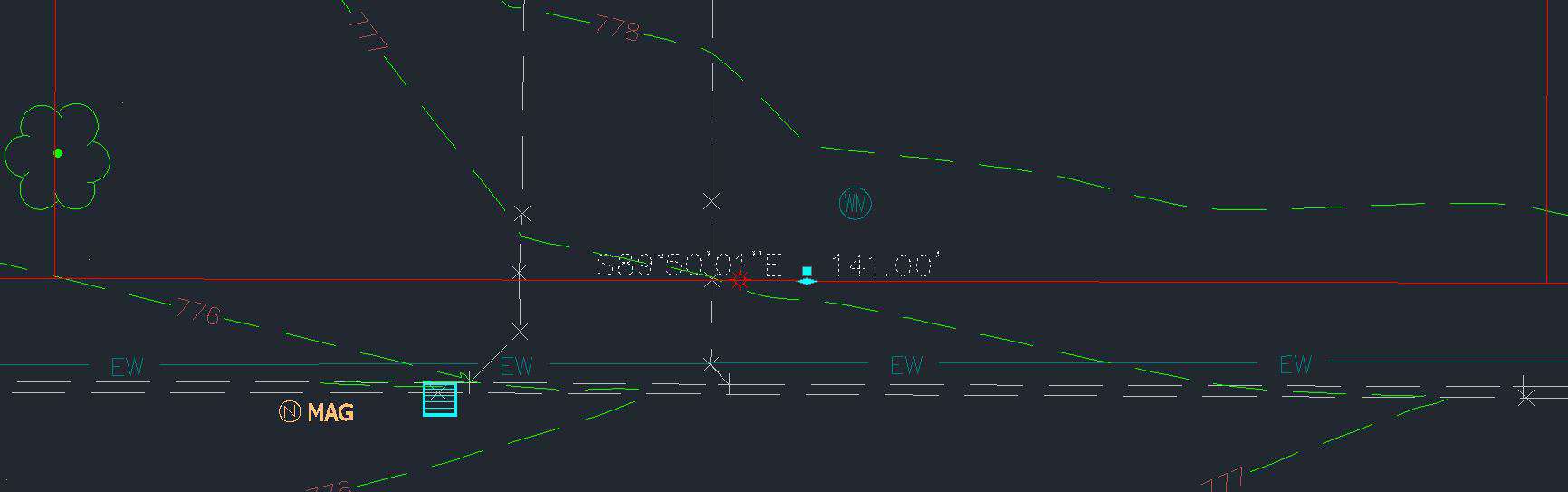
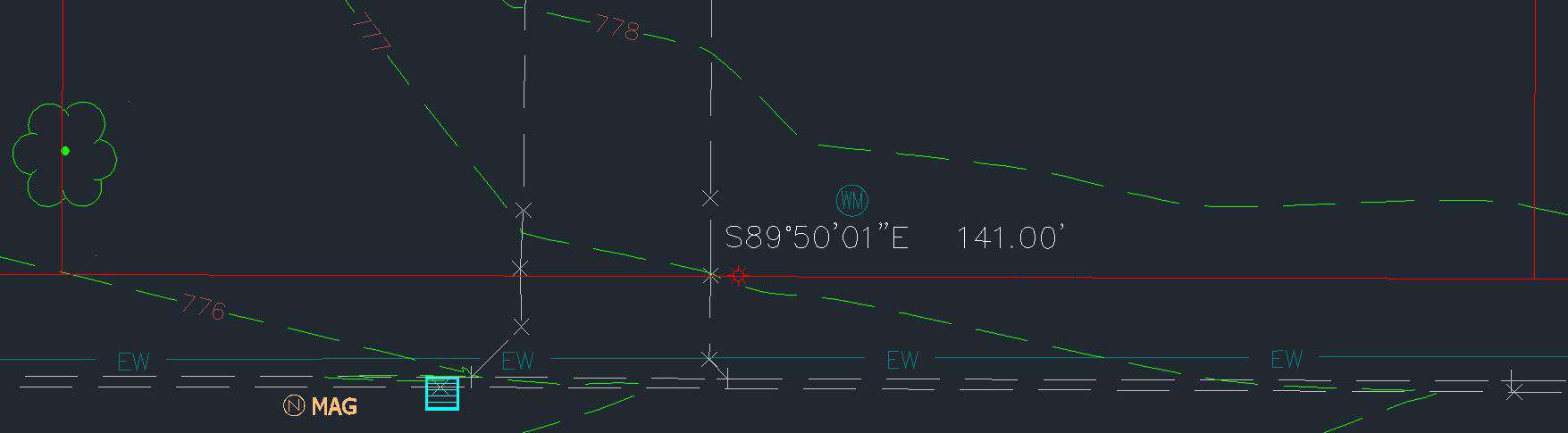
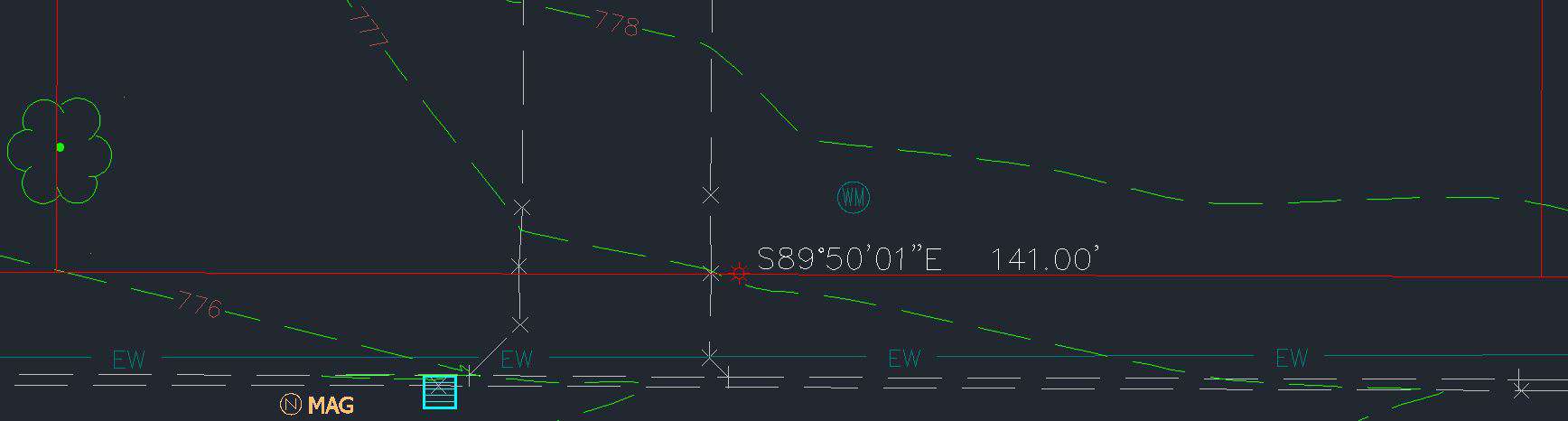
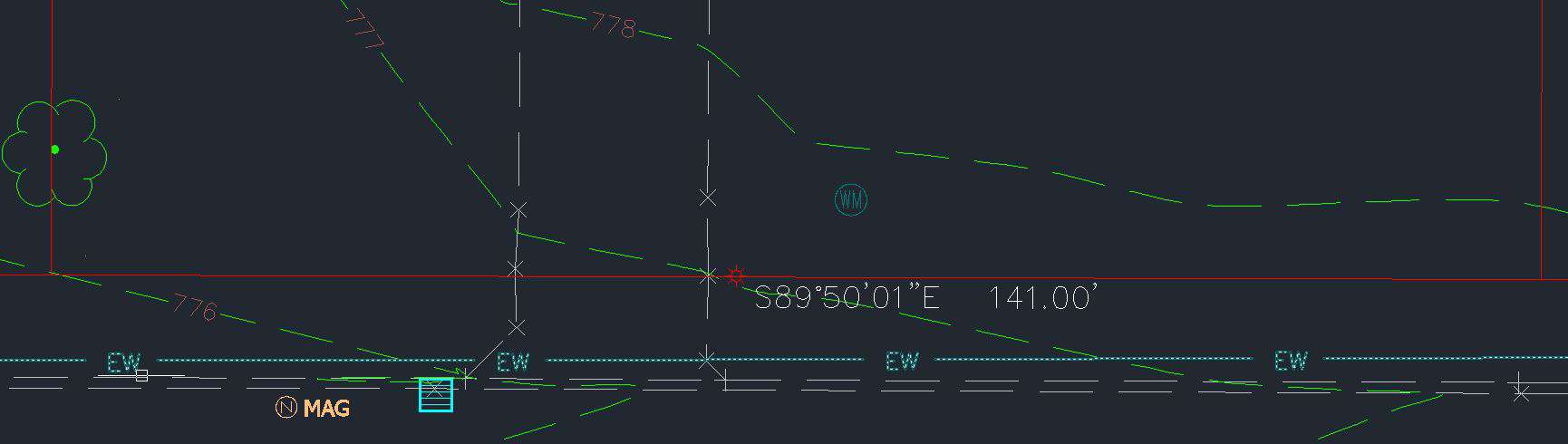
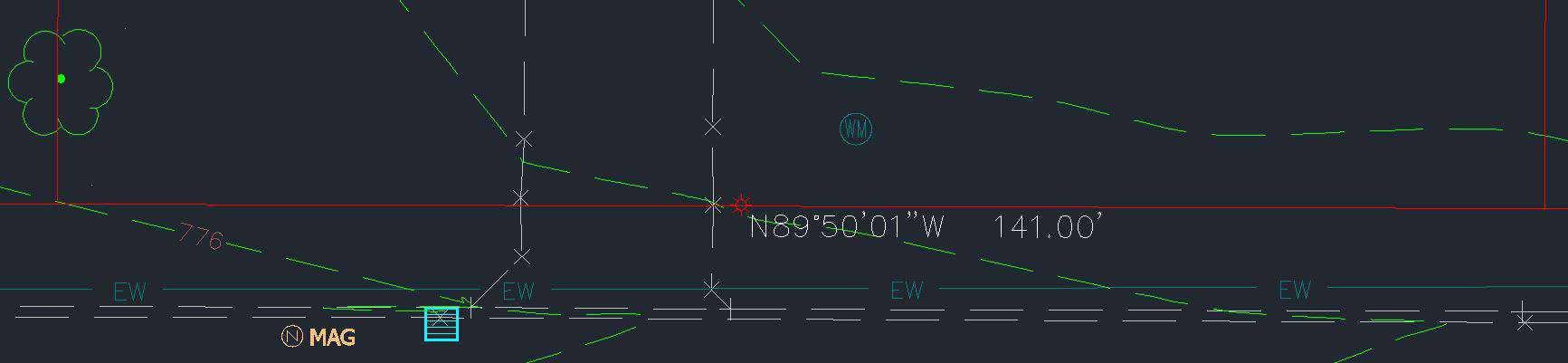
Image 1 shows a label with lines running through it, selected with grips. The top grip is for dragging the label, the bottom grip is for sliding the label. Image 2 shows the label dragged to a new location. As Dan Patterson noted, make sure you have your dragged state set to As Composed, and if you don't want a leader make you sure have the visibility set to False. Image 3 shows the label after sliding it from its original location to a new location.
If you right click on the label, you have options to flip the label, reverse the label, or reset the label. Image 4 shows the label flipped and Image 5 shows the label reversed. Reset is fairly obvious.
I'm not a surveyor, though I've been in the land surveying/civil engineering fields full time since 1982. I surveyed a couple of summers prior to that, and my dad used to take me to the office when I was as young as 12 so that I could plot metes and bounds or field notes for him. I'm a CAD guy. FWIW, I would be less concerned about the label changing as I would be that the LINE changed. Having dynamic labels is part of the checks and balances that are associated with having a good cad product. It can help you locate lines that missed getting trimmed or extended, and helps verify that your parcels are closed. It helps make sure your lines are drawn correctly and not just text put on a line that may or may not be drawn at the right bearing/distance. Carlson also has dynamic capabilities for annotation, and I use it in that program as well. In your particular situation, standing on the corner is correct that your drafter would have been better served by labeling using points rather than linework. I can't imagine taking away the dynamic capabilities of any object in C3D, which I unfortunately do not use any more. I honestly don't know if it's possible, except others say you can explode the objects, which I would NEVER do, nor would I ever advise anyone to do.
Your cad person needs more training, or at least to strive to make herself more educated about C3D. The reason the program has so many styles is that it gives you so much flexibility. I've never approached the 73 styles that standing on the corner lists, but I applaud the work he did creating them. He can change the appearance of his labels on the fly. That's a good thing!
Posted : December 10, 2015 7:23 am
Topic starter
Translate
▼
English
Spanish
French
German
Italian
Portuguese
Russian
Chinese
Japanese
Korean
Arabic
Hindi
Dutch
Polish
Turkish
Vietnamese
Thai
Swedish
Danish
Finnish
Norwegian
Czech
Hungarian
Romanian
Greek
Hebrew
Indonesian
Malay
Ukrainian
Bulgarian
Croatian
Slovak
Slovenian
Serbian
Lithuanian
Latvian
Estonian
I appreciate everyone's input here, thank you.
As said, I agree that I'm reluctant to change, and am more the, "if it ain't broke, don't fix it", mentality. That said, I'm not an idiot. I am also not a draftsman. But I have drafted my share of plans, both by hand and CAD, and am frustrated by the push-back I get from these CAD professionals who can't give me what I want, because of some style BS.
I guess I'm still unconvinced of the advantage over the possible errors, of having labels that can change on their own. Oh, well.
Posted : December 10, 2015 11:30 am
Page 1 / 2
Next