Reading RPLS is free for the whole profession. Members post, reply, and get the members-only rooms.

Notifications
Clear all

Topic starter
Translate
▼
English
Spanish
French
German
Italian
Portuguese
Russian
Chinese
Japanese
Korean
Arabic
Hindi
Dutch
Polish
Turkish
Vietnamese
Thai
Swedish
Danish
Finnish
Norwegian
Czech
Hungarian
Romanian
Greek
Hebrew
Indonesian
Malay
Ukrainian
Bulgarian
Croatian
Slovak
Slovenian
Serbian
Lithuanian
Latvian
Estonian
Over the years, I've noticed that some of the most popular threads here in our forums are those with photos. We love to see what you see when out doing what you do best, and it seems that the "today's office" posts are always a hit. For me, it allows me to live vicariously through you, since I do not partake in the field surveying pie anymore (and I particularly miss the "treasure hunt" part of the job).
So, I've decided to setup the https://surveyorconnect.com/community/forums/todays-office.47/&apos ;">Today's Office forum to hopefully spark even more of these posts. I think it would be great if a bunch of folks would make that a regular part of their day -- posting a photo or two (or 27) of their surveying adventures.
If you need me, I'll be over in the new https://surveyorconnect.com/community/forums/todays-office.47/&apos ;">Today's Office forum, hitting F5 repeatedly, anxiously awaiting the avalanche of photos that's sure to occur.
Like what we do here? Start your Membership or Donate
Need a new or refreshed website? Websites for Surveyors
Posted : July 21, 2017 8:46 am

Translate
▼
English
Spanish
French
German
Italian
Portuguese
Russian
Chinese
Japanese
Korean
Arabic
Hindi
Dutch
Polish
Turkish
Vietnamese
Thai
Swedish
Danish
Finnish
Norwegian
Czech
Hungarian
Romanian
Greek
Hebrew
Indonesian
Malay
Ukrainian
Bulgarian
Croatian
Slovak
Slovenian
Serbian
Lithuanian
Latvian
Estonian
It would be easier if the forum could resize photos that are too large. I usually reduce them 50% in paint. My Android phone can resize them if attached to an email. I don't know how to do it on my iPhone.
Posted : July 21, 2017 8:58 am

Translate
▼
English
Spanish
French
German
Italian
Portuguese
Russian
Chinese
Japanese
Korean
Arabic
Hindi
Dutch
Polish
Turkish
Vietnamese
Thai
Swedish
Danish
Finnish
Norwegian
Czech
Hungarian
Romanian
Greek
Hebrew
Indonesian
Malay
Ukrainian
Bulgarian
Croatian
Slovak
Slovenian
Serbian
Lithuanian
Latvian
Estonian
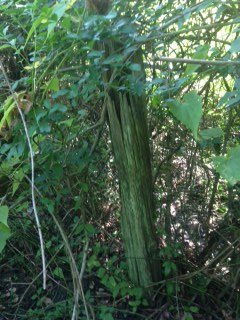
Dave Karoly, post: 437977, member: 94 wrote: It would be easier if the forum could resize photos that are too large. I usually reduce them 50% in paint. My Android phone can resize them if attached to an email. I don't know how to do it on my iPhone.
You can mail the pic to yourself on an iPhone and resize it.
I have done that for here and FB
Just did it as seen above
Posted : July 21, 2017 9:25 am

Translate
▼
English
Spanish
French
German
Italian
Portuguese
Russian
Chinese
Japanese
Korean
Arabic
Hindi
Dutch
Polish
Turkish
Vietnamese
Thai
Swedish
Danish
Finnish
Norwegian
Czech
Hungarian
Romanian
Greek
Hebrew
Indonesian
Malay
Ukrainian
Bulgarian
Croatian
Slovak
Slovenian
Serbian
Lithuanian
Latvian
Estonian
great idea Wendell
Posted : July 21, 2017 9:30 am

Translate
▼
English
Spanish
French
German
Italian
Portuguese
Russian
Chinese
Japanese
Korean
Arabic
Hindi
Dutch
Polish
Turkish
Vietnamese
Thai
Swedish
Danish
Finnish
Norwegian
Czech
Hungarian
Romanian
Greek
Hebrew
Indonesian
Malay
Ukrainian
Bulgarian
Croatian
Slovak
Slovenian
Serbian
Lithuanian
Latvian
Estonian
Dave Karoly, post: 437977, member: 94 wrote: It would be easier if the forum could resize photos that are too large. I usually reduce them 50% in paint. My Android phone can resize them if attached to an email. I don't know how to do it on my iPhone.
Dave,
Check out www.irfanview.com Cool free little program, and the only one I have come across that will batch process pics.
I download my camera into a folder, and then create a new folder called web inside. I have the irfanview setting established, and then just select all the files, make the webbed folder the destination, and then batch process. Vola, all your pics are resized. You can rename them, and convert them into another format too. Once you do it once or twice, it will be quick and easy, then you will have your full size and web size pics there ready to go.
Posted : July 21, 2017 9:39 am

Translate
▼
English
Spanish
French
German
Italian
Portuguese
Russian
Chinese
Japanese
Korean
Arabic
Hindi
Dutch
Polish
Turkish
Vietnamese
Thai
Swedish
Danish
Finnish
Norwegian
Czech
Hungarian
Romanian
Greek
Hebrew
Indonesian
Malay
Ukrainian
Bulgarian
Croatian
Slovak
Slovenian
Serbian
Lithuanian
Latvian
Estonian
Dave Karoly, post: 437977, member: 94 wrote: It would be easier if the forum could resize photos that are too large. I usually reduce them 50% in paint. My Android phone can resize them if attached to an email. I don't know how to do it on my iPhone.
Things like that are exactly why some of us prefer "real" computers (laptop or desktop). Much easier to view text and photos and 1000% easier to type for those of us with over sized fingers.
Posted : July 21, 2017 9:42 am

Translate
▼
English
Spanish
French
German
Italian
Portuguese
Russian
Chinese
Japanese
Korean
Arabic
Hindi
Dutch
Polish
Turkish
Vietnamese
Thai
Swedish
Danish
Finnish
Norwegian
Czech
Hungarian
Romanian
Greek
Hebrew
Indonesian
Malay
Ukrainian
Bulgarian
Croatian
Slovak
Slovenian
Serbian
Lithuanian
Latvian
Estonian
toivo1037, post: 437983, member: 973 wrote: the only one I have come across that will batch process pics.
Xnview also offers batch processing.
Posted : July 21, 2017 10:48 am

Translate
▼
English
Spanish
French
German
Italian
Portuguese
Russian
Chinese
Japanese
Korean
Arabic
Hindi
Dutch
Polish
Turkish
Vietnamese
Thai
Swedish
Danish
Finnish
Norwegian
Czech
Hungarian
Romanian
Greek
Hebrew
Indonesian
Malay
Ukrainian
Bulgarian
Croatian
Slovak
Slovenian
Serbian
Lithuanian
Latvian
Estonian

I use the convert program of ImageMagick for batch resizing.
#!/bin/bash
cd ~/Pictures
n=2
while
  printf -v fname "incoming/img_%04d.jpg" $n
  printf -v fnamem "incoming/mvi_%04d.mov" $n
  printf -v fname2 "800/img_%04d.jpg" $n
  printf -v fname3 "thumb/img_%04d.jpg" $n
  [ -f $fname -o -f $fnamem ]
do
  if [ -f $fname ]
  then
    echo $fname
    if [ ! -f $fname2 ]
    then
      convert $fname -resize 800x600 $fname2&
    fi
    if [ ! -f $fname3 ]
    then
      convert $fname -resize 160x120 $fname3
    fi
  fi
  n=`expr $n + 1`
done
Posted : July 21, 2017 11:29 am

Translate
▼
English
Spanish
French
German
Italian
Portuguese
Russian
Chinese
Japanese
Korean
Arabic
Hindi
Dutch
Polish
Turkish
Vietnamese
Thai
Swedish
Danish
Finnish
Norwegian
Czech
Hungarian
Romanian
Greek
Hebrew
Indonesian
Malay
Ukrainian
Bulgarian
Croatian
Slovak
Slovenian
Serbian
Lithuanian
Latvian
Estonian
In an hour or so. And the A/C had better be in top working condition.
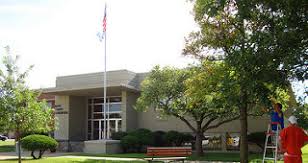
I love courthouses in the middle of Summer and the middle of Winter.
Posted : July 21, 2017 11:46 am

Translate
▼
English
Spanish
French
German
Italian
Portuguese
Russian
Chinese
Japanese
Korean
Arabic
Hindi
Dutch
Polish
Turkish
Vietnamese
Thai
Swedish
Danish
Finnish
Norwegian
Czech
Hungarian
Romanian
Greek
Hebrew
Indonesian
Malay
Ukrainian
Bulgarian
Croatian
Slovak
Slovenian
Serbian
Lithuanian
Latvian
Estonian
Dave Karoly, post: 437977, member: 94 wrote: It would be easier if the forum could resize photos that are too large. I usually reduce them 50% in paint. My Android phone can resize them if attached to an email. I don't know how to do it on my iPhone.
Take a screenshot of the photo by clicking the power and home buttons at the same time.
Posted : July 22, 2017 5:18 pm

Translate
▼
English
Spanish
French
German
Italian
Portuguese
Russian
Chinese
Japanese
Korean
Arabic
Hindi
Dutch
Polish
Turkish
Vietnamese
Thai
Swedish
Danish
Finnish
Norwegian
Czech
Hungarian
Romanian
Greek
Hebrew
Indonesian
Malay
Ukrainian
Bulgarian
Croatian
Slovak
Slovenian
Serbian
Lithuanian
Latvian
Estonian
Wendell, Great idea. "Today's Office".
IF there were an app that did the following:
UPLOAD and RESIZE photo, (software resides in the I-phone/Android) or in the PC, then it could ALL HAPPEN AT ONCE.
As this is a MAJOR slow down of photos.
Thanks!
N
Posted : July 22, 2017 5:28 pm
Translate
▼
English
Spanish
French
German
Italian
Portuguese
Russian
Chinese
Japanese
Korean
Arabic
Hindi
Dutch
Polish
Turkish
Vietnamese
Thai
Swedish
Danish
Finnish
Norwegian
Czech
Hungarian
Romanian
Greek
Hebrew
Indonesian
Malay
Ukrainian
Bulgarian
Croatian
Slovak
Slovenian
Serbian
Lithuanian
Latvian
Estonian
The re-sizer sits there, and resizes, sending the smaller pic to your host.
N
Posted : July 22, 2017 5:30 pm

Translate
▼
English
Spanish
French
German
Italian
Portuguese
Russian
Chinese
Japanese
Korean
Arabic
Hindi
Dutch
Polish
Turkish
Vietnamese
Thai
Swedish
Danish
Finnish
Norwegian
Czech
Hungarian
Romanian
Greek
Hebrew
Indonesian
Malay
Ukrainian
Bulgarian
Croatian
Slovak
Slovenian
Serbian
Lithuanian
Latvian
Estonian
Dave Karoly, post: 437977, member: 94 wrote: It would be easier if the forum could resize photos that are too large. I usually reduce them 50% in paint. My Android phone can resize them if attached to an email. I don't know how to do it on my iPhone.
If you go to your photos on the iphone, and "select" them from the folder, then hit the little box with the UP arrow, just pick "Mail" and put your address in.. When you hit send, a selection pops up from the bottom and you can resize them from there. Very handy for pics for FEMA's too.
Posted : July 22, 2017 5:33 pm

Translate
▼
English
Spanish
French
German
Italian
Portuguese
Russian
Chinese
Japanese
Korean
Arabic
Hindi
Dutch
Polish
Turkish
Vietnamese
Thai
Swedish
Danish
Finnish
Norwegian
Czech
Hungarian
Romanian
Greek
Hebrew
Indonesian
Malay
Ukrainian
Bulgarian
Croatian
Slovak
Slovenian
Serbian
Lithuanian
Latvian
Estonian
Holy Cow, post: 438004, member: 50 wrote: In an hour or so. And the A/C had better be in top working condition.
I love courthouses in the middle of Summer and the middle of Winter.
Pretty sure I've seen that one,. What town?
Posted : July 22, 2017 5:56 pm
Translate
▼
English
Spanish
French
German
Italian
Portuguese
Russian
Chinese
Japanese
Korean
Arabic
Hindi
Dutch
Polish
Turkish
Vietnamese
Thai
Swedish
Danish
Finnish
Norwegian
Czech
Hungarian
Romanian
Greek
Hebrew
Indonesian
Malay
Ukrainian
Bulgarian
Croatian
Slovak
Slovenian
Serbian
Lithuanian
Latvian
Estonian
[USER=571]@LRDay[/USER]
Iola Colborn was born in West Virginia Sept. 12, 1832 and arrived in Allen County with her husband, Josiah Colborn, in October of 1857.
The Colborns settled on land that two years later became the heart of the Iola townsite.
Several names were mentioned for the fledgling community before the townspeople settled on Iola, in honor of Mrs. Colborn.
.
.
.
.
When I was a young lad we had a cat named Iola. On many winter Saturdays my father would take a truck load of prairie hay to the community auction held in Iola. One day, upon his arrival, he heard strange noises coming from within the pile of small, square bales. Eventually, one of the unnamed kittens of one of our mother cats appeared and he put it in the cab of the truck for safekeeping until he returned home. Thus, she was dubbed Iola and lived a long, productive (kitten-wise) life. Can you imagine the stories she told all those kittens about her journey in that load of hay for so many miles to such a strange setting?
Posted : July 22, 2017 6:34 pm

Translate
▼
English
Spanish
French
German
Italian
Portuguese
Russian
Chinese
Japanese
Korean
Arabic
Hindi
Dutch
Polish
Turkish
Vietnamese
Thai
Swedish
Danish
Finnish
Norwegian
Czech
Hungarian
Romanian
Greek
Hebrew
Indonesian
Malay
Ukrainian
Bulgarian
Croatian
Slovak
Slovenian
Serbian
Lithuanian
Latvian
Estonian
Get the picture up on your PC screen and use the Snipping Tool to copy the piece of picture you want. Then paste it into your posting.
Posted : July 22, 2017 6:43 pm
Translate
▼
English
Spanish
French
German
Italian
Portuguese
Russian
Chinese
Japanese
Korean
Arabic
Hindi
Dutch
Polish
Turkish
Vietnamese
Thai
Swedish
Danish
Finnish
Norwegian
Czech
Hungarian
Romanian
Greek
Hebrew
Indonesian
Malay
Ukrainian
Bulgarian
Croatian
Slovak
Slovenian
Serbian
Lithuanian
Latvian
Estonian
I figured out how to do it in the iOS mail app. After the photo is attached click on "images" to the right of the to/cc box and that brings up the size options. It appears to be setting a default size so after the first time you just email the images to yourself and they come across smaller. It is subtle, doesn't really stand out.
On Android you click the minus sign next to the attachment and resize it, a little different.
Posted : July 23, 2017 8:52 am
Translate
▼
English
Spanish
French
German
Italian
Portuguese
Russian
Chinese
Japanese
Korean
Arabic
Hindi
Dutch
Polish
Turkish
Vietnamese
Thai
Swedish
Danish
Finnish
Norwegian
Czech
Hungarian
Romanian
Greek
Hebrew
Indonesian
Malay
Ukrainian
Bulgarian
Croatian
Slovak
Slovenian
Serbian
Lithuanian
Latvian
Estonian
Holy Cow, post: 438176, member: 50 wrote: [USER=571]@LRDay[/USER]
Iola Colborn was born in West Virginia Sept. 12, 1832 and arrived in Allen County with her husband, Josiah Colborn, in October of 1857.
The Colborns settled on land that two years later became the heart of the Iola townsite.
Several names were mentioned for the fledgling community before the townspeople settled on Iola, in honor of Mrs. Colborn.
.
.
.
.
When I was a young lad we had a cat named Iola. On many winter Saturdays my father would take a truck load of prairie hay to the community auction held in Iola. One day, upon his arrival, he heard strange noises coming from within the pile of small, square bales. Eventually, one of the unnamed kittens of one of our mother cats appeared and he put it in the cab of the truck for safekeeping until he returned home. Thus, she was dubbed Iola and lived a long, productive (kitten-wise) life. Can you imagine the stories she told all those kittens about her journey in that load of hay for so many miles to such a strange setting?
Been to Iola many times.
Posted : July 23, 2017 9:46 am