Reading RPLS is free for the whole profession. Members post, reply, and get the members-only rooms.

Notifications
Clear all

Topic starter
Translate
▼
English
Spanish
French
German
Italian
Portuguese
Russian
Chinese
Japanese
Korean
Arabic
Hindi
Dutch
Polish
Turkish
Vietnamese
Thai
Swedish
Danish
Finnish
Norwegian
Czech
Hungarian
Romanian
Greek
Hebrew
Indonesian
Malay
Ukrainian
Bulgarian
Croatian
Slovak
Slovenian
Serbian
Lithuanian
Latvian
Estonian
If you have a small under 10 employee firm and want to be able to track payroll, timesheets, project budgets and performances where can you turn. Is there an affordable option?
So far I'm limited to the back of the folder type of calculations after flipping through everyones timesheets.
Posted : December 19, 2016 9:51 am

Translate
▼
English
Spanish
French
German
Italian
Portuguese
Russian
Chinese
Japanese
Korean
Arabic
Hindi
Dutch
Polish
Turkish
Vietnamese
Thai
Swedish
Danish
Finnish
Norwegian
Czech
Hungarian
Romanian
Greek
Hebrew
Indonesian
Malay
Ukrainian
Bulgarian
Croatian
Slovak
Slovenian
Serbian
Lithuanian
Latvian
Estonian
Spreadsheet. Excel or Libre Office.
Posted : December 19, 2016 10:05 am

Translate
▼
English
Spanish
French
German
Italian
Portuguese
Russian
Chinese
Japanese
Korean
Arabic
Hindi
Dutch
Polish
Turkish
Vietnamese
Thai
Swedish
Danish
Finnish
Norwegian
Czech
Hungarian
Romanian
Greek
Hebrew
Indonesian
Malay
Ukrainian
Bulgarian
Croatian
Slovak
Slovenian
Serbian
Lithuanian
Latvian
Estonian
Look into http://www.axium.com/products/about-ajera-software.aspx&apos ;">Ajera. A little expensive for a mom and pop, but If you are approaching 10 employees (ie/ at the point where you can't do it on the back of an envelope anymore) it should be worthwhile.
Posted : December 19, 2016 10:17 am

Translate
▼
English
Spanish
French
German
Italian
Portuguese
Russian
Chinese
Japanese
Korean
Arabic
Hindi
Dutch
Polish
Turkish
Vietnamese
Thai
Swedish
Danish
Finnish
Norwegian
Czech
Hungarian
Romanian
Greek
Hebrew
Indonesian
Malay
Ukrainian
Bulgarian
Croatian
Slovak
Slovenian
Serbian
Lithuanian
Latvian
Estonian
We use Ajera for our entire firm (700+) and it does well, just runs slow.
T. Nelson - SAM
Posted : December 19, 2016 11:49 am

Translate
▼
English
Spanish
French
German
Italian
Portuguese
Russian
Chinese
Japanese
Korean
Arabic
Hindi
Dutch
Polish
Turkish
Vietnamese
Thai
Swedish
Danish
Finnish
Norwegian
Czech
Hungarian
Romanian
Greek
Hebrew
Indonesian
Malay
Ukrainian
Bulgarian
Croatian
Slovak
Slovenian
Serbian
Lithuanian
Latvian
Estonian
The large firm I worked for previously used Axium for its accounting, time card tracking and project management needs. At the time it was quite expensive and we had to hire an outside consultant to write the code to generate the reports we wanted. I would assume it has become at least somewhat cheaper and user friendly since then. It always reminded me of Windows 3.1...just a step above DOS from a GUI standpoint.
Now that I'm small (10 full time employees) I haven't found one program or app that does everything I want it the way I want it. There are tons of different solutions out there but I think the problem is they all try to be everything to everyone rather than meeting the needs of a particular industry or market sector and doing it well. The following is a list of programs and apps I've found that seem to work pretty well for me.
Accounting/Book Keeping: QuickBooks, very common, fairly inexpensive and easy to use with lots of help available on google and youtube
Payroll: ADP Run. you can do your own payroll through QB but we felt the cost of ADP handling it was worth them taking the liability for making sure it was right. It also opens up some other tools they offer from the HR side as well as hiring, group health insurance and Simple IRA.
Time Tracking: Klok2, simple to use, fairly cheap in a team setting (1 time license purchases rather than subscription model) and has a team connector installed on an admin computer to receive and compile the individual user time sheets on whatever schedule you would like them uploaded. mobile app too.
CRM: Nutshell, $10/month per user to manage our Client database, track sales goals, progress, leads, proposals and does a pretty good job reporting. mobile app too.
Project Management/Scheduling: Asana, I use this app multiple times on a daily basis. I use it to schedule field crews, continually modify that schedule, track deadlines and assign tasks to specific employees. It's free for teams to use with less than 15 members and the entire team can be broken up into different subgroups if for example you have construction group and a land survey group and the two don't get benefit from seeing what's going on with the deadlines or schedule of the other. mobile app too although it could use some work.
I'm sure there are similar or better solutions for each of these tasks but at some point I had to pick one and start running with it. Good luck in your endeavors!
Posted : December 19, 2016 2:18 pm

Translate
▼
English
Spanish
French
German
Italian
Portuguese
Russian
Chinese
Japanese
Korean
Arabic
Hindi
Dutch
Polish
Turkish
Vietnamese
Thai
Swedish
Danish
Finnish
Norwegian
Czech
Hungarian
Romanian
Greek
Hebrew
Indonesian
Malay
Ukrainian
Bulgarian
Croatian
Slovak
Slovenian
Serbian
Lithuanian
Latvian
Estonian
We're a small engineering firm (5 employees), but we always have subcontractors working for us as well. We use Quick Books for the accounting and invoicing and http://www.bqe.com/ProductOverview.asp?prodId=EO&apos ;">Engineer Office by Bill Quick for all time and expense tracking. In EO, you setup clients, projects, phases, budgets, etc. Then employees can enter their time and expenses in a web interface. We pay ~$1,200/yr for EO, but it has more than paid for itself.
Posted : December 21, 2016 8:08 am

Translate
▼
English
Spanish
French
German
Italian
Portuguese
Russian
Chinese
Japanese
Korean
Arabic
Hindi
Dutch
Polish
Turkish
Vietnamese
Thai
Swedish
Danish
Finnish
Norwegian
Czech
Hungarian
Romanian
Greek
Hebrew
Indonesian
Malay
Ukrainian
Bulgarian
Croatian
Slovak
Slovenian
Serbian
Lithuanian
Latvian
Estonian
We use WorkflowMax (www.workflowmax.com) for our project accounting, invoicing, and time tracking. It's a little bit of a beast to set up but it's really powerful for the price. It has estimating and CRM functions but I use Excel for estimating because I developed a pretty good system there. For accounting we use Xero which owns WorkflowMax but are probably switching to Quickbooks because my accountant is pretty much demanding that we do so.
For a simpler program that does Time Tracking, Invoicing, and Job Profit check out Harvest (www.harvestapp.com).
We use software called Float for scheduling. Very simple.
We use a web application called Zappier to connect a bunch of other web apps. When I get a new job we enter all the data into a Google Form which dumps into a Google Spreadsheet. Everytime a new spreadsheet row appears there Zappier automatically creates three Dropbox folders (we don't use a server, everything is web based). One for the Project data, one for the field downloads, and one for accounting/project management. It also automatically creates a Trello Card for notes and conversations on the project, a Float project for scheduling, Google Calendar events for due dates, Quickbooks client info, and sends emails with all project info to the PM, myself, and the bookkeeper. It does not set up the stuff in WorkflowMax yet but we are working on a custom application to do that through their API. I'm also working on a form for simple proposals that will automatically generate and send the .PDF contract once I input the pertinent information to a Google Form. Even further...this year I plan to start work on a program that automatically checks the field .rw5 or .fbk files for field code compliance and a few other things.
Posted : December 21, 2016 9:38 am

Translate
▼
English
Spanish
French
German
Italian
Portuguese
Russian
Chinese
Japanese
Korean
Arabic
Hindi
Dutch
Polish
Turkish
Vietnamese
Thai
Swedish
Danish
Finnish
Norwegian
Czech
Hungarian
Romanian
Greek
Hebrew
Indonesian
Malay
Ukrainian
Bulgarian
Croatian
Slovak
Slovenian
Serbian
Lithuanian
Latvian
Estonian
We use quickbooks for the accounting stuff and Asana (Paid version) for times sheets, scheduling, and project management. I have used many different softwares modules and Asana is the easiest. We setup custom fields for what we needed and it now handles everything seamlessly. The mobile App has some flaws, but at the same time we now transfer all files, pdfs, etc through it to the field crews. We did buy all the crews cheap (less than $100) tablets and right now it works very very well.
Posted : December 23, 2016 5:37 am
Translate
▼
English
Spanish
French
German
Italian
Portuguese
Russian
Chinese
Japanese
Korean
Arabic
Hindi
Dutch
Polish
Turkish
Vietnamese
Thai
Swedish
Danish
Finnish
Norwegian
Czech
Hungarian
Romanian
Greek
Hebrew
Indonesian
Malay
Ukrainian
Bulgarian
Croatian
Slovak
Slovenian
Serbian
Lithuanian
Latvian
Estonian
Terminus-NC, post: 405565, member: 11581 wrote: We use quickbooks for the accounting stuff and Asana (Paid version) for times sheets, scheduling, and project management. I have used many different softwares modules and Asana is the easiest. We setup custom fields for what we needed and it now handles everything seamlessly. The mobile App has some flaws, but at the same time we now transfer all files, pdfs, etc through it to the field crews. We did buy all the crews cheap (less than $100) tablets and right now it works very very well.
Does Asana handle project accounting? Quickbooks doesn't seem to do that unless you get the downloaded software, we work almost 100% in the cloud now.
Posted : December 28, 2016 2:05 pm
Translate
▼
English
Spanish
French
German
Italian
Portuguese
Russian
Chinese
Japanese
Korean
Arabic
Hindi
Dutch
Polish
Turkish
Vietnamese
Thai
Swedish
Danish
Finnish
Norwegian
Czech
Hungarian
Romanian
Greek
Hebrew
Indonesian
Malay
Ukrainian
Bulgarian
Croatian
Slovak
Slovenian
Serbian
Lithuanian
Latvian
Estonian
Quickbooks here is pretty weak for project specific invoicing....I am not sure exactly what module they are running, but I thought you could order a specific module to go with your business type. We almost added on Harvest as there is an integration with Quickbooks, but the tie between Asana and Harvest didn't appear to be very efficient. Using the custom fields we have created a process were the account can run a report in Asana using specifics tags to know what needs to be billed monthly.
Posted : December 28, 2016 3:47 pm
Translate
▼
English
Spanish
French
German
Italian
Portuguese
Russian
Chinese
Japanese
Korean
Arabic
Hindi
Dutch
Polish
Turkish
Vietnamese
Thai
Swedish
Danish
Finnish
Norwegian
Czech
Hungarian
Romanian
Greek
Hebrew
Indonesian
Malay
Ukrainian
Bulgarian
Croatian
Slovak
Slovenian
Serbian
Lithuanian
Latvian
Estonian
We've been using the quickbooks cloud version for 4 months now and just upgraded to the version that will help us track our monthly budget compared to actual spend.
I also started using Asana 3 days ago for project management on a trial basis. I like it so far. I would like for it to have a template of task when creating a project so I don't have to retype the task for each new project. That function might be there and I haven't found it yet...
Posted : December 29, 2016 8:36 pm
Translate
▼
English
Spanish
French
German
Italian
Portuguese
Russian
Chinese
Japanese
Korean
Arabic
Hindi
Dutch
Polish
Turkish
Vietnamese
Thai
Swedish
Danish
Finnish
Norwegian
Czech
Hungarian
Romanian
Greek
Hebrew
Indonesian
Malay
Ukrainian
Bulgarian
Croatian
Slovak
Slovenian
Serbian
Lithuanian
Latvian
Estonian
The paid version has setup templates or I think you make one.....How I do it is, I set up a project with all the tasks predefined without any tasks being dated or assigned. Then when I start a new project, I open that project and hit "Copy Project". There will be a pop up where you can assign project number and name and a few other things. Another little trick we learned was to use the "tags" function a lot. I create client tags for customers with a lot of projects and tags to identify what needs to be billed, non-billed, billable rework, etc....Then the accountant uses the tags to create reports for billing.
Posted : December 30, 2016 5:44 am

Translate
▼
English
Spanish
French
German
Italian
Portuguese
Russian
Chinese
Japanese
Korean
Arabic
Hindi
Dutch
Polish
Turkish
Vietnamese
Thai
Swedish
Danish
Finnish
Norwegian
Czech
Hungarian
Romanian
Greek
Hebrew
Indonesian
Malay
Ukrainian
Bulgarian
Croatian
Slovak
Slovenian
Serbian
Lithuanian
Latvian
Estonian
tomchurch, post: 405248, member: 10174 wrote: ...
We use a web application called Zappier to connect a bunch of other web apps. When I get a new job we enter all the data into a Google Form which dumps into a Google Spreadsheet. Everytime a new spreadsheet row appears there Zappier automatically creates three Dropbox folders (we don't use a server, everything is web based). One for the Project data, one for the field downloads, and one for accounting/project management. It also automatically creates a Trello Card for notes and conversations on the project, a Float project for scheduling, Google Calendar events for due dates, Quickbooks client info, and sends emails with all project info to the PM, myself, and the bookkeeper. It does not set up the stuff in WorkflowMax yet but we are working on a custom application to do that through their API. I'm also working on a form for simple proposals that will automatically generate and send the .PDF contract once I input the pertinent information to a Google Form. Even further...this year I plan to start work on a program that automatically checks the field .rw5 or .fbk files for field code compliance and a few other things.
Hi tomchurch, I find your management system VERY interesting and It looks like it is something that I would like to implement in the near future.
Would you mind to post pics or a short video showing how you had this system set up and how it works?
Posted : May 19, 2017 7:19 am
Translate
▼
English
Spanish
French
German
Italian
Portuguese
Russian
Chinese
Japanese
Korean
Arabic
Hindi
Dutch
Polish
Turkish
Vietnamese
Thai
Swedish
Danish
Finnish
Norwegian
Czech
Hungarian
Romanian
Greek
Hebrew
Indonesian
Malay
Ukrainian
Bulgarian
Croatian
Slovak
Slovenian
Serbian
Lithuanian
Latvian
Estonian
Is anyone here that uses Asana able to have the calendar show all projects not just the task for each individual project?
Posted : July 8, 2017 2:33 pm
Translate
▼
English
Spanish
French
German
Italian
Portuguese
Russian
Chinese
Japanese
Korean
Arabic
Hindi
Dutch
Polish
Turkish
Vietnamese
Thai
Swedish
Danish
Finnish
Norwegian
Czech
Hungarian
Romanian
Greek
Hebrew
Indonesian
Malay
Ukrainian
Bulgarian
Croatian
Slovak
Slovenian
Serbian
Lithuanian
Latvian
Estonian
TXSurveyor, post: 436017, member: 6719 wrote: Is anyone here that uses Asana able to have the calendar show all projects not just the task for each individual project?
Hi, this is not possible at least in the free Asana version.
How do you use asana? How do you set up your projects?
Would you show a screenshot of how your Asana look?
Regards
Posted : July 8, 2017 2:42 pm
Translate
▼
English
Spanish
French
German
Italian
Portuguese
Russian
Chinese
Japanese
Korean
Arabic
Hindi
Dutch
Polish
Turkish
Vietnamese
Thai
Swedish
Danish
Finnish
Norwegian
Czech
Hungarian
Romanian
Greek
Hebrew
Indonesian
Malay
Ukrainian
Bulgarian
Croatian
Slovak
Slovenian
Serbian
Lithuanian
Latvian
Estonian
I'm on my 2nd attempt to use Asana, just playing with it right now. At this point I'm not sure that I like but that might just be because I haven't learned how to make it work properly.
I really want a software that I can use to schedule 1 full time crew, and 2 part time crews . Our shedule has to be modified every couple of days to keep up with the moving parts
Posted : July 8, 2017 4:23 pm
Translate
▼
English
Spanish
French
German
Italian
Portuguese
Russian
Chinese
Japanese
Korean
Arabic
Hindi
Dutch
Polish
Turkish
Vietnamese
Thai
Swedish
Danish
Finnish
Norwegian
Czech
Hungarian
Romanian
Greek
Hebrew
Indonesian
Malay
Ukrainian
Bulgarian
Croatian
Slovak
Slovenian
Serbian
Lithuanian
Latvian
Estonian
TXSurveyor, post: 436017, member: 6719 wrote: Is anyone here that uses Asana able to have the calendar show all projects not just the task for each individual project?
This is how I have it setup. I put the job name in the task Field of the job then it shows up the way I want it on the calendar. Then I create a custom search on the assignee category including my whole team and view it in Calendar mode rather than list. In the calendar view the tasks can be dragged and dropped to different days as the schedule morphs throughout the week. I find it VERY useful. Hope that helps. 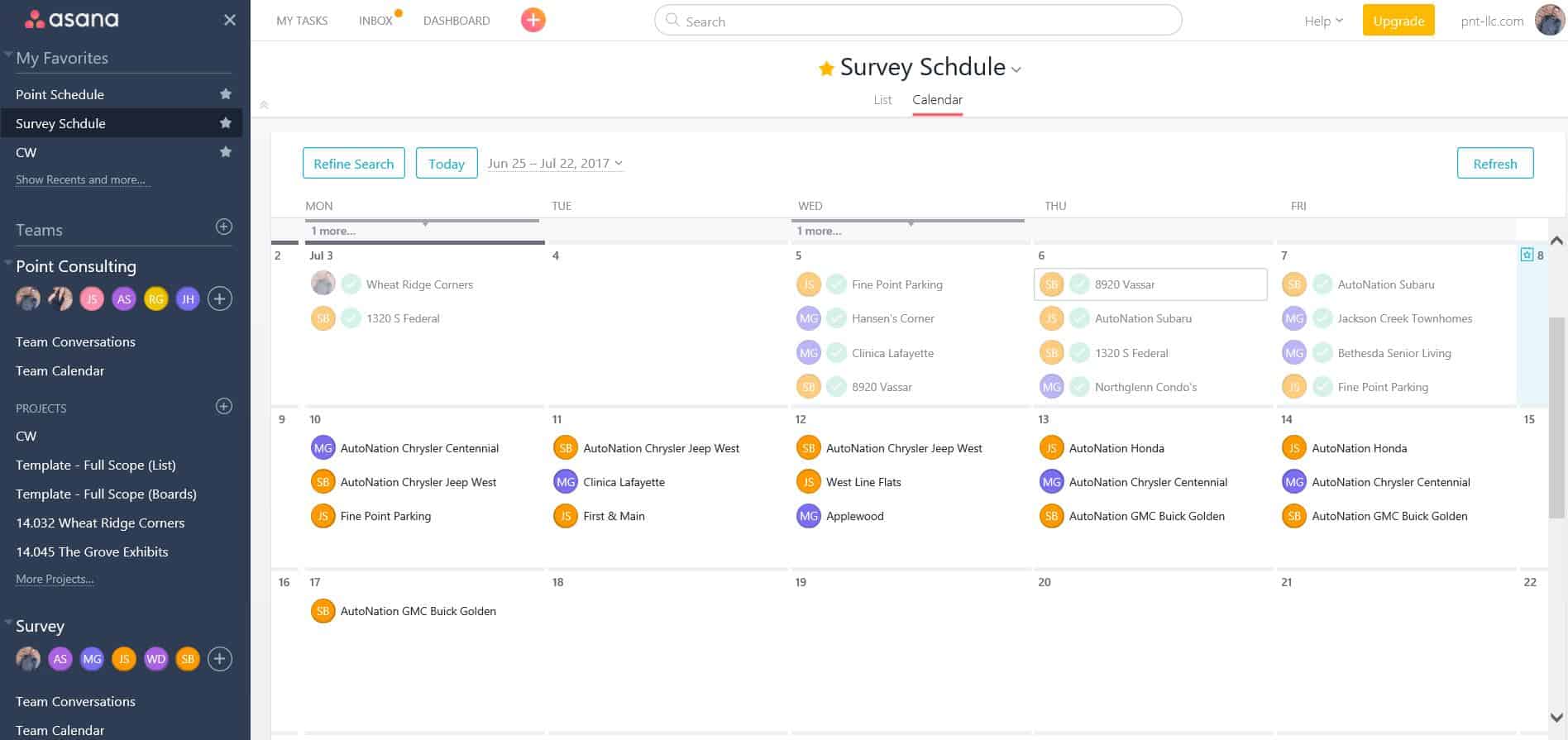
Posted : July 8, 2017 5:58 pm
Translate
▼
English
Spanish
French
German
Italian
Portuguese
Russian
Chinese
Japanese
Korean
Arabic
Hindi
Dutch
Polish
Turkish
Vietnamese
Thai
Swedish
Danish
Finnish
Norwegian
Czech
Hungarian
Romanian
Greek
Hebrew
Indonesian
Malay
Ukrainian
Bulgarian
Croatian
Slovak
Slovenian
Serbian
Lithuanian
Latvian
Estonian
Cameron Watson PLS, post: 436031, member: 11407 wrote: This is how I have it setup. I put the job name in the task Field of the job then it shows up the way I want it on the calendar. Then I create a custom search on the assignee category including my whole team and view it in Calendar mode rather than list. In the calendar view the tasks can be dragged and dropped to different days as the schedule morphs throughout the week. I find it VERY useful. Hope that helps.
Thanks for sharing. Excellent idea.im going to start trying that tomorrow
Posted : July 8, 2017 9:00 pm
Translate
▼
English
Spanish
French
German
Italian
Portuguese
Russian
Chinese
Japanese
Korean
Arabic
Hindi
Dutch
Polish
Turkish
Vietnamese
Thai
Swedish
Danish
Finnish
Norwegian
Czech
Hungarian
Romanian
Greek
Hebrew
Indonesian
Malay
Ukrainian
Bulgarian
Croatian
Slovak
Slovenian
Serbian
Lithuanian
Latvian
Estonian
I don't know how to make projects show up on the calendar other than how Cameron described it (a project just being a task).
How I do it is little more complex. Each project is created with client info (we use project coloring to identify counties).
In the project we create master tasks (I usually schedule these for Saturday, this way they are outside the normal schedule and easy for me to find). Once all sub tasks are done for a master task, I close it out. Now if you had a hard date to finish a boundary, then I would schedule the master task for that day (this would be the proper way of doing things). This master task stays assigned to me and I, as the PM, am responsible for it.
Within the master task, I assign the sub-tasks to the crews (remember to associate it with your project...Asana for some reason doesn't do that automatically). Since I use Asana to keep employee hours, each day of work on a master task gets a sub task.
So it looks something like this;
Project 17345 Surveyor Connect acres
Boundary survey due 7/15/17 (master task)
FW-Boundary traverse 7/10/17 (subtask)
FW-Boundary traverse 7/11/17 (subtask)
DR-Boundary traverse computations and drafting 7/12/17 (subtask)
FW-Set missing irons/Search ties 7/13/17 (subtask)
DR-FInalize plat and submit to client 7/14/17 (subtask)
The master task and all subtasks will show on the calendar (remember there is a 100 project limit for each team or they disappear off the calendar) and then you can drag and drop tasks around easy enough. The FW and DR help in the calendar clarifying the task type (you could use colors also, but I use them for counties...Helps with scheduling). From there, they crews use their tablets or phones to monitor their tasks and get PDF's and data files for each job.
Posted : July 9, 2017 6:50 am

Translate
▼
English
Spanish
French
German
Italian
Portuguese
Russian
Chinese
Japanese
Korean
Arabic
Hindi
Dutch
Polish
Turkish
Vietnamese
Thai
Swedish
Danish
Finnish
Norwegian
Czech
Hungarian
Romanian
Greek
Hebrew
Indonesian
Malay
Ukrainian
Bulgarian
Croatian
Slovak
Slovenian
Serbian
Lithuanian
Latvian
Estonian
We just went to Harvest. It has an app where the crews can clock in and out and change tasks, projects, create projects etc. It is cheap at 12 dollars per employee for the over 5 employees we have and we wanted all of them to have access and help manage the tasks and budgets.
I would take a look at it.
Posted : July 13, 2017 6:33 pm