Reading RPLS is free for the whole profession. Members post, reply, and get the members-only rooms.

Notifications
Clear all

Topic starter
Translate
▼
English
Spanish
French
German
Italian
Portuguese
Russian
Chinese
Japanese
Korean
Arabic
Hindi
Dutch
Polish
Turkish
Vietnamese
Thai
Swedish
Danish
Finnish
Norwegian
Czech
Hungarian
Romanian
Greek
Hebrew
Indonesian
Malay
Ukrainian
Bulgarian
Croatian
Slovak
Slovenian
Serbian
Lithuanian
Latvian
Estonian
Anyone who has updated to windows 10, perhaps you may be able to help. I have a 6500 all in one and since the update I cannot find the shortcut for the scanner function. Anysuggestions welcome. I have run the troubleshooting software from HP. I am able to plot and run a rest scan from the HP troubleshooting software. I am able to print normally
Posted : August 12, 2015 2:52 pm

Translate
▼
English
Spanish
French
German
Italian
Portuguese
Russian
Chinese
Japanese
Korean
Arabic
Hindi
Dutch
Polish
Turkish
Vietnamese
Thai
Swedish
Danish
Finnish
Norwegian
Czech
Hungarian
Romanian
Greek
Hebrew
Indonesian
Malay
Ukrainian
Bulgarian
Croatian
Slovak
Slovenian
Serbian
Lithuanian
Latvian
Estonian
Posted : August 12, 2015 4:37 pm

Translate
▼
English
Spanish
French
German
Italian
Portuguese
Russian
Chinese
Japanese
Korean
Arabic
Hindi
Dutch
Polish
Turkish
Vietnamese
Thai
Swedish
Danish
Finnish
Norwegian
Czech
Hungarian
Romanian
Greek
Hebrew
Indonesian
Malay
Ukrainian
Bulgarian
Croatian
Slovak
Slovenian
Serbian
Lithuanian
Latvian
Estonian
Dane Mince, post: 331567, member: 296 wrote: Anyone who has updated to windows 10, perhaps you may be able to help. I have a 6500 all in one and since the update I cannot find the shortcut for the scanner function. Anysuggestions welcome. I have run the troubleshooting software from HP. I am able to plot and run a rest scan from the HP troubleshooting software. I am able to print normally
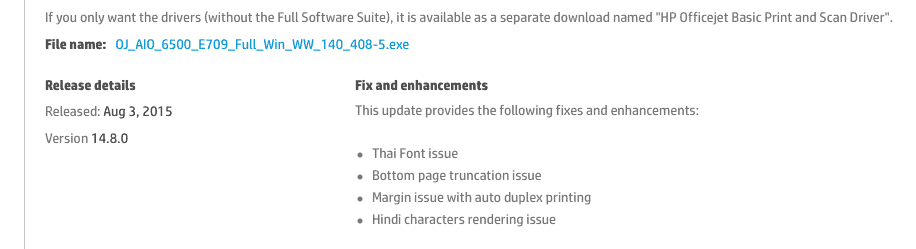
Definitely the easiest thing to do is download the latest drivers (which were only just released last week), and install the package.
Version is 14.8.0.
Posted : August 12, 2015 7:12 pm
Topic starter
Translate
▼
English
Spanish
French
German
Italian
Portuguese
Russian
Chinese
Japanese
Korean
Arabic
Hindi
Dutch
Polish
Turkish
Vietnamese
Thai
Swedish
Danish
Finnish
Norwegian
Czech
Hungarian
Romanian
Greek
Hebrew
Indonesian
Malay
Ukrainian
Bulgarian
Croatian
Slovak
Slovenian
Serbian
Lithuanian
Latvian
Estonian
OKAy, thanks I found it .....What they did is removes the desktop shortcut and replaced it with a windows scan button .....I have an HP laptop and they have a pretty good set of tools to download drivers and printer stuff..... all is well I have the current drivers, i think..... I do not know how many times I crused the net looking for whjat to do until I finally found info on the new windos 10 scan app...
Posted : August 12, 2015 7:43 pm
Translate
▼
English
Spanish
French
German
Italian
Portuguese
Russian
Chinese
Japanese
Korean
Arabic
Hindi
Dutch
Polish
Turkish
Vietnamese
Thai
Swedish
Danish
Finnish
Norwegian
Czech
Hungarian
Romanian
Greek
Hebrew
Indonesian
Malay
Ukrainian
Bulgarian
Croatian
Slovak
Slovenian
Serbian
Lithuanian
Latvian
Estonian
I heard that some 3rd party desktop gadgets were not going to available in W10 too.
I am on the queue for W10 for my Dell laptop and HP desk. I know the HP should be ok but don't know about the Dell which I want to turnover to our son for school work at home.
Posted : August 12, 2015 7:58 pm
Translate
▼
English
Spanish
French
German
Italian
Portuguese
Russian
Chinese
Japanese
Korean
Arabic
Hindi
Dutch
Polish
Turkish
Vietnamese
Thai
Swedish
Danish
Finnish
Norwegian
Czech
Hungarian
Romanian
Greek
Hebrew
Indonesian
Malay
Ukrainian
Bulgarian
Croatian
Slovak
Slovenian
Serbian
Lithuanian
Latvian
Estonian
Robert Hill, post: 331622, member: 378 wrote: I heard that some 3rd party desktop gadgets were not going to available in W10 too.
I am on the queue for W10 for my Dell laptop and HP desk. I know the HP should be ok but don't know about the Dell which I want to turnover to our son for school work at home.
Just a note: You don't have to wait if you prefer not to. You can download it anytime you want. And, if you're going to install on more than one machine, I highly recommend choosing the option to make a dvd or thumb drive install disk...that way you don't have to wait the 2-4 hours for it to download each time. Just boot from the drive you made and install.
Posted : August 13, 2015 7:39 am