Reading RPLS is free for the whole profession. Members post, reply, and get the members-only rooms.

Notifications
Clear all
Strictly Surveying
15
Posts
9
Users
0
Reactions
1,020
Views

Topic starter
Translate
▼
English
Spanish
French
German
Italian
Portuguese
Russian
Chinese
Japanese
Korean
Arabic
Hindi
Dutch
Polish
Turkish
Vietnamese
Thai
Swedish
Danish
Finnish
Norwegian
Czech
Hungarian
Romanian
Greek
Hebrew
Indonesian
Malay
Ukrainian
Bulgarian
Croatian
Slovak
Slovenian
Serbian
Lithuanian
Latvian
Estonian
Hi,
I have a TSCe where on pin in the multiport connector is broken (pin 9, one of the USB pins is missing).
Anyone has any idea how to get data out of the TSCe without USB?
I've tried using the serial port with activesync, but no connection.
I've connected ethernet but haven't found any way to get data out that way. I can connect to the WinCE FTP service, but I don't know the (default?) username/pass combo to log on there (it's supposed to be in the registry, but I cant find any way to look at the registry)
Any ideas?
Cheers,
Jonas
Posted : April 6, 2017 8:27 am

Translate
▼
English
Spanish
French
German
Italian
Portuguese
Russian
Chinese
Japanese
Korean
Arabic
Hindi
Dutch
Polish
Turkish
Vietnamese
Thai
Swedish
Danish
Finnish
Norwegian
Czech
Hungarian
Romanian
Greek
Hebrew
Indonesian
Malay
Ukrainian
Bulgarian
Croatian
Slovak
Slovenian
Serbian
Lithuanian
Latvian
Estonian
I seem to remember there being an adapter from the 25pin (?) connector to either a usb or a serial cable adapter. Many years ago, both me and the other solo guy I teamed up with had the older Ranger data collectors, and we found those connectors, and used them with much success. I don't know if I have one left since that data collector died many years ago. You might try contacting Chris Billingsley on this forum, and see if he has one left. His data collector died also, but I believe I gave all of my accessories for that collector to him after mine died.
Posted : April 6, 2017 8:33 am

Translate
▼
English
Spanish
French
German
Italian
Portuguese
Russian
Chinese
Japanese
Korean
Arabic
Hindi
Dutch
Polish
Turkish
Vietnamese
Thai
Swedish
Danish
Finnish
Norwegian
Czech
Hungarian
Romanian
Greek
Hebrew
Indonesian
Malay
Ukrainian
Bulgarian
Croatian
Slovak
Slovenian
Serbian
Lithuanian
Latvian
Estonian
I may have one of those 25 pin connectors Jimmy mentioned. I'll check when I get back to the office. If it's there you can have it.
Sent from my iPhone using Tapatalk
Posted : April 6, 2017 8:40 am

Translate
▼
English
Spanish
French
German
Italian
Portuguese
Russian
Chinese
Japanese
Korean
Arabic
Hindi
Dutch
Polish
Turkish
Vietnamese
Thai
Swedish
Danish
Finnish
Norwegian
Czech
Hungarian
Romanian
Greek
Hebrew
Indonesian
Malay
Ukrainian
Bulgarian
Croatian
Slovak
Slovenian
Serbian
Lithuanian
Latvian
Estonian
whitey1371, post: 422184, member: 10111 wrote: I may have one of those 25 pin connectors Jimmy mentioned. I'll check when I get back to the office. If it's there you can have it.
Sent from my iPhone using Tapatalk
On the TSC2 there is a slot for an external SD card hidden under the top, does TSCe have one?
Posted : April 6, 2017 10:42 am
Topic starter
Translate
▼
English
Spanish
French
German
Italian
Portuguese
Russian
Chinese
Japanese
Korean
Arabic
Hindi
Dutch
Polish
Turkish
Vietnamese
Thai
Swedish
Danish
Finnish
Norwegian
Czech
Hungarian
Romanian
Greek
Hebrew
Indonesian
Malay
Ukrainian
Bulgarian
Croatian
Slovak
Slovenian
Serbian
Lithuanian
Latvian
Estonian
whitey1371, post: 422184, member: 10111 wrote: I may have one of those 25 pin connectors Jimmy mentioned. I'll check when I get back to the office. If it's there you can have it.
Sent from my iPhone using Tapatalk
Thanks,
That's very generous of You. However, the problem is that it is in the 25-pin connector the pin is missing. So I won't get any functioning USB out of a multiport adapter.
So unless I can find a way to get the data out of one of the two serial ports or through the Ethernet port I'm stuck. So is the data 🙂
Posted : April 6, 2017 12:30 pm

Translate
▼
English
Spanish
French
German
Italian
Portuguese
Russian
Chinese
Japanese
Korean
Arabic
Hindi
Dutch
Polish
Turkish
Vietnamese
Thai
Swedish
Danish
Finnish
Norwegian
Czech
Hungarian
Romanian
Greek
Hebrew
Indonesian
Malay
Ukrainian
Bulgarian
Croatian
Slovak
Slovenian
Serbian
Lithuanian
Latvian
Estonian
I think there is aan infra red beamer in the tsce, if you have, or can find someone with a second unit you can transfer it wireless to that unit and then download as used to.
Chr.
Posted : April 6, 2017 1:40 pm

Translate
▼
English
Spanish
French
German
Italian
Portuguese
Russian
Chinese
Japanese
Korean
Arabic
Hindi
Dutch
Polish
Turkish
Vietnamese
Thai
Swedish
Danish
Finnish
Norwegian
Czech
Hungarian
Romanian
Greek
Hebrew
Indonesian
Malay
Ukrainian
Bulgarian
Croatian
Slovak
Slovenian
Serbian
Lithuanian
Latvian
Estonian
The way I get at files on my TSCE is via the USB connector (on the TSCE's external multiconnector dongle) and Windows Mobile Device Center. It maps the TSCE as a drive. So if one of the pins that connects to the USB port is broken, then I'd be screwed like you may be.
If all else fails you can open up the case, pull out the CompactFlash card and use a USB based flash card adapter to connect it to your computer as an external drive.
Posted : April 6, 2017 2:45 pm
Topic starter
Translate
▼
English
Spanish
French
German
Italian
Portuguese
Russian
Chinese
Japanese
Korean
Arabic
Hindi
Dutch
Polish
Turkish
Vietnamese
Thai
Swedish
Danish
Finnish
Norwegian
Czech
Hungarian
Romanian
Greek
Hebrew
Indonesian
Malay
Ukrainian
Bulgarian
Croatian
Slovak
Slovenian
Serbian
Lithuanian
Latvian
Estonian
astrodanco, post: 422281, member: 7558 wrote: The way I get at files on my TSCE is via the USB connector (on the TSCE's external multiconnector dongle) and Windows Mobile Device Center. It maps the TSCE as a drive. So if one of the pins that connects to the USB port is broken, then I'd be screwed like you may be.
If all else fails you can open up the case, pull out the CompactFlash card and use a USB based flash card adapter to connect it to your computer as an external drive.
Ah, so there's a compact flash card inside? That is good news. Thanks for all the good ideas and info!
I did however try to open the unit earlier, in hopes of finding a way to solder in a wire on the missing pin (on the inside of the connector), as a crude "fix" to get 'USB connectivity.
However, after removing all the visible screws (4 inside battery compartment + 4 more i think) there still seemed to be something holding the case together; i could not get it opened. Anyone who has opened a TSCe, that can tell if there are any hidden screws?
Cheers,
Jonas
Posted : April 6, 2017 3:44 pm

Translate
▼
English
Spanish
French
German
Italian
Portuguese
Russian
Chinese
Japanese
Korean
Arabic
Hindi
Dutch
Polish
Turkish
Vietnamese
Thai
Swedish
Danish
Finnish
Norwegian
Czech
Hungarian
Romanian
Greek
Hebrew
Indonesian
Malay
Ukrainian
Bulgarian
Croatian
Slovak
Slovenian
Serbian
Lithuanian
Latvian
Estonian
There is a screw in the middle of the narrow part of the body, accessed from the back. It is usually covered by a plug of clear RTV silicone - just run a sewing pin around the perimeter of the plug and it will slide right out.
Then you can turn out that screw.
GB
Posted : April 6, 2017 5:11 pm
Topic starter
Translate
▼
English
Spanish
French
German
Italian
Portuguese
Russian
Chinese
Japanese
Korean
Arabic
Hindi
Dutch
Polish
Turkish
Vietnamese
Thai
Swedish
Danish
Finnish
Norwegian
Czech
Hungarian
Romanian
Greek
Hebrew
Indonesian
Malay
Ukrainian
Bulgarian
Croatian
Slovak
Slovenian
Serbian
Lithuanian
Latvian
Estonian
 Thanks for all good information!
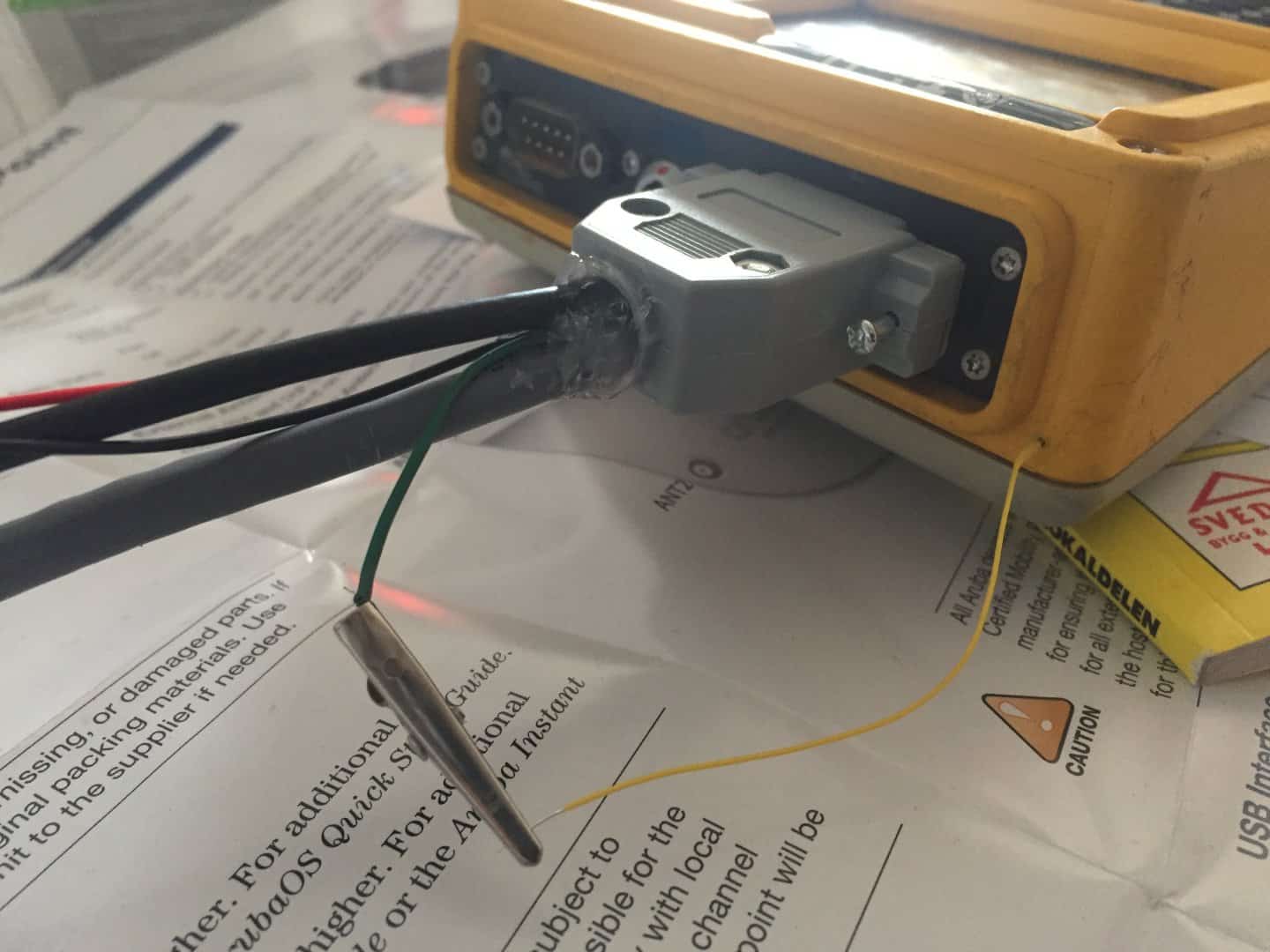
I was able to open the TSCe and solder a thin wire to a SMD resistor that was connected to the broken pin. I drilled a 1mm hole in the case next to connectors and pulled the wire out through the hole. I then sealed it with silicone and put the TSCe back together.
I then connected half a lab cable (with a "crocodile clamp") to the USB+ line on the cable/connector that goes on the 26-pin multiport connector, which can be easily connected to the wire now sticking out of the TSCe. Now USB works, and windows mobile device center successfully connects!
Now that USB works I could also use "CERegEditor by mdSoft" to modify the HKEY_LOCAL_MACHINEcommFTPDAllowAnonymous and AllowAnonymousUpload registry keys to 1, so now I can also use ftp over the Ethernet connection to the TSCe built-in FTP server to get data out, as a second/backup option.
The TSCe lives again! 🙂
Posted : April 10, 2017 2:28 am

Translate
▼
English
Spanish
French
German
Italian
Portuguese
Russian
Chinese
Japanese
Korean
Arabic
Hindi
Dutch
Polish
Turkish
Vietnamese
Thai
Swedish
Danish
Finnish
Norwegian
Czech
Hungarian
Romanian
Greek
Hebrew
Indonesian
Malay
Ukrainian
Bulgarian
Croatian
Slovak
Slovenian
Serbian
Lithuanian
Latvian
Estonian
Nice one. I have a Trimble ACU which has a similar multipin (can't remember how many) connector for USB transfer, but I didn't have the adapter so through www research and trial and error I found the 3 pins that were relevant and made an adapter. Couldn't post it here as I am away from the office. The ACU has bluetooth but it is somehow locked to only talking to Trimble devices - cheery people.
Posted : April 10, 2017 3:04 am

Translate
▼
English
Spanish
French
German
Italian
Portuguese
Russian
Chinese
Japanese
Korean
Arabic
Hindi
Dutch
Polish
Turkish
Vietnamese
Thai
Swedish
Danish
Finnish
Norwegian
Czech
Hungarian
Romanian
Greek
Hebrew
Indonesian
Malay
Ukrainian
Bulgarian
Croatian
Slovak
Slovenian
Serbian
Lithuanian
Latvian
Estonian
WOW! that's quite a fix! not something I would have any idea how to do or even attempt. I'm impressed. just hope you don't need any resale value on that!
Posted : April 10, 2017 7:35 am
Translate
▼
English
Spanish
French
German
Italian
Portuguese
Russian
Chinese
Japanese
Korean
Arabic
Hindi
Dutch
Polish
Turkish
Vietnamese
Thai
Swedish
Danish
Finnish
Norwegian
Czech
Hungarian
Romanian
Greek
Hebrew
Indonesian
Malay
Ukrainian
Bulgarian
Croatian
Slovak
Slovenian
Serbian
Lithuanian
Latvian
Estonian
nice fix. I rarely used that connector until I found that adapter. I usually used the 9 pin serial connector.
Posted : April 10, 2017 9:15 am
Topic starter
Translate
▼
English
Spanish
French
German
Italian
Portuguese
Russian
Chinese
Japanese
Korean
Arabic
Hindi
Dutch
Polish
Turkish
Vietnamese
Thai
Swedish
Danish
Finnish
Norwegian
Czech
Hungarian
Romanian
Greek
Hebrew
Indonesian
Malay
Ukrainian
Bulgarian
Croatian
Slovak
Slovenian
Serbian
Lithuanian
Latvian
Estonian
Jimmy Cleveland, post: 422709, member: 91 wrote: nice fix. I rarely used that connector until I found that adapter. I usually used the 9 pin serial connector.
That's interesting. How did You use that port?
Posted : April 10, 2017 11:26 am
Translate
▼
English
Spanish
French
German
Italian
Portuguese
Russian
Chinese
Japanese
Korean
Arabic
Hindi
Dutch
Polish
Turkish
Vietnamese
Thai
Swedish
Danish
Finnish
Norwegian
Czech
Hungarian
Romanian
Greek
Hebrew
Indonesian
Malay
Ukrainian
Bulgarian
Croatian
Slovak
Slovenian
Serbian
Lithuanian
Latvian
Estonian
I think I just plugged up the serial cable to the computer and connected to ActiveSync (at the time). It's been 10 years since I started using that data collector, and it died about 5 years into my business.
Posted : April 10, 2017 11:48 am