Reading RPLS is free for the whole profession. Members post, reply, and get the members-only rooms.

Notifications
Clear all
Strictly Surveying
14
Posts
10
Users
0
Reactions
1,239
Views

Topic starter
Translate
▼
English
Spanish
French
German
Italian
Portuguese
Russian
Chinese
Japanese
Korean
Arabic
Hindi
Dutch
Polish
Turkish
Vietnamese
Thai
Swedish
Danish
Finnish
Norwegian
Czech
Hungarian
Romanian
Greek
Hebrew
Indonesian
Malay
Ukrainian
Bulgarian
Croatian
Slovak
Slovenian
Serbian
Lithuanian
Latvian
Estonian
Terramodle was a great program... I heard. I never used it. I heard Trimble Navigation bought it... But I don't know that.
I have used a number of cogo programs.
My favorite so far was landcheck, by PT Sloan of mena.
It did not develop a large market share, and it was limited to 250 pairs of coords.
I have come up with a number of ideas, but I have not drawn it up. Just getting it all written down, with all the options, is quite a task. The core program will need either no tech support, or very little.
But, as you become comfortable, it becomes more powerfull. Routines such as making coords along a poly line, at certain stations, from the beginning of the polyline.
Written so simple, that training is nearly never needed.
Anyhow, what is your favorite? I want to see what's out there, before I launch into this.
Nate
Posted : February 27, 2016 7:22 pm

Translate
▼
English
Spanish
French
German
Italian
Portuguese
Russian
Chinese
Japanese
Korean
Arabic
Hindi
Dutch
Polish
Turkish
Vietnamese
Thai
Swedish
Danish
Finnish
Norwegian
Czech
Hungarian
Romanian
Greek
Hebrew
Indonesian
Malay
Ukrainian
Bulgarian
Croatian
Slovak
Slovenian
Serbian
Lithuanian
Latvian
Estonian
I am a big fan of the Cogo package in C&G.
Posted : February 27, 2016 9:13 pm

Translate
▼
English
Spanish
French
German
Italian
Portuguese
Russian
Chinese
Japanese
Korean
Arabic
Hindi
Dutch
Polish
Turkish
Vietnamese
Thai
Swedish
Danish
Finnish
Norwegian
Czech
Hungarian
Romanian
Greek
Hebrew
Indonesian
Malay
Ukrainian
Bulgarian
Croatian
Slovak
Slovenian
Serbian
Lithuanian
Latvian
Estonian
The cogo is usually done in my head then double checked with C&G.
Posted : February 27, 2016 9:23 pm

Translate
▼
English
Spanish
French
German
Italian
Portuguese
Russian
Chinese
Japanese
Korean
Arabic
Hindi
Dutch
Polish
Turkish
Vietnamese
Thai
Swedish
Danish
Finnish
Norwegian
Czech
Hungarian
Romanian
Greek
Hebrew
Indonesian
Malay
Ukrainian
Bulgarian
Croatian
Slovak
Slovenian
Serbian
Lithuanian
Latvian
Estonian
Nate The Surveyor, post: 360028, member: 291 wrote:
Written so simple, that training is nearly never needed.
Anyhow, what is your favorite? I want to see what's out there, before I launch into this.
Nate
Nate,
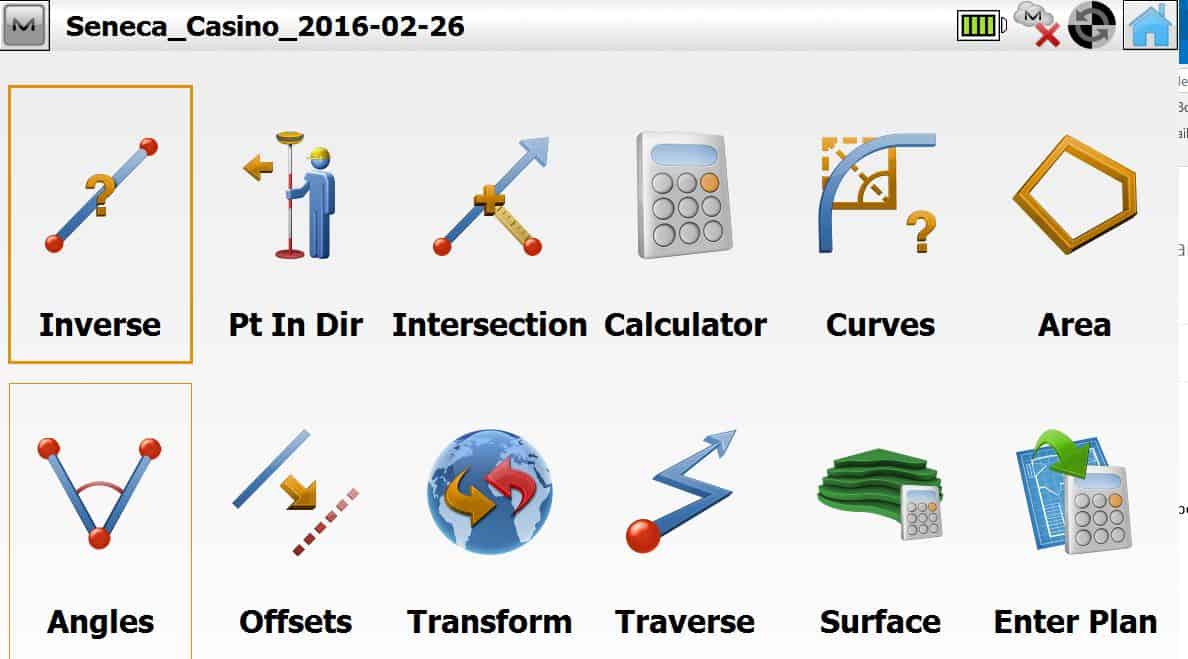
Try the demo version of Magnet Field PC. Put it on your descktop PC or laptop. The demo version is fully functional up to 25 points. You can purchase basic version (No Roads, Robot or GNSS) for $500 or lease it on monthly installments. Most basic cogo routines you would need are there. I'm hoping they release an Android version soon. Magnet has a FREE Android version now of Magnet, but no cogo. It connects to the LN100.
Let me know if you want me to send you email a link to download Magnet Field demo.
Here is a screen shot of cogo routines. As you can there are Lot's of pictorial icons to make intuitive.
Posted : February 28, 2016 6:45 am
Topic starter
Translate
▼
English
Spanish
French
German
Italian
Portuguese
Russian
Chinese
Japanese
Korean
Arabic
Hindi
Dutch
Polish
Turkish
Vietnamese
Thai
Swedish
Danish
Finnish
Norwegian
Czech
Hungarian
Romanian
Greek
Hebrew
Indonesian
Malay
Ukrainian
Bulgarian
Croatian
Slovak
Slovenian
Serbian
Lithuanian
Latvian
Estonian
Thanks Lee.
I can go find it, but put a link up, others may wish to look it over too.
There is no substitute for good cogo.
Posted : February 28, 2016 9:06 am
Translate
▼
English
Spanish
French
German
Italian
Portuguese
Russian
Chinese
Japanese
Korean
Arabic
Hindi
Dutch
Polish
Turkish
Vietnamese
Thai
Swedish
Danish
Finnish
Norwegian
Czech
Hungarian
Romanian
Greek
Hebrew
Indonesian
Malay
Ukrainian
Bulgarian
Croatian
Slovak
Slovenian
Serbian
Lithuanian
Latvian
Estonian
Nate The Surveyor, post: 360050, member: 291 wrote: Thanks Lee.
I can go find it, but put a link up, others may wish to look it over too.
There is no substitute for good cogo.
Hmmmm. That part is not so easy. Topcon's support page is a bit challenging to navigate.
Since you asked, here is the link for direct download
http://topconcare.com/files/1114/5038/1474/MAGNET_Field_v321_PC_20151215.zip
The file is 128MB in size.
I do not think my link will work upon 1st click. You will be taken to Topcons login page and prompted for your user name and password. You can setup a free user account then try to navigate through website and find the download. It takes about 10 clicks to get there. After you login, my link should work for a direct download.
Posted : February 28, 2016 9:32 am

Translate
▼
English
Spanish
French
German
Italian
Portuguese
Russian
Chinese
Japanese
Korean
Arabic
Hindi
Dutch
Polish
Turkish
Vietnamese
Thai
Swedish
Danish
Finnish
Norwegian
Czech
Hungarian
Romanian
Greek
Hebrew
Indonesian
Malay
Ukrainian
Bulgarian
Croatian
Slovak
Slovenian
Serbian
Lithuanian
Latvian
Estonian
 Download (FreeCOGO_Quadrant.zip)
Posted : February 28, 2016 4:54 pm
Translate
▼
English
Spanish
French
German
Italian
Portuguese
Russian
Chinese
Japanese
Korean
Arabic
Hindi
Dutch
Polish
Turkish
Vietnamese
Thai
Swedish
Danish
Finnish
Norwegian
Czech
Hungarian
Romanian
Greek
Hebrew
Indonesian
Malay
Ukrainian
Bulgarian
Croatian
Slovak
Slovenian
Serbian
Lithuanian
Latvian
Estonian
Posted : February 28, 2016 4:59 pm

Translate
▼
English
Spanish
French
German
Italian
Portuguese
Russian
Chinese
Japanese
Korean
Arabic
Hindi
Dutch
Polish
Turkish
Vietnamese
Thai
Swedish
Danish
Finnish
Norwegian
Czech
Hungarian
Romanian
Greek
Hebrew
Indonesian
Malay
Ukrainian
Bulgarian
Croatian
Slovak
Slovenian
Serbian
Lithuanian
Latvian
Estonian
I'm a big fan of the Cogo routine in Microsurvey.
I did a quick calc in the hotel room. My partner was amazed at how fast I got it done. Calculating coordinates for the next day. He uses Civil3d.
Posted : February 28, 2016 5:12 pm

Translate
▼
English
Spanish
French
German
Italian
Portuguese
Russian
Chinese
Japanese
Korean
Arabic
Hindi
Dutch
Polish
Turkish
Vietnamese
Thai
Swedish
Danish
Finnish
Norwegian
Czech
Hungarian
Romanian
Greek
Hebrew
Indonesian
Malay
Ukrainian
Bulgarian
Croatian
Slovak
Slovenian
Serbian
Lithuanian
Latvian
Estonian
I'll second Microsurvey COGO.
Can't fault it.
I am a great fan of their Batch Cogo. It's just a simple text file recording Cogo input. Can be rerun with scale and rotation of bearings.
I gather it's not a feature many aspire to.
I run all old cadastral surveys through Batch Cogo.
Also a great way to check my final cadastral plans.
Be good if they'd make it stand alone.
Posted : February 28, 2016 6:12 pm

Translate
▼
English
Spanish
French
German
Italian
Portuguese
Russian
Chinese
Japanese
Korean
Arabic
Hindi
Dutch
Polish
Turkish
Vietnamese
Thai
Swedish
Danish
Finnish
Norwegian
Czech
Hungarian
Romanian
Greek
Hebrew
Indonesian
Malay
Ukrainian
Bulgarian
Croatian
Slovak
Slovenian
Serbian
Lithuanian
Latvian
Estonian
leegreen, post: 360053, member: 2332 wrote: Hmmmm. That part is not so easy. Topcon's support page is a bit challenging to navigate.
Since you asked, here is the link for direct download
http://topconcare.com/files/1114/5038/1474/MAGNET_Field_v321_PC_20151215.zip
The file is 128MB in size.I do not think my link will work upon 1st click. You will be taken to Topcons login page and prompted for your user name and password. You can setup a free user account then try to navigate through website and find the download. It takes about 10 clicks to get there. After you login, my link should work for a direct download.
Try Magnet Office Tools-
Posted : February 29, 2016 11:30 am
Translate
▼
English
Spanish
French
German
Italian
Portuguese
Russian
Chinese
Japanese
Korean
Arabic
Hindi
Dutch
Polish
Turkish
Vietnamese
Thai
Swedish
Danish
Finnish
Norwegian
Czech
Hungarian
Romanian
Greek
Hebrew
Indonesian
Malay
Ukrainian
Bulgarian
Croatian
Slovak
Slovenian
Serbian
Lithuanian
Latvian
Estonian
Copan CoGo Lite - Free
Does just about everything
(especially like recall Distance and Azimuth by Point Number)
Also has batch processing (PC version)
Only "negative" is that it requires a key to run.
That's easily provided free by the company.
http://www.underhill.ca/software/copan-windows&apos ;">Link for download
Posted : February 29, 2016 1:03 pm
Translate
▼
English
Spanish
French
German
Italian
Portuguese
Russian
Chinese
Japanese
Korean
Arabic
Hindi
Dutch
Polish
Turkish
Vietnamese
Thai
Swedish
Danish
Finnish
Norwegian
Czech
Hungarian
Romanian
Greek
Hebrew
Indonesian
Malay
Ukrainian
Bulgarian
Croatian
Slovak
Slovenian
Serbian
Lithuanian
Latvian
Estonian
pmoran, post: 360187, member: 8922 wrote: Try Magnet Office Tools-
Pat,
I think Nate is looking for a field application to go along with his Javad LS.
Posted : February 29, 2016 1:15 pm

Translate
▼
English
Spanish
French
German
Italian
Portuguese
Russian
Chinese
Japanese
Korean
Arabic
Hindi
Dutch
Polish
Turkish
Vietnamese
Thai
Swedish
Danish
Finnish
Norwegian
Czech
Hungarian
Romanian
Greek
Hebrew
Indonesian
Malay
Ukrainian
Bulgarian
Croatian
Slovak
Slovenian
Serbian
Lithuanian
Latvian
Estonian
I love Carlson. When I used PacSoft, I loved PacSoft. The TDS nomads are okay, and Trimble works but is clunky in the field but doable.
The tools available in Carlson in AutoCAD, for me, are the best yet.
Posted : February 29, 2016 1:36 pm