

Spally, post: 354907, member: 10989 wrote: Fin, are you wanting CSV, Tab or Space separated? Are you wanting "TOP01", "TOP1", "01TOP", or "TOP 1". I have numerous stylesheets that can do these, I just need to know which way you want your data. What CAD package are you sending the data you?
I would be interested in seeing those stylesheets. I usually need point number, northing, easting, elevation, code, code number (stringing), controlling code [ie Begin Line/PC/PT etc], attributes---CSV file. I can't figure out how to get the controlling code or the stringing number out of Captivate for each individual point without using attributes (which kills the linework on the DC). I usually go into Geopak or Inroads Survey using the comma seperated ASCII format. I do not wish to load direct raw because I have spreadsheets to convert to different code lists (rather than having the field crew learn many different code lists). Any help would be greatly appreciated.

Ah, yes, the very few things I don't like about Leica.
It won't allow me to change the descriptor after I collect it, even though I'm the person who just collected it and I tend to be fairly responsible about changing anything.
I've learned to have but one project at a time in the data collector. Then it can't change the project on me, and, it can't "accidentally" reach across to another file and import an irrelevant point into the current project. It will do that, so be careful.

AllenRobberson, post: 348043, member: 10829 wrote: Hello Alastair,
My name is Allen Robberson and i Work for Sandis in Northern CA. We just purchased 22 leica captivate CS20. I was wondering if you could email me @ arobberson (at) sandis.net I have some questions about options in captivate. We are having some real issues.
Thanks Allen
[USER=10829]@AllenRobberson[/USER] It's been 2+ months - Inquiring minds want to know - did Leica fix the issues you were having?

Bruce Small, post: 414683, member: 1201 wrote: Ah, yes, the very few things I don't like about Leica.
It won't allow me to change the descriptor after I collect it, even though I'm the person who just collected it and I tend to be fairly responsible about changing anything.QUOTE]
Bruce,
You can change the descriptor at any point in Smartworks, Viva & Captivate. All you do is go to data management and edit. There you will see several pages including one for code. Under the code page you can change the code and any attributes you have defined for that code.
The one thing that I would love to see under edit is an applied offset. Once you have used the offset it is hidden in the collector. You can only view them in LGO, Infinity or a self created format file. This make it real hard to correct a simple miss-keying in the field. It would also be nice to be able to change antenna heights for GNSS observations.
Bruce Small, post: 414683, member: 1201 wrote: Ah, yes, the very few things I don't like about Leica.
It won't allow me to change the descriptor after I collect it, even though I'm the person who just collected it and I tend to be fairly responsible about changing anything.
Bruce,
You can change the descriptor at any point in Smartworks, Viva & Captivate. All you do is go to data management and edit. There you will see several pages including one for code. Under the code page you can change the code and any attributes you have defined for that code.
The one thing that I would love to see under edit is an applied offset. Once you have used the offset it is hidden in the collector. You can only view them in LGO, Infinity or a self created format file. This make it real hard to correct a simple miss-keying in the field. It would also be nice to be able to change antenna heights for GNSS observations.
John Putnam, post: 414760, member: 1188 wrote: Bruce,
You can change the descriptor at any point in Smartworks, Viva & Captivate. All you do is go to data management and edit. There you will see several pages including one for code. Under the code page you can change the code and any attributes you have defined for that code.
The one thing that I would love to see under edit is an applied offset. Once you have used the offset it is hidden in the collector. You can only view them in LGO, Infinity or a self created format file. This make it real hard to correct a simple miss-keying in the field. It would also be nice to be able to change antenna heights for GNSS observations.
Nope, just tried it again. It will not allow me to change the descriptor. Not a huge problem because the work around is to take the shot again using the same point number and the correct descriptor, then it gives me the option of storing the latest descriptor and I do.

Hello Everyone....Im new to this community..but a long time (20 year) surveyor. We are also having the field to finish issues the CS20...it doesn't export like a standard file. Im not sure if its an ascii file setting, or something else. We also have Infinity that's adds constant issues to the situation. We could like to do coding Captivates way, or the older DOS way, but bring it in directly to AutoCAD, Civil, or Carson... The only way Ive currently been able to complete this, is by ASCII and then DXF...Any help would be great...We don't get great support services here in Northwest Washington

Howdy Seth Bishop PLS, glad you found the site and look forward hearing more

Seth Bishop PLS, post: 449367, member: 13077 wrote: it doesn't export like a standard file.
Please clarify. Though I don??t currently have any Leica gear in front of me, I had zero issues spending a little time configuring captivate export settings to get exactly what I wanted and expected. My standard issue practice is to export a RW5 and a txt file. Those files are saved, then edited as needed, and ??save as?ed their cad-insertable versions. That way unmolested, dated raw and ascii files are maintained and the cleaned up versions (also dated and time stamped) can be cleanly put into cad.
Have worked exclusively in Leica for the last 5 years, but basically the same as Trimble before that.
Various software strikes me like car radios- they may look a little different in a Ford and a Toyota, but the buttons have the same basic functions. Just a matter of figuring out which is which.

Seth Bishop PLS, post: 449367, member: 13077 wrote: Hello Everyone....Im new to this community..but a long time (20 year) surveyor. We are also having the field to finish issues the CS20...it doesn't export like a standard file. Im not sure if its an ascii file setting, or something else. We also have Infinity that's adds constant issues to the situation. We could like to do coding Captivates way, or the older DOS way, but bring it in directly to AutoCAD, Civil, or Carson... The only way Ive currently been able to complete this, is by ASCII and then DXF...Any help would be great...We don't get great support services here in Northwest Washington
Just a guess - are you missing the string numbers when you export to a txt file?

Seth Bishop PLS, post: 449367, member: 13077 wrote: Hello Everyone....Im new to this community..but a long time (20 year) surveyor. We are also having the field to finish issues the CS20...it doesn't export like a standard file. Im not sure if its an ascii file setting, or something else. We also have Infinity that's adds constant issues to the situation. We could like to do coding Captivates way, or the older DOS way, but bring it in directly to AutoCAD, Civil, or Carson... The only way Ive currently been able to complete this, is by ASCII and then DXF...Any help would be great...We don't get great support services here in Northwest Washington
If you're doing linework the "captivate way" then you've assigned lines to certain codes within captivate and you draw them as you go while you're collecting ground features. Your output file when finished is an XML using the Civil3D style sheet. You can then process the linework into C3D through the survey database.

My Leica guy had a Carlson stylesheet made for me for export
sbye, post: 449529, member: 6409 wrote: My Leica guy had a Carlson stylesheet made for me for export
Was talking to Leica about this today. I don't understand why all these stylesheets are not available on Leica MyWorld or similar.
A Harris, post: 449381, member: 81 wrote: Howdy Seth Bishop PLS, glad you found the site and look forward hearing more
Hey thanks A Harris....Glad to be here!!!
squowse, post: 449531, member: 7109 wrote: Was talking to Leica about this today. I don't understand why all these stylesheets are not available on Leica MyWorld or similar.
That's our frustration as well... Been asking for help for over 6 months from Leica and our sales person...and nothing...so decided to help myself again unfortunately...
sbye, post: 449529, member: 6409 wrote: My Leica guy had a Carlson stylesheet made for me for export
a Carlson sheet for 2018 or what version? if you don't mind me asking... luckily between this site, you tube, and a lot of searching I think I'm getting close.
Cameron Watson PLS, post: 449445, member: 11407 wrote: If you're doing linework the "captivate way" then you've assigned lines to certain codes within captivate and you draw them as you go while you're collecting ground features. Your output file when finished is an XML using the Civil3D style sheet. You can then process the linework into C3D through the survey database.
Hey thanks... You said it correctly... But I have not yet found instructions that tell me I needed a style sheet... HAHA... Yes you have me on the right track... My company also bought Leica Infinity which frustrates the issue... Thanks for the help
squowse, post: 449421, member: 7109 wrote: Just a guess - are you missing the string numbers when you export to a txt file?
Yes that's exactly the problem. Im understanding that I should've been using a style sheet. They need to put that into the literature somewhere..HAHA...
Seth Bishop PLS, post: 449539, member: 13077 wrote: Yes that's exactly the problem. Im understanding that I should've been using a style sheet. They need to put that into the literature somewhere..HAHA...
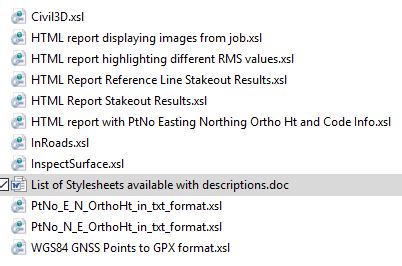
These are the stylesheets available from myWorld;
Seth Bishop PLS, post: 449539, member: 13077 wrote: Yes that's exactly the problem. Im understanding that I should've been using a style sheet. They need to put that into the literature somewhere..HAHA...
you want them in a csv (text file)? try this one, it can be modified to give the exact output you need.
need to change the file extension to .XSL and put it in the CONVERT folder in the internal memory of the controller.
then you can use it to export > stylesheet
if you get a HeXML version error then line 5 needs changing
credit and many thanks to Spally