Reading RPLS is free for the whole profession. Members post, reply, and get the members-only rooms.


Notifications
Clear all

Topic starter
Translate
▼
English
Spanish
French
German
Italian
Portuguese
Russian
Chinese
Japanese
Korean
Arabic
Hindi
Dutch
Polish
Turkish
Vietnamese
Thai
Swedish
Danish
Finnish
Norwegian
Czech
Hungarian
Romanian
Greek
Hebrew
Indonesian
Malay
Ukrainian
Bulgarian
Croatian
Slovak
Slovenian
Serbian
Lithuanian
Latvian
Estonian
I couple of questions for all the Topcon Magnet Guru's.....We use Carlson for F2F and basically use their preprogrammed special codes to generate line work. That said:
1-Is there a way in Magnet field to change the control codes to match the Carlson Codes?
2-IS there a way to get field entered descriptor codes to populate the Global code list on the fly?
Posted : November 11, 2016 5:26 am

Translate
▼
English
Spanish
French
German
Italian
Portuguese
Russian
Chinese
Japanese
Korean
Arabic
Hindi
Dutch
Polish
Turkish
Vietnamese
Thai
Swedish
Danish
Finnish
Norwegian
Czech
Hungarian
Romanian
Greek
Hebrew
Indonesian
Malay
Ukrainian
Bulgarian
Croatian
Slovak
Slovenian
Serbian
Lithuanian
Latvian
Estonian
I'm just about to start looking into this. I'm a Carlson f2f user but I just got magnet field and magnet office. I'll let you know what I find out.
Sent from my SAMSUNG-SM-N920A using Tapatalk
Posted : November 12, 2016 5:39 pm

Translate
▼
English
Spanish
French
German
Italian
Portuguese
Russian
Chinese
Japanese
Korean
Arabic
Hindi
Dutch
Polish
Turkish
Vietnamese
Thai
Swedish
Danish
Finnish
Norwegian
Czech
Hungarian
Romanian
Greek
Hebrew
Indonesian
Malay
Ukrainian
Bulgarian
Croatian
Slovak
Slovenian
Serbian
Lithuanian
Latvian
Estonian
Terminus-NC, post: 399237, member: 11581 wrote: I couple of questions for all the Topcon Magnet Guru's.....We use Carlson for F2F and basically use their preprogrammed special codes to generate line work. That said:
1-Is there a way in Magnet field to change the control codes to match the Carlson Codes?
2-IS there a way to get field entered descriptor codes to populate the Global code list on the fly?
Yes to all the above. There are code styles predefined in Magnet field for Carlson, plus you can customize your own. You can also import a Carlson code list.
Posted : November 13, 2016 5:22 am
Translate
▼
English
Spanish
French
German
Italian
Portuguese
Russian
Chinese
Japanese
Korean
Arabic
Hindi
Dutch
Polish
Turkish
Vietnamese
Thai
Swedish
Danish
Finnish
Norwegian
Czech
Hungarian
Romanian
Greek
Hebrew
Indonesian
Malay
Ukrainian
Bulgarian
Croatian
Slovak
Slovenian
Serbian
Lithuanian
Latvian
Estonian
No kidding? That's great! Do you do this through magnet field or magnet office?
Sent from my SAMSUNG-SM-N920A using Tapatalk
Posted : November 13, 2016 10:38 am
Translate
▼
English
Spanish
French
German
Italian
Portuguese
Russian
Chinese
Japanese
Korean
Arabic
Hindi
Dutch
Polish
Turkish
Vietnamese
Thai
Swedish
Danish
Finnish
Norwegian
Czech
Hungarian
Romanian
Greek
Hebrew
Indonesian
Malay
Ukrainian
Bulgarian
Croatian
Slovak
Slovenian
Serbian
Lithuanian
Latvian
Estonian
I always set it in Magnet Field. Never tried it with Office.
Posted : November 13, 2016 10:46 am

Translate
▼
English
Spanish
French
German
Italian
Portuguese
Russian
Chinese
Japanese
Korean
Arabic
Hindi
Dutch
Polish
Turkish
Vietnamese
Thai
Swedish
Danish
Finnish
Norwegian
Czech
Hungarian
Romanian
Greek
Hebrew
Indonesian
Malay
Ukrainian
Bulgarian
Croatian
Slovak
Slovenian
Serbian
Lithuanian
Latvian
Estonian
So does it need to be an xml file or can it be carlsons fcl format?
Sent from my SAMSUNG-SM-N920A using Tapatalk
Posted : November 13, 2016 8:02 pm

Translate
▼
English
Spanish
French
German
Italian
Portuguese
Russian
Chinese
Japanese
Korean
Arabic
Hindi
Dutch
Polish
Turkish
Vietnamese
Thai
Swedish
Danish
Finnish
Norwegian
Czech
Hungarian
Romanian
Greek
Hebrew
Indonesian
Malay
Ukrainian
Bulgarian
Croatian
Slovak
Slovenian
Serbian
Lithuanian
Latvian
Estonian
arctan(x), post: 399470, member: 6795 wrote: So does it need to be an xml file or can it be carlsons fcl format?
Sent from my SAMSUNG-SM-N920A using Tapatalk
You need to convert the fcl into a xml and load it in your code library. When exporting your files, use text custom report.txt and under code list set it to Carlson(you will have to set up the Carlson config. to match what you have on your PC). Once everything is set up right it should flow smoothly.
Posted : November 13, 2016 9:03 pm
Translate
▼
English
Spanish
French
German
Italian
Portuguese
Russian
Chinese
Japanese
Korean
Arabic
Hindi
Dutch
Polish
Turkish
Vietnamese
Thai
Swedish
Danish
Finnish
Norwegian
Czech
Hungarian
Romanian
Greek
Hebrew
Indonesian
Malay
Ukrainian
Bulgarian
Croatian
Slovak
Slovenian
Serbian
Lithuanian
Latvian
Estonian
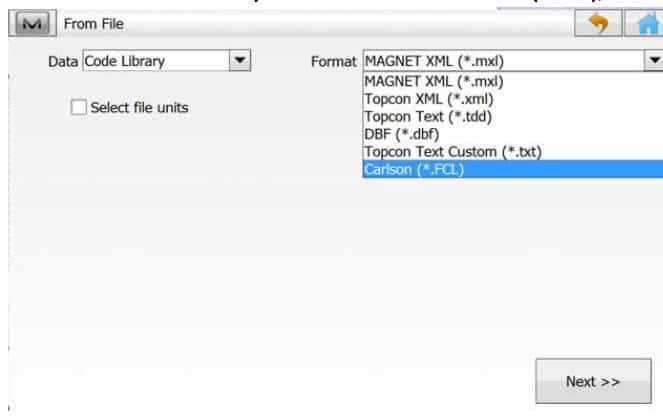
No need for converting. Topcon Magnet can import the Carlson format.
Posted : November 14, 2016 4:19 am
Translate
▼
English
Spanish
French
German
Italian
Portuguese
Russian
Chinese
Japanese
Korean
Arabic
Hindi
Dutch
Polish
Turkish
Vietnamese
Thai
Swedish
Danish
Finnish
Norwegian
Czech
Hungarian
Romanian
Greek
Hebrew
Indonesian
Malay
Ukrainian
Bulgarian
Croatian
Slovak
Slovenian
Serbian
Lithuanian
Latvian
Estonian
So I can just browse to my fcl file and click OK? That's too easy. Lol
I was perusing the older threads and there was a topic about everybody coming together with their input to try to make magnet field better. How far have they come since version 2?
Sent from my SAMSUNG-SM-N920A using Tapatalk
Posted : November 14, 2016 7:32 am
Translate
▼
English
Spanish
French
German
Italian
Portuguese
Russian
Chinese
Japanese
Korean
Arabic
Hindi
Dutch
Polish
Turkish
Vietnamese
Thai
Swedish
Danish
Finnish
Norwegian
Czech
Hungarian
Romanian
Greek
Hebrew
Indonesian
Malay
Ukrainian
Bulgarian
Croatian
Slovak
Slovenian
Serbian
Lithuanian
Latvian
Estonian
arctan(x), post: 399486, member: 6795 wrote: So I can just browse to my fcl file and click OK? That's too easy. Lol
Yes, it's just that easy.
arctan(x), post: 399486, member: 6795 wrote: How far have they come since version 2?
It took a while, but it has all come together in Magnet Field v4.1.2
Posted : November 14, 2016 7:48 am

Translate
▼
English
Spanish
French
German
Italian
Portuguese
Russian
Chinese
Japanese
Korean
Arabic
Hindi
Dutch
Polish
Turkish
Vietnamese
Thai
Swedish
Danish
Finnish
Norwegian
Czech
Hungarian
Romanian
Greek
Hebrew
Indonesian
Malay
Ukrainian
Bulgarian
Croatian
Slovak
Slovenian
Serbian
Lithuanian
Latvian
Estonian
Perfect! I got mine loaded. Now how about the prompting for attributes? I have a .gis file from Carlson. Is there any way I can import that?
Sent from my SAMSUNG-SM-N920A using Tapatalk
Posted : November 14, 2016 5:13 pm
Translate
▼
English
Spanish
French
German
Italian
Portuguese
Russian
Chinese
Japanese
Korean
Arabic
Hindi
Dutch
Polish
Turkish
Vietnamese
Thai
Swedish
Danish
Finnish
Norwegian
Czech
Hungarian
Romanian
Greek
Hebrew
Indonesian
Malay
Ukrainian
Bulgarian
Croatian
Slovak
Slovenian
Serbian
Lithuanian
Latvian
Estonian
arctan(x), post: 399617, member: 6795 wrote: Perfect! I got mine loaded. Now how about the prompting for attributes? I have a .gis file from Carlson. Is there any way I can import that?
Sent from my SAMSUNG-SM-N920A using Tapatalk
Magnet can prompt for attributes. I am not familiar with Carlson GIS. Try to export an FCL with Attribute info, import that in Magnet.
Posted : November 14, 2016 5:26 pm