Reading RPLS is free for the whole profession. Members post, reply, and get the members-only rooms.


Notifications
Clear all

Topic starter
Translate
▼
English
Spanish
French
German
Italian
Portuguese
Russian
Chinese
Japanese
Korean
Arabic
Hindi
Dutch
Polish
Turkish
Vietnamese
Thai
Swedish
Danish
Finnish
Norwegian
Czech
Hungarian
Romanian
Greek
Hebrew
Indonesian
Malay
Ukrainian
Bulgarian
Croatian
Slovak
Slovenian
Serbian
Lithuanian
Latvian
Estonian
I just updated TBC to the 3.70 version. Exist projects seem to adjust ok. However I've created a couple of new projects using conventional (total station) traverses. When I go to do a least squares adjustment I get an error message that says "a network adjustment cannot be performed because earth curvature correction has been turned off for terrestrial data. Network adjustment requires curvature correction be turned on ("yes").
I must be blind or something because I cannot find where this setting resides to turn it on. I think I've looked every where there is in the project settings.
Any help would be very much appreciated.
thanks.
Posted : June 10, 2016 4:03 pm
Topic starter
Translate
▼
English
Spanish
French
German
Italian
Portuguese
Russian
Chinese
Japanese
Korean
Arabic
Hindi
Dutch
Polish
Turkish
Vietnamese
Thai
Swedish
Danish
Finnish
Norwegian
Czech
Hungarian
Romanian
Greek
Hebrew
Indonesian
Malay
Ukrainian
Bulgarian
Croatian
Slovak
Slovenian
Serbian
Lithuanian
Latvian
Estonian
.
Posted : June 12, 2016 10:43 pm

Translate
▼
English
Spanish
French
German
Italian
Portuguese
Russian
Chinese
Japanese
Korean
Arabic
Hindi
Dutch
Polish
Turkish
Vietnamese
Thai
Swedish
Danish
Finnish
Norwegian
Czech
Hungarian
Romanian
Greek
Hebrew
Indonesian
Malay
Ukrainian
Bulgarian
Croatian
Slovak
Slovenian
Serbian
Lithuanian
Latvian
Estonian
Try going to the Project Explorer, expanding Imported Files, expanding your job, right-clicking on an instrument setup, and going to Properties - see the attached photo. If it's not turned on there turn it on.
Posted : June 13, 2016 7:20 am

Translate
▼
English
Spanish
French
German
Italian
Portuguese
Russian
Chinese
Japanese
Korean
Arabic
Hindi
Dutch
Polish
Turkish
Vietnamese
Thai
Swedish
Danish
Finnish
Norwegian
Czech
Hungarian
Romanian
Greek
Hebrew
Indonesian
Malay
Ukrainian
Bulgarian
Croatian
Slovak
Slovenian
Serbian
Lithuanian
Latvian
Estonian
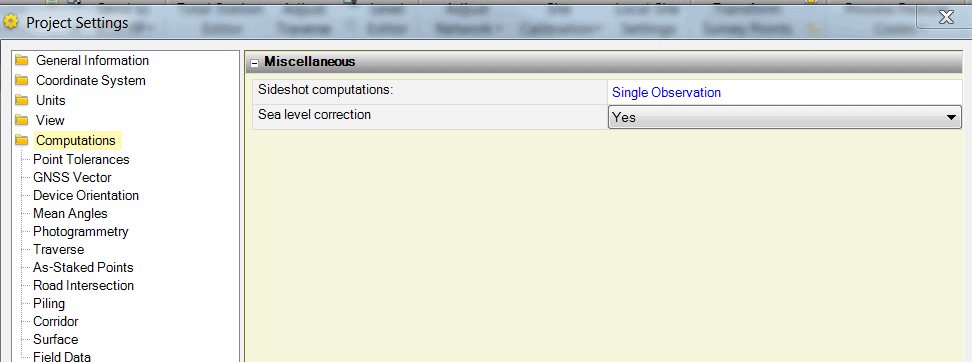
Try Project settings computations, Sea Level correction.
Posted : June 13, 2016 7:31 am

Translate
▼
English
Spanish
French
German
Italian
Portuguese
Russian
Chinese
Japanese
Korean
Arabic
Hindi
Dutch
Polish
Turkish
Vietnamese
Thai
Swedish
Danish
Finnish
Norwegian
Czech
Hungarian
Romanian
Greek
Hebrew
Indonesian
Malay
Ukrainian
Bulgarian
Croatian
Slovak
Slovenian
Serbian
Lithuanian
Latvian
Estonian
makerofmaps, post: 376923, member: 9079 wrote: Try Project settings computations, Sea Level correction.
Sea level correction? This is what Trimbel calls earth curvature correction?
Posted : June 13, 2016 8:25 am

Translate
▼
English
Spanish
French
German
Italian
Portuguese
Russian
Chinese
Japanese
Korean
Arabic
Hindi
Dutch
Polish
Turkish
Vietnamese
Thai
Swedish
Danish
Finnish
Norwegian
Czech
Hungarian
Romanian
Greek
Hebrew
Indonesian
Malay
Ukrainian
Bulgarian
Croatian
Slovak
Slovenian
Serbian
Lithuanian
Latvian
Estonian
Darn Lee. I was waiting for you to respond hoping you knew of a better way. That's the way I do it but it can be a pain on a traverse with 30 setups.
Posted : June 13, 2016 8:27 am
Translate
▼
English
Spanish
French
German
Italian
Portuguese
Russian
Chinese
Japanese
Korean
Arabic
Hindi
Dutch
Polish
Turkish
Vietnamese
Thai
Swedish
Danish
Finnish
Norwegian
Czech
Hungarian
Romanian
Greek
Hebrew
Indonesian
Malay
Ukrainian
Bulgarian
Croatian
Slovak
Slovenian
Serbian
Lithuanian
Latvian
Estonian
You should be able to select them all using Control or Shift then right-click and select Properties.
Posted : June 13, 2016 8:52 am
Topic starter
Translate
▼
English
Spanish
French
German
Italian
Portuguese
Russian
Chinese
Japanese
Korean
Arabic
Hindi
Dutch
Polish
Turkish
Vietnamese
Thai
Swedish
Danish
Finnish
Norwegian
Czech
Hungarian
Romanian
Greek
Hebrew
Indonesian
Malay
Ukrainian
Bulgarian
Croatian
Slovak
Slovenian
Serbian
Lithuanian
Latvian
Estonian
Thank you much Lee D.
I was digging through the individual observations and had skipped right past the set up point(s).
Surprised I had never encountered this before. Now I realize the issue originates in the DC when the .job file is first created.
All of our field crews had always had the correction turned on. It just so happened that this particular job came in the day after I had updated TBC and was going down the path of thinking the TBC update had changed a global setting somewhere.
Anyways problem solved and should have been obvious to me. Thanks again.
Posted : June 13, 2016 11:14 am
Translate
▼
English
Spanish
French
German
Italian
Portuguese
Russian
Chinese
Japanese
Korean
Arabic
Hindi
Dutch
Polish
Turkish
Vietnamese
Thai
Swedish
Danish
Finnish
Norwegian
Czech
Hungarian
Romanian
Greek
Hebrew
Indonesian
Malay
Ukrainian
Bulgarian
Croatian
Slovak
Slovenian
Serbian
Lithuanian
Latvian
Estonian
You're quite welcome - I was going to mention the DC but it sounded like the TBC was the only thing that had changed.
I've never turned on C&R on the data collector unless I was using it with a Trimble robot, when we hook up to a Nikon or Spectra gun I prefer to do the C&R as well as the temp/pressure/prism constants on the gun itself, that way non-DC shots are still as accurate as possible. Maybe I need to re-think this?
Posted : June 13, 2016 12:07 pm