Reading RPLS is free for the whole profession. Members post, reply, and get the members-only rooms.


Notifications
Clear all

Topic starter
Translate
▼
English
Spanish
French
German
Italian
Portuguese
Russian
Chinese
Japanese
Korean
Arabic
Hindi
Dutch
Polish
Turkish
Vietnamese
Thai
Swedish
Danish
Finnish
Norwegian
Czech
Hungarian
Romanian
Greek
Hebrew
Indonesian
Malay
Ukrainian
Bulgarian
Croatian
Slovak
Slovenian
Serbian
Lithuanian
Latvian
Estonian
The thread on point clouds brought up another question. What sort of hardware are people running to crunch these data sets? I just ordered a new laptop that will double as a bbq grill. In 6 months it will be outdated but thats another thread. We will be ordering more soon.
Are there any must haves in hardware for the new demands?
Posted : November 15, 2017 10:54 am

Translate
▼
English
Spanish
French
German
Italian
Portuguese
Russian
Chinese
Japanese
Korean
Arabic
Hindi
Dutch
Polish
Turkish
Vietnamese
Thai
Swedish
Danish
Finnish
Norwegian
Czech
Hungarian
Romanian
Greek
Hebrew
Indonesian
Malay
Ukrainian
Bulgarian
Croatian
Slovak
Slovenian
Serbian
Lithuanian
Latvian
Estonian
thebionicman, post: 455712, member: 8136 wrote: The thread on point clouds brought up another question. What sort of hardware are people running to crunch these data sets? I just ordered a new laptop that will double as a bbq grill. In 6 months it will be outdated but thats another thread. We will be ordering more soon.
Are there any must haves in hardware for the new demands?
I did some benchmark testing with our software supplier a year ago using Cyclone and there wasn't much of a noticeable difference between 16 & 32 GB of RAM. 32 was obviously a little faster but it wasn't like OMG I'm sitting here all day using 16. Running on an SSD and using an application that will utilize all available processor cores is where you'll get the most noticeable improved results.
Posted : November 15, 2017 11:26 am

Translate
▼
English
Spanish
French
German
Italian
Portuguese
Russian
Chinese
Japanese
Korean
Arabic
Hindi
Dutch
Polish
Turkish
Vietnamese
Thai
Swedish
Danish
Finnish
Norwegian
Czech
Hungarian
Romanian
Greek
Hebrew
Indonesian
Malay
Ukrainian
Bulgarian
Croatian
Slovak
Slovenian
Serbian
Lithuanian
Latvian
Estonian
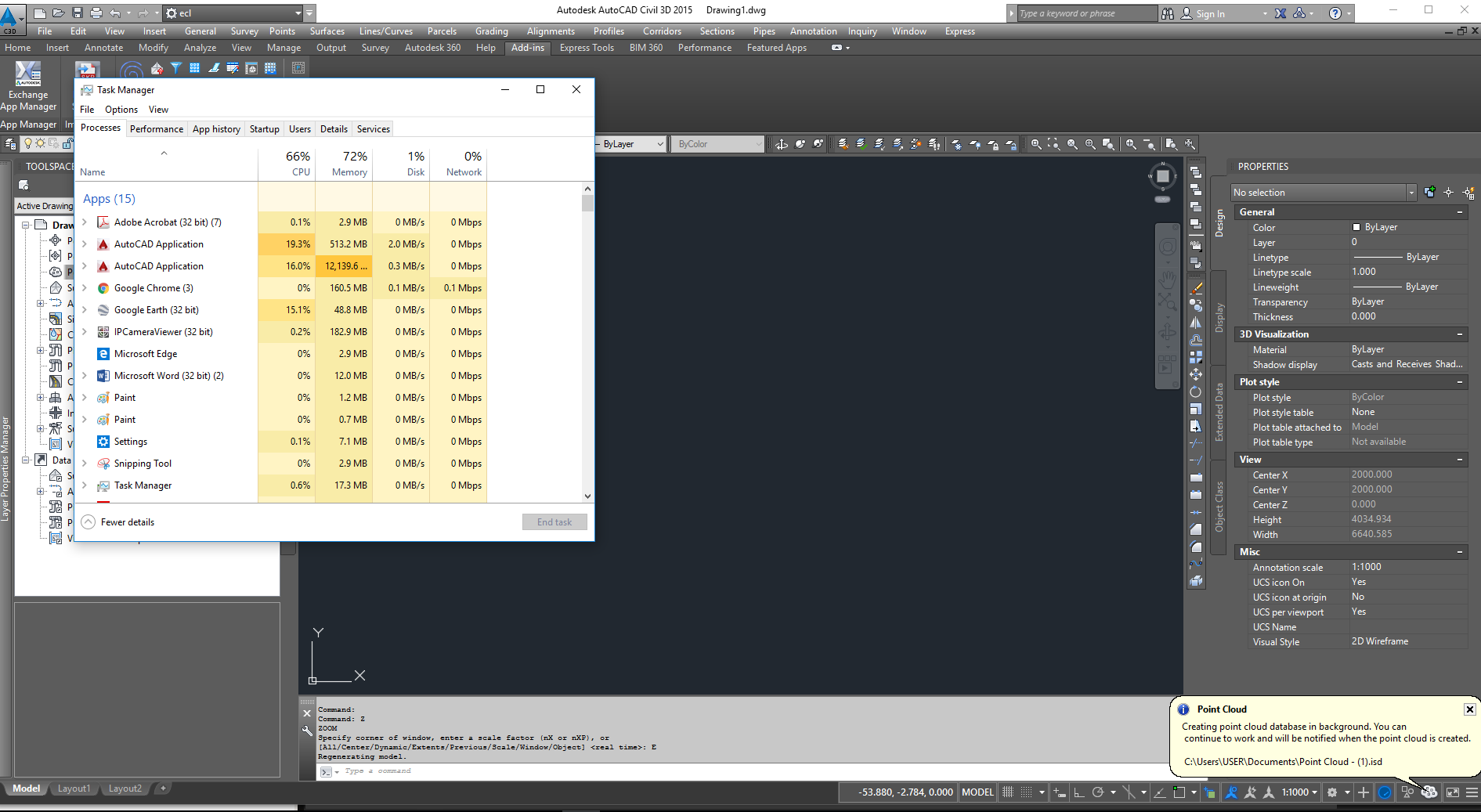
We use Civil 3D and our latest PC's and laptops are HP 3.2GHz i7, 32 GB RAM, Quadro 4GB graphics, Win10, SSD. Although the i7 does go into turbo mode, Civil 3D only uses one of the 4 cores (except for, I understand, one or two tasks like regen) so most of the time whole processor useage is (or was) only up to 25%. I say was because the latest ones seem to only go up to 15%. RAM is typically up to 9GB useage but that is when we have PDF viewers and web browser open as well. But as below I have seen some heavy useage when running two Civil 3D applications and doing some point cloud type work.
Posted : November 15, 2017 11:42 am
Topic starter
Translate
▼
English
Spanish
French
German
Italian
Portuguese
Russian
Chinese
Japanese
Korean
Arabic
Hindi
Dutch
Polish
Turkish
Vietnamese
Thai
Swedish
Danish
Finnish
Norwegian
Czech
Hungarian
Romanian
Greek
Hebrew
Indonesian
Malay
Ukrainian
Bulgarian
Croatian
Slovak
Slovenian
Serbian
Lithuanian
Latvian
Estonian
Interesting. I was running an i7, 16 gb ram, 256 ssd with a 4 gb video card. I would get up to 50 percent processor and 11 gb memory. Surfaces were generated overnight and took a nominal 5 hours to generate.
The new machine is i7, 64 gb ram, dual 512 ssd, 10 gb video. It will be interesting to see which software uses the tools..
Posted : November 15, 2017 12:06 pm

Translate
▼
English
Spanish
French
German
Italian
Portuguese
Russian
Chinese
Japanese
Korean
Arabic
Hindi
Dutch
Polish
Turkish
Vietnamese
Thai
Swedish
Danish
Finnish
Norwegian
Czech
Hungarian
Romanian
Greek
Hebrew
Indonesian
Malay
Ukrainian
Bulgarian
Croatian
Slovak
Slovenian
Serbian
Lithuanian
Latvian
Estonian
We run an Alienware with either 6 or 8 core processor, 64 gigs of ram (but 32 would work), and an NVIDIA GPU with 9 gigs onboad. The GPU made the biggest difference vs our previous point cloud processing machine. SSD drive is a must too.
Posted : November 15, 2017 12:10 pm

Translate
▼
English
Spanish
French
German
Italian
Portuguese
Russian
Chinese
Japanese
Korean
Arabic
Hindi
Dutch
Polish
Turkish
Vietnamese
Thai
Swedish
Danish
Finnish
Norwegian
Czech
Hungarian
Romanian
Greek
Hebrew
Indonesian
Malay
Ukrainian
Bulgarian
Croatian
Slovak
Slovenian
Serbian
Lithuanian
Latvian
Estonian
Taco Bell Dawg, post: 455731, member: 12957 wrote: We run an Alienware with either 6 or 8 core processor, 64 gigs of ram (but 32 would work), and an NVIDIA GPU with 9 gigs onboad. The GPU made the biggest difference vs our previous point cloud processing machine. SSD drive is a must too.
Single most important part of the computer today that will give you the OMG moment is the hard drive, and an SSD hard drive is not nearly as fast as an nvme Drive. NVME m.2 will deliver speeds up to 3500 megabytes per second, an SSD drive is only 500 megabytes per second. Obviously you will want to pair this with a very fast processor and RAM.
Posted : November 15, 2017 1:03 pm

Translate
▼
English
Spanish
French
German
Italian
Portuguese
Russian
Chinese
Japanese
Korean
Arabic
Hindi
Dutch
Polish
Turkish
Vietnamese
Thai
Swedish
Danish
Finnish
Norwegian
Czech
Hungarian
Romanian
Greek
Hebrew
Indonesian
Malay
Ukrainian
Bulgarian
Croatian
Slovak
Slovenian
Serbian
Lithuanian
Latvian
Estonian
We just ordered 4 supercomputers. I think they have a bunch of ram. Something to remote in for LIDAR processing.
Posted : November 15, 2017 2:56 pm
Topic starter
Translate
▼
English
Spanish
French
German
Italian
Portuguese
Russian
Chinese
Japanese
Korean
Arabic
Hindi
Dutch
Polish
Turkish
Vietnamese
Thai
Swedish
Danish
Finnish
Norwegian
Czech
Hungarian
Romanian
Greek
Hebrew
Indonesian
Malay
Ukrainian
Bulgarian
Croatian
Slovak
Slovenian
Serbian
Lithuanian
Latvian
Estonian
leegreen, post: 455739, member: 2332 wrote: Single most important part of the computer today that will give you the OMG moment is the hard drive, and an SSD hard drive is not nearly as fast as an nvme Drive. NVME m.2 will deliver speeds up to 3500 megabytes per second, an SSD drive is only 500 megabytes per second. Obviously you will want to pair this with a very fast processor and RAM.
Depreciation schedules need to use a stopwatch rather than a calendar...
Posted : November 15, 2017 3:03 pm
Translate
▼
English
Spanish
French
German
Italian
Portuguese
Russian
Chinese
Japanese
Korean
Arabic
Hindi
Dutch
Polish
Turkish
Vietnamese
Thai
Swedish
Danish
Finnish
Norwegian
Czech
Hungarian
Romanian
Greek
Hebrew
Indonesian
Malay
Ukrainian
Bulgarian
Croatian
Slovak
Slovenian
Serbian
Lithuanian
Latvian
Estonian
thebionicman, post: 455766, member: 8136 wrote: Depreciation schedules need to use a stopwatch rather than a calendar...
Very true for Drones also. Can't image being one of those early adopters that purchased high dollar drones that are now EOL, within months.
Posted : November 15, 2017 6:25 pm