Reading RPLS is free for the whole profession. Members post, reply, and get the members-only rooms.


Notifications
Clear all
Software, CAD & Mapping
7
Posts
5
Users
0
Reactions
1,985
Views

Topic starter
Translate
▼
English
Spanish
French
German
Italian
Portuguese
Russian
Chinese
Japanese
Korean
Arabic
Hindi
Dutch
Polish
Turkish
Vietnamese
Thai
Swedish
Danish
Finnish
Norwegian
Czech
Hungarian
Romanian
Greek
Hebrew
Indonesian
Malay
Ukrainian
Bulgarian
Croatian
Slovak
Slovenian
Serbian
Lithuanian
Latvian
Estonian
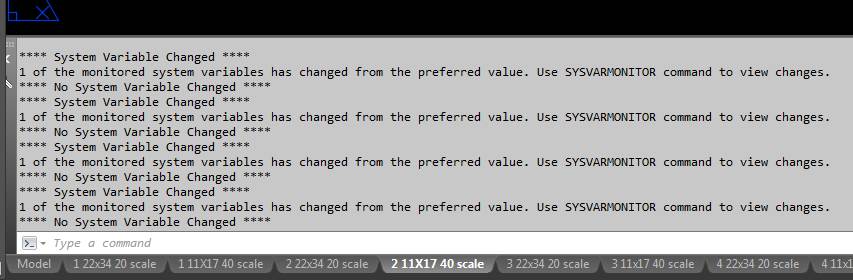
Nice use of my command line. Anybody else getting these messages when using Carlson 2017?
Posted : September 30, 2016 11:35 am

Translate
▼
English
Spanish
French
German
Italian
Portuguese
Russian
Chinese
Japanese
Korean
Arabic
Hindi
Dutch
Polish
Turkish
Vietnamese
Thai
Swedish
Danish
Finnish
Norwegian
Czech
Hungarian
Romanian
Greek
Hebrew
Indonesian
Malay
Ukrainian
Bulgarian
Croatian
Slovak
Slovenian
Serbian
Lithuanian
Latvian
Estonian
imaudigger, post: 393345, member: 7286 wrote: Nice use of my command line. Anybody else getting these messages when using Carlson 2017?
Presuming you're using Carlson 2017 as an add-on to either AutoCAD 2016 or AutoCAD 2017, I found this "https://knowledge.autodesk.com/support/autocad/troubleshooting/caas/sfdcarticles/sfdcarticles/System-variable-changed-message-appears-in-AutoCAD.html&apos ;">System Variable Changed" knowledgebase article. Adjusting the value for the https://knowledge.autodesk.com/support/autocad/learn-explore/caas/CloudHelp/cloudhelp/2016/ENU/AutoCAD-Core/files/GUID-4C530D78-D0EF-4FEF-ADC1-295A36655067-htm.html&apos ;">SYSMON variable should allow you to set the desired level of command feedback.
Posted : September 30, 2016 4:46 pm

Translate
▼
English
Spanish
French
German
Italian
Portuguese
Russian
Chinese
Japanese
Korean
Arabic
Hindi
Dutch
Polish
Turkish
Vietnamese
Thai
Swedish
Danish
Finnish
Norwegian
Czech
Hungarian
Romanian
Greek
Hebrew
Indonesian
Malay
Ukrainian
Bulgarian
Croatian
Slovak
Slovenian
Serbian
Lithuanian
Latvian
Estonian
Ladd is correct. It's not a function of Carlson, but of Autocad, beginning with 2016. Besides the knowledge network he links, http://blog.ketiv.com/system-variable-monitor-new-in-autodesk-autocad-2016&apos ;">this may be a more thorough explanation.
On a side note from that link, down in the comments, Nicole Morris is an old Autocad protege of mine. Probably the sharpest student I ever had. She went on to be a presenter at Autodesk University for many years. She was also on one of my field crews, tail chaining like a pro!
Posted : September 30, 2016 5:05 pm

Translate
▼
English
Spanish
French
German
Italian
Portuguese
Russian
Chinese
Japanese
Korean
Arabic
Hindi
Dutch
Polish
Turkish
Vietnamese
Thai
Swedish
Danish
Finnish
Norwegian
Czech
Hungarian
Romanian
Greek
Hebrew
Indonesian
Malay
Ukrainian
Bulgarian
Croatian
Slovak
Slovenian
Serbian
Lithuanian
Latvian
Estonian
Wow, thanks for the information. I just installed Carlson 2017 yesterday but I am running it on AutoCAD C3D 2013. I was considering installing my C3D 2016 (the last one I will own, told Autodesk to take a hike) to be all up to date but I guess that may not be a good idea.
T.W.
Posted : October 1, 2016 10:05 am
Translate
▼
English
Spanish
French
German
Italian
Portuguese
Russian
Chinese
Japanese
Korean
Arabic
Hindi
Dutch
Polish
Turkish
Vietnamese
Thai
Swedish
Danish
Finnish
Norwegian
Czech
Hungarian
Romanian
Greek
Hebrew
Indonesian
Malay
Ukrainian
Bulgarian
Croatian
Slovak
Slovenian
Serbian
Lithuanian
Latvian
Estonian
Tom Wilson, post: 393480, member: 247 wrote: Wow, thanks for the information. I just installed Carlson 2017 yesterday but I am running it on AutoCAD C3D 2013. I was considering installing my C3D 2016 (the last one I will own, told Autodesk to take a hike) to be all up to date but I guess that may not be a good idea.
T.W.
I wouldn't use this as an excuse to not upgrade. It doesn't pop up all that often, and it's really not an issue. I noticed it the first time or two when I got the message, but don't notice it at all any more. It probably is a good thing to have that command available. C3D 2016 is better than C3D 2013 IMHO.
Posted : October 2, 2016 7:24 pm
Topic starter
Translate
▼
English
Spanish
French
German
Italian
Portuguese
Russian
Chinese
Japanese
Korean
Arabic
Hindi
Dutch
Polish
Turkish
Vietnamese
Thai
Swedish
Danish
Finnish
Norwegian
Czech
Hungarian
Romanian
Greek
Hebrew
Indonesian
Malay
Ukrainian
Bulgarian
Croatian
Slovak
Slovenian
Serbian
Lithuanian
Latvian
Estonian
So..........system variable changed...no system variable changed....WHICH IS IT!?
Posted : October 3, 2016 11:36 am

Translate
▼
English
Spanish
French
German
Italian
Portuguese
Russian
Chinese
Japanese
Korean
Arabic
Hindi
Dutch
Polish
Turkish
Vietnamese
Thai
Swedish
Danish
Finnish
Norwegian
Czech
Hungarian
Romanian
Greek
Hebrew
Indonesian
Malay
Ukrainian
Bulgarian
Croatian
Slovak
Slovenian
Serbian
Lithuanian
Latvian
Estonian
As long as I've used the various versions of AutoCAD, settings get magically changed. Bringing in a drawing from somebody else, loading piggy back applications, or exiting in the middle of a routine are all common culprits. At least now there's a way to monitor it and change them back.
Posted : October 3, 2016 2:05 pm