Reading RPLS is free for the whole profession. Members post, reply, and get the members-only rooms.


Notifications
Clear all
Software, CAD & Mapping
2
Posts
2
Users
0
Reactions
1,021
Views

Topic starter
Translate
▼
English
Spanish
French
German
Italian
Portuguese
Russian
Chinese
Japanese
Korean
Arabic
Hindi
Dutch
Polish
Turkish
Vietnamese
Thai
Swedish
Danish
Finnish
Norwegian
Czech
Hungarian
Romanian
Greek
Hebrew
Indonesian
Malay
Ukrainian
Bulgarian
Croatian
Slovak
Slovenian
Serbian
Lithuanian
Latvian
Estonian
I have all my field codes in in a F2F file .FLD and I can look at them I can edit them but I CANNOT copy them or print them. I have found no bloody way to copy and paste them or print them, even when I use the spreadsheet editor I unable to do what I need.
Any suggestions?
Posted : October 12, 2017 9:08 am

Translate
▼
English
Spanish
French
German
Italian
Portuguese
Russian
Chinese
Japanese
Korean
Arabic
Hindi
Dutch
Polish
Turkish
Vietnamese
Thai
Swedish
Danish
Finnish
Norwegian
Czech
Hungarian
Romanian
Greek
Hebrew
Indonesian
Malay
Ukrainian
Bulgarian
Croatian
Slovak
Slovenian
Serbian
Lithuanian
Latvian
Estonian
Just A. Surveyor, post: 450634, member: 12855 wrote: I have all my field codes in in a F2F file .FLD and I can look at them I can edit them but I CANNOT copy them or print them. I have found no bloody way to copy and paste them or print them, even when I use the spreadsheet editor I unable to do what I need.
Any suggestions?
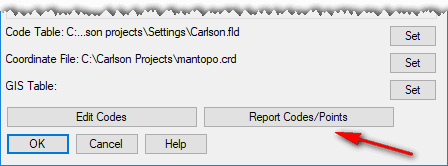
In a project with an active coordinate file, you should be able to print them via Survey -- Draw Field to Finish. In the resulting dialog box, look for the button below:
Posted : October 12, 2017 3:19 pm