

I have a 40" HDTV above and a 23" monitor below.
When my home TV was replaced, I put the old one next to my 40" HDTV. I got whiplash looking back and forth. I would do it again with wall mounts to twist the TVs to portrait.

Thanks for all the suggestions!
Corey

I have a single ultrawide monitor -- 34" 3440x1440 -- along with the screen built-in to my Surface Pro 3.
http://www.amazon.com/LG-Electronics-34UM95-34-Inch-LED-Lit/dp/B00JR6GCZA
Best. Monitor. Ever.
Like what we do here? Donate
Need a new or refreshed website? Five Point Web Solutions
Looking for a web host? Website Hosting & Management

I am not sure that there is a such thing as too big, or too many...lots of comments from satisfied people, dont think there are any that are saying, "I wish it were smaller."

An introduction to multi monitor systems for those who really dream big.

One of these setups is where I got my first look at a dual monitor workstation.
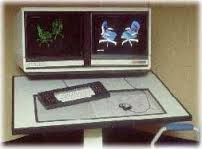
The complete digitizing tablet could be used as a command template and for digitizing or drawing. I liked to have 4 windows open on the left screen that were zoomed in to key points in the drawing and the full drawing on the right screen so I could see everything.

I am pretty spoiled by having two monitors. I have (2) 24" monitors on my desk at my new job.
When I worked for myself, I needed a second monitor for my laptop(s), I purchased (2) Insigna 19" led tvs that double as monitors. One is on my desk in my old office, and one is on my small workstation I have in the sitting area in my bedroom. The one in the bedroom came in very handy Sunday night while I was working and watching the live weather feeds during the severe weather outbreak.
I also have an (1) Element 19" TV on a side table, beside my recliner in the living room. It is crazy, but I will often do research while watching TV with my wife in the evenings, and having that dual monitor in there made it much easier for me to multitask, and still be able to talk and visit with my wife when we watch movies, TV, etc.
I also have another (1) Element 19" TV for my office at the new job for when I work on my laptop. I also have an antenna for it so I can watch the weather feeds during bad weather, or catch the news if I am working early, or late.
It sounds crazy, but because I work on a laptop most of the time, it is pretty nice having that extra screen to keep from printing out so much paperwork, or being able to have multiple tasks going on at the same time.
I do find it pretty inconvenient to only have one monitor when I travel for work. I do work a lot in multiple locations, so having the extra monitors helps me stay somewhat productive. I went with the TV model because they were only about $15-$20 more than the monitor only, so I figured I could use them for dual purposes. (It also comes in handy during football season!)

Wendell, post: 359910, member: 1 wrote: I have a single ultrawide monitor -- 34" 3440x1440 -- along with the screen built-in to my Surface Pro 3.
http://www.amazon.com/LG-Electronics-34UM95-34-Inch-LED-Lit/dp/B00JR6GCZA
Best. Monitor. Ever.
Wendell, I have a Surface Pro 4 and I just love it. Everything about it is just super-duper fine. I got the docking station and it has two little monitor ports and I have adapters that go to the old-style video connectors for connecting to projectors.
But I also LOVE the pen and am not sure that I can live without it on the external monitors. Have you looked at touch & pen compatible external displays? Do they make such a thing (I can't find anything on amazon).
M
Mark Silver, post: 362816, member: 1087 wrote: But I also LOVE the pen and am not sure that I can live without it on the external monitors. Have you looked at touch & pen compatible external displays? Do they make such a thing (I can't find anything on amazon).
Can't say I've done any looking, but I do leave my SP3 sitting on my desk and facing me if I want to use the pen. I do also love having the pen, especially at meetings for taking notes.
Like what we do here? Donate
Need a new or refreshed website? Five Point Web Solutions
Looking for a web host? Website Hosting & Management

I'm thinking about getting a Surface Pro 4 for use on a job where I'll be needing to download GNSS data in the field. Any advice on hardware options?
You need one of the dongles that converts the little video connector to a VGA connector. This one works for me:
https://www.amazon.com/gp/product/B00Z6TES7G/ref=oh_aui_detailpage_o04_s00?ie=UTF8&psc=1
I bought this mouse:
https://www.amazon.com/gp/product/B00BZC31WQ/ref=oh_aui_detailpage_o00_s00?ie=UTF8&psc=1
and this USB Hub (4 port / USB3):
https://www.amazon.com/gp/product/B00R0WB690/ref=oh_aui_detailpage_o00_s00?ie=UTF8&psc=1
and I recently got this port thing for my desktop:
http://www.amazon.com/gp/product/B0163HP38W?keywords=surface%20pro%204%20accessories&qid=1458405174&ref_=sr_1_2&s=pc&sr=1-2&apos ;"> http://www.amazon.com/gp/product/B0163HP38W?keywords=surface pro 4 accessories&qid=1458405174&ref_=sr_1_2&s=pc&sr=1-2
and I carry this UBS to Serial adapter:
http://www.amazon.com/gp/product/B00BUZ0K68?psc=1&redirect=true&ref_=oh_aui_detailpage_o02_s00
Of course you need the trick keyboard. (I configured mine to turn off the touch pad when my Bluetooth mouse connects.)
The internal speakers are amazing. Battery life is impressive.
I also bought a much smaller laptop bag. I got one that is big enough to pack two days of clothes (for short business trips), enough power bars to survive for two days of plane travel and the SP4. It is still small enough to fit under a seat on a plane.
I really like the SP4. I can't imagine running around without one now that I have one. I use it for everything. It does have problems:
[INDENT]The video driver locks up and a message comes up and says it has been reloaded occasionally. No bad repercussions, and it routinely loads new drivers. I am pretty sure they will get this worked out.
I don't understand how to turn it on all the time: if it is off, you push and hold for a few seconds. If it is in standby you tap the button. Sometimes I have to hold the power key for 30 seconds to force it to reboot. I am sure this problem is just me.
I am positive that I will loose the pen. I probably should just purchase a half dozen of them or tie my pen to the bag. But I love the pen.
Oh, never-ever-never take it to the beach. The whole thing is magnetized and there would be metal filings everywhere. I don't think you could ever get it cleaned up.
Finally, I am not sure if you need lots of memory. I got the 4Gig one and it seems plenty fast. (I was thinking I would get a faster second one if I liked the first one.)[/INDENT]
M