Reading RPLS is free for the whole profession. Members post, reply, and get the members-only rooms.


Notifications
Clear all
Software, CAD & Mapping
9
Posts
7
Users
0
Reactions
1,174
Views

Topic starter
Translate
▼
English
Spanish
French
German
Italian
Portuguese
Russian
Chinese
Japanese
Korean
Arabic
Hindi
Dutch
Polish
Turkish
Vietnamese
Thai
Swedish
Danish
Finnish
Norwegian
Czech
Hungarian
Romanian
Greek
Hebrew
Indonesian
Malay
Ukrainian
Bulgarian
Croatian
Slovak
Slovenian
Serbian
Lithuanian
Latvian
Estonian
I am on Carlson 2009.
I have an older job, that I'd like to put in the Javad, and go to work. Trouble is, the file I want to merge with, has already got points 1-150 in it. I know, I can add a few hundred, and go to work. But, I'd druther, just add a letter, and go to work.
Any ideas?
I can edit them in manually. Every time I do that, it removes the point from the drawing... so then, I have to re draw them. Then, after redrawing them, then I have to manually move the point names on the screen, to keep it neat.
Thanks everybody.
Nate
Posted : May 29, 2016 9:45 pm

Translate
▼
English
Spanish
French
German
Italian
Portuguese
Russian
Chinese
Japanese
Korean
Arabic
Hindi
Dutch
Polish
Turkish
Vietnamese
Thai
Swedish
Danish
Finnish
Norwegian
Czech
Hungarian
Romanian
Greek
Hebrew
Indonesian
Malay
Ukrainian
Bulgarian
Croatian
Slovak
Slovenian
Serbian
Lithuanian
Latvian
Estonian
Nate The Surveyor, post: 374584, member: 291 wrote: I am on Carlson 2009.
I have an older job, that I'd like to put in the Javad, and go to work. Trouble is, the file I want to merge with, has already got points 1-150 in it. I know, I can add a few hundred, and go to work. But, I'd druther, just add a letter, and go to work.
Any ideas?I can edit them in manually. Every time I do that, it removes the point from the drawing... so then, I have to re draw them. Then, after redrawing them, then I have to manually move the point names on the screen, to keep it neat.
Thanks everybody.
Nate
Points, Point Utilities,Renumber Points,If it's anything like 2016 you'll have an option to add a prefix or suffix to the points, otherwise just have it renumber from a1, that should result in a1, a2, a3, etc.
Posted : May 29, 2016 10:21 pm

Translate
▼
English
Spanish
French
German
Italian
Portuguese
Russian
Chinese
Japanese
Korean
Arabic
Hindi
Dutch
Polish
Turkish
Vietnamese
Thai
Swedish
Danish
Finnish
Norwegian
Czech
Hungarian
Romanian
Greek
Hebrew
Indonesian
Malay
Ukrainian
Bulgarian
Croatian
Slovak
Slovenian
Serbian
Lithuanian
Latvian
Estonian
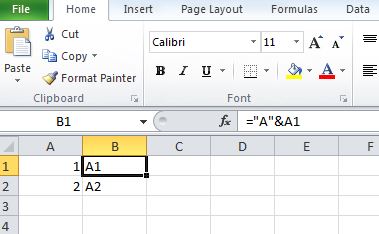
In Excel you can add a letter and a number by using the = & formula:
Posted : May 29, 2016 10:24 pm
Topic starter
Translate
▼
English
Spanish
French
German
Italian
Portuguese
Russian
Chinese
Japanese
Korean
Arabic
Hindi
Dutch
Polish
Turkish
Vietnamese
Thai
Swedish
Danish
Finnish
Norwegian
Czech
Hungarian
Romanian
Greek
Hebrew
Indonesian
Malay
Ukrainian
Bulgarian
Croatian
Slovak
Slovenian
Serbian
Lithuanian
Latvian
Estonian
I guess I would have to upgrade to 2016. Adding a prefix, or suffix does not seem available.
I. Can bump the point numbers up, and go to work... But I'm going to want this utility.... Eventually.
I've never used excel...
In the pursuit of life, liberty and happiness, I've managed to avoid it! (Joke). Only a few months ago did I go to Windows 7!
(I miss xp)
Posted : May 30, 2016 5:48 am

Translate
▼
English
Spanish
French
German
Italian
Portuguese
Russian
Chinese
Japanese
Korean
Arabic
Hindi
Dutch
Polish
Turkish
Vietnamese
Thai
Swedish
Danish
Finnish
Norwegian
Czech
Hungarian
Romanian
Greek
Hebrew
Indonesian
Malay
Ukrainian
Bulgarian
Croatian
Slovak
Slovenian
Serbian
Lithuanian
Latvian
Estonian
Nate The Surveyor, post: 374603, member: 291 wrote: I guess I would have to upgrade to 2016. Adding a prefix, or suffix does not seem available.
I. Can bump the point numbers up, and go to work... But I'm going to want this utility.... Eventually.
I've never used excel...
In the pursuit of life, liberty and happiness, I've managed to avoid it! (Joke). Only a few months ago did I go to Windows 7!
(I miss xp)
Wouldn't this be super easy to do with any text editing program? If you can output an ASCII coordinate file, you could add the letters and re-import.
Hard to believe Carlson wouldn't have this baked in since the beginning of time.
Posted : May 30, 2016 10:15 am

Translate
▼
English
Spanish
French
German
Italian
Portuguese
Russian
Chinese
Japanese
Korean
Arabic
Hindi
Dutch
Polish
Turkish
Vietnamese
Thai
Swedish
Danish
Finnish
Norwegian
Czech
Hungarian
Romanian
Greek
Hebrew
Indonesian
Malay
Ukrainian
Bulgarian
Croatian
Slovak
Slovenian
Serbian
Lithuanian
Latvian
Estonian
I generally stay away from alphanumeric point numbers, but:
Under settings/carlson configure/general setting...Check off Carlson Alphanumeric
Hopefully your data collector can collect data with the alpha code, if not then:
If you process raw files....Under tools there is a renumber command and just enter in the letter you want in the entry field. It should just add the letter to your point numbers.
If you just use txt files....just add the letter in the value to add to point #'s box in the import txt files process.
Those are the two ways I would try first. As I said, I don't use alphanumeric regularly. I also think the last time I tried processing alpha points through field to finish, I believe it failed (probably user error).
Posted : May 30, 2016 10:39 am

Translate
▼
English
Spanish
French
German
Italian
Portuguese
Russian
Chinese
Japanese
Korean
Arabic
Hindi
Dutch
Polish
Turkish
Vietnamese
Thai
Swedish
Danish
Finnish
Norwegian
Czech
Hungarian
Romanian
Greek
Hebrew
Indonesian
Malay
Ukrainian
Bulgarian
Croatian
Slovak
Slovenian
Serbian
Lithuanian
Latvian
Estonian
Nate The Surveyor, post: 374603, member: 291 wrote: I've never used excel.......I've managed to avoid it!
I've said it before, modest Excel skills are easily obtained and a very handy thing for a surveyor to have in the tool bag. You could do this with any vintage of Excel you might have. If you don't have Excel at all then LibreOffice's Calc is free and a very faithful reproduction of Excel.
Posted : May 30, 2016 10:54 am
Topic starter
Translate
▼
English
Spanish
French
German
Italian
Portuguese
Russian
Chinese
Japanese
Korean
Arabic
Hindi
Dutch
Polish
Turkish
Vietnamese
Thai
Swedish
Danish
Finnish
Norwegian
Czech
Hungarian
Romanian
Greek
Hebrew
Indonesian
Malay
Ukrainian
Bulgarian
Croatian
Slovak
Slovenian
Serbian
Lithuanian
Latvian
Estonian
Yes, RFC, it would be easy. But, my worksheet would not change. Unless, I re-imported them. Then, we have a bunch of point attributes, to move around, to clean it up again.
There is a thing in CARLSON called "File Associations) Which, associates the actual coord, to the point on the screen, that is the ACAD point. If the association does not update, then we have a problem.
I don't just want it for this job. I want to quickly and easily be able to add a letter or 2, and throw the file in the Javad, without a hitch. Calc new points in the field, and send them back to acad/Carlson.
It seems that it is in 2016. Handy utility.
N
Posted : May 30, 2016 10:58 am

Translate
▼
English
Spanish
French
German
Italian
Portuguese
Russian
Chinese
Japanese
Korean
Arabic
Hindi
Dutch
Polish
Turkish
Vietnamese
Thai
Swedish
Danish
Finnish
Norwegian
Czech
Hungarian
Romanian
Greek
Hebrew
Indonesian
Malay
Ukrainian
Bulgarian
Croatian
Slovak
Slovenian
Serbian
Lithuanian
Latvian
Estonian
I've wrassled with this same problem in the past, Nate, and never found an easy solution. The other suggestions you got is about the best I could do, as well. It is aggravating that Carlson loses the point association when you change the point number in the Edit Points routine. There's just no easy way to add letters to the point numbers after they're already in the drawing and you've spent time manipulating the point blocks to suit your needs.
Posted : May 30, 2016 12:06 pm