Reading RPLS is free for the whole profession. Members post, reply, and get the members-only rooms.


Notifications
Clear all
Software, CAD & Mapping
18
Posts
16
Users
0
Reactions
2,734
Views

Topic starter
Translate
▼
English
Spanish
French
German
Italian
Portuguese
Russian
Chinese
Japanese
Korean
Arabic
Hindi
Dutch
Polish
Turkish
Vietnamese
Thai
Swedish
Danish
Finnish
Norwegian
Czech
Hungarian
Romanian
Greek
Hebrew
Indonesian
Malay
Ukrainian
Bulgarian
Croatian
Slovak
Slovenian
Serbian
Lithuanian
Latvian
Estonian
In autocad I had a printer option called "dwg to pdf.pc3" I think. Whats a good way to plot to PDF with Carlson?
Thanks
Posted : January 31, 2017 11:06 pm

Translate
▼
English
Spanish
French
German
Italian
Portuguese
Russian
Chinese
Japanese
Korean
Arabic
Hindi
Dutch
Polish
Turkish
Vietnamese
Thai
Swedish
Danish
Finnish
Norwegian
Czech
Hungarian
Romanian
Greek
Hebrew
Indonesian
Malay
Ukrainian
Bulgarian
Croatian
Slovak
Slovenian
Serbian
Lithuanian
Latvian
Estonian
I use Adobe XI Pro
Posted : February 1, 2017 12:38 am

Translate
▼
English
Spanish
French
German
Italian
Portuguese
Russian
Chinese
Japanese
Korean
Arabic
Hindi
Dutch
Polish
Turkish
Vietnamese
Thai
Swedish
Danish
Finnish
Norwegian
Czech
Hungarian
Romanian
Greek
Hebrew
Indonesian
Malay
Ukrainian
Bulgarian
Croatian
Slovak
Slovenian
Serbian
Lithuanian
Latvian
Estonian
Cutepdf
Posted : February 1, 2017 2:21 am

Translate
▼
English
Spanish
French
German
Italian
Portuguese
Russian
Chinese
Japanese
Korean
Arabic
Hindi
Dutch
Polish
Turkish
Vietnamese
Thai
Swedish
Danish
Finnish
Norwegian
Czech
Hungarian
Romanian
Greek
Hebrew
Indonesian
Malay
Ukrainian
Bulgarian
Croatian
Slovak
Slovenian
Serbian
Lithuanian
Latvian
Estonian
CutePDF works for me.
Find it, download and install as a printer. Very reliable. I print to a 24"x36", put on a flash drive and send my wife to Staples. all she needs to know is how many copies. I do not email to Staples as we have two, each about 4 mile away in different directions, so she picks which one.
Paul in PA
Posted : February 1, 2017 5:59 am

Translate
▼
English
Spanish
French
German
Italian
Portuguese
Russian
Chinese
Japanese
Korean
Arabic
Hindi
Dutch
Polish
Turkish
Vietnamese
Thai
Swedish
Danish
Finnish
Norwegian
Czech
Hungarian
Romanian
Greek
Hebrew
Indonesian
Malay
Ukrainian
Bulgarian
Croatian
Slovak
Slovenian
Serbian
Lithuanian
Latvian
Estonian
+1 for cutepdf
Posted : February 1, 2017 6:16 am

Translate
▼
English
Spanish
French
German
Italian
Portuguese
Russian
Chinese
Japanese
Korean
Arabic
Hindi
Dutch
Polish
Turkish
Vietnamese
Thai
Swedish
Danish
Finnish
Norwegian
Czech
Hungarian
Romanian
Greek
Hebrew
Indonesian
Malay
Ukrainian
Bulgarian
Croatian
Slovak
Slovenian
Serbian
Lithuanian
Latvian
Estonian
CutePDF is good, not quite on par with the "dwg to pdf.pc3" method. My complaint with CutePDF is the PDF is always in portrait orientation and doesn't open automatically. But it is free...
Posted : February 1, 2017 7:17 am

Translate
▼
English
Spanish
French
German
Italian
Portuguese
Russian
Chinese
Japanese
Korean
Arabic
Hindi
Dutch
Polish
Turkish
Vietnamese
Thai
Swedish
Danish
Finnish
Norwegian
Czech
Hungarian
Romanian
Greek
Hebrew
Indonesian
Malay
Ukrainian
Bulgarian
Croatian
Slovak
Slovenian
Serbian
Lithuanian
Latvian
Estonian
Yes, the plot to pdf that is present in Autocad is fine to print to. Works well.
Posted : February 1, 2017 7:58 am

Translate
▼
English
Spanish
French
German
Italian
Portuguese
Russian
Chinese
Japanese
Korean
Arabic
Hindi
Dutch
Polish
Turkish
Vietnamese
Thai
Swedish
Danish
Finnish
Norwegian
Czech
Hungarian
Romanian
Greek
Hebrew
Indonesian
Malay
Ukrainian
Bulgarian
Croatian
Slovak
Slovenian
Serbian
Lithuanian
Latvian
Estonian
I recently made to move to Carlson and read that having a print to pdf would be cost prohibitive for them to have as a basic function, but there were many after market that work. Will follow this thread in hopes of finding one that works for me.
Posted : February 1, 2017 8:03 am

Translate
▼
English
Spanish
French
German
Italian
Portuguese
Russian
Chinese
Japanese
Korean
Arabic
Hindi
Dutch
Polish
Turkish
Vietnamese
Thai
Swedish
Danish
Finnish
Norwegian
Czech
Hungarian
Romanian
Greek
Hebrew
Indonesian
Malay
Ukrainian
Bulgarian
Croatian
Slovak
Slovenian
Serbian
Lithuanian
Latvian
Estonian
I have survey 2016 OEM and it has the DWG to PDF.pc3
Maybe because it is the embedded AutoCAD engine?
Posted : February 1, 2017 11:24 am

Translate
▼
English
Spanish
French
German
Italian
Portuguese
Russian
Chinese
Japanese
Korean
Arabic
Hindi
Dutch
Polish
Turkish
Vietnamese
Thai
Swedish
Danish
Finnish
Norwegian
Czech
Hungarian
Romanian
Greek
Hebrew
Indonesian
Malay
Ukrainian
Bulgarian
Croatian
Slovak
Slovenian
Serbian
Lithuanian
Latvian
Estonian
It'd be worth going through the add a plotter routine just to see if it's built-in but not installed by default. AutoCAD does that with their dwg-tif, dwg-png, etc. plotters. They only install the dwg-jpgp plotter and you have to know to look for the others.
Posted : February 1, 2017 1:01 pm

Translate
▼
English
Spanish
French
German
Italian
Portuguese
Russian
Chinese
Japanese
Korean
Arabic
Hindi
Dutch
Polish
Turkish
Vietnamese
Thai
Swedish
Danish
Finnish
Norwegian
Czech
Hungarian
Romanian
Greek
Hebrew
Indonesian
Malay
Ukrainian
Bulgarian
Croatian
Slovak
Slovenian
Serbian
Lithuanian
Latvian
Estonian
I use PDFcreator.
Posted : February 1, 2017 7:06 pm

Translate
▼
English
Spanish
French
German
Italian
Portuguese
Russian
Chinese
Japanese
Korean
Arabic
Hindi
Dutch
Polish
Turkish
Vietnamese
Thai
Swedish
Danish
Finnish
Norwegian
Czech
Hungarian
Romanian
Greek
Hebrew
Indonesian
Malay
Ukrainian
Bulgarian
Croatian
Slovak
Slovenian
Serbian
Lithuanian
Latvian
Estonian
I know I'm beating my head against the wall, but once again, this is another example of something that is not a function of Carlson, but rather a function of whatever CAD engine you are using. What I would do would be to either (a) open up your Autocad and find the specified path for plotters, then set the same path in your new CAD engine, or (b) do a search for your pc3 file so you can set the found location as the path in your new CAD engine.
FYI, this isn't any different than loading a new version of Autocad. You always need to set paths for your plotters and pen configurations at the very least.
Posted : February 1, 2017 7:53 pm

Translate
▼
English
Spanish
French
German
Italian
Portuguese
Russian
Chinese
Japanese
Korean
Arabic
Hindi
Dutch
Polish
Turkish
Vietnamese
Thai
Swedish
Danish
Finnish
Norwegian
Czech
Hungarian
Romanian
Greek
Hebrew
Indonesian
Malay
Ukrainian
Bulgarian
Croatian
Slovak
Slovenian
Serbian
Lithuanian
Latvian
Estonian
Carlson does have an export to PDF option. I'll lookup the command for you tomorrow.
Edit: in the 2017 version
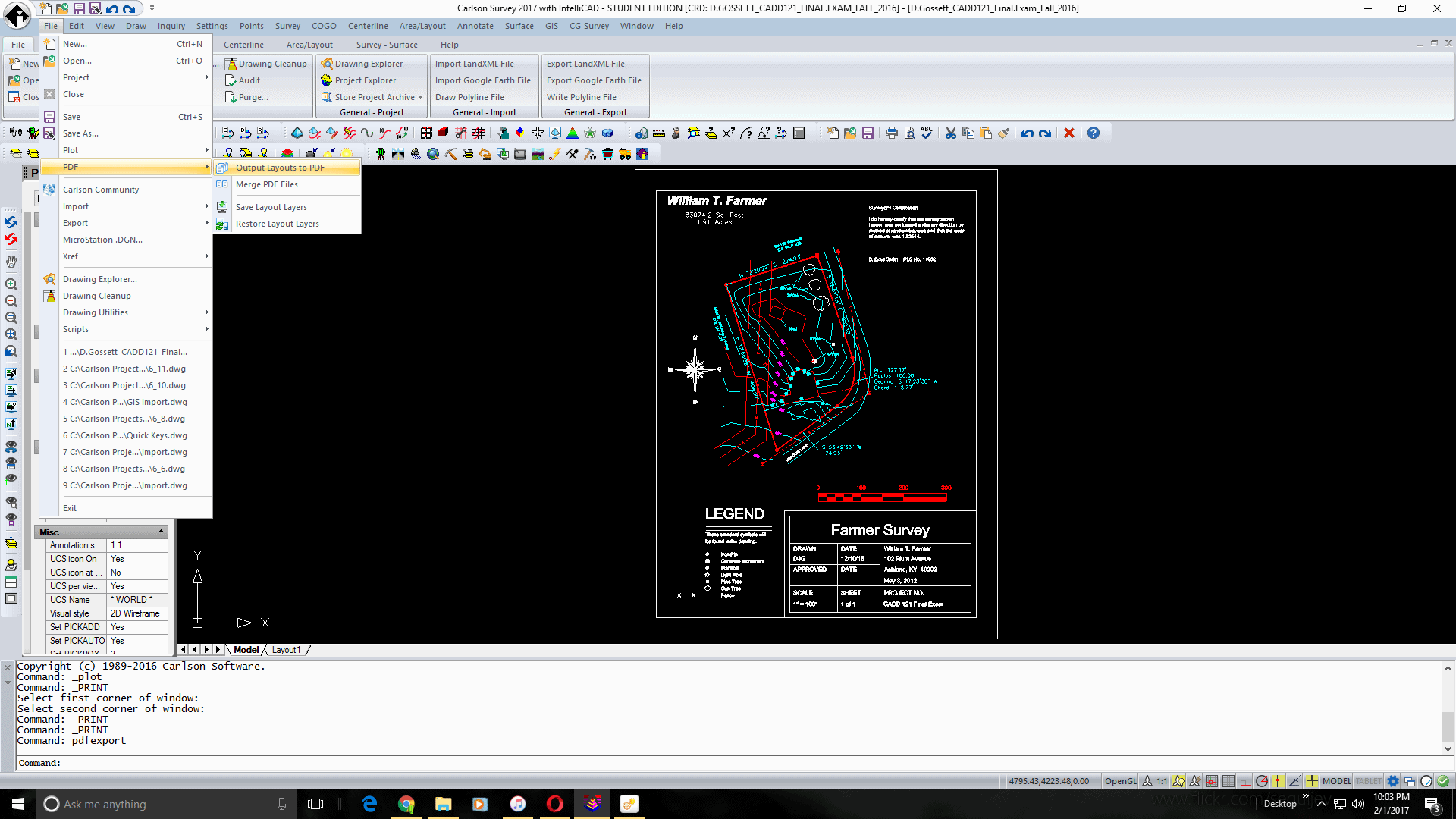
Edit: is your version has it, it will be in the file menu -> PDF -> output layouts to PDF
Sent from my SAMSUNG-SM-N920A using Tapatalk
Posted : February 1, 2017 9:54 pm

Translate
▼
English
Spanish
French
German
Italian
Portuguese
Russian
Chinese
Japanese
Korean
Arabic
Hindi
Dutch
Polish
Turkish
Vietnamese
Thai
Swedish
Danish
Finnish
Norwegian
Czech
Hungarian
Romanian
Greek
Hebrew
Indonesian
Malay
Ukrainian
Bulgarian
Croatian
Slovak
Slovenian
Serbian
Lithuanian
Latvian
Estonian
Try going to the file menu and just below plot should be pdf. Under the pdf you should have an option for sending layouts to pdf. This is using Carlson 2017 with intellicad engine.
Hope that helps.
.png "2017-02-01 (1).png")
Posted : February 1, 2017 10:10 pm

Translate
▼
English
Spanish
French
German
Italian
Portuguese
Russian
Chinese
Japanese
Korean
Arabic
Hindi
Dutch
Polish
Turkish
Vietnamese
Thai
Swedish
Danish
Finnish
Norwegian
Czech
Hungarian
Romanian
Greek
Hebrew
Indonesian
Malay
Ukrainian
Bulgarian
Croatian
Slovak
Slovenian
Serbian
Lithuanian
Latvian
Estonian
BlitzkriegBob, post: 411993, member: 9554 wrote: this is another example of something that is not a function of Carlson, but rather a function of whatever CAD engine you are using.
In addition to some of the other suggested methods in this thread (and, depending on your version of Carlson and IntelliCAD), look under File -- Export -- Standard Export (key-in EXPORT) and set the Save As Type to PDF. This option provides (among other things) Layer support in the PDF. I hope this information helps.
Posted : February 1, 2017 10:22 pm
Topic starter
Translate
▼
English
Spanish
French
German
Italian
Portuguese
Russian
Chinese
Japanese
Korean
Arabic
Hindi
Dutch
Polish
Turkish
Vietnamese
Thai
Swedish
Danish
Finnish
Norwegian
Czech
Hungarian
Romanian
Greek
Hebrew
Indonesian
Malay
Ukrainian
Bulgarian
Croatian
Slovak
Slovenian
Serbian
Lithuanian
Latvian
Estonian
hey guys, thanks for all the help. It seems like there is a lot of good options here. I am using the 2017 version with Intellicad. I tried the File > PDF > output to PDF as mentioned by a few of you. That seemed to work pretty good but it did not handle some of the linetypes and my ctb file quite like I expected but it seems like it would work with a little tinkering. I also tried "bullzip PDF printer" it took all of 60 seconds to download for free and it shows up as a plotter in the pull down. That seems to handle my ctb and linetypes fine. So far so good. Thanks again.
Posted : February 1, 2017 11:28 pm
Topic starter
Translate
▼
English
Spanish
French
German
Italian
Portuguese
Russian
Chinese
Japanese
Korean
Arabic
Hindi
Dutch
Polish
Turkish
Vietnamese
Thai
Swedish
Danish
Finnish
Norwegian
Czech
Hungarian
Romanian
Greek
Hebrew
Indonesian
Malay
Ukrainian
Bulgarian
Croatian
Slovak
Slovenian
Serbian
Lithuanian
Latvian
Estonian
BlitzkriegBob, post: 411993, member: 9554 wrote: I know I'm beating my head against the wall, but once again, this is another example of something that is not a function of Carlson, but rather a function of whatever CAD engine you are using. What I would do would be to either (a) open up your Autocad and find the specified path for plotters, then set the same path in your new CAD engine, or (b) do a search for your pc3 file so you can set the found location as the path in your new CAD engine.
FYI, this isn't any different than loading a new version of Autocad. You always need to set paths for your plotters and pen configurations at the very least.
This would make a lot of sense, but I guess I didn't mention I'm on a totally new system (computer and software running Carlson 2017 with intellicad. The C3D i was using was owned by my employer. I'm using Carlson at home.
Posted : February 1, 2017 11:32 pm

Translate
▼
English
Spanish
French
German
Italian
Portuguese
Russian
Chinese
Japanese
Korean
Arabic
Hindi
Dutch
Polish
Turkish
Vietnamese
Thai
Swedish
Danish
Finnish
Norwegian
Czech
Hungarian
Romanian
Greek
Hebrew
Indonesian
Malay
Ukrainian
Bulgarian
Croatian
Slovak
Slovenian
Serbian
Lithuanian
Latvian
Estonian
RPLS#, post: 411828, member: 12280 wrote: In autocad I had a printer option called "dwg to pdf.pc3" I think. Whats a good way to plot to PDF with Carlson?
Thanks
PrimoPDF here. My Carlson also has an option to print to a default pdf inside, but I don't use it.
Posted : February 2, 2017 9:24 am