Reading RPLS is free for the whole profession. Members post, reply, and get the members-only rooms.


Notifications
Clear all

Topic starter
Translate
▼
English
Spanish
French
German
Italian
Portuguese
Russian
Chinese
Japanese
Korean
Arabic
Hindi
Dutch
Polish
Turkish
Vietnamese
Thai
Swedish
Danish
Finnish
Norwegian
Czech
Hungarian
Romanian
Greek
Hebrew
Indonesian
Malay
Ukrainian
Bulgarian
Croatian
Slovak
Slovenian
Serbian
Lithuanian
Latvian
Estonian
I have had this happen a few times and usually it was w/drawings that didn't really "need" images attached to them, but now I've got one the client wants, and I cannot get the image to plot. I inserted a GeoTiff and it shows up in the plot preview, but when I plot it, no image, no image frame, nothing but the lines I have on the drawing (as drafted). I'm sure it's just a setting or something of that nature, but I cannot figure it out, nor do I see another topic about it. I'm plotting from paper space also, don't know if that matters or not.
Posted : July 25, 2016 12:32 pm

Translate
▼
English
Spanish
French
German
Italian
Portuguese
Russian
Chinese
Japanese
Korean
Arabic
Hindi
Dutch
Polish
Turkish
Vietnamese
Thai
Swedish
Danish
Finnish
Norwegian
Czech
Hungarian
Romanian
Greek
Hebrew
Indonesian
Malay
Ukrainian
Bulgarian
Croatian
Slovak
Slovenian
Serbian
Lithuanian
Latvian
Estonian
hlbennettpls, post: 382523, member: 10049 wrote: I have had this happen a few times and usually it was w/drawings that didn't really "need" images attached to them, but now I've got one the client wants, and I cannot get the image to plot. I inserted a GeoTiff and it shows up in the plot preview, but when I plot it, no image, no image frame, nothing but the lines I have on the drawing (as drafted). I'm sure it's just a setting or something of that nature, but I cannot figure it out, nor do I see another topic about it. I'm plotting from paper space also, don't know if that matters or not.
There was a patch that didn't show up on startup as they usually do. Go to programs, Carlson, check for updates. You might find a patch or update to install.
Posted : July 25, 2016 1:45 pm

Translate
▼
English
Spanish
French
German
Italian
Portuguese
Russian
Chinese
Japanese
Korean
Arabic
Hindi
Dutch
Polish
Turkish
Vietnamese
Thai
Swedish
Danish
Finnish
Norwegian
Czech
Hungarian
Romanian
Greek
Hebrew
Indonesian
Malay
Ukrainian
Bulgarian
Croatian
Slovak
Slovenian
Serbian
Lithuanian
Latvian
Estonian
Does the picture show up in your plot preview? If it is in the plot preview, but not in the actual plot on paper, the problem is in your printer. Most likely not enough memory. If you go to make the plot and the image doesn't show up in the plot preview, the problem is Carlson related. If it's the printer memory problem, clipping the image to just cover the size of your drawing may help, or making up an new temp lot file for that drawing might help. Sometimes, even sending it to a different printer can be a solution.
Posted : July 25, 2016 7:57 pm
Topic starter
Translate
▼
English
Spanish
French
German
Italian
Portuguese
Russian
Chinese
Japanese
Korean
Arabic
Hindi
Dutch
Polish
Turkish
Vietnamese
Thai
Swedish
Danish
Finnish
Norwegian
Czech
Hungarian
Romanian
Greek
Hebrew
Indonesian
Malay
Ukrainian
Bulgarian
Croatian
Slovak
Slovenian
Serbian
Lithuanian
Latvian
Estonian
It's 12MB, is that too much?!
Posted : July 26, 2016 2:44 pm
Topic starter
Translate
▼
English
Spanish
French
German
Italian
Portuguese
Russian
Chinese
Japanese
Korean
Arabic
Hindi
Dutch
Polish
Turkish
Vietnamese
Thai
Swedish
Danish
Finnish
Norwegian
Czech
Hungarian
Romanian
Greek
Hebrew
Indonesian
Malay
Ukrainian
Bulgarian
Croatian
Slovak
Slovenian
Serbian
Lithuanian
Latvian
Estonian
And yes, it shows up in the preview, but doesn't print.
Posted : July 26, 2016 2:45 pm

Translate
▼
English
Spanish
French
German
Italian
Portuguese
Russian
Chinese
Japanese
Korean
Arabic
Hindi
Dutch
Polish
Turkish
Vietnamese
Thai
Swedish
Danish
Finnish
Norwegian
Czech
Hungarian
Romanian
Greek
Hebrew
Indonesian
Malay
Ukrainian
Bulgarian
Croatian
Slovak
Slovenian
Serbian
Lithuanian
Latvian
Estonian
hlbennettpls, post: 382673, member: 10049 wrote: And yes, it shows up in the preview, but doesn't print.
Im following this one, I get the same thing happening to me. I have just been ignoring it but here in the near future I have to print some recordable plats that have images in them. I havent tried the patch, did you try it hlbennett?
Posted : July 26, 2016 2:49 pm
Topic starter
Translate
▼
English
Spanish
French
German
Italian
Portuguese
Russian
Chinese
Japanese
Korean
Arabic
Hindi
Dutch
Polish
Turkish
Vietnamese
Thai
Swedish
Danish
Finnish
Norwegian
Czech
Hungarian
Romanian
Greek
Hebrew
Indonesian
Malay
Ukrainian
Bulgarian
Croatian
Slovak
Slovenian
Serbian
Lithuanian
Latvian
Estonian
No, I haven't.
Posted : July 27, 2016 5:44 am
Topic starter
Translate
▼
English
Spanish
French
German
Italian
Portuguese
Russian
Chinese
Japanese
Korean
Arabic
Hindi
Dutch
Polish
Turkish
Vietnamese
Thai
Swedish
Danish
Finnish
Norwegian
Czech
Hungarian
Romanian
Greek
Hebrew
Indonesian
Malay
Ukrainian
Bulgarian
Croatian
Slovak
Slovenian
Serbian
Lithuanian
Latvian
Estonian
Just tried it and it says "no update available"...
Posted : July 27, 2016 5:45 am

Translate
▼
English
Spanish
French
German
Italian
Portuguese
Russian
Chinese
Japanese
Korean
Arabic
Hindi
Dutch
Polish
Turkish
Vietnamese
Thai
Swedish
Danish
Finnish
Norwegian
Czech
Hungarian
Romanian
Greek
Hebrew
Indonesian
Malay
Ukrainian
Bulgarian
Croatian
Slovak
Slovenian
Serbian
Lithuanian
Latvian
Estonian
hlbennettpls, post: 382523, member: 10049 wrote: I have had this happen a few times and usually it was w/drawings that didn't really "need" images attached to them, but now I've got one the client wants, and I cannot get the image to plot. I inserted a GeoTiff and it shows up in the plot preview, but when I plot it, no image, no image frame, nothing but the lines I have on the drawing (as drafted). I'm sure it's just a setting or something of that nature, but I cannot figure it out, nor do I see another topic about it. I'm plotting from paper space also, don't know if that matters or not.
If you're using a HP plotter go to Properties, Services, Troubleshooting Menu, and uncheck Enable SpoolSmart.
Another option is to print to PDF then print the PDF file.
Posted : July 27, 2016 6:29 am
Translate
▼
English
Spanish
French
German
Italian
Portuguese
Russian
Chinese
Japanese
Korean
Arabic
Hindi
Dutch
Polish
Turkish
Vietnamese
Thai
Swedish
Danish
Finnish
Norwegian
Czech
Hungarian
Romanian
Greek
Hebrew
Indonesian
Malay
Ukrainian
Bulgarian
Croatian
Slovak
Slovenian
Serbian
Lithuanian
Latvian
Estonian
Another thing I have done that helped sometimes was to print from a different computer in the office. A tech once suggested I turn off "print in background" (not sure that's exactly what it's called, but hopefully I'm close enough) It slows the printing way down, but Pictures did come through
Posted : July 27, 2016 7:00 am

Translate
▼
English
Spanish
French
German
Italian
Portuguese
Russian
Chinese
Japanese
Korean
Arabic
Hindi
Dutch
Polish
Turkish
Vietnamese
Thai
Swedish
Danish
Finnish
Norwegian
Czech
Hungarian
Romanian
Greek
Hebrew
Indonesian
Malay
Ukrainian
Bulgarian
Croatian
Slovak
Slovenian
Serbian
Lithuanian
Latvian
Estonian
Try printing it to pdf and then printing the pdf.
Posted : July 28, 2016 9:08 am
Topic starter
Translate
▼
English
Spanish
French
German
Italian
Portuguese
Russian
Chinese
Japanese
Korean
Arabic
Hindi
Dutch
Polish
Turkish
Vietnamese
Thai
Swedish
Danish
Finnish
Norwegian
Czech
Hungarian
Romanian
Greek
Hebrew
Indonesian
Malay
Ukrainian
Bulgarian
Croatian
Slovak
Slovenian
Serbian
Lithuanian
Latvian
Estonian
Ok, here's what we've found so far on this one. If you do not alter the aerial at all (i.e. shading etc.), then the aerial will plot. However, the bad part about this is, you cannot read the text or see much of the line work if there is dark canopy on the aerial. Anyhow, if you alter the shading, the aerial will not plot. Still no patches from Carlson that I see. Oh, it also will not print to pdf if the aerial has been altered either.
Posted : September 28, 2016 12:24 pm

Translate
▼
English
Spanish
French
German
Italian
Portuguese
Russian
Chinese
Japanese
Korean
Arabic
Hindi
Dutch
Polish
Turkish
Vietnamese
Thai
Swedish
Danish
Finnish
Norwegian
Czech
Hungarian
Romanian
Greek
Hebrew
Indonesian
Malay
Ukrainian
Bulgarian
Croatian
Slovak
Slovenian
Serbian
Lithuanian
Latvian
Estonian
Try unchecking this setting to see if it is what is causing problems.
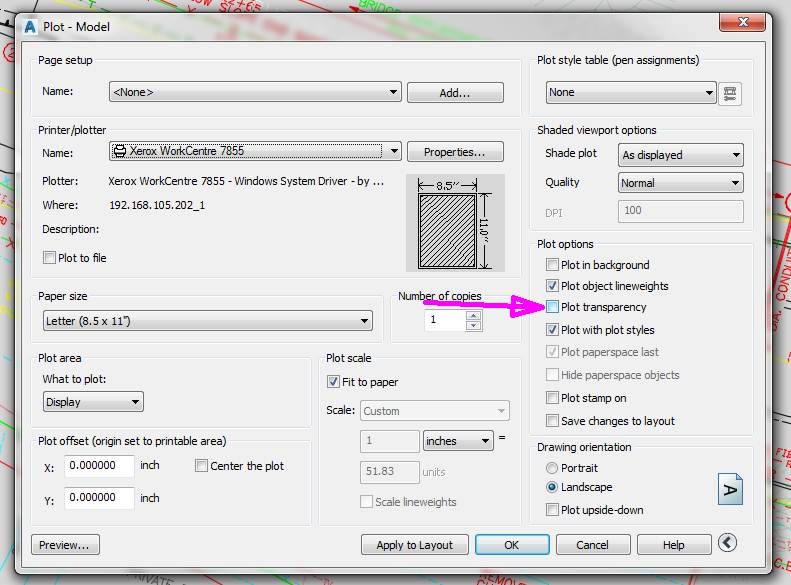
I cannot print to a Xerox if this is checked. I have to plot to PDF then print from Adobe. PIA.
Posted : September 28, 2016 3:43 pm

Translate
▼
English
Spanish
French
German
Italian
Portuguese
Russian
Chinese
Japanese
Korean
Arabic
Hindi
Dutch
Polish
Turkish
Vietnamese
Thai
Swedish
Danish
Finnish
Norwegian
Czech
Hungarian
Romanian
Greek
Hebrew
Indonesian
Malay
Ukrainian
Bulgarian
Croatian
Slovak
Slovenian
Serbian
Lithuanian
Latvian
Estonian
When you select pdf, it will spool the entire file and any image files will follow.
To print on paper you may need to select "print image"
Posted : September 28, 2016 4:36 pm

Translate
▼
English
Spanish
French
German
Italian
Portuguese
Russian
Chinese
Japanese
Korean
Arabic
Hindi
Dutch
Polish
Turkish
Vietnamese
Thai
Swedish
Danish
Finnish
Norwegian
Czech
Hungarian
Romanian
Greek
Hebrew
Indonesian
Malay
Ukrainian
Bulgarian
Croatian
Slovak
Slovenian
Serbian
Lithuanian
Latvian
Estonian
Try plotting to a pdf. If it comes through that way then try printing the pdf file to the plotter
Posted : September 28, 2016 5:45 pm
Topic starter
Translate
▼
English
Spanish
French
German
Italian
Portuguese
Russian
Chinese
Japanese
Korean
Arabic
Hindi
Dutch
Polish
Turkish
Vietnamese
Thai
Swedish
Danish
Finnish
Norwegian
Czech
Hungarian
Romanian
Greek
Hebrew
Indonesian
Malay
Ukrainian
Bulgarian
Croatian
Slovak
Slovenian
Serbian
Lithuanian
Latvian
Estonian
The image does not show up when we print to pdf either. The image is not present in the print preview window, nor does it show up on the pdf either. Called Carlson, they said "this is a known issue with no fix as of yet".
Posted : September 29, 2016 8:34 am

Translate
▼
English
Spanish
French
German
Italian
Portuguese
Russian
Chinese
Japanese
Korean
Arabic
Hindi
Dutch
Polish
Turkish
Vietnamese
Thai
Swedish
Danish
Finnish
Norwegian
Czech
Hungarian
Romanian
Greek
Hebrew
Indonesian
Malay
Ukrainian
Bulgarian
Croatian
Slovak
Slovenian
Serbian
Lithuanian
Latvian
Estonian
Don't know if this will work, but it's worth a try. Download and install AutoDesk DWG TrueView - it's free. Open the drawing in TrueView and try to print from there.
Posted : September 29, 2016 10:41 am
Translate
▼
English
Spanish
French
German
Italian
Portuguese
Russian
Chinese
Japanese
Korean
Arabic
Hindi
Dutch
Polish
Turkish
Vietnamese
Thai
Swedish
Danish
Finnish
Norwegian
Czech
Hungarian
Romanian
Greek
Hebrew
Indonesian
Malay
Ukrainian
Bulgarian
Croatian
Slovak
Slovenian
Serbian
Lithuanian
Latvian
Estonian
I would save the image to a different format, then insert it again. Could be a problem with the file type or the compression method.
Posted : September 29, 2016 2:25 pm
Topic starter
Translate
▼
English
Spanish
French
German
Italian
Portuguese
Russian
Chinese
Japanese
Korean
Arabic
Hindi
Dutch
Polish
Turkish
Vietnamese
Thai
Swedish
Danish
Finnish
Norwegian
Czech
Hungarian
Romanian
Greek
Hebrew
Indonesian
Malay
Ukrainian
Bulgarian
Croatian
Slovak
Slovenian
Serbian
Lithuanian
Latvian
Estonian
imaudigger, post: 393211, member: 7286 wrote: I would save the image to a different format, then insert it again. Could be a problem with the file type or the compression method.
It does it with *.tiff, *.geotiff, and *.jpg. Doesn't matter.
Posted : September 30, 2016 6:29 am

Translate
▼
English
Spanish
French
German
Italian
Portuguese
Russian
Chinese
Japanese
Korean
Arabic
Hindi
Dutch
Polish
Turkish
Vietnamese
Thai
Swedish
Danish
Finnish
Norwegian
Czech
Hungarian
Romanian
Greek
Hebrew
Indonesian
Malay
Ukrainian
Bulgarian
Croatian
Slovak
Slovenian
Serbian
Lithuanian
Latvian
Estonian
I've had that issue in the past using large images with Civil 3D. More than likely it's a memory limitation. Do you have access to an ECW format file? That's a compressed format with smaller file size. Does your plotter have memory on board? If so, are you maxed out? Is there a setting within Intellicad that would allow you to fully process the plot on the computer before sending to the plotter? Autocad has variables for RASTERPERCENT and RASTERTHRESHOLD. Is there anything similar in Intellicad?
Posted : September 30, 2016 5:43 pm
Page 1 / 2
Next