Reading RPLS is free for the whole profession. Members post, reply, and get the members-only rooms.


Notifications
Clear all

Topic starter
Translate
▼
English
Spanish
French
German
Italian
Portuguese
Russian
Chinese
Japanese
Korean
Arabic
Hindi
Dutch
Polish
Turkish
Vietnamese
Thai
Swedish
Danish
Finnish
Norwegian
Czech
Hungarian
Romanian
Greek
Hebrew
Indonesian
Malay
Ukrainian
Bulgarian
Croatian
Slovak
Slovenian
Serbian
Lithuanian
Latvian
Estonian
I am transitioning over from Carlson Survey 2013 to 2016 and I am having problems getting my point layers to behave as i had them in 2013.
What I like is when I do a draw/locate points, I want the point nodes to be on the layer per my field code table, but not insert symbols or anything else (I do all that in Field to Finish).
Carlson 2013 had a check box to just this in the Point Defaults

However, In Carlson 2016 that has gone away.
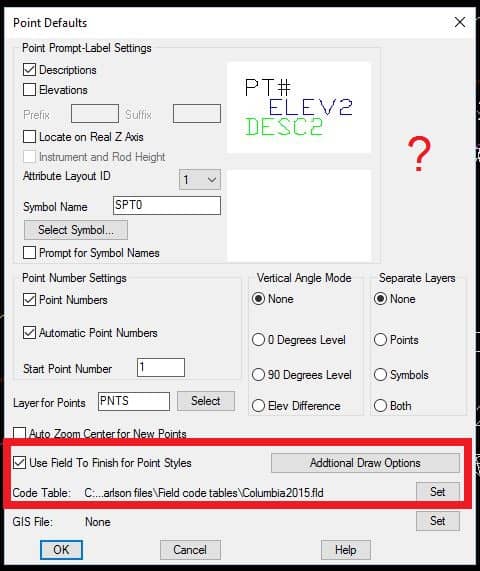
They do have a check box to use the field to finish for the point styles which does what I want for the point layers, but it also inserts the symbols and replaces the field codes with the full field code descriptions, which I don't want.
Does anyone know how to get the Carlson 2013 functionality back?
Posted : May 20, 2016 8:31 am

Translate
▼
English
Spanish
French
German
Italian
Portuguese
Russian
Chinese
Japanese
Korean
Arabic
Hindi
Dutch
Polish
Turkish
Vietnamese
Thai
Swedish
Danish
Finnish
Norwegian
Czech
Hungarian
Romanian
Greek
Hebrew
Indonesian
Malay
Ukrainian
Bulgarian
Croatian
Slovak
Slovenian
Serbian
Lithuanian
Latvian
Estonian
It isn't in the new version....I had the same issue. To use the field to finish code tables to sort layers is an all or nothing deal as it was explained to me. I used to do as you are, but now I have switched to mainly using the field to finish to draw my points (You will get used to pretty quick).
Hopefully Carlson returns the function to what it was (I was told there have been many complaints). That said, my overall suggestion is to let field to finish draw your points with the symbols.
Another note is to not use the symbols Carlson supplies outside of trees and points. I had a terrible time using a lot of there symbols outside of the points or trees libraries.
Posted : May 20, 2016 4:12 pm

Translate
▼
English
Spanish
French
German
Italian
Portuguese
Russian
Chinese
Japanese
Korean
Arabic
Hindi
Dutch
Polish
Turkish
Vietnamese
Thai
Swedish
Danish
Finnish
Norwegian
Czech
Hungarian
Romanian
Greek
Hebrew
Indonesian
Malay
Ukrainian
Bulgarian
Croatian
Slovak
Slovenian
Serbian
Lithuanian
Latvian
Estonian
I've never used Carlson, but the way I got around this same type of problem in LDD was to use an identical description key file, except with o blocks defined. Maybe something like that would work for you.
Posted : May 20, 2016 6:00 pm

Translate
▼
English
Spanish
French
German
Italian
Portuguese
Russian
Chinese
Japanese
Korean
Arabic
Hindi
Dutch
Polish
Turkish
Vietnamese
Thai
Swedish
Danish
Finnish
Norwegian
Czech
Hungarian
Romanian
Greek
Hebrew
Indonesian
Malay
Ukrainian
Bulgarian
Croatian
Slovak
Slovenian
Serbian
Lithuanian
Latvian
Estonian
Bow Tie Surveyor, post: 373123, member: 6939 wrote: I am transitioning over from Carlson Survey 2013 to 2016 and I am having problems getting my point layers to behave as i had them in 2013.
What I like is when I do a draw/locate points, I want the point nodes to be on the layer per my field code table, but not insert symbols or anything else (I do all that in Field to Finish).
Carlson 2013 had a check box to just this in the Point Defaults
However, In Carlson 2016 that has gone away.
They do have a check box to use the field to finish for the point styles which does what I want for the point layers, but it also inserts the symbols and replaces the field codes with the full field code descriptions, which I don't want.
Does anyone know how to get the Carlson 2013 functionality back?
I was told by programming that "The "Use F2F..." now uses all the F2F properties and you canÛªt do layers only."
Posted : May 21, 2016 10:13 am
Topic starter
Translate
▼
English
Spanish
French
German
Italian
Portuguese
Russian
Chinese
Japanese
Korean
Arabic
Hindi
Dutch
Polish
Turkish
Vietnamese
Thai
Swedish
Danish
Finnish
Norwegian
Czech
Hungarian
Romanian
Greek
Hebrew
Indonesian
Malay
Ukrainian
Bulgarian
Croatian
Slovak
Slovenian
Serbian
Lithuanian
Latvian
Estonian
Ladd Nelson, post: 373268, member: 307 wrote: I was told by programming that "The "Use F2F..." now uses all the F2F properties and you canÛªt do layers only."
It would be great to get that functionality back. If I am just doing COGO calculations, I don't want to see a bunch of extra junk cluttering up the screen. And I am not sure why anyone would want to see the full code description on their points nodes. I like to have my points nodes be as compact as possible to make them easy to discern on the screen. When I use my "FRAC" field code, I don't want to see "FOUND IRON ROD AND CAP" on my point node. It just clutters things up.
Posted : May 21, 2016 10:54 am

Translate
▼
English
Spanish
French
German
Italian
Portuguese
Russian
Chinese
Japanese
Korean
Arabic
Hindi
Dutch
Polish
Turkish
Vietnamese
Thai
Swedish
Danish
Finnish
Norwegian
Czech
Hungarian
Romanian
Greek
Hebrew
Indonesian
Malay
Ukrainian
Bulgarian
Croatian
Slovak
Slovenian
Serbian
Lithuanian
Latvian
Estonian
I believe you can do what you want using Point Groups. Check just the symbol box and description box under "draw locate points" and insert them using the Point Group radio button. If you have field to finish set up correctly, your point groups will all be created the first time you run through F2F. Then it's just a matter of drawing the desired group as needed.
Posted : May 21, 2016 11:11 am
Translate
▼
English
Spanish
French
German
Italian
Portuguese
Russian
Chinese
Japanese
Korean
Arabic
Hindi
Dutch
Polish
Turkish
Vietnamese
Thai
Swedish
Danish
Finnish
Norwegian
Czech
Hungarian
Romanian
Greek
Hebrew
Indonesian
Malay
Ukrainian
Bulgarian
Croatian
Slovak
Slovenian
Serbian
Lithuanian
Latvian
Estonian
If you want just the field codes as your descriptions.....In the field to finish setup boxes make the three lines were you enter description data the same as your field code. If your firm is smaller and everyone knows the codes, then this route works great. Larger firms, where the knowledge of what the field codes represent gets worse the farther from the survey department the CAD person is, have more use for the full description.
Another trick that might help is to reduce the attribute scale to .025 on the first tab of the F2F coding field (This will make your labels smaller) while leaving the symbol scale on the second tab at 1 (Which will scale your 1 to 1 drawn symbol to the proper drawing scale).
Posted : May 22, 2016 6:11 am
Translate
▼
English
Spanish
French
German
Italian
Portuguese
Russian
Chinese
Japanese
Korean
Arabic
Hindi
Dutch
Polish
Turkish
Vietnamese
Thai
Swedish
Danish
Finnish
Norwegian
Czech
Hungarian
Romanian
Greek
Hebrew
Indonesian
Malay
Ukrainian
Bulgarian
Croatian
Slovak
Slovenian
Serbian
Lithuanian
Latvian
Estonian
"Larger firms, where the knowledge of what the field codes represent gets worse the farther from the survey department the CAD person is, have more use for the full description."
Direct indication of the failure of CAD standards and a CAD Manager/ Supervisor that needs an immediate reprimand or replacement. I have worked in big companies and in small companies and have always found that such lack of knowledge is directly due to the failure of the Supervisor. Such types do not last long around here. Especially when management sees how much such inept procedures are costing the firm.
Don't forget too that any additional information can be added to the description code for on screen view as part of the descriptor or as a separate text item using the "/" code.
Posted : May 22, 2016 11:55 am