Reading RPLS is free for the whole profession. Members post, reply, and get the members-only rooms.


Notifications
Clear all
Software, CAD & Mapping
8
Posts
5
Users
0
Reactions
1,824
Views

Topic starter
Translate
▼
English
Spanish
French
German
Italian
Portuguese
Russian
Chinese
Japanese
Korean
Arabic
Hindi
Dutch
Polish
Turkish
Vietnamese
Thai
Swedish
Danish
Finnish
Norwegian
Czech
Hungarian
Romanian
Greek
Hebrew
Indonesian
Malay
Ukrainian
Bulgarian
Croatian
Slovak
Slovenian
Serbian
Lithuanian
Latvian
Estonian
I have Carlson Survey 2013 and I am trying to import polygons from an ESRI SHP file. I created a DBF Target Database that the program wants to have. I go to GIS->Import Shape file which looks like this:
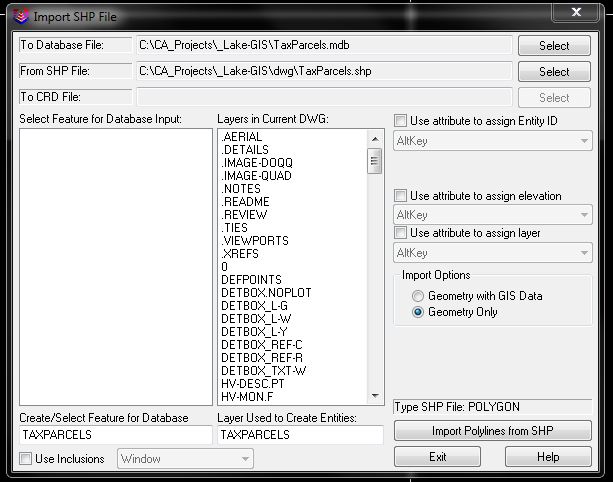
When I hit Import Polygons from SHP I get this error:

What am I missing here?
Thanks,
The Bow Tie Surveyor
Posted : December 7, 2012 8:10 am

Translate
▼
English
Spanish
French
German
Italian
Portuguese
Russian
Chinese
Japanese
Korean
Arabic
Hindi
Dutch
Polish
Turkish
Vietnamese
Thai
Swedish
Danish
Finnish
Norwegian
Czech
Hungarian
Romanian
Greek
Hebrew
Indonesian
Malay
Ukrainian
Bulgarian
Croatian
Slovak
Slovenian
Serbian
Lithuanian
Latvian
Estonian
Can't Help You
I do it, but pretty much bang around against the walls until something works. I think we get to a point in our lives when the brain does not want to retain certain new information. However I have yet to run into that particular error message.
All I know is that eventually I get it to work.
Paul in PA
Posted : December 7, 2012 9:08 am

Translate
▼
English
Spanish
French
German
Italian
Portuguese
Russian
Chinese
Japanese
Korean
Arabic
Hindi
Dutch
Polish
Turkish
Vietnamese
Thai
Swedish
Danish
Finnish
Norwegian
Czech
Hungarian
Romanian
Greek
Hebrew
Indonesian
Malay
Ukrainian
Bulgarian
Croatian
Slovak
Slovenian
Serbian
Lithuanian
Latvian
Estonian
Go to GIS>GIS DATABASE SETTINGS. There are two more files you will need. Choose SELECT and then choose HELP. I was going to send you the files, but they are too large to email so you may have to create new ones.
Posted : December 7, 2012 9:43 am

Translate
▼
English
Spanish
French
German
Italian
Portuguese
Russian
Chinese
Japanese
Korean
Arabic
Hindi
Dutch
Polish
Turkish
Vietnamese
Thai
Swedish
Danish
Finnish
Norwegian
Czech
Hungarian
Romanian
Greek
Hebrew
Indonesian
Malay
Ukrainian
Bulgarian
Croatian
Slovak
Slovenian
Serbian
Lithuanian
Latvian
Estonian
In response to a similar question from a different client a few years ago, I put together a Carlson GIS Primer:
http://www.carlsonsoftware.com/solutions/gis-products/gis-primer/
This primer is available as a link off of the Carlson GIS product page.
I hope this information helps.
Posted : December 7, 2012 9:47 am
Topic starter
Translate
▼
English
Spanish
French
German
Italian
Portuguese
Russian
Chinese
Japanese
Korean
Arabic
Hindi
Dutch
Polish
Turkish
Vietnamese
Thai
Swedish
Danish
Finnish
Norwegian
Czech
Hungarian
Romanian
Greek
Hebrew
Indonesian
Malay
Ukrainian
Bulgarian
Croatian
Slovak
Slovenian
Serbian
Lithuanian
Latvian
Estonian
> Go to GIS>GIS DATABASE SETTINGS. There are two more files you will need. Choose SELECT and then choose HELP. I was going to send you the files, but they are too large to email so you may have to create new ones.
That was it. It wanted me to create a .gis file (whatever that is), then it went through.
Thanks everyone!
The Bow Tie Surveyor
Posted : December 7, 2012 10:15 am

Translate
▼
English
Spanish
French
German
Italian
Portuguese
Russian
Chinese
Japanese
Korean
Arabic
Hindi
Dutch
Polish
Turkish
Vietnamese
Thai
Swedish
Danish
Finnish
Norwegian
Czech
Hungarian
Romanian
Greek
Hebrew
Indonesian
Malay
Ukrainian
Bulgarian
Croatian
Slovak
Slovenian
Serbian
Lithuanian
Latvian
Estonian
let's dig up an old thread.
so... i would like to- on a somewhat regular basis- import S_FL_HAZARD_LN.shp into my CAD files from FEMA.?ÿ those shapefiles are county-wide, and are humongous.?ÿ i've jumped through every last hoop i know to get this to work, and am still running into carlson locking up.?ÿ my assumption is the "use inclusions" toggle allows me to crop the import based on either a selected polyline or by a cursor crossing of the intended area, however it would still seem, based upon how slow it moves until it locks up and the locking up itself, that this inclusion step isn't occurring.
i used mapshaper to open up the file, and everything looks normal, however i'm not familiar enough with that free software to go in and start cropping shapefiles.
any idea what i'm missing??ÿ and yes, before anyone asks- all my drawing settings have been checked and rechecked and rechecked again.?ÿ i've been on Ladd's primer, thatcrazycadgirl, etc, etc, everything i can find online, and am not sure what to try next.
Posted : January 10, 2021 12:09 pm
Translate
▼
English
Spanish
French
German
Italian
Portuguese
Russian
Chinese
Japanese
Korean
Arabic
Hindi
Dutch
Polish
Turkish
Vietnamese
Thai
Swedish
Danish
Finnish
Norwegian
Czech
Hungarian
Romanian
Greek
Hebrew
Indonesian
Malay
Ukrainian
Bulgarian
Croatian
Slovak
Slovenian
Serbian
Lithuanian
Latvian
Estonian
ok, well i got it cropped, now there's this issue, which i've run into before and never figured out.?ÿ it appears to have been inserted with X and Y values flipped on the origin point, except negatively on the X.?ÿ in other words: Y,X > -X,Y.
again, i've been through everything in settings i can think of, there's nothing glaring in the prj file, not sure what the issue is.?ÿ like i said, i've had this happen in the past but just gave up due to time constraints.?ÿ in this case it's a very large project where the northern boundary will be established as some offset of the floodplain, so i'd like to get this imported correctly.
thanks in advance for any suggestions.
Posted : January 10, 2021 3:52 pm
Translate
▼
English
Spanish
French
German
Italian
Portuguese
Russian
Chinese
Japanese
Korean
Arabic
Hindi
Dutch
Polish
Turkish
Vietnamese
Thai
Swedish
Danish
Finnish
Norwegian
Czech
Hungarian
Romanian
Greek
Hebrew
Indonesian
Malay
Ukrainian
Bulgarian
Croatian
Slovak
Slovenian
Serbian
Lithuanian
Latvian
Estonian
update- i should have stated re: the above successful cropping was the result of importing it into a trial version of ArcGIS and clipping it then exporting it.?ÿ however, the prj file coming out of the ESRI is WGS 84, where the FEMA prj file is in NAD 83.?ÿ i'm guessing(?) this has something to do with the problem, however when i go fiddle with all the drawing settings in an attempt to make this work, this is where the -X,Y scenario happens.?ÿ i even copied the original prj file and replaced the ESRI one, it returns "latitude out of range" error message but still imports in the same place.
what i'm finding is that i can import virtually every other shapefile out of the FEMA zip folder and it comes in (presumably) in the correct location.?ÿ however the layer i want/need- the actual flooplain lines- is i guess just too big for the processor/memory on my machine.?ÿ it's 54mb.?ÿ any leads on how else to cut this thing down without transforming the coord base, or else how to get this clipped ESRI file to come in correctly?
Posted : January 10, 2021 5:30 pm