Reading RPLS is free for the whole profession. Members post, reply, and get the members-only rooms.

Notifications
Clear all
GNSS & Geodesy
11
Posts
5
Users
0
Reactions
1,253
Views

Topic starter
Translate
▼
English
Spanish
French
German
Italian
Portuguese
Russian
Chinese
Japanese
Korean
Arabic
Hindi
Dutch
Polish
Turkish
Vietnamese
Thai
Swedish
Danish
Finnish
Norwegian
Czech
Hungarian
Romanian
Greek
Hebrew
Indonesian
Malay
Ukrainian
Bulgarian
Croatian
Slovak
Slovenian
Serbian
Lithuanian
Latvian
Estonian
I am trying to add a Topcon Hiper V antenna to My Topcon Tools V 8.2.
I have tried downloading and importing the antenna files from NGS for this antenna, but I cannot get Topcon Tools to recognize the antenna, and show it in the antenna list.
I had the same problem when I tried adding my OPUS X90 receivers, and had to manually add them by keying in all of the antenna constants, parameters, etc.
I have tried searching, and cannot find this information on the Topcon Hiper V antennas. Does anyone have this information that they would be willing to share. I do not do much static anymore, and have no interest in upgrading to Topcon Magnet Office at the current time.
Thanks in advance,
Jimmy
Posted : May 9, 2016 7:57 am

Translate
▼
English
Spanish
French
German
Italian
Portuguese
Russian
Chinese
Japanese
Korean
Arabic
Hindi
Dutch
Polish
Turkish
Vietnamese
Thai
Swedish
Danish
Finnish
Norwegian
Czech
Hungarian
Romanian
Greek
Hebrew
Indonesian
Malay
Ukrainian
Bulgarian
Croatian
Slovak
Slovenian
Serbian
Lithuanian
Latvian
Estonian
Our Topcon Tech said to use the Hiper II parameters. These should be in V 8.2 list.
Posted : May 9, 2016 11:36 am
Topic starter
Translate
▼
English
Spanish
French
German
Italian
Portuguese
Russian
Chinese
Japanese
Korean
Arabic
Hindi
Dutch
Polish
Turkish
Vietnamese
Thai
Swedish
Danish
Finnish
Norwegian
Czech
Hungarian
Romanian
Greek
Hebrew
Indonesian
Malay
Ukrainian
Bulgarian
Croatian
Slovak
Slovenian
Serbian
Lithuanian
Latvian
Estonian
Thank you. I believe our dealer said that they were very close to the Hiper V units as well.
Posted : May 9, 2016 12:09 pm
Topic starter
Translate
▼
English
Spanish
French
German
Italian
Portuguese
Russian
Chinese
Japanese
Korean
Arabic
Hindi
Dutch
Polish
Turkish
Vietnamese
Thai
Swedish
Danish
Finnish
Norwegian
Czech
Hungarian
Romanian
Greek
Hebrew
Indonesian
Malay
Ukrainian
Bulgarian
Croatian
Slovak
Slovenian
Serbian
Lithuanian
Latvian
Estonian
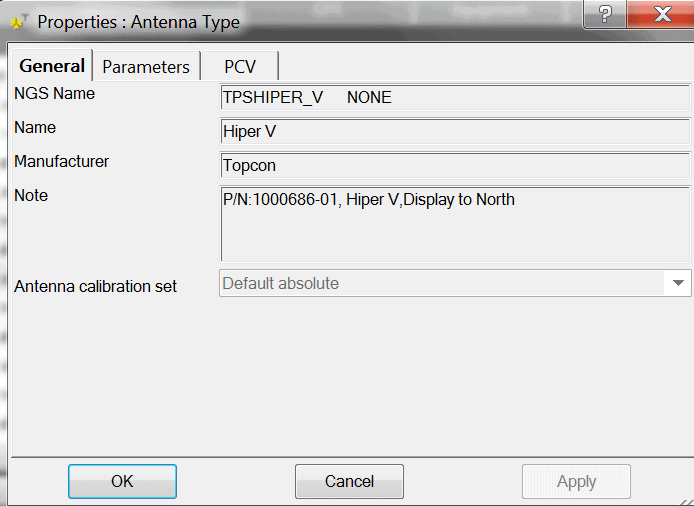
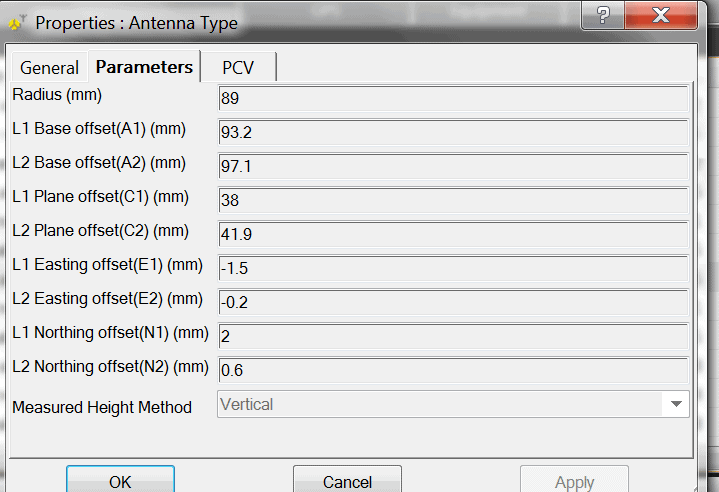
Randy Black with Topcon sent me the information below from what I assume is Topcon Magnet Tools. I hope this helps anyone needing this information. A huge Thank You goes out to Randy. He is a great guy, and has helped me numerous times over the years.
Posted : May 10, 2016 5:24 am
Translate
▼
English
Spanish
French
German
Italian
Portuguese
Russian
Chinese
Japanese
Korean
Arabic
Hindi
Dutch
Polish
Turkish
Vietnamese
Thai
Swedish
Danish
Finnish
Norwegian
Czech
Hungarian
Romanian
Greek
Hebrew
Indonesian
Malay
Ukrainian
Bulgarian
Croatian
Slovak
Slovenian
Serbian
Lithuanian
Latvian
Estonian
Thanks for sharing! Looks like they didn't provide the PCV values from the PCV tab. I entered the ones from the HiPer II. Seems to work ok.
Posted : May 12, 2016 4:22 pm
Topic starter
Translate
▼
English
Spanish
French
German
Italian
Portuguese
Russian
Chinese
Japanese
Korean
Arabic
Hindi
Dutch
Polish
Turkish
Vietnamese
Thai
Swedish
Danish
Finnish
Norwegian
Czech
Hungarian
Romanian
Greek
Hebrew
Indonesian
Malay
Ukrainian
Bulgarian
Croatian
Slovak
Slovenian
Serbian
Lithuanian
Latvian
Estonian
RoadBurner, post: 371972, member: 6168 wrote: Thanks for sharing! Looks like they didn't provide the PCV values from the PCV tab. I entered the ones from the HiPer II. Seems to work ok.
Sorry, I did receive this a little later from Randy, and forgot to update the thread.

Posted : May 12, 2016 7:03 pm
Translate
▼
English
Spanish
French
German
Italian
Portuguese
Russian
Chinese
Japanese
Korean
Arabic
Hindi
Dutch
Polish
Turkish
Vietnamese
Thai
Swedish
Danish
Finnish
Norwegian
Czech
Hungarian
Romanian
Greek
Hebrew
Indonesian
Malay
Ukrainian
Bulgarian
Croatian
Slovak
Slovenian
Serbian
Lithuanian
Latvian
Estonian
Hey, you're alright! 😉
Thanks again
Posted : May 13, 2016 9:33 am
Topic starter
Translate
▼
English
Spanish
French
German
Italian
Portuguese
Russian
Chinese
Japanese
Korean
Arabic
Hindi
Dutch
Polish
Turkish
Vietnamese
Thai
Swedish
Danish
Finnish
Norwegian
Czech
Hungarian
Romanian
Greek
Hebrew
Indonesian
Malay
Ukrainian
Bulgarian
Croatian
Slovak
Slovenian
Serbian
Lithuanian
Latvian
Estonian
RoadBurner, post: 372077, member: 6168 wrote: Hey, you're alright! 😉
Thanks again
Ha! Thanks, I try. Randy gets the credit.
Posted : May 13, 2016 12:32 pm

Translate
▼
English
Spanish
French
German
Italian
Portuguese
Russian
Chinese
Japanese
Korean
Arabic
Hindi
Dutch
Polish
Turkish
Vietnamese
Thai
Swedish
Danish
Finnish
Norwegian
Czech
Hungarian
Romanian
Greek
Hebrew
Indonesian
Malay
Ukrainian
Bulgarian
Croatian
Slovak
Slovenian
Serbian
Lithuanian
Latvian
Estonian
Ol? Amigo!
Vc tem como mandar imagens dos par?metros?ÿ do Topcon Hiper SR, assim como vc mandou do Hiper V
Posted : September 23, 2019 7:50 pm

Translate
▼
English
Spanish
French
German
Italian
Portuguese
Russian
Chinese
Japanese
Korean
Arabic
Hindi
Dutch
Polish
Turkish
Vietnamese
Thai
Swedish
Danish
Finnish
Norwegian
Czech
Hungarian
Romanian
Greek
Hebrew
Indonesian
Malay
Ukrainian
Bulgarian
Croatian
Slovak
Slovenian
Serbian
Lithuanian
Latvian
Estonian
Jimmy,
I wonder if you have that working yet??ÿ I found out that with?ÿ TopSURV, the HiPer V rover requires the OAF addition for 3rd party software.?ÿ This was for a customer a few years ago that wanted to run a new HiPer V off his HiPer II as a base.?ÿ The DC software must set the RTK Rover Position Update Rate or you have to have that OAF line added.?ÿ OOPS.?ÿ NOW I SEE THIS IS ABOUT POST PROCESSING SOFTWARE
Posted : September 24, 2019 8:53 am
Topic starter
Translate
▼
English
Spanish
French
German
Italian
Portuguese
Russian
Chinese
Japanese
Korean
Arabic
Hindi
Dutch
Polish
Turkish
Vietnamese
Thai
Swedish
Danish
Finnish
Norwegian
Czech
Hungarian
Romanian
Greek
Hebrew
Indonesian
Malay
Ukrainian
Bulgarian
Croatian
Slovak
Slovenian
Serbian
Lithuanian
Latvian
Estonian
Jerry, yes, it was for post processing. It seems to be working fine.
Hope you and the family are doing well.
Posted : September 25, 2019 6:34 am