Reading RPLS is free for the whole profession. Members post, reply, and get the members-only rooms.


Notifications
Clear all
GNSS & Geodesy
10
Posts
6
Users
0
Reactions
1,460
Views

Topic starter
Translate
▼
English
Spanish
French
German
Italian
Portuguese
Russian
Chinese
Japanese
Korean
Arabic
Hindi
Dutch
Polish
Turkish
Vietnamese
Thai
Swedish
Danish
Finnish
Norwegian
Czech
Hungarian
Romanian
Greek
Hebrew
Indonesian
Malay
Ukrainian
Bulgarian
Croatian
Slovak
Slovenian
Serbian
Lithuanian
Latvian
Estonian
I have been trying off and on to setup a recently acquired Trimble R7 as a portable base station with CMR corrections transmitted over the cell network. I do not have a cell modem yet, so I am working on getting it working internally. I do this all the time out in the field with my R10 (with a GSM modem internal), but I want to use the R7 instead. TodayÛ?SUCCESS (sort of).
I have the R7 setup to transmit CMR+ out port 2 (custom radio). I acquired a serial to wifi converter (took a while to get it-bought it on Amazon but it shipped from China: http://www.usriot.com/p/rs232-rs485-wifi-device-servers/ ), set it up on my internal network, with a port of 8899. I connect the R7, start the survey, and the rx light on the serial to wifi blinks.
Next, I set up my R10 and connect it to the internal wifi as well (different access point on other side of building). I configured one of the TCP/IP ports to connect to the internal IP address and port 8899. That worked.
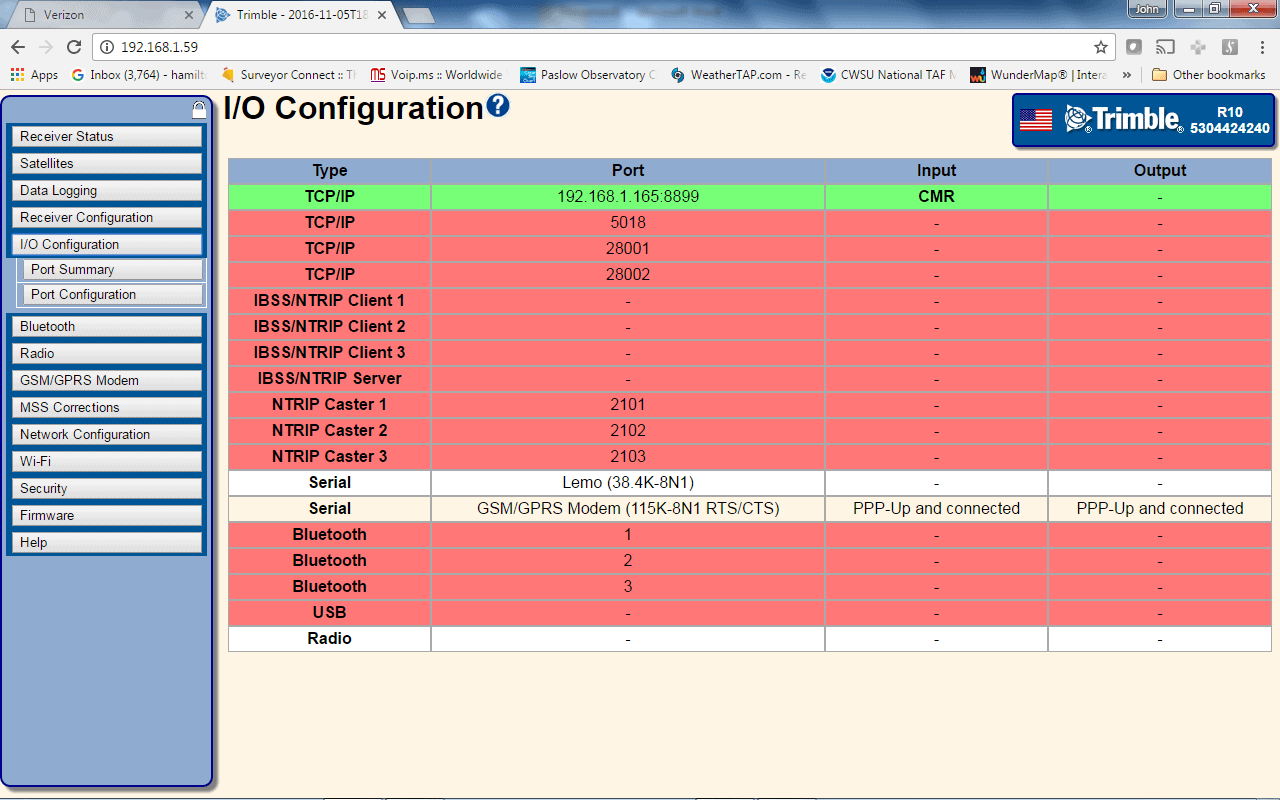
Looking at the position screen, it shows an RTK position, and if I use the data collector I can do an RTK survey (set to internal radio, even though it is not actually using the radio, which is the same thing I do when I connect the R10 directly to an NTRIP server, not going through the DC). So I am sure the setup works.
To summarize, it works fine on my internal network, which is transparent to the rover, it thinks it is getting corrections from a radio. No NTRIP involved.
So I then open up that port (8899) on my router. I have other devices (camera server, ftp, etc) that I did the same thing on and they all work from the outside world.
When I then disconnect the R10 from the internal network and connect using the GSM modem, that particular port (using the current IP address of my network, which is dynamic but hardly ever changes) does not connect. If, instead of typing in the IP address, I type in a domain name, it resolves to the correct IP address (which means 1) it is connected to the internet and 2) the IP address is correct). I do have a dynamic name service setup, so my domain name will resolve to the correct and current IP address. I know it works because I connect to my security cameras that way and we send data to an internal ftp server from the field.
I think it has to do with a port forwarding issue, but I can't figure out why, since I opened up the ports on the router same way as with the other devices internal that need access from outside.
My next step is to get a cell modem and use that instead of the serial to wifi device. But, i want to be sure that what i am trying to do will work. Based on it working internally, I don't see why it wouldn't, but being unable to access it from outside leaves a doubt in my mind.
I would appreciate any advice from anyone as to what the problem might be. The cell modem isn't terribly expensive ($300), so I may just go ahead and get it and try to get that working.
Posted : November 5, 2016 1:02 pm
Topic starter
Translate
▼
English
Spanish
French
German
Italian
Portuguese
Russian
Chinese
Japanese
Korean
Arabic
Hindi
Dutch
Polish
Turkish
Vietnamese
Thai
Swedish
Danish
Finnish
Norwegian
Czech
Hungarian
Romanian
Greek
Hebrew
Indonesian
Malay
Ukrainian
Bulgarian
Croatian
Slovak
Slovenian
Serbian
Lithuanian
Latvian
Estonian
Additional info...I setup the R10 as an ntrip server on the internal network (works in this configuration externally using GSM modem), using port 2101. I then opened up 2101 on the router. I tried to connect using the Lefebure NTRIP client on my phone. I use this app to test the connectivity when setting the R10 up as a base.
It keeps saying
"Network: Connecting..."
and then
"Network Connection dropped"
More evidence that it is my router blocking it? Or could it be Verizon (I have verizon fios)?
Posted : November 5, 2016 1:44 pm

Translate
▼
English
Spanish
French
German
Italian
Portuguese
Russian
Chinese
Japanese
Korean
Arabic
Hindi
Dutch
Polish
Turkish
Vietnamese
Thai
Swedish
Danish
Finnish
Norwegian
Czech
Hungarian
Romanian
Greek
Hebrew
Indonesian
Malay
Ukrainian
Bulgarian
Croatian
Slovak
Slovenian
Serbian
Lithuanian
Latvian
Estonian
gschrock, post: 398585, member: 556 wrote: lets corner one or more and pick their brains...

Posted : November 5, 2016 6:53 pm

Translate
▼
English
Spanish
French
German
Italian
Portuguese
Russian
Chinese
Japanese
Korean
Arabic
Hindi
Dutch
Polish
Turkish
Vietnamese
Thai
Swedish
Danish
Finnish
Norwegian
Czech
Hungarian
Romanian
Greek
Hebrew
Indonesian
Malay
Ukrainian
Bulgarian
Croatian
Slovak
Slovenian
Serbian
Lithuanian
Latvian
Estonian
I don't know if this has any value to your situation, but I'll share something I experienced today: with the help of one of the Javad surveyors, a few weeks ago I set up my Triumph-2 with a TCP connection over a Verizon Jetpack using a fixed IP address. (A $500 fixed IP address, I might add.) However, I was in the office at the time and did no testing other than to verify the connection. Today I set everything up outside, but couldn't get the rover to connect; it cycled through INIT, CONNECTING and SOCKET TIMEOUT messages. I checked all the settings, recalled the connection profile a few times, and restarted the base, but nothing worked. Wondering about the Jetpack, I pinged it from my phone, which is what I was using as the wifi hotspot for the rover. As soon as the ping came back, the rover connected and continued to work. It seems unlikely that this was a coincidence, but I can't explain why the ping would be necessary to get the Jetpack to connect to the rover.
Posted : November 5, 2016 8:10 pm

Translate
▼
English
Spanish
French
German
Italian
Portuguese
Russian
Chinese
Japanese
Korean
Arabic
Hindi
Dutch
Polish
Turkish
Vietnamese
Thai
Swedish
Danish
Finnish
Norwegian
Czech
Hungarian
Romanian
Greek
Hebrew
Indonesian
Malay
Ukrainian
Bulgarian
Croatian
Slovak
Slovenian
Serbian
Lithuanian
Latvian
Estonian
Posted : November 6, 2016 3:15 pm
Translate
▼
English
Spanish
French
German
Italian
Portuguese
Russian
Chinese
Japanese
Korean
Arabic
Hindi
Dutch
Polish
Turkish
Vietnamese
Thai
Swedish
Danish
Finnish
Norwegian
Czech
Hungarian
Romanian
Greek
Hebrew
Indonesian
Malay
Ukrainian
Bulgarian
Croatian
Slovak
Slovenian
Serbian
Lithuanian
Latvian
Estonian
MathTeacher, post: 398678, member: 7674 wrote: https://www.verizonwireless.com/support/knowledge-base-40681/
That link explains how to disable the Jetpack's SSID broadcast. I'm not understanding why that would have any bearing on the ability to connect to it when I have the IP address and password. Can you shed some light on this?
Posted : November 6, 2016 4:24 pm

Translate
▼
English
Spanish
French
German
Italian
Portuguese
Russian
Chinese
Japanese
Korean
Arabic
Hindi
Dutch
Polish
Turkish
Vietnamese
Thai
Swedish
Danish
Finnish
Norwegian
Czech
Hungarian
Romanian
Greek
Hebrew
Indonesian
Malay
Ukrainian
Bulgarian
Croatian
Slovak
Slovenian
Serbian
Lithuanian
Latvian
Estonian
Something strange going on with the interweb and TCP communications and pinging, lately. I was setting up a system this weekend and was connected but the pings were intermitant.
Posted : November 6, 2016 6:41 pm
Translate
▼
English
Spanish
French
German
Italian
Portuguese
Russian
Chinese
Japanese
Korean
Arabic
Hindi
Dutch
Polish
Turkish
Vietnamese
Thai
Swedish
Danish
Finnish
Norwegian
Czech
Hungarian
Romanian
Greek
Hebrew
Indonesian
Malay
Ukrainian
Bulgarian
Croatian
Slovak
Slovenian
Serbian
Lithuanian
Latvian
Estonian
Jim Frame, post: 398684, member: 10 wrote: Can you shed some light on this?
I guess I jumped to a conclusion. My personal home wifi is in an upstairs bedroom and, when it's broadcasting, it can be "seen" further away than I want it to be. I disabled the broadcast and renamed it so that it's not so apparent. Makes my kids mad because they have to ping it when they get new stuff and come to visit. I thought that you might have a similar problem.
Sorry for the confusion.
Posted : November 7, 2016 11:49 am

Translate
▼
English
Spanish
French
German
Italian
Portuguese
Russian
Chinese
Japanese
Korean
Arabic
Hindi
Dutch
Polish
Turkish
Vietnamese
Thai
Swedish
Danish
Finnish
Norwegian
Czech
Hungarian
Romanian
Greek
Hebrew
Indonesian
Malay
Ukrainian
Bulgarian
Croatian
Slovak
Slovenian
Serbian
Lithuanian
Latvian
Estonian
John, I am a little confused by your situation, BUT did want to throw out there that to connect to my RTK bridge I had to have a static IP, no problem with the bridge hooking to a RTN, but no go on hooking to the bridge over a wireless carrier without a static IP (to use as a NTRIP server or to change a configuration remotely), even though the assigned dynamic IP usually remains the same until a power cycle. ALL incoming non fixed IP addresses are blocked at the carrier level.
Not sure if this relevant or not at this stage, BUT likely will be once you move out of the office test environment and try this over a cell network.
SHG
Posted : November 7, 2016 7:56 pm
Topic starter
Translate
▼
English
Spanish
French
German
Italian
Portuguese
Russian
Chinese
Japanese
Korean
Arabic
Hindi
Dutch
Polish
Turkish
Vietnamese
Thai
Swedish
Danish
Finnish
Norwegian
Czech
Hungarian
Romanian
Greek
Hebrew
Indonesian
Malay
Ukrainian
Bulgarian
Croatian
Slovak
Slovenian
Serbian
Lithuanian
Latvian
Estonian
Thanks, Shelby. I was planning on getting a fixed IP, which i do have for the R10. Costs $3/month extra.
Posted : November 8, 2016 9:02 am