Reading RPLS is free for the whole profession. Members post, reply, and get the members-only rooms.

Notifications
Clear all
Strictly Surveying
7
Posts
5
Users
0
Reactions
1,581
Views

Topic starter
Translate
▼
English
Spanish
French
German
Italian
Portuguese
Russian
Chinese
Japanese
Korean
Arabic
Hindi
Dutch
Polish
Turkish
Vietnamese
Thai
Swedish
Danish
Finnish
Norwegian
Czech
Hungarian
Romanian
Greek
Hebrew
Indonesian
Malay
Ukrainian
Bulgarian
Croatian
Slovak
Slovenian
Serbian
Lithuanian
Latvian
Estonian
Need help getting my TDS data collector to communicate with my windows 10 computer. Ce.net version 4.
thanks for your help
Posted : October 18, 2016 11:07 am

Translate
▼
English
Spanish
French
German
Italian
Portuguese
Russian
Chinese
Japanese
Korean
Arabic
Hindi
Dutch
Polish
Turkish
Vietnamese
Thai
Swedish
Danish
Finnish
Norwegian
Czech
Hungarian
Romanian
Greek
Hebrew
Indonesian
Malay
Ukrainian
Bulgarian
Croatian
Slovak
Slovenian
Serbian
Lithuanian
Latvian
Estonian
We use Windows Mobile Device Center to download our Spectra Precision Rangers running Survey Pro. I have also used File Explorer when they show up as an external device, similar to a USB drive. I just browse out to the Survey Pro jobs directory, and copy and past to my desktop/laptop.
I will say that sometimes we have to plug and unplug the data collector sometimes if it wants to be stubborn. Not sure if that is the PC or the DC.
Posted : October 18, 2016 11:30 am

Translate
▼
English
Spanish
French
German
Italian
Portuguese
Russian
Chinese
Japanese
Korean
Arabic
Hindi
Dutch
Polish
Turkish
Vietnamese
Thai
Swedish
Danish
Finnish
Norwegian
Czech
Hungarian
Romanian
Greek
Hebrew
Indonesian
Malay
Ukrainian
Bulgarian
Croatian
Slovak
Slovenian
Serbian
Lithuanian
Latvian
Estonian
So, with Windows CE_Net V 4, I suppose this is a Ranger 200C or older?
You may also have some issues with connectivity, since the Ranger only has serial ports, unless you are one of those rare individuals who happens to possess a Mulitport adapter for the Ranger R, T, & C series units. I think a USB-to-serial adapter will work for the connectivity but you still may have a couple of hoops to jump through to make the connection.
Posted : October 18, 2016 3:41 pm
Topic starter
Translate
▼
English
Spanish
French
German
Italian
Portuguese
Russian
Chinese
Japanese
Korean
Arabic
Hindi
Dutch
Polish
Turkish
Vietnamese
Thai
Swedish
Danish
Finnish
Norwegian
Czech
Hungarian
Romanian
Greek
Hebrew
Indonesian
Malay
Ukrainian
Bulgarian
Croatian
Slovak
Slovenian
Serbian
Lithuanian
Latvian
Estonian
It is a ranger 200c. I have a multiport adapter. I have an option for USB or ethernet. I have not been ab;e to get anyone of these to work. I suspect I need a USB dfriver as the device is unrecognized by my win 7 machine. I have an xp machine.....lost my 300c and now I am scambling....
Posted : October 18, 2016 5:10 pm

Translate
▼
English
Spanish
French
German
Italian
Portuguese
Russian
Chinese
Japanese
Korean
Arabic
Hindi
Dutch
Polish
Turkish
Vietnamese
Thai
Swedish
Danish
Finnish
Norwegian
Czech
Hungarian
Romanian
Greek
Hebrew
Indonesian
Malay
Ukrainian
Bulgarian
Croatian
Slovak
Slovenian
Serbian
Lithuanian
Latvian
Estonian
The only way I could get the old style Ranger to connect to Win7 was using Active Sync in the XP virtual machine. I haven't tried that on my new Win10 Enterprise computer because we don't use the Ranger anymore.
Posted : October 18, 2016 9:00 pm

Translate
▼
English
Spanish
French
German
Italian
Portuguese
Russian
Chinese
Japanese
Korean
Arabic
Hindi
Dutch
Polish
Turkish
Vietnamese
Thai
Swedish
Danish
Finnish
Norwegian
Czech
Hungarian
Romanian
Greek
Hebrew
Indonesian
Malay
Ukrainian
Bulgarian
Croatian
Slovak
Slovenian
Serbian
Lithuanian
Latvian
Estonian
For anyone using trying to use Topcon's usb drivers in Win10 there's a trick. The latest drivers I can find are for Win7 and the drivers are unsigned and Win10 will not allow unsigned drivers to install. I found the below procedure and it works like a charm. I believe Win8 and Win8.1 have the same issue.
- Press the Windows key + R to bring up the Run box. Type shutdown /r /o and hit Enter.
- Windows informs you that you are about to be signed off. Click Close.
- Once your Computer has rebooted you will need to choose the Troubleshoot option.
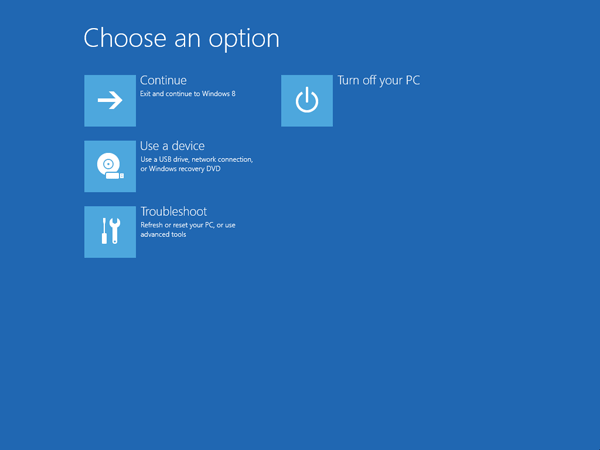
- Then head into Advanced options.
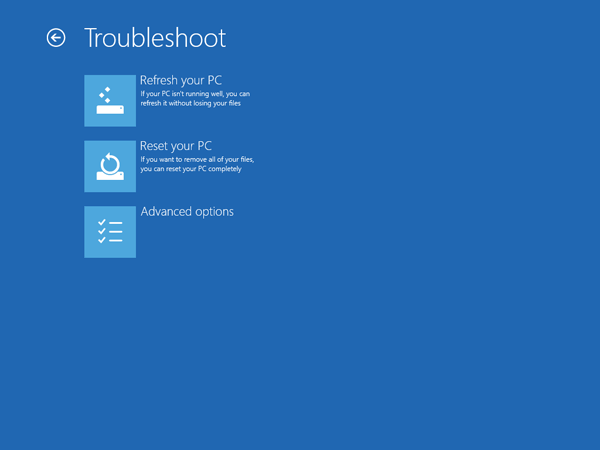
- In the Advanced Options window, choose Startup Settings.
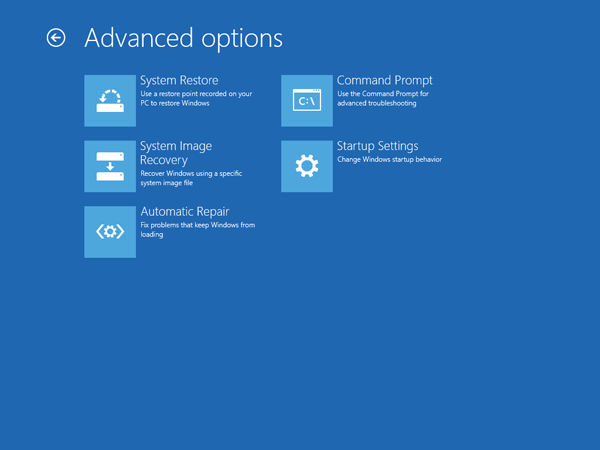
- Click the Restart button on the Startup Settings screen to reboot your computer again.
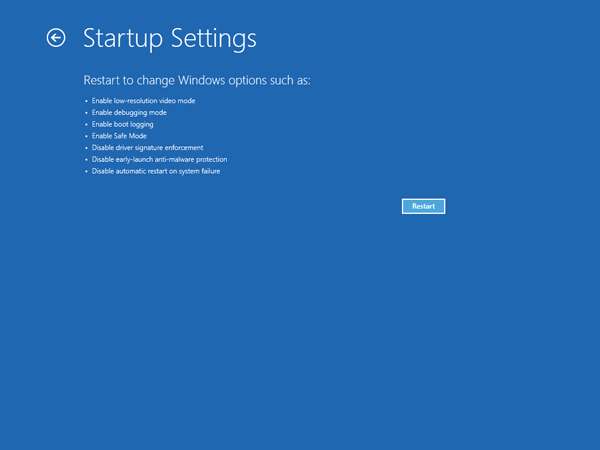
- After restart in Startup Settings windows, press the F7 key on your keyboard to select ÛÏDisable driver signature enforcementÛÏ.
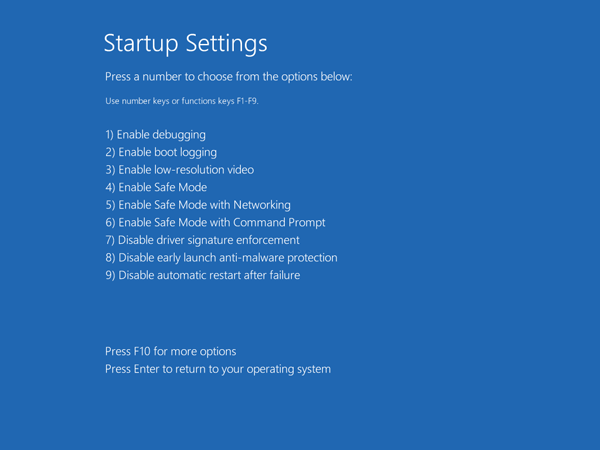
- Your PC will then reboot. Proceed to install your unsigned drivers. During the installation procedure, Windows will inform you that canÛªt verify the publisher of this driver software. Just ignore the warning message and choose ÛÏInstall this driver software anywayÛ to complete the installation.
Keep in mind that after the next restart, Driver Signature Enforcement will be automatically enabled again to prevent new drivers from being installed, but Windows will keep using any unsigned drivers youÛªve already installed.
Posted : October 18, 2016 9:28 pm
Topic starter
Translate
▼
English
Spanish
French
German
Italian
Portuguese
Russian
Chinese
Japanese
Korean
Arabic
Hindi
Dutch
Polish
Turkish
Vietnamese
Thai
Swedish
Danish
Finnish
Norwegian
Czech
Hungarian
Romanian
Greek
Hebrew
Indonesian
Malay
Ukrainian
Bulgarian
Croatian
Slovak
Slovenian
Serbian
Lithuanian
Latvian
Estonian
Virtual xp sounds good... I have an old xp and I used Activesync 3.8 and that worked.
Posted : October 18, 2016 9:54 pm