Reading RPLS is free for the whole profession. Members post, reply, and get the members-only rooms.

Notifications
Clear all
Strictly Surveying
24
Posts
10
Users
0
Reactions
6,753
Views

Topic starter
Translate
▼
English
Spanish
French
German
Italian
Portuguese
Russian
Chinese
Japanese
Korean
Arabic
Hindi
Dutch
Polish
Turkish
Vietnamese
Thai
Swedish
Danish
Finnish
Norwegian
Czech
Hungarian
Romanian
Greek
Hebrew
Indonesian
Malay
Ukrainian
Bulgarian
Croatian
Slovak
Slovenian
Serbian
Lithuanian
Latvian
Estonian
Hi All,
I'm using a Hiper V Topcon model and have been getting some issues with the radio signal strength of both the receiver and the base(the red light was blinking meaning the connection was low).
But the main issue today was that when I started the base to begin the survey the base did not come off of autonomous. Usually it would start at autonomous then go to float then fixed but today it just went on autonomous and never changed (the satellite coverage however was awesome!). This meant it didn't allow me to record gcp points as well, which was annoying. The accuracy for Horizontal and Vertical did not go any lower than 1 meter and this was odd as I'm used to seeing it closer to two decimal places.
Has anyone had or understands the issue here and how to fix it???
See picture attached as reference.
Thanks
Anare
Posted : July 21, 2015 10:15 pm

Translate
▼
English
Spanish
French
German
Italian
Portuguese
Russian
Chinese
Japanese
Korean
Arabic
Hindi
Dutch
Polish
Turkish
Vietnamese
Thai
Swedish
Danish
Finnish
Norwegian
Czech
Hungarian
Romanian
Greek
Hebrew
Indonesian
Malay
Ukrainian
Bulgarian
Croatian
Slovak
Slovenian
Serbian
Lithuanian
Latvian
Estonian
I won't be any help at all here, but I can tell you the one thing I don't like about Topcons is their radio link. In ten years I have replaced several, at a considerable expense.
Something else I've noticed: I've had interference from things that dealers have told me shouldn't cause radio interference. Things like cell towers, airport radar and various marker and glideslope beacons. I had Hipers some time back that simply would not work at the base of a 135kV transmission tower, but 100' away it was fine. We finally retired all the Hipers for GR3s and GR5s, which btw, don't seem to have that problem.
I love Topcon equipment, but everything I've ever had go wrong with them was radio oriented.
Posted : July 21, 2015 10:36 pm
Topic starter
Translate
▼
English
Spanish
French
German
Italian
Portuguese
Russian
Chinese
Japanese
Korean
Arabic
Hindi
Dutch
Polish
Turkish
Vietnamese
Thai
Swedish
Danish
Finnish
Norwegian
Czech
Hungarian
Romanian
Greek
Hebrew
Indonesian
Malay
Ukrainian
Bulgarian
Croatian
Slovak
Slovenian
Serbian
Lithuanian
Latvian
Estonian
Thanks for sharing Paden, and yeah I have also had issues with such telecommunications networks. The radio link seems to be very fussy at times. I love Topcon equipment too and performing RTK surveys, but I fear this latest issue in the equipment might have us searching elsewhere. As the projects I work on have deadlines and I would like to boast such sub-centimeter accuracies but these receivers are causing issues. And they ain't bloody cheap either!
Posted : July 21, 2015 10:43 pm

Translate
▼
English
Spanish
French
German
Italian
Portuguese
Russian
Chinese
Japanese
Korean
Arabic
Hindi
Dutch
Polish
Turkish
Vietnamese
Thai
Swedish
Danish
Finnish
Norwegian
Czech
Hungarian
Romanian
Greek
Hebrew
Indonesian
Malay
Ukrainian
Bulgarian
Croatian
Slovak
Slovenian
Serbian
Lithuanian
Latvian
Estonian
I don't think this a radio issue. I had similar problem yesterday with Hiper V's. Taking much longer than normal to go from Auto to Fix. I turned off Glonass, and instantly went to fixed. Turn Glonass back, and on my way. No problems rest of the day.
Not certain why. It just seemed to work. Have had to do this twice in past 10 days.
Posted : July 22, 2015 4:50 am

Translate
▼
English
Spanish
French
German
Italian
Portuguese
Russian
Chinese
Japanese
Korean
Arabic
Hindi
Dutch
Polish
Turkish
Vietnamese
Thai
Swedish
Danish
Finnish
Norwegian
Czech
Hungarian
Romanian
Greek
Hebrew
Indonesian
Malay
Ukrainian
Bulgarian
Croatian
Slovak
Slovenian
Serbian
Lithuanian
Latvian
Estonian
I'm a little confused by your post- you mention the base didn't fix. In a Base/Rover config the base never fixes. You set the base and the rover fixes. Only a corrected receiver can resolve to a fixed solution.Check the reference card regarding the lights for your radio. I think a quick review of that will answer that concern.
Posted : July 22, 2015 6:28 am
Translate
▼
English
Spanish
French
German
Italian
Portuguese
Russian
Chinese
Japanese
Korean
Arabic
Hindi
Dutch
Polish
Turkish
Vietnamese
Thai
Swedish
Danish
Finnish
Norwegian
Czech
Hungarian
Romanian
Greek
Hebrew
Indonesian
Malay
Ukrainian
Bulgarian
Croatian
Slovak
Slovenian
Serbian
Lithuanian
Latvian
Estonian
anarefj,
Pmoran is correct. Nice to see you commenting here P.
The base will never get a fix. Your post and your photo suggest you are connecting to a Topcon base using Magnet software. A fix will only be acquired at the rover.
Also it would help if we knew your location.
If it is a radio issue, you should use first use UHF scanner to check for an open radio frequency in your area.
Posted : July 22, 2015 6:39 am
Translate
▼
English
Spanish
French
German
Italian
Portuguese
Russian
Chinese
Japanese
Korean
Arabic
Hindi
Dutch
Polish
Turkish
Vietnamese
Thai
Swedish
Danish
Finnish
Norwegian
Czech
Hungarian
Romanian
Greek
Hebrew
Indonesian
Malay
Ukrainian
Bulgarian
Croatian
Slovak
Slovenian
Serbian
Lithuanian
Latvian
Estonian
paden cash, post: 328460, member: 20 wrote: I won't be any help at all here, but I can tell you the one thing I don't like about Topcons is their radio link. In ten years I have replaced several, at a considerable expense.
Something else I've noticed: I've had interference from things that dealers have told me shouldn't cause radio interference. Things like cell towers, airport radar and various marker and glideslope beacons. I had Hipers some time back that simply would not work at the base of a 135kV transmission tower, but 100' away it was fine. We finally retired all the Hipers for GR3s and GR5s, which btw, don't seem to have that problem.
I love Topcon equipment, but everything I've ever had go wrong with them was radio oriented.
Hi Paden-
The new HiPer V is a recent release and uses basically the same DUHFII radios as our GR5. The new HiPer SR is a short range base/rover system that uses a class 1 Bluetooth connection called Long Link. I appreciate your kind words about our gear. We are proud of what we make and we strive to make our customers happy with its performance.
Posted : July 22, 2015 7:09 am
Topic starter
Translate
▼
English
Spanish
French
German
Italian
Portuguese
Russian
Chinese
Japanese
Korean
Arabic
Hindi
Dutch
Polish
Turkish
Vietnamese
Thai
Swedish
Danish
Finnish
Norwegian
Czech
Hungarian
Romanian
Greek
Hebrew
Indonesian
Malay
Ukrainian
Bulgarian
Croatian
Slovak
Slovenian
Serbian
Lithuanian
Latvian
Estonian
leegreen, post: 328467, member: 2332 wrote: I don't think this a radio issue. I had similar problem yesterday with Hiper V's. Taking much longer than normal to go from Auto to Fix. I turned off Glonass, and instantly went to fixed. Turn Glonass back, and on my way. No problems rest of the day.
Not certain why. It just seemed to work. Have had to do this twice in past 10 days.
How exactly did you turn off the glonass satelites?
Posted : July 22, 2015 3:15 pm
Topic starter
Translate
▼
English
Spanish
French
German
Italian
Portuguese
Russian
Chinese
Japanese
Korean
Arabic
Hindi
Dutch
Polish
Turkish
Vietnamese
Thai
Swedish
Danish
Finnish
Norwegian
Czech
Hungarian
Romanian
Greek
Hebrew
Indonesian
Malay
Ukrainian
Bulgarian
Croatian
Slovak
Slovenian
Serbian
Lithuanian
Latvian
Estonian
pmoran, post: 328477, member: 8922 wrote: I'm a little confused by your post- you mention the base didn't fix. In a Base/Rover config the base never fixes. You set the base and the rover fixes. Only a corrected receiver can resolve to a fixed solution.Check the reference card regarding the lights for your radio. I think a quick review of that will answer that concern.
Sorry, you are correct. I meant the rover didnt get a fix...
Posted : July 22, 2015 3:17 pm
Translate
▼
English
Spanish
French
German
Italian
Portuguese
Russian
Chinese
Japanese
Korean
Arabic
Hindi
Dutch
Polish
Turkish
Vietnamese
Thai
Swedish
Danish
Finnish
Norwegian
Czech
Hungarian
Romanian
Greek
Hebrew
Indonesian
Malay
Ukrainian
Bulgarian
Croatian
Slovak
Slovenian
Serbian
Lithuanian
Latvian
Estonian
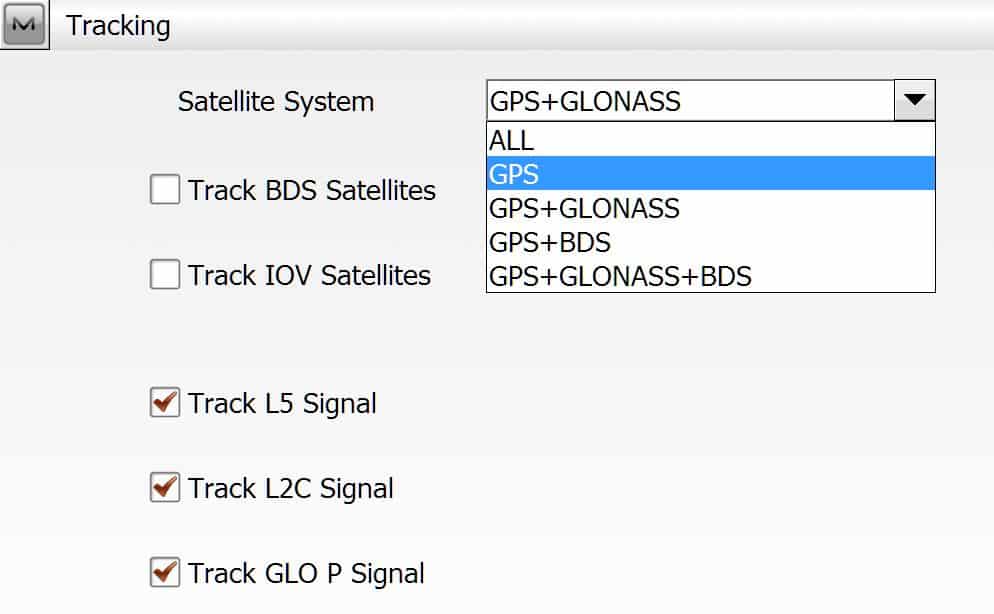
anarefj, post: 328584, member: 9382 wrote: How exactly did you turn off the glonass satelites?
In Magnet Field go to SETUP >STATUS >Tracking Options
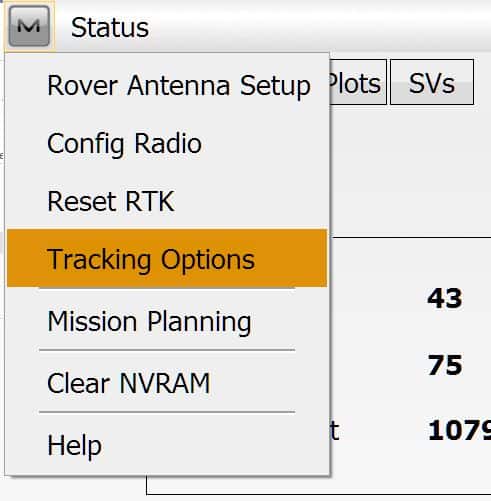
Click on pulldown for Satellite System and Select GPS only.
Posted : July 22, 2015 3:50 pm
Topic starter
Translate
▼
English
Spanish
French
German
Italian
Portuguese
Russian
Chinese
Japanese
Korean
Arabic
Hindi
Dutch
Polish
Turkish
Vietnamese
Thai
Swedish
Danish
Finnish
Norwegian
Czech
Hungarian
Romanian
Greek
Hebrew
Indonesian
Malay
Ukrainian
Bulgarian
Croatian
Slovak
Slovenian
Serbian
Lithuanian
Latvian
Estonian
leegreen, post: 328591, member: 2332 wrote: In Magnet Field go to SETUP >STATUS >Tracking Options
Click on pulldown for Satellite System and Select GPS only.
Hi Lee. I'm actually out in the field as we speak and am attempting your option. Appreciate your assist!
Posted : July 22, 2015 4:23 pm
Topic starter
Translate
▼
English
Spanish
French
German
Italian
Portuguese
Russian
Chinese
Japanese
Korean
Arabic
Hindi
Dutch
Polish
Turkish
Vietnamese
Thai
Swedish
Danish
Finnish
Norwegian
Czech
Hungarian
Romanian
Greek
Hebrew
Indonesian
Malay
Ukrainian
Bulgarian
Croatian
Slovak
Slovenian
Serbian
Lithuanian
Latvian
Estonian
Just wanted to let everyone know that the Topcon Rover receiver finally got a fix and it took 40 minutes longer then expected. But I guess sometimes these devices take time. Thanks again for everyones input.
Posted : July 22, 2015 6:12 pm
Topic starter
Translate
▼
English
Spanish
French
German
Italian
Portuguese
Russian
Chinese
Japanese
Korean
Arabic
Hindi
Dutch
Polish
Turkish
Vietnamese
Thai
Swedish
Danish
Finnish
Norwegian
Czech
Hungarian
Romanian
Greek
Hebrew
Indonesian
Malay
Ukrainian
Bulgarian
Croatian
Slovak
Slovenian
Serbian
Lithuanian
Latvian
Estonian
pmoran, post: 328484, member: 8922 wrote: Hi Paden-
The new HiPer V is a recent release and uses basically the same DUHFII radios as our GR5. The new HiPer SR is a short range base/rover system that uses a class 1 Bluetooth connection called Long Link. I appreciate your kind words about our gear. We are proud of what we make and we strive to make our customers happy with its performance.
I would assume that you work or are a Topcon Retailer? Anyway would you be able to explain to me why the inbuilt GPS for the FC-500 was not installed. At times the receivers aren't able to get signals in dense or marginal canopy and using the inbuilt GPS on the FC-500 at least to get something would be great.
Posted : July 22, 2015 7:52 pm
Translate
▼
English
Spanish
French
German
Italian
Portuguese
Russian
Chinese
Japanese
Korean
Arabic
Hindi
Dutch
Polish
Turkish
Vietnamese
Thai
Swedish
Danish
Finnish
Norwegian
Czech
Hungarian
Romanian
Greek
Hebrew
Indonesian
Malay
Ukrainian
Bulgarian
Croatian
Slovak
Slovenian
Serbian
Lithuanian
Latvian
Estonian
anarefj, post: 328639, member: 9382 wrote: I would assume that you work or are a Topcon Retailer? Anyway would you be able to explain to me why the inbuilt GPS for the FC-500 was not installed. At times the receivers aren't able to get signals in dense or marginal canopy and using the inbuilt GPS on the FC-500 at least to get something would be great.
Not all FC500 include GPS capabilities. There are 4 distinct models of FC500.
Posted : July 23, 2015 6:57 am

Translate
▼
English
Spanish
French
German
Italian
Portuguese
Russian
Chinese
Japanese
Korean
Arabic
Hindi
Dutch
Polish
Turkish
Vietnamese
Thai
Swedish
Danish
Finnish
Norwegian
Czech
Hungarian
Romanian
Greek
Hebrew
Indonesian
Malay
Ukrainian
Bulgarian
Croatian
Slovak
Slovenian
Serbian
Lithuanian
Latvian
Estonian
leegreen, post: 328591, member: 2332 wrote: In Magnet Field go to SETUP >STATUS >Tracking Options
Click on pulldown for Satellite System and Select GPS only.
Lee, is there a way to do that with TopSURV 8?
OK. I think I found it under Config: Advanced. I think...
Posted : July 23, 2015 10:02 am

Translate
▼
English
Spanish
French
German
Italian
Portuguese
Russian
Chinese
Japanese
Korean
Arabic
Hindi
Dutch
Polish
Turkish
Vietnamese
Thai
Swedish
Danish
Finnish
Norwegian
Czech
Hungarian
Romanian
Greek
Hebrew
Indonesian
Malay
Ukrainian
Bulgarian
Croatian
Slovak
Slovenian
Serbian
Lithuanian
Latvian
Estonian
I use an older GRS-1 receiver and I had issues yesterday too... the radio connection was poor. Took close to an hour to get a fixed signal. Coincidence? Who knows.
Posted : July 23, 2015 10:41 am
Translate
▼
English
Spanish
French
German
Italian
Portuguese
Russian
Chinese
Japanese
Korean
Arabic
Hindi
Dutch
Polish
Turkish
Vietnamese
Thai
Swedish
Danish
Finnish
Norwegian
Czech
Hungarian
Romanian
Greek
Hebrew
Indonesian
Malay
Ukrainian
Bulgarian
Croatian
Slovak
Slovenian
Serbian
Lithuanian
Latvian
Estonian
Sabre970, post: 328723, member: 7481 wrote: I use an older GRS-1 receiver and I had issues yesterday too... the radio connection was poor. Took close to an hour to get a fixed signal. Coincidence? Who knows.
What radio are you using on GRS-1?
Most used that with cell modem on a network GPS.
Posted : July 23, 2015 3:05 pm
Translate
▼
English
Spanish
French
German
Italian
Portuguese
Russian
Chinese
Japanese
Korean
Arabic
Hindi
Dutch
Polish
Turkish
Vietnamese
Thai
Swedish
Danish
Finnish
Norwegian
Czech
Hungarian
Romanian
Greek
Hebrew
Indonesian
Malay
Ukrainian
Bulgarian
Croatian
Slovak
Slovenian
Serbian
Lithuanian
Latvian
Estonian
leegreen, post: 328765, member: 2332 wrote: What radio are you using on GRS-1?
Most used that with cell modem on a network GPS.
Sorry, that's what I meant. I always think its a radio, but it is actually a cell connection. Shouldn't have had a problem regardless though
Posted : July 24, 2015 7:03 am
Translate
▼
English
Spanish
French
German
Italian
Portuguese
Russian
Chinese
Japanese
Korean
Arabic
Hindi
Dutch
Polish
Turkish
Vietnamese
Thai
Swedish
Danish
Finnish
Norwegian
Czech
Hungarian
Romanian
Greek
Hebrew
Indonesian
Malay
Ukrainian
Bulgarian
Croatian
Slovak
Slovenian
Serbian
Lithuanian
Latvian
Estonian
Sabre970, post: 328879, member: 7481 wrote: Sorry, that's what I meant. I always think its a radio, but it is actually a cell connection. Shouldn't have had a problem regardless though
That's what I thought.
Most here are quick to think these issues are caused by radio. I do think that is correct. Your GRS-1 is not using a UHR or SS radio, it uses a cell modem to connect. Most of the time my Hiper V's will connect with a fix in less than 1 minute, either via base/rover with UHF internal radios, or network connection with cell modem on controller.
When I see 100% radio, and autonomous for more than several minutes. I shutoff the GLONASS and most often get a fix instantly.
I had Hiper V's for over a year now, this past two weeks is first time I have had problems with connection.
Posted : July 24, 2015 7:30 am

Translate
▼
English
Spanish
French
German
Italian
Portuguese
Russian
Chinese
Japanese
Korean
Arabic
Hindi
Dutch
Polish
Turkish
Vietnamese
Thai
Swedish
Danish
Finnish
Norwegian
Czech
Hungarian
Romanian
Greek
Hebrew
Indonesian
Malay
Ukrainian
Bulgarian
Croatian
Slovak
Slovenian
Serbian
Lithuanian
Latvian
Estonian
I'm not sure if this is what our guys are still doing, but in the past when it looks like the radio (cell or otherwise) is locked at 100% but it remains autonomous, we have hit "Reset RTK" and that usually fixes right away after that.
Posted : July 24, 2015 7:52 am
Page 1 / 2
Next