

Mike,
I echo Christof's enthusiasm for your video. Nicely done!
Dave

I've completed the Videos for the http://apwcts.rguidestore.com/subsurface-utility-mapping-with-civil-3d.html ">Subsurface Utility Mapping with Civil 3D

Here is my companies approach to Rim and Invert labels in Civil 3D. It can be modified in any way to get the desired results or labels. Our field crews simply shoot the center rim of each structure weather it is a Manhole or Catch Basin. The shot is coded as CB (for Catch Basin) or MH, SMH, STMH, ect. (for manholes). A note is also collected for each shot that contains pipe directions, pipe sizes/types and measured inverts for each. A note might look something like this:
N 12"cmp 3.25' SE 18"cmp 4.52'
That's it for the field.
The next steps are all done in the office.
In order to use this information to label inverts you need to set a few things up in your Civil 3D Template. You will first need to set up some user defined properties as in the below image. You will need to create some for each pipe as well as one for importing survey notes. I choose to limit myself to 6 pipes per structure. More can always be added later.

Next you will need to set up a few point label expressions (one for each pipe) as in the below image.

Once you have these two things created you can set up a point label style to use with Manholes, Catch Basins, ect. See below image.

After you have this you are ready to import your field points. Points are exported from our collectors in a .csv or .txt file in the following format. Point Number, Northing, Easting, Elevation, Description, Note. They are imported into Civil 3d using a custom point file format that includes point notes (see image below).

After I have the points and notes in my drawing I simply have to look at the properties of each point associated with a MH or CB and enter in the information my field crew put in the point notes. The infromation is entered into the point properties screen (see below picture). These properties will be visible for every point in your drawing once you complete the steps listed above. After this is done the point label is created and inverts are calculated.
This process doesn't save a ton of steps but it eliminates any math errors and leaves you with a clean drawing that contains all of the field information used to calculate the inverts and create the labels. I believe it could be automated even further but it would require having our field crews fill in a few extra comment fields in the collector.
In the below picture you can see the end result is a point label and symbol that has the notes, inverts, and pipe information all embedded into your drawing. I wouldn't be surprised if I missed a few steps or if this seems a bit complicated. I have never written a how-to before so I apologize in advance! But hopefully it is enough to give you an idea of what Civil 3D is capable of if you take the time to set up a good template.


Awesome tutorial! Very helpful. My only problem is now I have annotation for 6 pipes when usually there's only 2-4 pipes. How do I get the unused pipe inverts to drop off and not show up on the label? Thanks!
Im not sure why the labels are showing when you have not entered any information. I wish I had an answer for you! In my drawings the only label that shows up are for the pipes that I entered data for. If you enter anyting into the label that is not an expression then it will show up for each pipe. Not sure if this helps.

You'll need to create an expression for a null value if you only have one label style for multiple inverts... IF({invert1}<1,0.00/12,0.055/12).
I would be interested to see what lisp routines some of you utilize for labeling inverts and direction. Please email me @[email protected]

Mark Mayer, post: 252134, member: 424 wrote: For years I've done those calcs in red pencil on the sketch in the fieldbook.
Now our company has a LISP routine with which you click on the rim shot and tell it the number of pipes. It then cycles through asking the direction, pipe diameter and measure down to each pipe. When you've entered it all it makes an annotated label, completed with leadered arrow. Text style and layering set by the LISP.
Hi I am interested in how the LISP routine work and how it looks? Sounds so much easier then manually drawing all these

sireath, post: 378382, member: 9370 wrote: I am interested in how the LISP routine work and how it looks?
Sorry, I no longer have access to it. If I did I would have to decline to share it without the employers permission as it was a proprietary thing. Nevertheless I think anyone moderately skilled in LISP programming could duplicate it.

I'm a big fan of automating repetitive tasks, but manhole annotation has never seemed like a good candidate for that to me. I shoot the center of the lid and measure the downs from there, recording in a field book, then do the reductions as I draft. It's unusual for me to have a project with more than a couple dozen manholes, so maybe I'd feel different if that number was in the hundreds. But maybe not!
Mark Mayer, post: 378392, member: 424 wrote: Sorry, I no longer have access to it. If I did I would have to decline to share it without the employers permission as it was a proprietary thing. Nevertheless I think anyone moderately skilled in LISP programming could duplicate it.
No worries. Mate
Jim Frame, post: 378395, member: 10 wrote: .....maybe I'd feel different if that number was in the hundreds. But maybe not!
You would feel different if you weren't doing your own drafting.
Jim Frame, post: 378395, member: 10 wrote: I'm a big fan of automating repetitive tasks, but manhole annotation has never seemed like a good candidate for that to me.....
The biggest gain from having a LISP to annotate manholes is quality control. You get the whole roomful of CAD techs to annotate manholes the same way.
Jim Frame, post: 378395, member: 10 wrote: .... I shoot the center of the lid and measure the downs from there, ....
I like to shoot the center of the manhole barrel, as closely represented by that part of the rim closest to it. This means pulling the lids and dipping the MHs first, and shooting them later. Not that it's ever been an issue. But you have to do those things at some point any way.
We have a spread sheet setup for each project and we put it on a laptop. Crew punches in the info. If it shows up green then its good. If it shows up red then they know it needs to be rechecked. We can import from that.

My clients usually want minimal information, and since I don't use a field book:
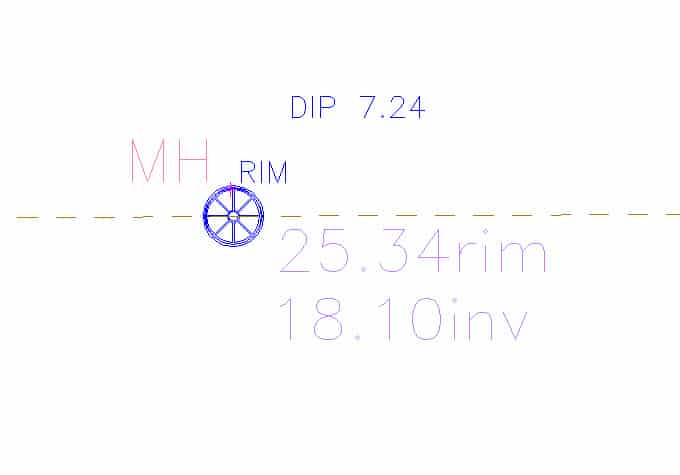
I shoot the center of the manhole lid coded as MH. That automatically draws a manhole lid (which actually looks like a manhole lid) and labels it MH.
I shoot the north rim as an elevation, so that plots a cross in 3D and labels it with the actual elevation.
When I dip the manhole I measure down, take a shot a few feet away from the manhole lid, and describe it as dip xx.xx, entering the actual dip. That plots it as a descriptor just off the manhole lid where I can easily see it and compute the invert to add to the drawing.

We use a pipe mic dip sheet (not to occassionly be confused the the actual person conducting the work) which has clear input for all pertinent data. Once back in the office all data is entered into a custom built excel spreadsheet. Pertinent information is transferred to whatever software is necessary, ArcGIS, Microstation or CAD.

mcarris33, post: 252141, member: 8575 wrote: Mike,
Since you are using Civil 3D you want to look at Point User Defined Properties (UDP).
If you set up the UDP's as CUT Values along with an expression to calc the actual Inv Elevation you can then setup a Label Style to display the inverts.
It works very well and is easy once it all setup. I"m working on a video to demonstrate all this. We just completed a project with over 200 MH/CB structures and this saves significant amount of time and reduces the error of a fat finger calc.
Mike Carris
www.apw-cts.com
You shoot the rim, but then you have cuts to the IE, are these coded into the descriptor?
Bruce Small, post: 378438, member: 1201 wrote: When I dip the manhole I measure down, take a shot a few feet away from the manhole lid, and describe it as dip xx.xx, entering the actual dip. That plots it as a descriptor just off the manhole lid where I can easily see it and compute the invert to add to the drawing.
A suggestion. Add the dip to your rod height and code it "IE" then the elevation on the point will be the invert elevation.
Mark Mayer, post: 378526, member: 424 wrote: A suggestion. Add the dip to your rod height and code it "IE" then the elevation on the point will be the invert elevation.
No, that would require some thinking about the numbers and adding to the rod height, just as I'm worn out from getting the lid dragged off to the side after pounding on the lid to break it loose. I'm not at my mental best at those times. I prefer very simple when I'm tired and my mind is not to be trusted.
Bruce Small, post: 378527, member: 1201 wrote: No, that would require some thinking ...
Understood. But in Survey Pro there is a "Distance offset" function usually used for horizontal distance offset shots. It can be used for vertical offsets as well. That could be just the thing, for those of us that use Survey Pro.

Mark Mayer, post: 378529, member: 424 wrote: Understood. But in Survey Pro there is a "Distance offset" function usually used for horizontal distance offset shots. It can be used for vertical offsets as well. That could be just the thing, for those of us that use Survey Pro.
Access has a robust offset routine too, never thought of using it that way. It can offset left, right, up, down, in, and out.

Dave Karoly, post: 378530, member: 94 wrote: Access has a robust offset routine too, never thought of using it that way. It can offset left, right, up, down, in, and out.
I've used the vertical offset feature in TopSurv, SurvCe, and now Access. It's awful nice to have a shot at the actual invert elevation without having to do math or key info back into CAD. I typically shoot the manhole top with the vertical offset value set to zero and store with a description of mh, then I key in a negative vertical offset and change the description to mhinv or mhdrop depending on the case. When a manhole has pipes at different elevations, I take the invert shot on the rim above the corresponding pipe as a reminder as to which pipe goes which direction.