Reading RPLS is free for the whole profession. Members post, reply, and get the members-only rooms.

Notifications
Clear all

Topic starter
Translate
▼
English
Spanish
French
German
Italian
Portuguese
Russian
Chinese
Japanese
Korean
Arabic
Hindi
Dutch
Polish
Turkish
Vietnamese
Thai
Swedish
Danish
Finnish
Norwegian
Czech
Hungarian
Romanian
Greek
Hebrew
Indonesian
Malay
Ukrainian
Bulgarian
Croatian
Slovak
Slovenian
Serbian
Lithuanian
Latvian
Estonian
I was staking a "road" in magnet, but I could not find where I could just walk to any point on the centerline and get a station and a cut/fill. I had to specify a station that I wanted to stake if I wanted to get a cut/fill. If you're familiar with SurvCE, when you're staking an alignment, you can just specify "point on centerline". That's the functionality I'm after.
Is that possible in magnet?
I saw that I could use the on screen info buttons to display current station and cut/fill but if the station wasn't set to where I was, the cut and fill were given from whatever station that I had previously set.
Sent from my SAMSUNG-SM-N920A using Tapatalk
Posted : May 1, 2017 8:52 pm

Translate
▼
English
Spanish
French
German
Italian
Portuguese
Russian
Chinese
Japanese
Korean
Arabic
Hindi
Dutch
Polish
Turkish
Vietnamese
Thai
Swedish
Danish
Finnish
Norwegian
Czech
Hungarian
Romanian
Greek
Hebrew
Indonesian
Malay
Ukrainian
Bulgarian
Croatian
Slovak
Slovenian
Serbian
Lithuanian
Latvian
Estonian
Change from "Station" stake out to "Real Time".
Posted : May 2, 2017 1:03 am
Topic starter
Translate
▼
English
Spanish
French
German
Italian
Portuguese
Russian
Chinese
Japanese
Korean
Arabic
Hindi
Dutch
Polish
Turkish
Vietnamese
Thai
Swedish
Danish
Finnish
Norwegian
Czech
Hungarian
Romanian
Greek
Hebrew
Indonesian
Malay
Ukrainian
Bulgarian
Croatian
Slovak
Slovenian
Serbian
Lithuanian
Latvian
Estonian
So stake real time road is what I'm after inatead of stake road? I'll try that out again but it was asking for slopes that I didnt want to set.
What difference is there between cut/fill to CL and perp cut/fill to segment? Does the first option give you the cut to your current station and the second gives you a cut perpendicular to the profile line? What is the perpendicular option good for?


Sent from my SAMSUNG-SM-N920A using Tapatalk
Posted : May 2, 2017 7:18 am
Translate
▼
English
Spanish
French
German
Italian
Portuguese
Russian
Chinese
Japanese
Korean
Arabic
Hindi
Dutch
Polish
Turkish
Vietnamese
Thai
Swedish
Danish
Finnish
Norwegian
Czech
Hungarian
Romanian
Greek
Hebrew
Indonesian
Malay
Ukrainian
Bulgarian
Croatian
Slovak
Slovenian
Serbian
Lithuanian
Latvian
Estonian
Topcon Magnet Field Lesson #24
That's for a Road. Sounds like you are staking a polyline.
For this go to MAP
Select the Poly line with cursor, so that the vertices and line work are highlighted and shows direction of line work
Now long press on the selected line. Release and you get a MENU, select Stake Linework like show below.
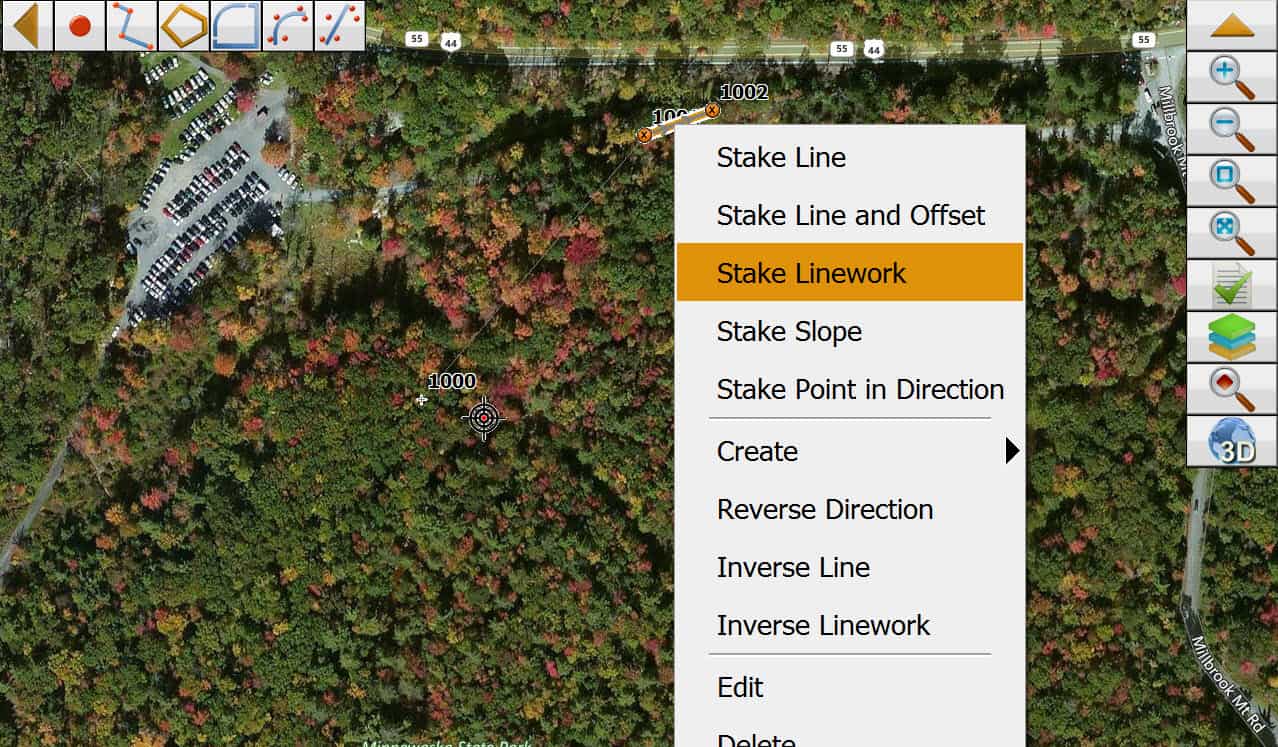
Select NEXT to 1st prompt
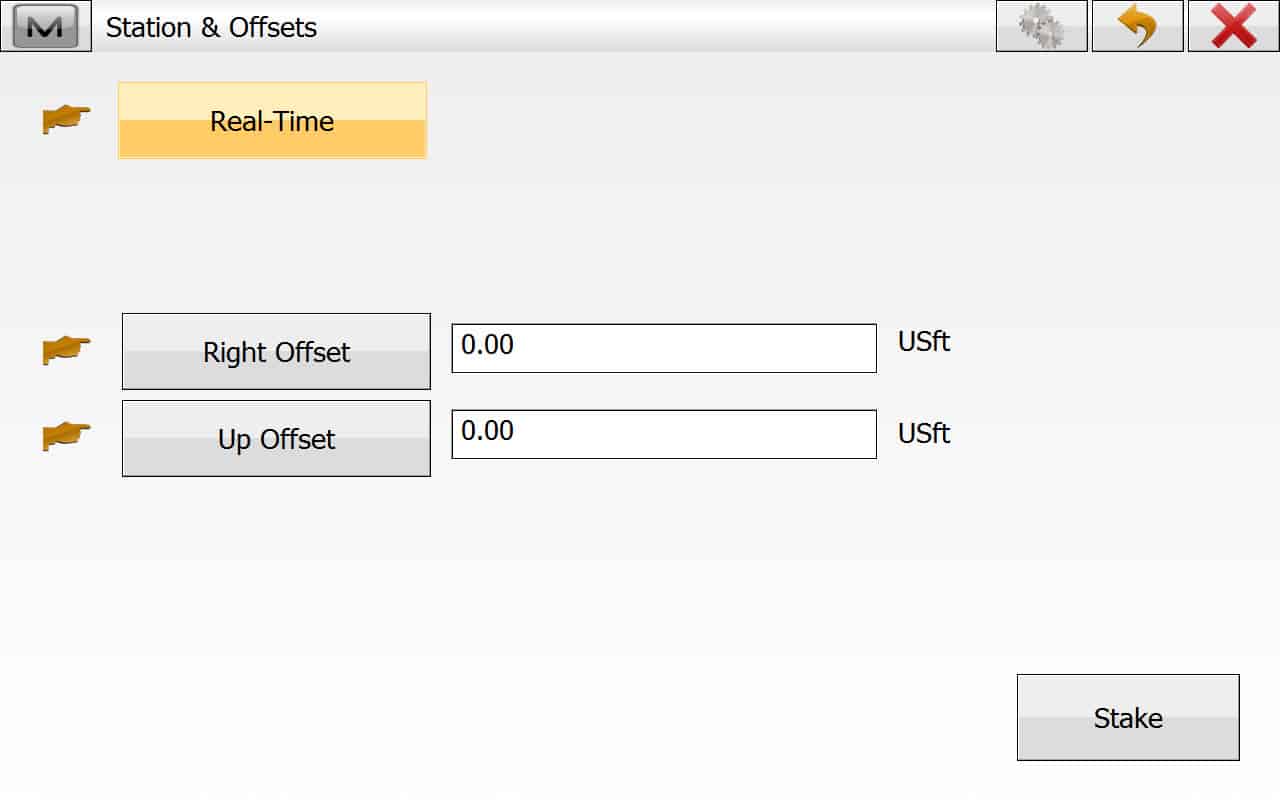
At this screen Toggle the 1st box to Real-Time (It can also be Station, and Skew Station)
Notice you can also apply a horizontal of vertical offset. I think that question came up on the board a few days ago.
Posted : May 2, 2017 7:33 am
Topic starter
Translate
▼
English
Spanish
French
German
Italian
Portuguese
Russian
Chinese
Japanese
Korean
Arabic
Hindi
Dutch
Polish
Turkish
Vietnamese
Thai
Swedish
Danish
Finnish
Norwegian
Czech
Hungarian
Romanian
Greek
Hebrew
Indonesian
Malay
Ukrainian
Bulgarian
Croatian
Slovak
Slovenian
Serbian
Lithuanian
Latvian
Estonian
Does this method work for 3d polylines?
Sent from my SAMSUNG-SM-N920A using Tapatalk
Posted : May 2, 2017 7:51 am
Translate
▼
English
Spanish
French
German
Italian
Portuguese
Russian
Chinese
Japanese
Korean
Arabic
Hindi
Dutch
Polish
Turkish
Vietnamese
Thai
Swedish
Danish
Finnish
Norwegian
Czech
Hungarian
Romanian
Greek
Hebrew
Indonesian
Malay
Ukrainian
Bulgarian
Croatian
Slovak
Slovenian
Serbian
Lithuanian
Latvian
Estonian
arctan(x), post: 426461, member: 6795 wrote: Does this method work for 3d polylines?
Sent from my SAMSUNG-SM-N920A using Tapatalk
Yes
Posted : May 2, 2017 8:05 am
Topic starter
Translate
▼
English
Spanish
French
German
Italian
Portuguese
Russian
Chinese
Japanese
Korean
Arabic
Hindi
Dutch
Polish
Turkish
Vietnamese
Thai
Swedish
Danish
Finnish
Norwegian
Czech
Hungarian
Romanian
Greek
Hebrew
Indonesian
Malay
Ukrainian
Bulgarian
Croatian
Slovak
Slovenian
Serbian
Lithuanian
Latvian
Estonian
So I dont need to try to import carlson centerlines and profiles through landxml. I can just import a drawing with my 3d polylines?
If thats the case, that has to be the easiest way ive heard of staking an alignment!
I'm warming up to magnet. I think people may think its not all that great but the more I learn, the more I like it.
Sent from my SAMSUNG-SM-N920A using Tapatalk
Posted : May 2, 2017 8:39 am
Translate
▼
English
Spanish
French
German
Italian
Portuguese
Russian
Chinese
Japanese
Korean
Arabic
Hindi
Dutch
Polish
Turkish
Vietnamese
Thai
Swedish
Danish
Finnish
Norwegian
Czech
Hungarian
Romanian
Greek
Hebrew
Indonesian
Malay
Ukrainian
Bulgarian
Croatian
Slovak
Slovenian
Serbian
Lithuanian
Latvian
Estonian
arctan(x), post: 426473, member: 6795 wrote: So I dont need to try to import carlson centerlines and profiles through landxml. I can just import a drawing with my 3d polylines?
If thats the case, that has to be the easiest way ive heard of staking an alignment!
I'm warming up to magnet. I think people may think its not all that great but the more I learn, the more I like it.Sent from my SAMSUNG-SM-N920A using Tapatalk
That's correct. Just import the DWG, DGN or DXF of 3d line work and stake anything you want, or create points on the fly. Suggest you try the offset line routine and offset points from line. Magnet is the only software I know that will create the proper offset points for stake a curb at a 90å¡ corner. It creates both 90å¡ offset points for the corner, most CAD software creates only a single that is 45å¡ from the true corner.
Like I've said several times before. Those that hate Magnet, likely never had any type of formal training. Lot's of hidden gems in the software. Most people use less than 10% of the software full potential.
Posted : May 2, 2017 8:47 am
Translate
▼
English
Spanish
French
German
Italian
Portuguese
Russian
Chinese
Japanese
Korean
Arabic
Hindi
Dutch
Polish
Turkish
Vietnamese
Thai
Swedish
Danish
Finnish
Norwegian
Czech
Hungarian
Romanian
Greek
Hebrew
Indonesian
Malay
Ukrainian
Bulgarian
Croatian
Slovak
Slovenian
Serbian
Lithuanian
Latvian
Estonian
If you need to stake a spiral curve (horizontal) or parabolic curve (vertical), then you must import it via LandXML, otherwise a a 3d polyline will work fine.
Posted : May 2, 2017 9:18 am
Topic starter
Translate
▼
English
Spanish
French
German
Italian
Portuguese
Russian
Chinese
Japanese
Korean
Arabic
Hindi
Dutch
Polish
Turkish
Vietnamese
Thai
Swedish
Danish
Finnish
Norwegian
Czech
Hungarian
Romanian
Greek
Hebrew
Indonesian
Malay
Ukrainian
Bulgarian
Croatian
Slovak
Slovenian
Serbian
Lithuanian
Latvian
Estonian
This made staking my alignments so easy! Thanks Lee!
Sent from my SAMSUNG-SM-N920A using Tapatalk
Posted : May 3, 2017 8:47 pm