

Mark Mayer, post: 384998, member: 424 wrote: The vectors, with covariance data, are in the raw data file. I convert the raw data file to the StarNet gps format.
Okay, so you're outputting the RTK vectors from the controller in some format that can be imported into Star*Net? What flavor of controller software are you using/have you used to do that?

Kent McMillan, post: 384988, member: 3 wrote: I haven't installed GNSS Solutions yet, but aside from time windowing, selectively disabling SVs, and raising elevation masks, what sort of vector manipulation would one need or want?
Those are the basic features I like to see, but in nosing around GNSS Solutions this morning, I didn't find them. I thought they were in there, though -- I'm pretty sure they were in Ashtech Solutions, the predecessor product -- so maybe I'm just not looking in the right places.

Kent McMillan, post: 385004, member: 3 wrote: What flavor of controller software are you using/have you used to do that?
SP Survey Pro (fka TDS) currently. I have also used Trimble Access (fka Survey Controller) and Microsurvey FieldGenius to do the same.
I have been assured that Leica VIVA has the capability via a converter that Leica supplies to current subscribers. When I was using VIVA - in Oklahoma - we were using LGO to adjust our data. I can assure you that the covariance data is present in the VIVA files.
Jim Frame, post: 385003, member: 10 wrote: I don't either, I export them from the receiver as an NGS g-file and import that into Star*Net.
The NGS G-File format would seem to be a natural enough choice. Although I've never worked with vectors in that format, I trust that it preserves descriptors in the vector record?
Kent McMillan, post: 385007, member: 3 wrote: I trust that it preserves descriptors in the vector record?
It doesn't, unfortunately -- only a 4-character serial number. This S/N is typically the point number, though it can be alphanumeric and Star*Net doesn't mind. (I haven't tested to see if my receiver will export point numbers larger than 4 characters, or if Star*Net will import them correctly in that case.)
The workaround I use is to also export an ASCII point file and convert those to Star*Net coordinate records, with no standard errors specified (i.e. free). That gets the descriptions into the adjustment and associates them with the vector records.
Jim Frame, post: 385005, member: 10 wrote: Those are the basic features I like to see, but in nosing around GNSS Solutions this morning, I didn't find them. I thought they were in there, though -- I'm pretty sure they were in Ashtech Solutions, the predecessor product -- so maybe I'm just not looking in the right places.
According to the User's Manual, those features ought to be present in the Project>Process Options dialog box.
Jim Frame, post: 385010, member: 10 wrote: It doesn't, unfortunately -- only a 4-character serial number. This S/N is typically the point number, though it can be alphanumeric and Star*Net doesn't mind. (I haven't tested to see if my receiver will export point numbers larger than 4 characters, or if Star*Net will import them correctly in that case.)
The workaround I use is to also export an ASCII point file and convert those to Star*Net coordinate records, with no standard errors specified (i.e. free). That gets the descriptions into the adjustment and associates them with the vector records.
Hmm. I can see that would work, but I have to wonder what some RTK manufacturer was thinking since it seems such an unnatural format for transfer if descriptors aren't preserved. How much trouble can it be to create either a user-editable template or one specifically for Star*Net format?
I see the SV on/off control, but without being able to see the noise levels of the SVs in the solution, messing with SVs is kind of flying blind. In TGO/TBC you can see graphically how the well the integer ambiguity determination fits the vector data, so noisy SV data is readily identified. The mask control is obvious, but I don't see any time windowing control.
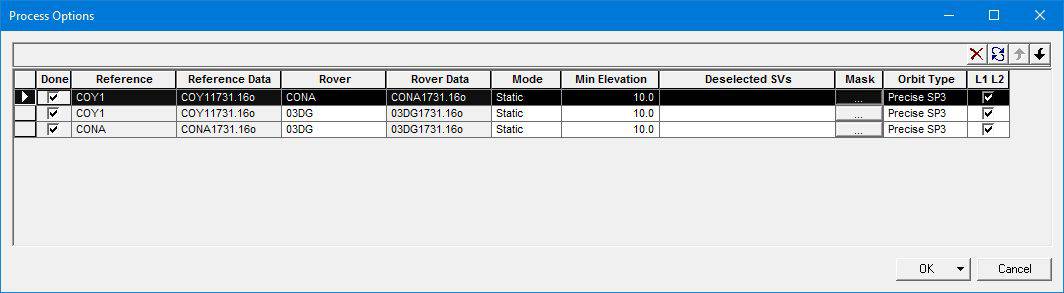
Jim Frame, post: 385013, member: 10 wrote: I see the SV on/off control, but without being able to see the noise levels of the SVs in the solution, messing with SVs is kind of flying blind.
If I'm understanding the manual correctly, the View>As Workbook option allows you to open several displays at the same time, which I presume are interactive in the editing process.

Sorry for delay, I was actually out working today! Had a great time, tested RTK equipment in TURN network on a big project all day. I was spoiled by great cell coverage and a 40 MPH wind that made it the coolest field day that I have had in months. I was doing recon and if not for the network, I would have been screwing around with repeater all day.
GNSS Solutions: It is truly not ever going to be updated, but even with me having three other licensed products, I still use GNSS Solutions as my go-to tool. Since I am the only person in the world who supports it, I get three or four failed jobs every week and I have gotten really good at 'making' GNSS Solutions work. I still trust it, assuming you click the 'Apply to All' on every RINEX file that is imported after checking the HI (push the button even if you don't change anything.)
One of the things about GNSS Solutions is the baseline processor in it is REALLY good with GPS and GLO. I have never seen GNSSSol differ by more than a couple of mm for well formed jobs from SPSO. I don't know which one I trust more.
Another thing about GNSS Solutions is I have never seen much difference between L1/L2 processing and L1 only processing. In fact, I have never seen a job that will process with L1/L2 that won't process L1 only. I can make jobs by trimming occupations to an absolute minimum occupation time that will fix L1/L2, but fail on L1 only. But these are purely manufactured jobs that are purposely trimmed to the point of failure. You would not do that in real life, right?
So, I am not sure if there is any benefit to turning on L2 when using GNSS Solutions. I do turn it on, but I also test with it off and I only see a mm or two difference. If you are looking at GNSS Solutions L2 keys, you probably should get one real-soon-now as there is a limited number available. (I actually stock them, so I know there are a few left.)
[ Since this thread is going to end up being a top search result for the subject at hand this is a good time for me to restate that if you are still using Ashtech Solutions, you need to do the free upgrade to GNSS Solutions. I DO NOT trust the AS processing engine for files collected recently. If you process jobs in both AS and GNSSsol, you will find that often times you get different results. ]
CGO Office (from CHC) has a great baseline processor. (It uses a popular/well known processor but I don't know if I can say publicly what it is.) But it does not automatically download CORS data and there are no projections (for the USA) built in. That said, if if does what you need it is a great deal and when I make a suggestion for improvement it gets implemented. You can load it and give it whirl for free, so nothing but time and frustration lost. The kinematic processor in it seems to actually be better than GNSS Solutions too.
SPSO (TBC) is a tough nut to crack after using GNSS Solutions. And there are some things about it that are insanely difficult. Adding a custom antenna model is ridiculous. Occasionally I will be given an observation file (usually stop-n-go) that will not process in SPSO, but just flies through GNSSsol. And importing files from legacy Ashtech equipment (like a PM3) can be a trip down the rabbit hole.
I have recently tried four other products (I won't name them) and none of them seemed acceptable for one reason or another. And they were crazy expensive too. However, if I had a major brand of equipment I would certainly get the matching processor to reduce the possibility of finger pointing. )
And I think that OPUS Projects has become my tool of choice for static observation sets that are longer than 2-hours. I really like the (crazy-super-overly-optimistic) error estimates because they make me feel super-great about my work. The big thing for me is I can see the mechanics of the frame adjustments, I appreciate the solid earth (and tidal) modeling and for some reason if OPUS Projects gets an answer different than GNSS Solutions or SPSO I assume that OP is correct. Especially elevations. The bad thing is 2-hours and no GLO-GAL-BDU processing. But because of the provenance of OPUS-Projects, I suspect that processor sales will drop significantly over the next few years.
That said, SPSO/TBC is the de facto industry standard. If GNSS Solutions does not work out, just get on the SPSO/TBC bandwagon, pay the toll (and the yearly maintenance) and go with it. It is not really that expensive. If anyone wants to try SPSO out, let me know and I will get you a demo code. Make sure you will have time to do the evaluation as the code is only good for 30-days from when I get it.
Mark Silver, post: 385027, member: 1087 wrote: One of the things about GNSS Solutions is the baseline processor in it is REALLY good with GPS and GLO. I have never seen GNSSSol differ by more than a couple of mm for well formed jobs from SPSO. I don't know which one I trust more.
Another thing about GNSS Solutions is I have never seen much difference between L1/L2 processing and L1 only processing. In fact, I have never seen a job that will process with L1/L2 that won't process L1 only.
Hmm. My main interest is in getting fairly bulletproof software that can process Static and PPK vectors and output the vector solutions in a format that Star*Net can import. I gather from the user manual that GNSS Solutions offers the option of exporting vectors in Ashtech "O"-file format, which Star*Net should import just fine.
I'm not clear what the best way to handle RTK vectors would be, but suppose that is more of a function of the RTK controller software and the formats in which I can output vectors (if it can).
Is GNSS Solutions a reasonable choice as an intermediate destination for importing RTK vectors for some basic Q/A inspection before sending them to Star*Net or is its import capability limited to just Ashtech-proprietary RTK vector formats?
Kent McMillan, post: 385036, member: 3 wrote: or is its import capability limited to just Ashtech-proprietary RTK vector formats?
It'll take RINEX, of course.
Maybe I'm missing something, but for me the initial quality examination of RTK results happens in the RTK controller. Once the vector data is exported and then imported to Star*Net I can look at the residuals and apply whatever error scaling I deem appropriate.
Jim Frame, post: 385037, member: 10 wrote:
Maybe I'm missing something, but for me the initial quality examination of RTK results happens in the RTK controller.
I was thinking along the lines of editing a bum antenna height or deleting vectors that should not have slipped past inspection in the field, but did by some misadventure.

Kent,
What can really blow up a network solution is a bum antenna height on one days observations, especially points that have been statically occupied several times.
Paul in PA
Paul in PA, post: 385044, member: 236 wrote:
What can really blow up a network solution is a bum antenna height on one days observations, especially points that have been statically occupied several times.
What I was specifically thinking of was the ability to import RTK vectors and examine them en masse in some tabular format listing the antenna heights and vector statistics. It should be much easier to change antenna heights before exporting the vectors to Star*Net and it would be nice to spot a series of low-grade vector solutions and just not export them in the first place.

You'll need to be careful with that. Are the exported vectors mark to mark or phase center to phase center?
Shawn Billings, post: 385099, member: 6521 wrote: You'll need to be careful with that. Are the exported vectors mark to mark or phase center to phase center?
I'm assuming that any major manufacturer of RTK equipment will handle that detail in some fashion when vectors are logged since it would be crazy not to do so.
From your comment above, it sounded like you might be looking to edit the antenna height after exporting the data. I guess I misread.
Shawn Billings, post: 385099, member: 6521 wrote: You'll need to be careful with that. Are the exported vectors mark to mark or phase center to phase center?
In the case of TBC and the Triumph-LS, mark-to-mark. In don't think I've encountered a vector export that isn't mark-to-mark.

I do not (usually) process RTK vectors in TBC. I read them into a database (MS access), and in there I can edit base positions, HI's, etc, and also examine the statistics and precisions. All of the vectors in this database, which were obtained from a dc file (Trimble dc file=ascii format) are APC (antenna phase center) to APC. This makes it easier to change HI's at the base or rover in the database. I can then export from there to a star*net or geolab format, and in the export routine it applies the HI's to get mark-to-mark.
The database has a field for "disable (true/false or yes/no) which controls whether a solution is exported or not.