Reading RPLS is free for the whole profession. Members post, reply, and get the members-only rooms.

Notifications
Clear all
Strictly Surveying
9
Posts
5
Users
0
Reactions
1,669
Views

Topic starter
Translate
▼
English
Spanish
French
German
Italian
Portuguese
Russian
Chinese
Japanese
Korean
Arabic
Hindi
Dutch
Polish
Turkish
Vietnamese
Thai
Swedish
Danish
Finnish
Norwegian
Czech
Hungarian
Romanian
Greek
Hebrew
Indonesian
Malay
Ukrainian
Bulgarian
Croatian
Slovak
Slovenian
Serbian
Lithuanian
Latvian
Estonian
I'm a big fan of EXCEL. So I am always tinkering with formatting and I really appreciate a well presented spreadsheet.
One of my personal dislikes is seeing a sheet with the degrees, minutes, and seconds in separate columns.
Ugly and tedious, so here's my tricks...
I'll highlight the cell in yellow I'm talking about (just ignore the one in the bottom right corner for now - I got ahead of myself there) and the formula will be displayed in the formula bar.
Here's the best way I've found to compute the azimuth from coordinates.
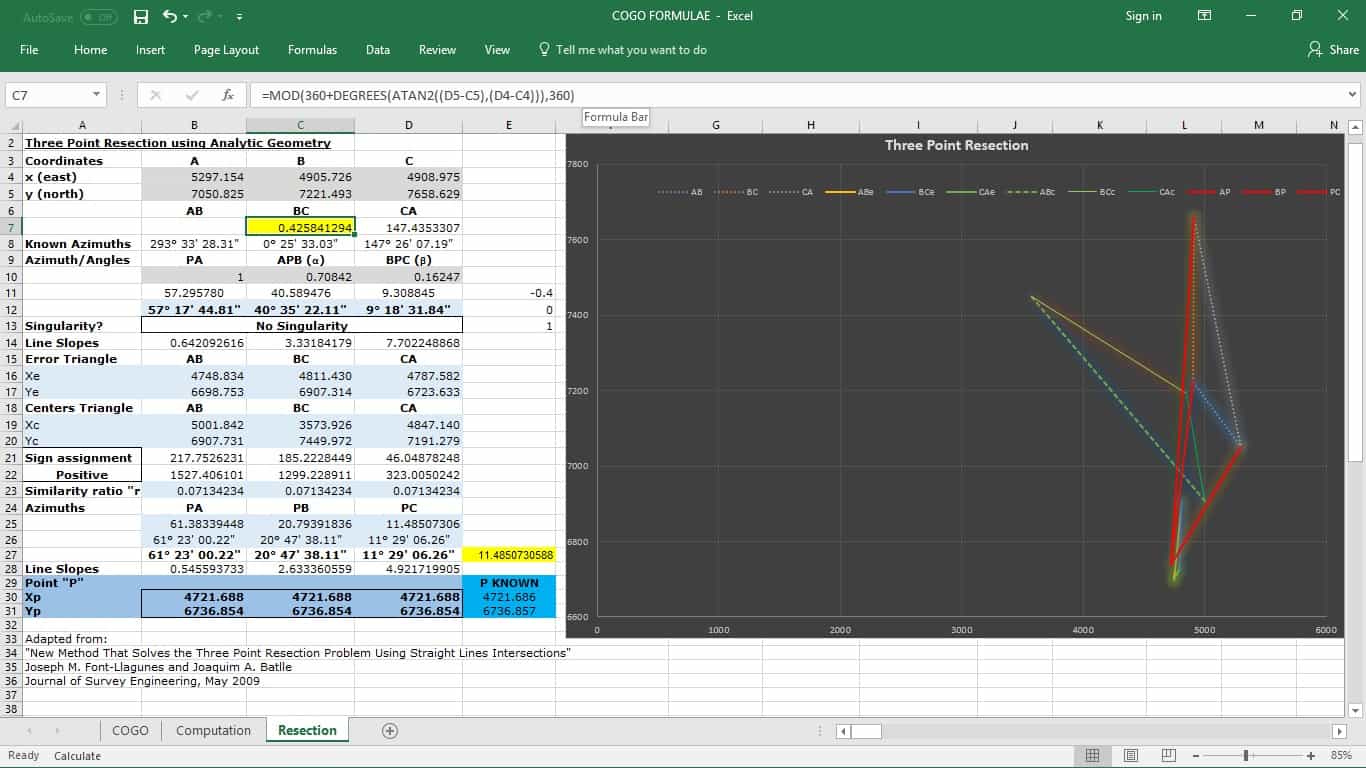
Now to convert the former cell, which is decimal degrees into the current cell which is a nice way to display degrees, minutes, and seconds, I use this formula.

If you've got the same disease I suffer from, you pack the last two formulae into one cell, like this.
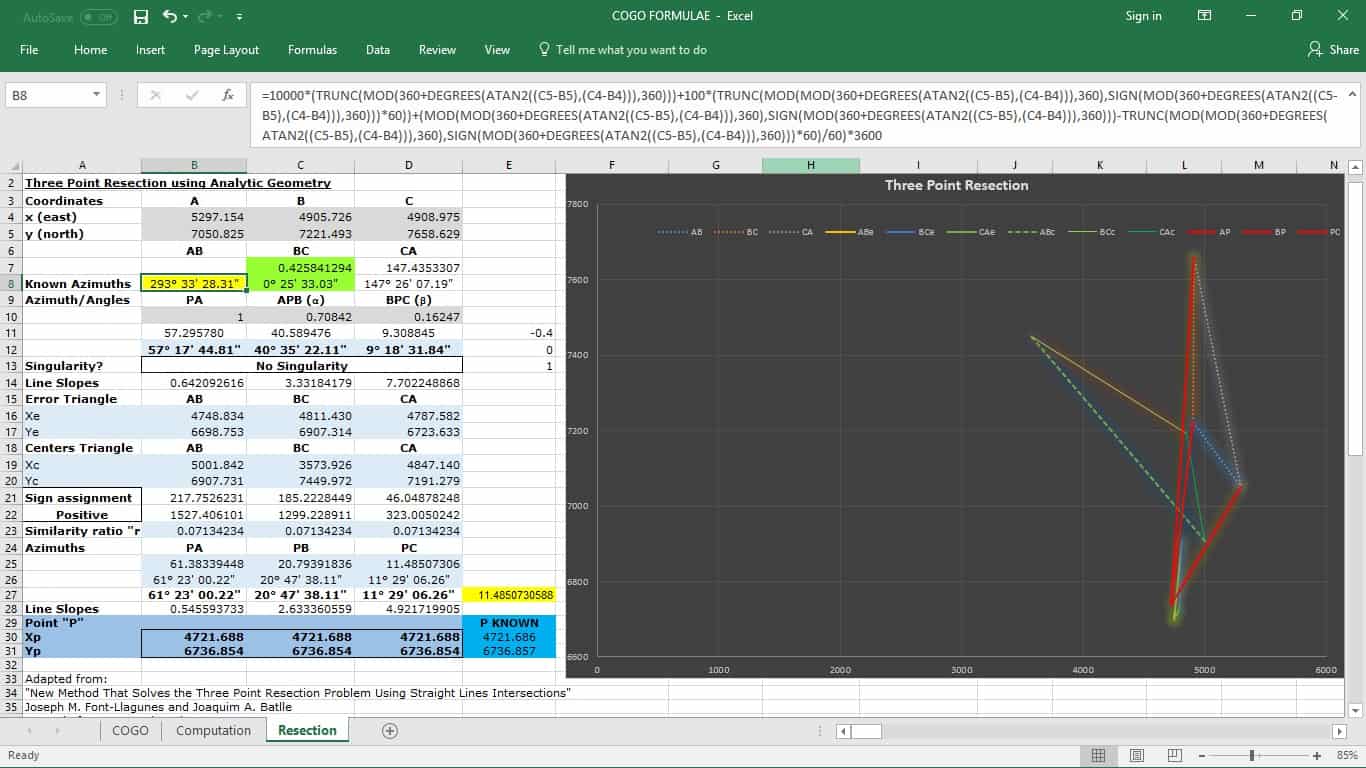
But, how did I get the angles to display like that?
Insert the degree symbol into a cell.
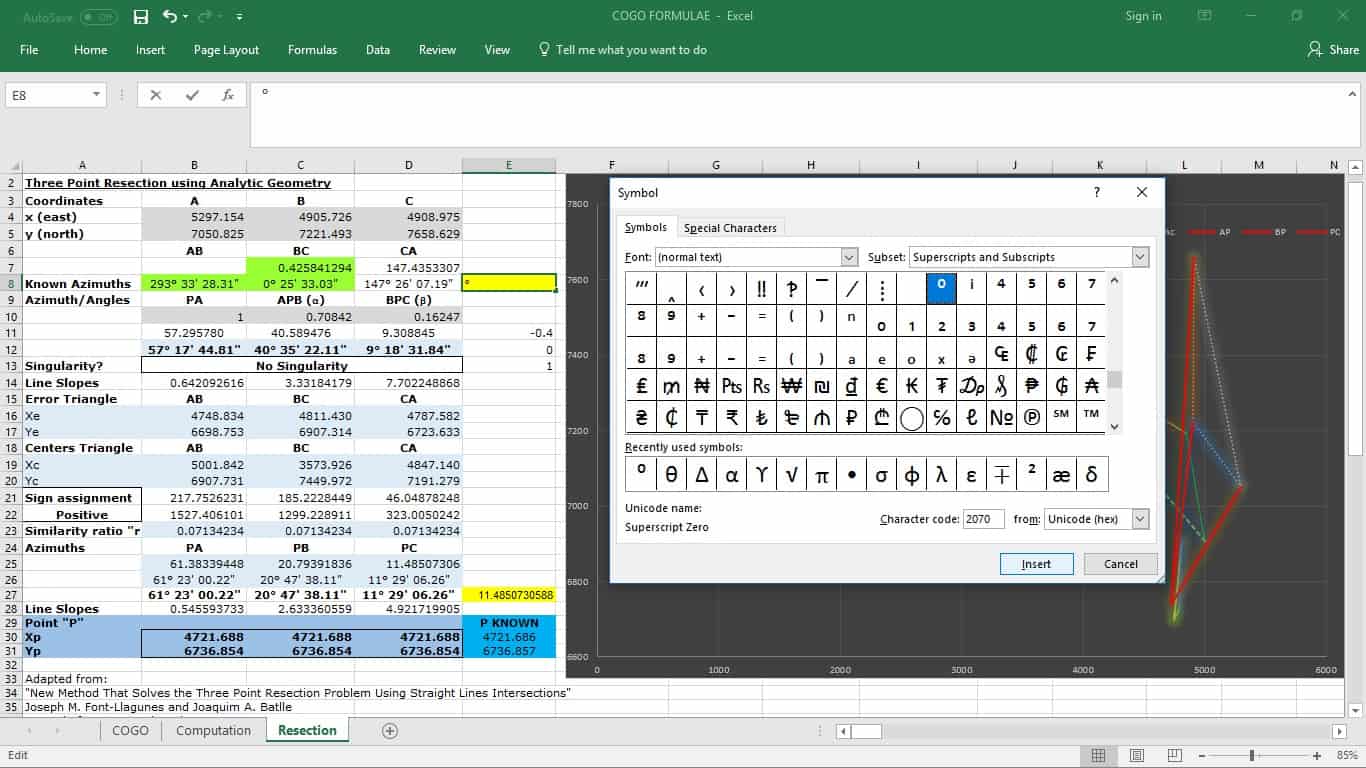
Then copy that symbol from the formula bar!!
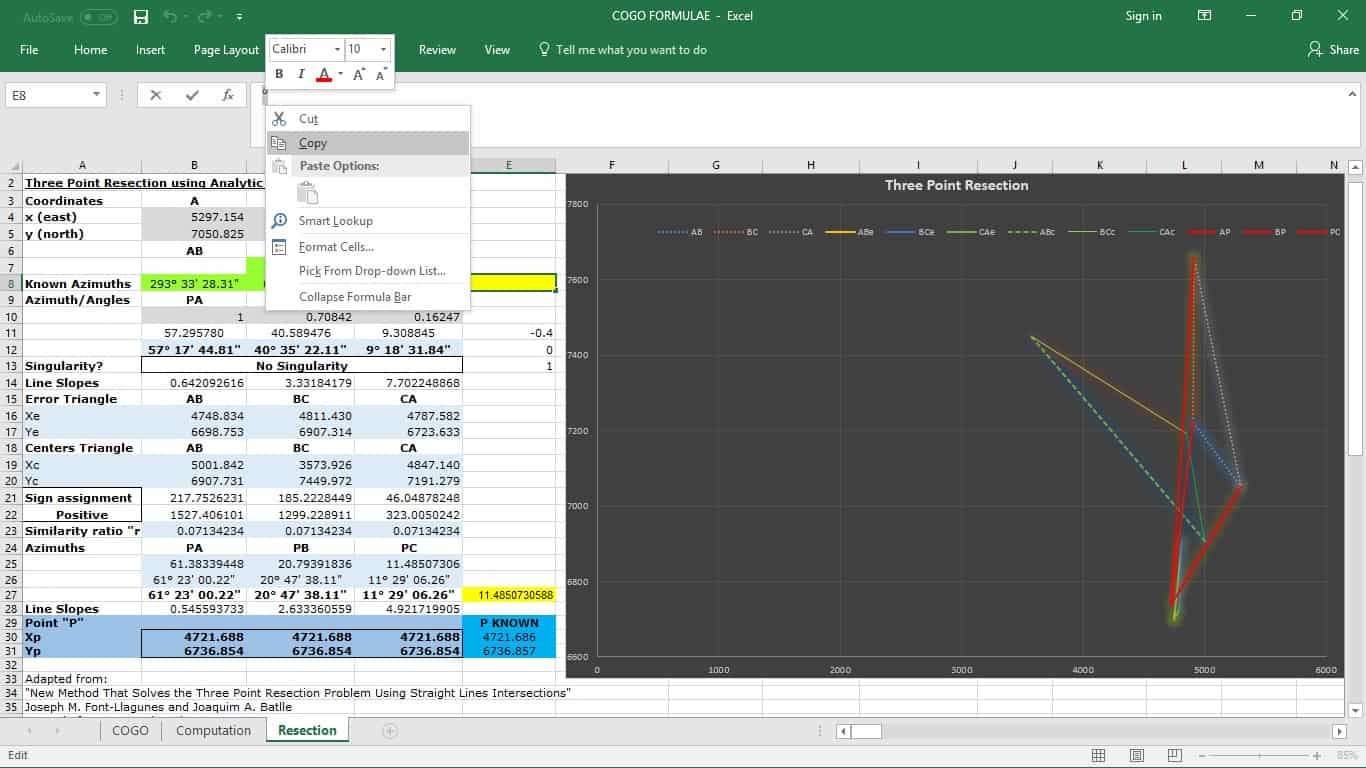
Then pick another cell, and go to Format Cells, Custom, and Paste the symbol into the Type box.
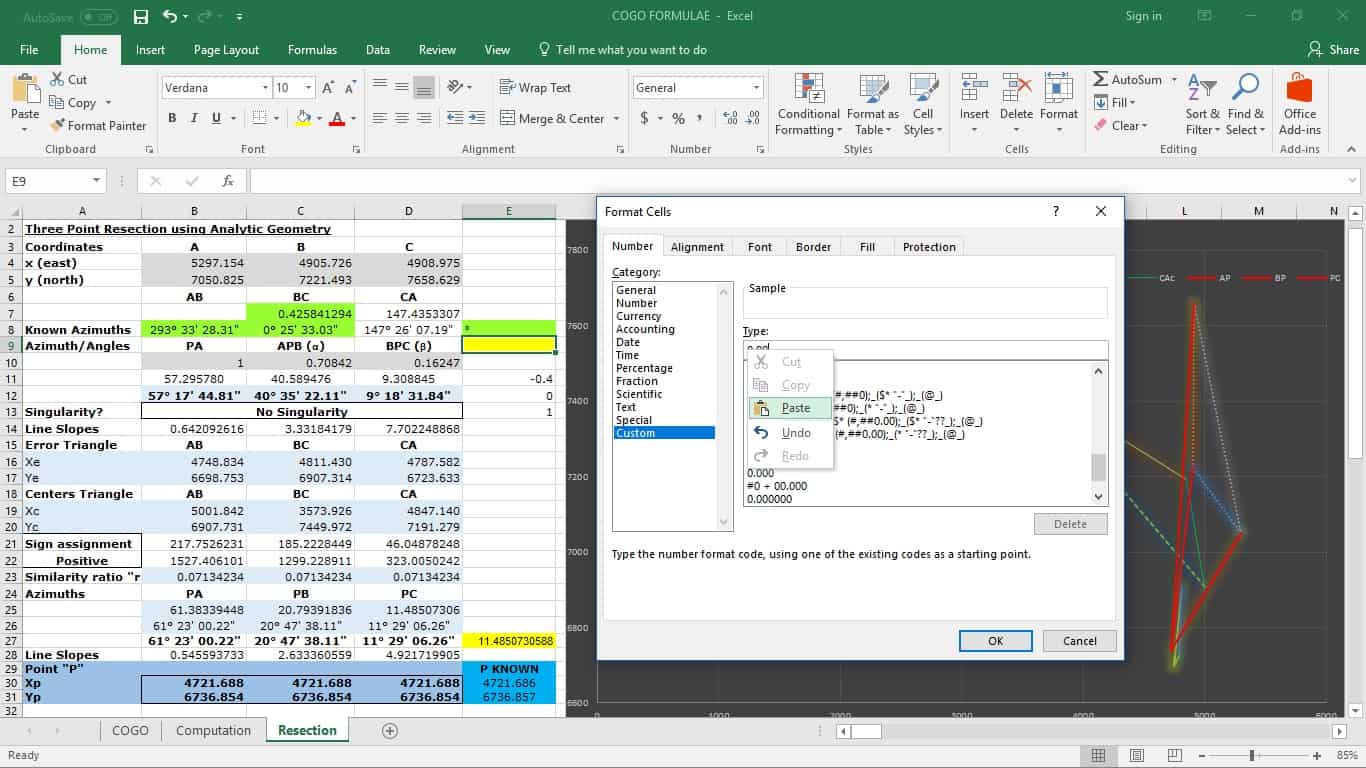
I managed to create a nice format, but technically the " symbol should be above or right behind the decimal.
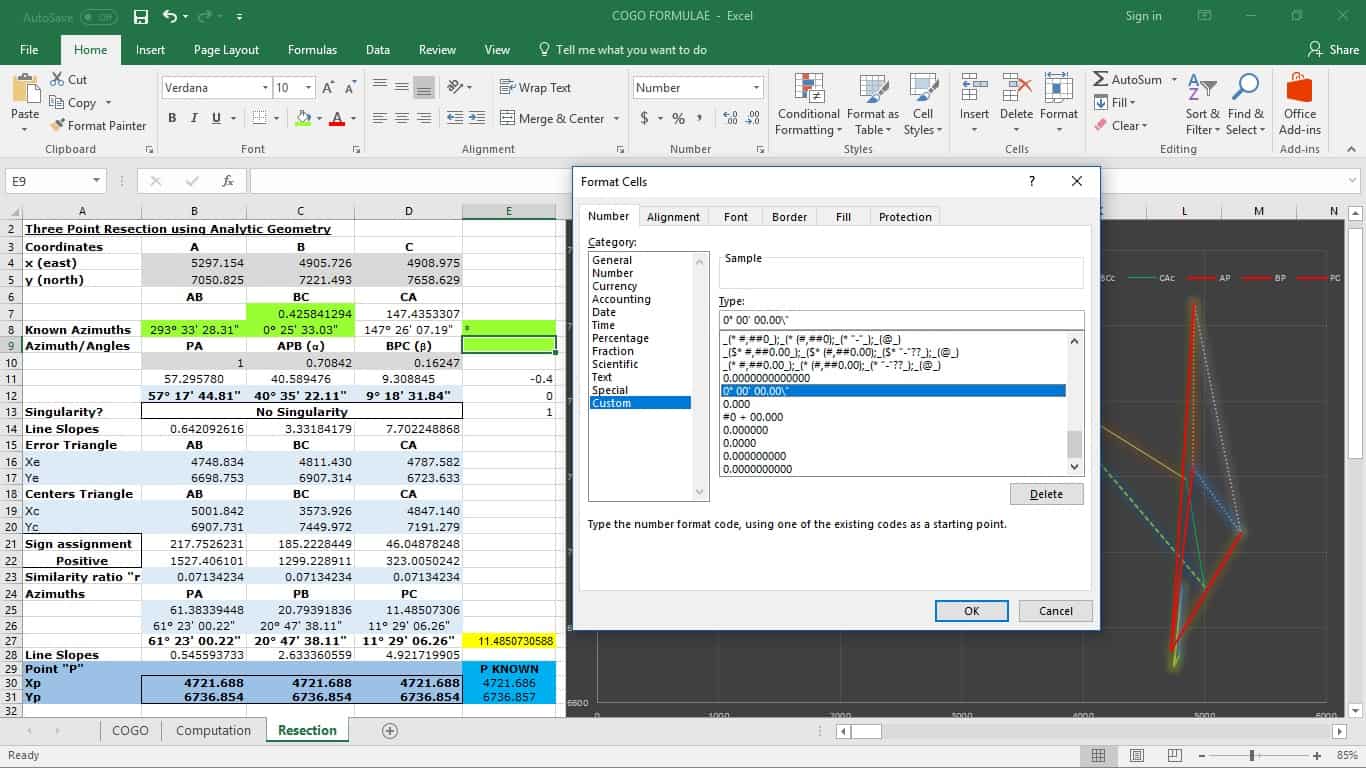
However, the really nice thing about this format is you don't type a decimal unless you get to decimal degrees.
You can see the format I prefer in the "Type" box.
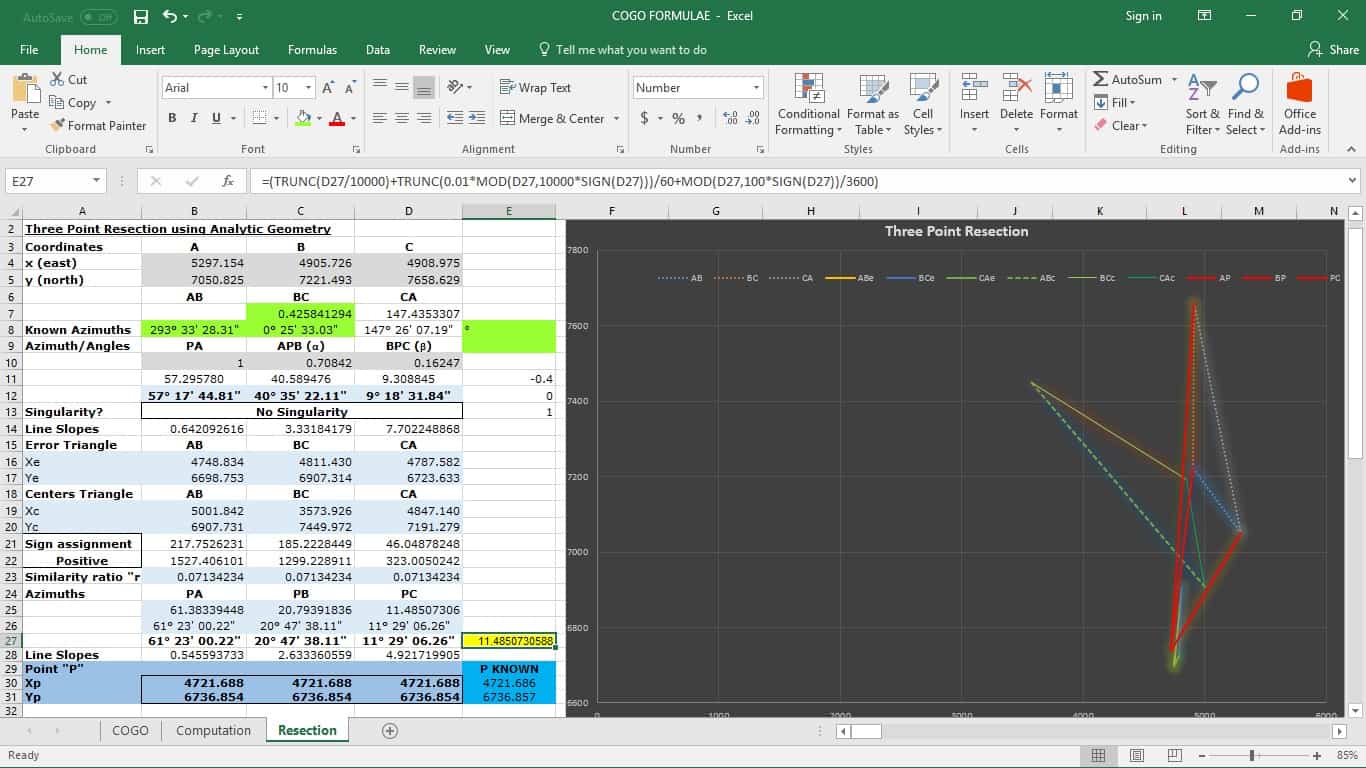
So, finally, back to that pesky yellow cell in the bottom right.
That's how I convert my dms format to decimal degrees.
Ok, so I thought that was some pretty cool stuff.
Posted : August 27, 2017 2:20 pm
Topic starter
Translate
▼
English
Spanish
French
German
Italian
Portuguese
Russian
Chinese
Japanese
Korean
Arabic
Hindi
Dutch
Polish
Turkish
Vietnamese
Thai
Swedish
Danish
Finnish
Norwegian
Czech
Hungarian
Romanian
Greek
Hebrew
Indonesian
Malay
Ukrainian
Bulgarian
Croatian
Slovak
Slovenian
Serbian
Lithuanian
Latvian
Estonian
Oh, maybe a few words about the sheet itself.
There are probably about a thousand methods to solve the three point problem, but I love this one.
First off, I'm a big analytic geometry guy.
Second, it depends on an initial guess on the azimuth within +90 or -90 degrees of the true azimuth between P and A and corrects it.
Thirdly, it brilliantly uses the similarity ratio between a triangle created from the error and a triangle created from the circumferences through two known points and the unknown point to find the correction to the initial azimuth guesstimate.
Brilliant geometry.
Posted : August 27, 2017 2:49 pm

Translate
▼
English
Spanish
French
German
Italian
Portuguese
Russian
Chinese
Japanese
Korean
Arabic
Hindi
Dutch
Polish
Turkish
Vietnamese
Thai
Swedish
Danish
Finnish
Norwegian
Czech
Hungarian
Romanian
Greek
Hebrew
Indonesian
Malay
Ukrainian
Bulgarian
Croatian
Slovak
Slovenian
Serbian
Lithuanian
Latvian
Estonian
Scott Zelenak, post: 443545, member: 327 wrote: Oh, maybe a few words about the sheet itself.
There are probably about a thousand methods to solve the three point problem, but I love this one.First off, I'm a big analytic geometry guy.
Second, it depends on an initial guess on the azimuth within +90 or -90 degrees of the true azimuth between P and A and corrects it.
Thirdly, it brilliantly uses the similarity ratio between a triangle created from the error and a triangle created from the circumferences through two known points and the unknown point to find the correction to the initial azimuth guesstimate.
Brilliant geometry.
Just....wow.
The similarity ratio is that which states that the angles of any triangle are proportional to the length of the opposite side? Are you drawing a circle through each set of two points, with the assumption that the resected point will be at the center of that circle?
Posted : August 27, 2017 5:00 pm
Topic starter
Translate
▼
English
Spanish
French
German
Italian
Portuguese
Russian
Chinese
Japanese
Korean
Arabic
Hindi
Dutch
Polish
Turkish
Vietnamese
Thai
Swedish
Danish
Finnish
Norwegian
Czech
Hungarian
Romanian
Greek
Hebrew
Indonesian
Malay
Ukrainian
Bulgarian
Croatian
Slovak
Slovenian
Serbian
Lithuanian
Latvian
Estonian
Open source from one of the authors....
Look at bottom of first screen shot.
Posted : August 27, 2017 6:51 pm

Translate
▼
English
Spanish
French
German
Italian
Portuguese
Russian
Chinese
Japanese
Korean
Arabic
Hindi
Dutch
Polish
Turkish
Vietnamese
Thai
Swedish
Danish
Finnish
Norwegian
Czech
Hungarian
Romanian
Greek
Hebrew
Indonesian
Malay
Ukrainian
Bulgarian
Croatian
Slovak
Slovenian
Serbian
Lithuanian
Latvian
Estonian
You're doing the ddd to dms the hard way, and TRUNC() can get funky sometimes, so I prefer to use this method.
Figure out the bearing in decimal degrees, modulo(360) like you've done already. Then divide that by 24 and use a custom display format of:
[h]* mm' ss.00"
Or
[hhh]* mm' ss.00"
Posted : August 28, 2017 1:36 am

Translate
▼
English
Spanish
French
German
Italian
Portuguese
Russian
Chinese
Japanese
Korean
Arabic
Hindi
Dutch
Polish
Turkish
Vietnamese
Thai
Swedish
Danish
Finnish
Norwegian
Czech
Hungarian
Romanian
Greek
Hebrew
Indonesian
Malay
Ukrainian
Bulgarian
Croatian
Slovak
Slovenian
Serbian
Lithuanian
Latvian
Estonian
Conrad, post: 443598, member: 6642 wrote: You're doing the ddd to dms the hard way, and TRUNC() can get funky sometimes, so I prefer to use this method.
Figure out the bearing in decimal degrees, modulo(360) like you've done already. Then divide that by 24 and use a custom display format of:
[h]* mm' ss.00"
Or
[hhh]* mm' ss.00"
I've experimented with the Excel time functions, and found that in particular, =TIME(0,0,0.5) would truncate the fractional seconds. I was doing some astro azimuths, and recording time to the nearest tenth of a second, so naturally I didn't care for this behavior. I felt that if I went the route of using Excel functions for time (or twisting them to use them on degrees) I would have to constantly keep in mind which functions (or formats) supported fractions of a second, and which didn't. I also interpreted this as an attitude on the part of Excel developers that fractions of a second are not important. Thus, even if something works in the current version of Excel, I don't feel it will continue to work in future versions. So I decided to eschew Excel time formats and functions. I'm in the process of writing some VBA to give me what I want.
Posted : August 28, 2017 8:33 am
Translate
▼
English
Spanish
French
German
Italian
Portuguese
Russian
Chinese
Japanese
Korean
Arabic
Hindi
Dutch
Polish
Turkish
Vietnamese
Thai
Swedish
Danish
Finnish
Norwegian
Czech
Hungarian
Romanian
Greek
Hebrew
Indonesian
Malay
Ukrainian
Bulgarian
Croatian
Slovak
Slovenian
Serbian
Lithuanian
Latvian
Estonian
ashton, post: 443640, member: 422 wrote: I've experimented with the Excel time functions, and found that in particular, =TIME(0,0,0.5) would truncate the fractional seconds. I was doing some astro azimuths, and recording time to the nearest tenth of a second, so naturally I didn't care for this behavior.
i've had no problems with the formatting that i've posted as it happily allows to the 3rd decimal for seconds.
I also interpreted this as an attitude on the part of Excel developers that fractions of a second are not important.
i take the developers allowing 3 decimals of a second in the formatting i'm using as a sign that they take fractions of a second seriously.
Thus, even if something works in the current version of Excel, I don't feel it will continue to work in future versions. So I decided to eschew Excel time formats and functions. I'm in the process of writing some VBA to give me what I want.
good luck with the VBA, i should get around to it myself. though the formatting i posted works well so far, i'll keep checking it as i've got funky results from excel before.
Posted : August 28, 2017 5:41 pm
Translate
▼
English
Spanish
French
German
Italian
Portuguese
Russian
Chinese
Japanese
Korean
Arabic
Hindi
Dutch
Polish
Turkish
Vietnamese
Thai
Swedish
Danish
Finnish
Norwegian
Czech
Hungarian
Romanian
Greek
Hebrew
Indonesian
Malay
Ukrainian
Bulgarian
Croatian
Slovak
Slovenian
Serbian
Lithuanian
Latvian
Estonian
Scott Zelenak, post: 443541, member: 327 wrote: I'm a big fan of EXCEL. So I am always tinkering with formatting and I really appreciate a well presented spreadsheet.
Ok, so I thought that was some pretty cool stuff.
just a small thing I forgot to mention in my first reply,
MOD(360+degrees(atan(........)),360)
contains a redundant '360+' because, for example, mod(-179,360) = 181. you don't need to use + 360 to bring it into the positive first because the MOD function does it for you.
Posted : August 28, 2017 5:55 pm

Translate
▼
English
Spanish
French
German
Italian
Portuguese
Russian
Chinese
Japanese
Korean
Arabic
Hindi
Dutch
Polish
Turkish
Vietnamese
Thai
Swedish
Danish
Finnish
Norwegian
Czech
Hungarian
Romanian
Greek
Hebrew
Indonesian
Malay
Ukrainian
Bulgarian
Croatian
Slovak
Slovenian
Serbian
Lithuanian
Latvian
Estonian
Just use radians. Formatting isn't an issue. And formulae are easier to write and trouble shoot.
But I didn't think a single cell dms was even possible. Fun stuff. Looks like a bit of a challenge for the first time.
Posted : August 28, 2017 11:26 pm